
1. Producte acabatview
The SEQURE SQESC 2670 is a 70A Brushless Electronic Speed Controller (ESC) designed for various RC models, including cars, boats, and drones. It features AM32 firmware and supports 2-6S Lipo batteries. This ESC is equipped with a 5V/4A BEC (Battery Eliminator Circuit) that can be adjusted to provide different voltage outputs for external devices like receivers and servos.
Les característiques clau inclouen:
- Firmware: AM32
- Voltage: DC 7V-25.2V (2-6S Lipo)
- Corrent constant: 70A
- Punt actual: 110A
- Sortida BEC: Adjustable 5V/4A, 6V/4A, 7.2V/4A, 8.2V/4A, 12V/3A (requires soldering for voltage selecció)
- Signal Protocols: Dshot (All), PWM, Oneshot, Multishot, etc.
- Paràmetres programables: Motor timing, throttle calibration, current detection, motor steering, telemetry signal, RGB LED light settings.
- Proteccions: Vol baixtage, over-heat, locked rotor, current protection.
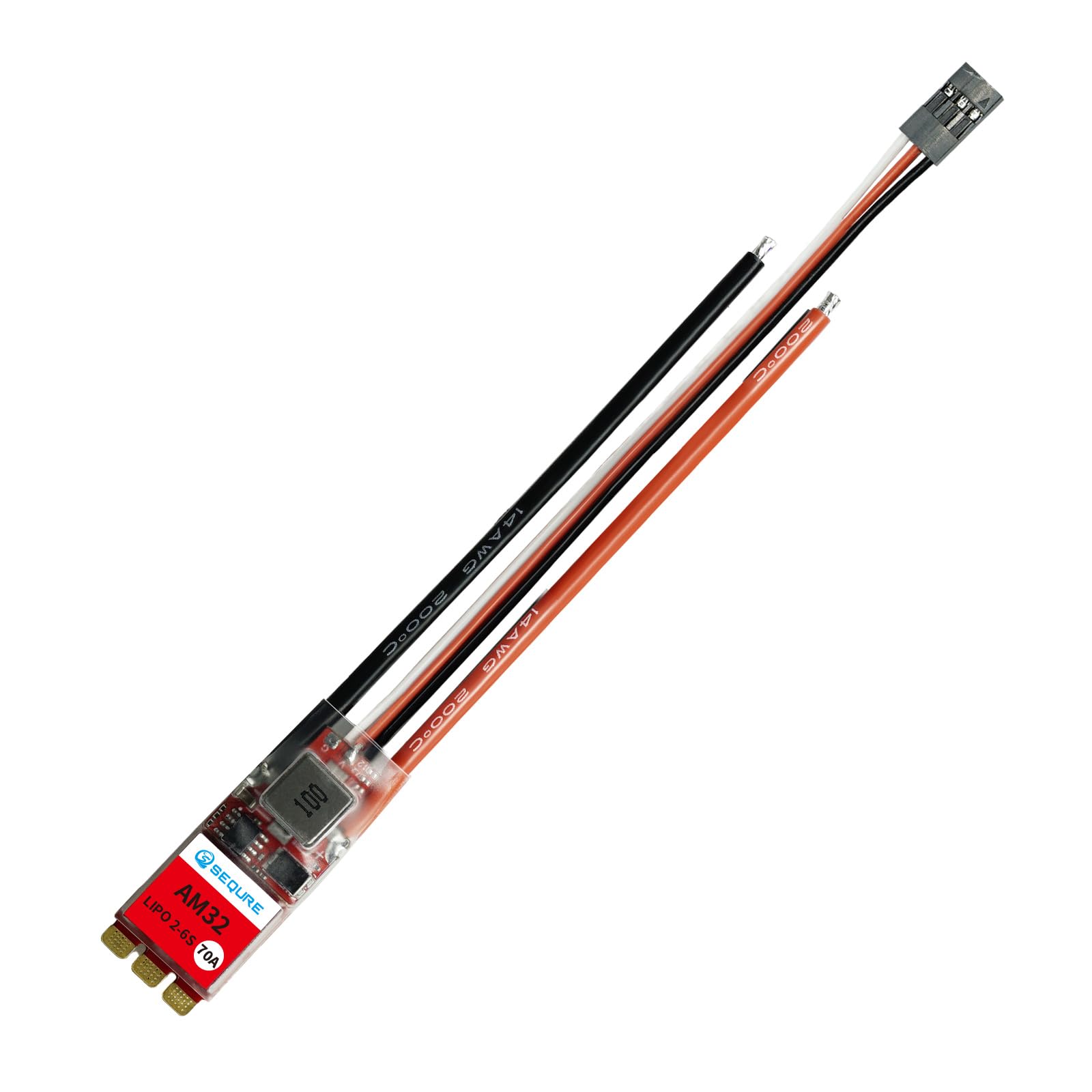
Image 1: The SEQURE SQESC 2670 70A Brushless ESC.
2. Contingut del paquet
En obrir el paquet, hauríeu de trobar els elements següents:
- 1x SEQURE SQESC 2670 Brushless ESC
- 1x BEC (Battery Eliminator Circuit) module
3. Especificacions tècniques
| Paràmetre | Valor |
|---|---|
| Nom del model | SQESC 2670 |
| Processador | STM32G071 |
| Firmware | AM32 |
| Entrada Voltage | DC 7V-25.2V (2-6S Lipo) |
| Corrent constant | 70A |
| Corrent màxima | 110A |
| Sortida BEC | 5V/4A, 6V/4A, 7.2V/4A, 8.2V/4A, 12V/3A (Adjustable) |
| Signal Protocols | Dshot (All), PWM, Oneshot, Multishot, etc. |
| Programmable Parameter Adjustments | Sí |
| Steering Setting of the Motor | Sí |
| Calibració de l'accelerador | Sí |
| Boost Timing Setting | Sí |
| Detecció de corrent | Sí |
| Telemetry Signal | Sí |
| Llum LED RGB | Sí |
| Dimensions del producte | 1.37 x 0.71 x 0.3 polzades |
| Pes de l'article | 0.634 unces |
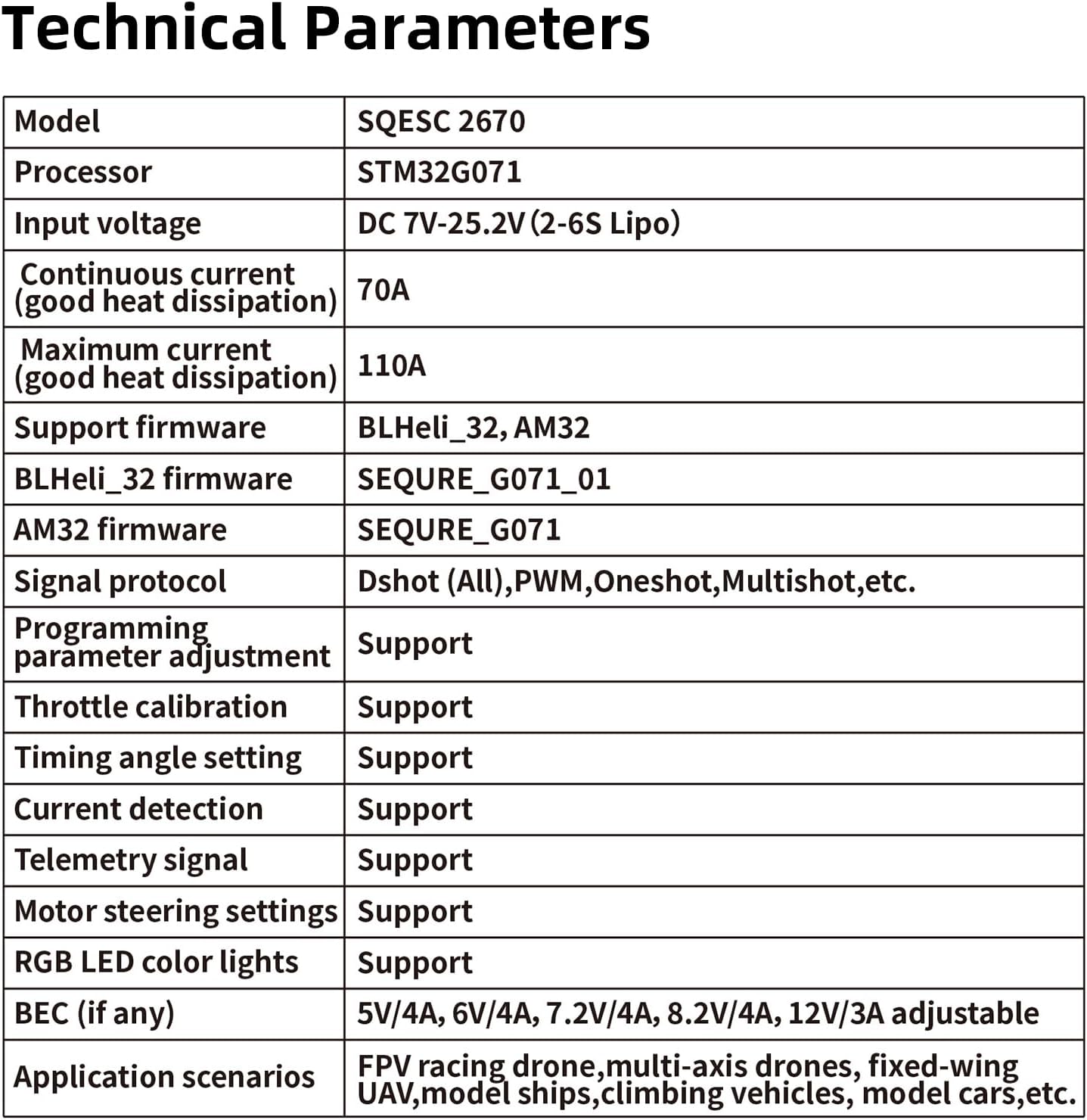
Image 2: Detailed technical parameters of the SQESC 2670.
4. Configuració i cablejat
Proper wiring is crucial for the safe and correct operation of your ESC. Refer to the wiring diagram and follow the steps below.
4.1 Esquema de cablejat

Image 3: Wiring diagram for the SQESC 2670, showing connections with and without the BEC module.
4.2 Passos de connexió
- Connect Motor: Connect the three motor wires to the corresponding output pads on the ESC.
- Connecta la bateria: Connect your 2-6S Lipo battery (DC 7V-25.2V) to the main power input of the ESC. Ensure correct polarity.
- Connecteu l'entrada de senyal: Connect the signal wire (S) from the ESC to your receiver. The ground (GND) wire should also be connected.
- Telemetry Signal: If using telemetry, connect the telemetry signal wire to your flight controller or receiver as per your system's requirements.
- BEC Connection (Optional): If you require regulated voltage for your receiver or servos, connect the BEC module. The BEC output voltage can be adjusted by soldering specific pads on the BEC module (refer to Image 4).
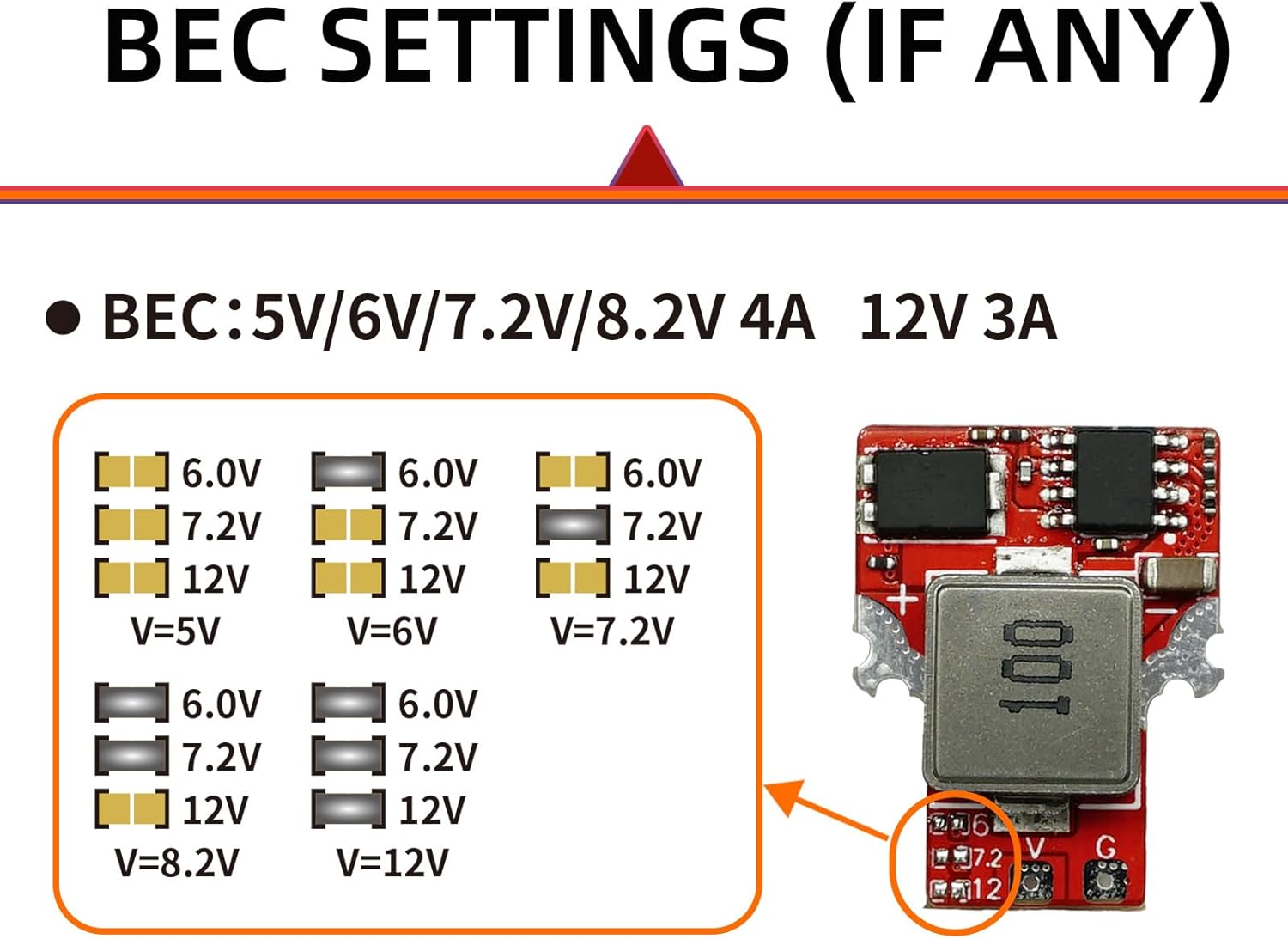
Image 4: BEC voltage adjustment points on the SQESC 2670. Solder the corresponding pads to select the desired voltage sortida.
4.3 Encès inicial
After all connections are secure, connect the battery. The ESC will emit a series of beeps indicating successful initialization.
Video 1: This video demonstrates the initial power-on sequence and connection of the ESC to the ESC-Link for parameter configuration.
5. Funcionament i configuració
The SQESC 2670 ESC is highly configurable using the ESC-Link configuration tool, which is compatible with AM32 and BLHeli_32 firmware. This allows for precise tuning of motor parameters, throttle response, and other settings.
5.1 Required Software
To configure the ESC, you will need the "Serial Port Connector" program. This program can be downloaded from the official SEQURE website. Navigate to the "BLHeliSuite32 & AM32" section and download the AM32 firmware ESC configuration tool for your operating system (Windows/Linux).
5.2 Passos de configuració
- Connect ESC-Link: Power on the ESC by connecting the battery. Connect the ESC's 3-pin cable (Signal 'S' and Ground 'GND') to the ESC-Link module.
- Connexió a l'ordinador: Connect the ESC-Link module to your computer via a data cable.
- Programari de llançament: Open the "Multi ESC Config Tool" (Serial Port Connector program) on your computer.
- Establir connexió: In the software, check "Direct Connect", select the correct COM port, and click "Connect".
- Paràmetres de lectura: Click on "M1" (or the relevant motor identifier) to read the current parameters from the ESC.
- Modify Parameters: Adjust parameters such as reverse rotation, timing advance, motor KV, startup power, PWM frequency, and various protections according to your model's requirements.
- Desa la configuració: After making changes, click "Save Settings" to write the new parameters to the ESC.
- Verifica els canvis: You can click "M1" again to re-read the parameters and confirm that your modifications have been saved correctly.
- Desconnectar: Once configuration is complete, click "Close Connection" in the software, then disconnect the ESC-Link and power supply from the ESC.
Video 2: This video provides a step-by-step guide on how to connect the ESC to the ESC-Link tool, download the necessary software, and modify/save parameters for AM32/BLHeli_32 firmware.
5.3 Actualització del firmware
To upgrade the ESC firmware:
- Follow steps 1-4 from the "Configuration Steps" above to connect the ESC to the software.
- In the software, navigate to the "Flash" tab.
- Click "Load Firmware" and select the appropriate firmware file for your ESC.
- Click "Flash Firmware" and wait for the process to complete. Do not disconnect the ESC during this time.
- Once the upgrade is successful, disconnect the ESC as described in step 9 of the "Configuration Steps".
6. Escenaris d'aplicació
The SEQURE SQESC 2670 is versatile and suitable for a wide range of RC applications due to its robust design and configurable features.
- FPV Racing Drones
- Multi-axis Drones
- Fixed-wing Aircraft
- Ship Models (RC Boats)
- Climbing Vehicles (RC Crawlers)
- Car Models (RC Cars)

Imatge 5: Ex.amples of RC models where the SQESC 2670 can be utilized.
Video 3: This video showcases the SQESC 2670 Brushless ESC in action, demonstrating its performance in various RC applications like climbing vehicles.
7. Manteniment
To ensure the longevity and optimal performance of your SEQURE SQESC 2670, consider the following maintenance tips:
- Mantenir net: Regularly clean the ESC to prevent dust, dirt, or debris from accumulating on the components, especially the heat sink. Use a soft brush or compressed air.
- Inspeccionar connexions: Periodically check all wiring connections for looseness, corrosion, or damage. Secure any loose connections and replace damaged wires.
- Gestió de la temperatura: Ensure adequate airflow around the ESC during operation to prevent overheating. Avoid operating in enclosed spaces without ventilation.
- Emmagatzematge: Guardeu l'ESC en un lloc sec i fresc, allunyat de la llum solar directa i de temperatures extremes.
8. Solució De Problemes
If you encounter issues with your SQESC 2670, refer to the following common troubleshooting steps:
- Sense alimentació/Sense resposta:
- Comproveu la connexió de la bateria i assegureu-vos que estigui completament carregada.
- Verify all power wires are securely connected and not damaged.
- Ensure the BEC is providing power to the receiver if applicable.
- Motor Not Spinning/Erratic Behavior:
- Check motor wire connections for proper contact.
- Recalibrate the throttle range of the ESC.
- Verify motor direction and adjust in the configuration software if necessary.
- Check for any obstructions preventing the motor from spinning freely.
- Sobreescalfament:
- Ensure proper ventilation around the ESC.
- Check for excessive load on the motor or incorrect gearing.
- Review motor timing settings; aggressive timing can cause heat.
- Configuration Software Issues:
- Assegureu-vos de seleccionar el port COM correcte.
- Verify the ESC-Link module is properly connected to both the ESC and the computer.
- Try restarting the software and reconnecting.
For persistent issues, consult the official SEQURE support resources or contact customer service.
9. Garantia i Suport
For warranty information, technical support, or further assistance, please visit the official SEQURE weblloc web o poseu-vos en contacte amb el seu departament d'atenció al client. Conserveu el rebut de compra com a comprovant de compra per a reclamacions de garantia.
SEQURE Official Weblloc: https://www.sequremall.com