1. Introducció
This manual provides essential information for the proper installation, operation, and maintenance of the RDI 107A Remote Display, model 080G3421. This device is designed to provide a remote visual interface for compatible systems, displaying critical data with its blue 12VDC display.
Si us plau, llegiu aquest manual detingudament abans de la instal·lació i el funcionament per garantir un ús segur i eficient del producte.
2. Producte acabatview
The RDI 107A is a compact remote display unit. It features a digital display, control buttons, and connection terminals for integration into various systems. Its robust design ensures reliable performance in industrial and commercial environments.
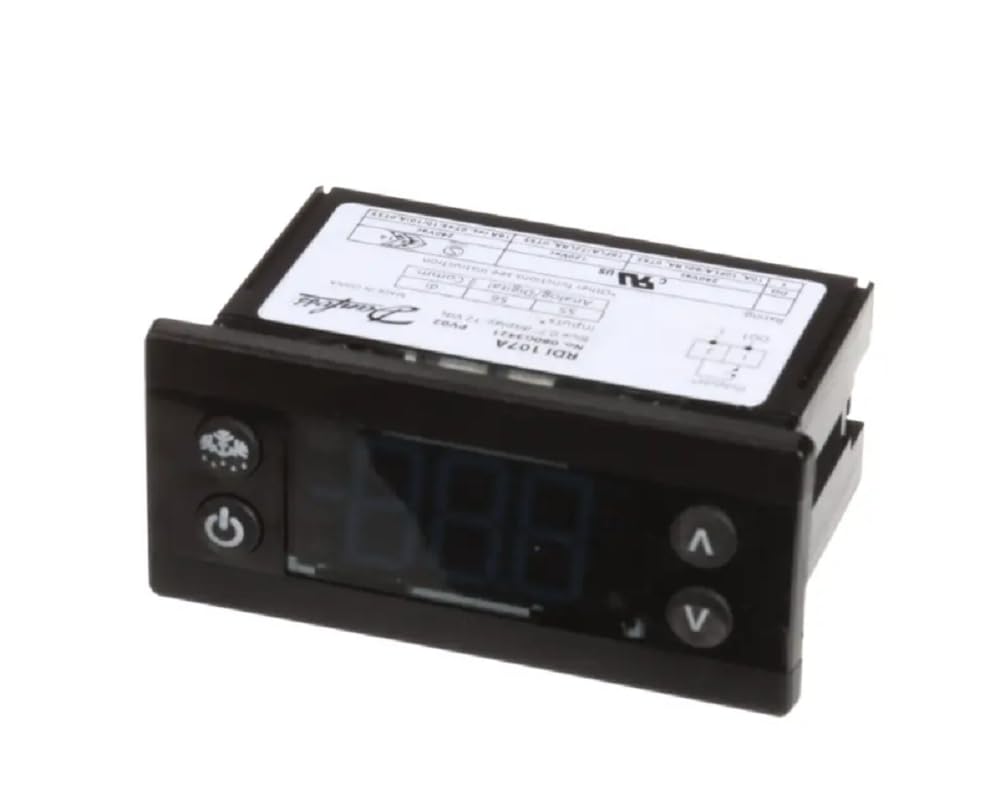
Figura 2.1: Frontal view of the RDI 107A Remote Display. This image shows the digital display and the three control buttons located on the front panel.
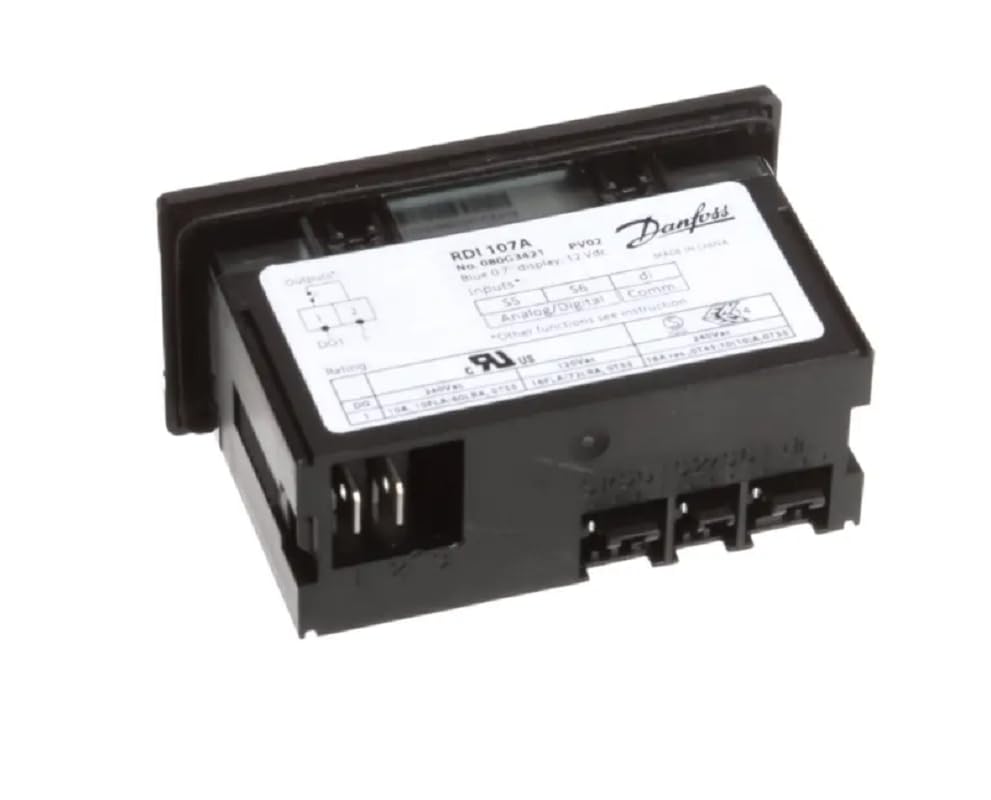
Figura 2.2: posterior view of the RDI 107A Remote Display. This image highlights the connection terminals and the product information label, including model number and voltage requisits.
3. Configuració i instal·lació
3.1 Precaucions de seguretat
- Ensure power is disconnected from the system before installation.
- Només personal qualificat ha de realitzar les connexions elèctriques.
- Comproveu el vol correctetage i la polaritat abans d'aplicar l'alimentació.
- No exposeu el dispositiu a una humitat excessiva o temperatures extremes.
3.2 Muntatge
The RDI 107A is designed for panel mounting. Cut an appropriate opening in the control panel according to the dimensions provided in the specifications section. Secure the display using the provided mounting clips or screws.
3.3 Connexions elèctriques
Refer to the wiring diagram on the product label (Figure 2.2) and the following instructions for electrical connections:
- Font d'alimentació: Connect the 12VDC power supply to the designated terminals. Ensure correct polarity (+ and -).
- Senyals d'entrada: Connect analog or digital input signals from your system to the corresponding input terminals. Refer to your system's documentation for specific signal types and connections.
- Senyals de sortida: If applicable, connect output signals from the display to your system's control inputs.
- Comunicació: Connect communication lines (e.g., RS485) if the display is part of a networked system.
Note: Incorrect wiring can damage the device and connected equipment. Double-check all connections before applying power.
4. Instruccions de funcionament
4.1 Engegada/apagada
- To power on the display, ensure the 12VDC power supply is connected and active. The display should illuminate.
- Manteniu premut el botó Botó d'engegada for approximately 3 seconds to turn the display off or on.
4.2 Navegació de la pantalla
The RDI 107A typically displays data received from the connected system. The Botó de fletxa amunt (^) i Botó de fletxa avall (v) are used for navigating through different display modes or adjusting parameters, depending on the system's configuration.
- Premeu el botó Botó de fletxa amunt to scroll up through display screens or increase a value.
- Premeu el botó Botó de fletxa avall to scroll down through display screens or decrease a value.
- Consult the documentation of the primary system connected to the RDI 107A for specific display modes and parameter adjustment procedures.
5. Manteniment
5.1 Neteja
- To clean the display, use a soft, dry cloth.
- Per a la brutícia persistent, lleugerament dampal drap amb aigua o un netejador suau i no abrasiu.
- Do not use harsh chemicals, solvents, or abrasive materials, as these can damage the display surface or casing.
- Ensure no liquid enters the device.
5.2 Atenció general
- Regularly inspect the wiring connections for any signs of wear or damage.
- Ensure the display is securely mounted and free from excessive vibrations.
- Keep the ventilation openings (if any) clear of dust and debris.
6. Solució De Problemes
| Problema | Causa possible | Solució |
|---|---|---|
| La pantalla no s'encén. | Sense subministrament d'alimentació; Cablejat incorrecte; Font d'alimentació defectuosa. | Check 12VDC power connection and polarity. Verify power supply is active. Inspect wiring for breaks or loose connections. |
| Display shows incorrect readings or no data. | Incorrect input signal wiring; Faulty input source; Communication error. | Verify input signal connections according to the system's wiring diagram. Check the primary system for proper operation and data output. Ensure communication lines are correctly connected and configured. |
| Els botons no responen. | Device frozen; Physical damage to buttons. | Try cycling power to the device. If buttons remain unresponsive, contact technical support. |
If the problem persists after attempting the above solutions, please contact technical support for further assistance.
7. Especificacions
| Característica | Detall |
|---|---|
| Número de model | 080G3421 / RDI 107A |
| Tipus de visualització | Digital, Blue |
| Font d'alimentació | 12VDC |
| Fabricant | És cert |
| País d'origen | EUA |
| ASIN | B0CQ1P75KR |
| Data de primera disponibilitat | 11 de desembre de 2023 |
| Dimensions | (Refer to product diagram for exact panel cutout and external dimensions) |
| Entrades/sortides | Analog/Digital Inputs, Communication (specifics depend on system integration) |
8. Garantia i Suport
For warranty information and technical support, please refer to the documentation provided with your complete system or contact the manufacturer, True, directly. Keep your purchase receipt and product ASIN (B0CQ1P75KR) handy for any inquiries.
Manufacturer: True
ASIN: B0CQ1P75KR


