
1. Introducció
The Jesverty PS-30SWX is a regulated DC power supply designed to convert AC power to a stable DC voltage. It is suitable for powering various 13.8V equipment, including CB, HAM, GMRS, and LMR two-way radios, and scanners. This unit features an adjustable output voltage from 5V to 15V DC and provides a maximum continuous current of 30A.
This manual provides essential information for the safe and efficient operation of your PS-30SWX power supply. Please read it thoroughly before use and retain it for future reference.
2. Precaucions de seguretat
To ensure safe operation and prevent damage to the unit or connected devices, observe the following precautions:
- No exposeu la unitat a la pluja o la humitat.
- No obriu la c.asing; no hi ha peces a l'interior que l'usuari pugui reparar. Demaneu totes les tasques de manteniment a personal qualificat.
- Assegureu-vos una ventilació adequada. No bloquegeu les obertures de ventilació.
- Connect the unit to a grounded 115V AC outlet.
- Comproveu que la sortida voltage and current settings are appropriate for your connected device before powering it on.
- The unit is equipped with overheat, short-circuit, over-voltage, over-current, and overload protection.
3. Característiques i components del producte
Familiarize yourself with the various parts of your PS-30SWX power supply:
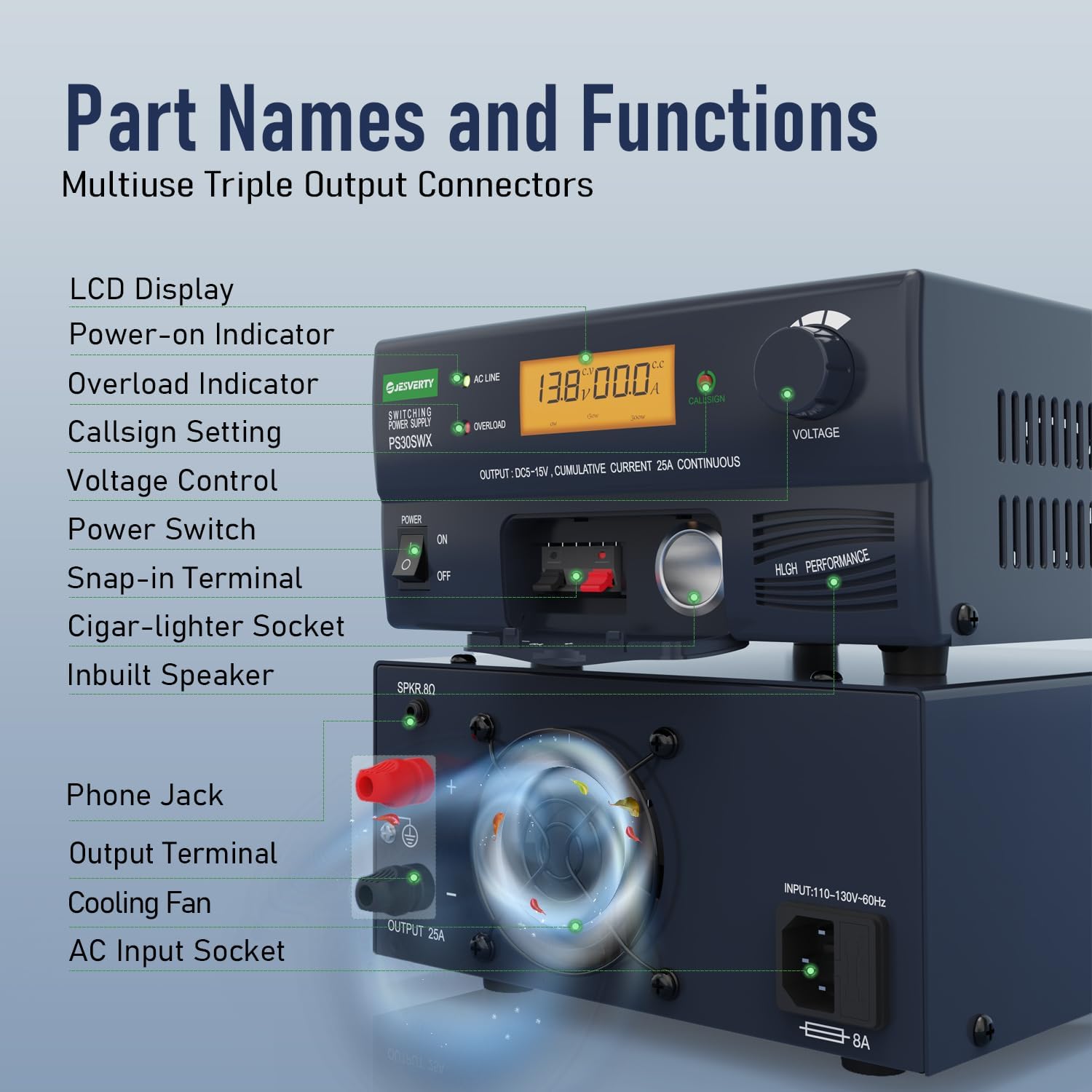
Figura 1: Front and Rear Panel Components. This image displays the Jesverty PS-30SWX power supply with labels pointing to its various components, including the LCD display, power switch, voltage control knob, output terminals, and cooling fan.
Panell frontal:
- Pantalla LCD: Mostra el volum de sortidatage i corrent.
- Indicador d'encesa: S'il·lumina quan la unitat està engegada.
- Indicador de sobrecàrrega: Illuminates if an overload condition is detected.
- Callsign Setting Button: Used to store a call number in memory.
- Voltage Control Knob: Ajusta el volum de sortidatagi (5V-15V).
- Interruptor d'alimentació: Encén/apaga la unitat.
- Snap-in Terminals: Provides up to 6A output.
- Cigar-lighter Socket: Provides up to 10A output.
Panell posterior:
- Phone Jack (SPKR 8Ω): Connects an external speaker for radio signal audio.
- Output Terminals (5-Way Binding Posts): Universal hardwired screw-type connection for up to 30A output.
- Ventilador de refrigeració: Temperature-regulated fan for heat dissipation.
- Presa d'entrada de CA: Per connectar el cable d'alimentació de CA.
4. Configuració
Follow these steps to set up your PS-30SWX power supply:
- Col·locació: Place the power supply on a stable, flat surface, ensuring adequate space around the unit for ventilation. Do not place it near heat sources or in direct sunlight.
- Connexió d'alimentació CA: Connect the supplied AC power cord to the AC Input Socket on the rear panel of the power supply and then plug it into a standard 115V AC wall outlet.
- Connexió del dispositiu DC: Connect your DC-powered device to the power supply using one of the following methods:
- Cigar-lighter Socket: For devices requiring up to 10A. Open the cover and insert the cigar-lighter plug.
- Snap-in Terminals: For devices requiring up to 6A. Open the cover and connect the wires.
- Output Terminals (Binding Posts): For devices requiring up to 30A. Connect the positive (+) and negative (-) wires from your device to the corresponding binding posts on the rear panel. Ensure connections are secure.

Figura 2: Cigar-lighter socket access. This image shows the front panel of the power supply with the cover for the cigar-lighter socket opened, revealing the socket.

Figura 3: Rear panel connections. This image highlights the rear panel of the power supply, showing the 5-way binding posts for high-current output and the AC input socket.
- Vol inicialtage Configuració: Before turning on the power supply, rotate the Voltage Control Knob to the desired output voltage, typically 13.8V for most amateur radio equipment.
5. Instruccions de funcionament
Once the power supply is set up, follow these steps for operation:
- Encès: Flip the Power Switch to the 'ON' position. The LCD display will illuminate, showing the current output voltage i amperage. The Power-on Indicator will also light up.
- Ajust Voltage: Gira el voltage Control Knob clockwise to increase the output voltage and counter-clockwise to decrease it. The LCD display will show the adjusted voltage in real-time. The adjustable range is 5V to 15V DC.
- Callsign Storage: To store a callsign, press the Callsign Setting Button. Follow the on-screen prompts or refer to the specific instructions for this feature if available in a separate guide.
- Audio Speaker Function: If your radio signal includes audio, connect an 8Ω speaker to the Phone Jack (SPKR 8Ω) on the rear panel to transfer the radio signal into sound.
- Seguiment: Continuously monitor the LCD display for voltage and current readings during operation. If the Overload Indicator illuminates, reduce the load or check for short circuits.
- Apagar: When finished, turn off your connected device first, then flip the Power Switch on the power supply to the 'OFF' position.

Figura 4: Accurate Back-lit LCD Display. This image shows a close-up of the power supply's front panel, highlighting the clear, back-lit LCD display showing voltage i lectures actuals.
Vídeo 1: Jesverty PS-30SWX DC Regulated Universal Bench Power Supply Overview. This video demonstrates the key features and operation of the PS-30SWX power supply, including AC to DC conversion, various power connection methods (cigar lighter, snap-in, binding posts), voltage adjustment from 3-15V, audio speaker connection, and callsign setting.
6. Manteniment
Un manteniment regular ajuda a garantir la longevitat i el rendiment òptim de la font d'alimentació:
- Neteja: Disconnect the power supply from the AC outlet before cleaning. Use a soft, dry cloth to wipe the exterior. Do not use liquid cleaners or abrasive materials.
- Ventilació: Periodically check that the ventilation openings and the cooling fan are free from dust and obstructions. Blocked vents can lead to overheating.
- Connexions: Ensure all input and output connections remain secure. Loose connections can cause intermittent power or damage.
7. Solució De Problemes
If you encounter issues with your PS-30SWX power supply, refer to the following common troubleshooting steps:
- Sense energia:
- Check if the AC power cord is securely plugged into both the unit and the wall outlet.
- Ensure the Power Switch is in the 'ON' position.
- Verifiqueu que la presa de corrent funciona connectant-hi un altre dispositiu.
- Overload Indicator On:
- The connected device may be drawing too much current. Disconnect the device and check its power requirements.
- Check for any short circuits in the wiring to your connected device.
- Reduïu la càrrega de la font d'alimentació.
- Volum de sortida incorrectetage:
- Ajusteu el voltage Control Knob to the desired voltage.
- Ensure the LCD display is functioning correctly.
- No Audio from Speaker Jack:
- Verify the speaker is correctly connected to the SPKR 8Ω jack.
- Ensure the connected radio is outputting audio.
- Check the speaker's functionality with another audio source.
If the problem persists after attempting these steps, please contact Jesverty customer support.
8. Especificacions
Key technical specifications for the Jesverty PS-30SWX power supply:
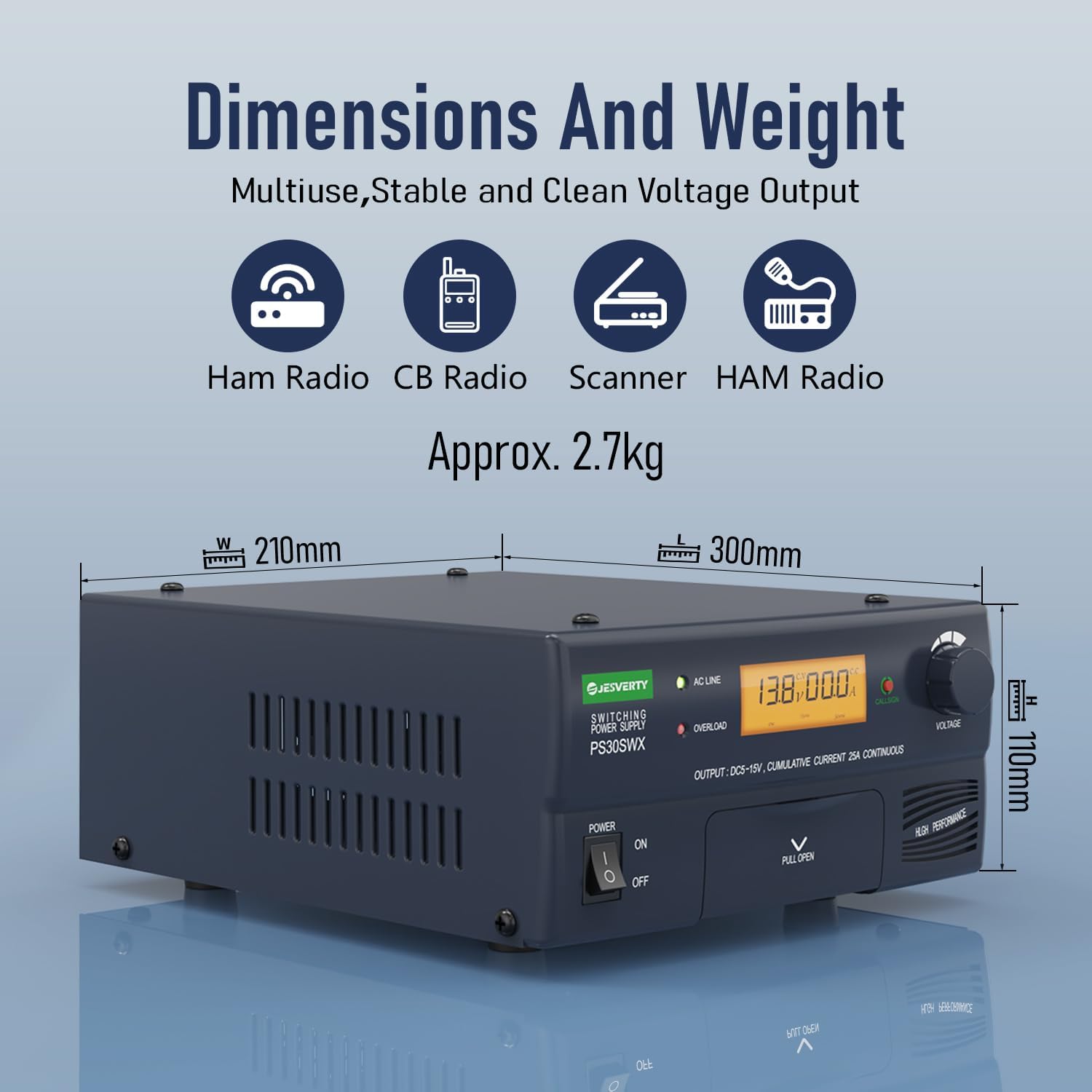
Figura 5: Dimensions and Weight. This image illustrates the physical dimensions (width, length, height) and weight of the PS-30SWX power supply.
| Característica | Especificació |
|---|---|
| Número de model | PS-30SWX |
| Entrada Voltage | 110-130V CA, 60Hz |
| Vol. De sortidatage | 5V-15V DC (Adjustable) |
| Corrent continu màxim | 30A |
| Cigar Plug Output | 10A |
| Snap-in Terminal Output | 6A |
| Output Terminals (Binding Posts) | 30 A màx |
| Audio Speaker Output | 8Ω Phone Jack |
| Proteccions de seguretat | Overheat, Short-circuit, Over-voltage, Over-current, Overload |
| Dimensions (L x A x A) | 13.46 x 11.06 x 6.57 inches (Approx. 342 x 281 x 167 mm) |
| Pes de l'article | 7 pounds (Approx. 3.17 kg) |
| Material | Metall, plàstic |
9. Garantia i Suport
Jesverty provides lifetime technical support for the PS-30SWX power supply. If you have any questions, require assistance, or are not satisfied with your product, please do not hesitate to contact us. Our customer service team is available to help.
For support, please refer to the contact information provided with your product packaging or visit the official Jesverty weblloc.