
Introducció
This manual provides essential information for the proper installation, operation, and maintenance of your GRAUGEAR 8TB External Hard Drive. Please read these instructions carefully before using the device to ensure optimal performance and longevity. This external hard drive is designed to expand storage for your PlayStation 5 (PS5, PS5 Slim & Pro) and PlayStation 4 (PS4) consoles.
Producte acabatview
Característiques clau
- Gran capacitat d'emmagatzematge: Store up to 188 games (based on an average of 36GB per game) on this 8TB hard drive, keeping your favorite games readily accessible.
- Alta compatibilitat: Specifically formatted for PS5 and PS4, this external hard drive offers seamless compatibility and easy setup for game configuration.
- Disseny durador: Features an elegant aluminum chassis, designed in PS5 style, which integrates perfectly with a gaming setup while providing robust data protection and improved heat dissipation.
- Supervisió convenient: An integrated LED display allows you to monitor the operating status and data access for hassle-free use.
- Connectivitat flexible: Includes a USB cable with both Type-C to Type-C and Type-C to Type-A adapters, enabling fast and flexible connections to various devices.
Contingut del paquet
Verifiqueu que tots els elements siguin presents al paquet:
- GRAUGEAR G-3505 External Hard Drive
- USB Cable (Type-C to Type-C, Type-C to Type-A)
- Adaptador d'alimentació
- Manual d'instruccions
- Targeta de servei
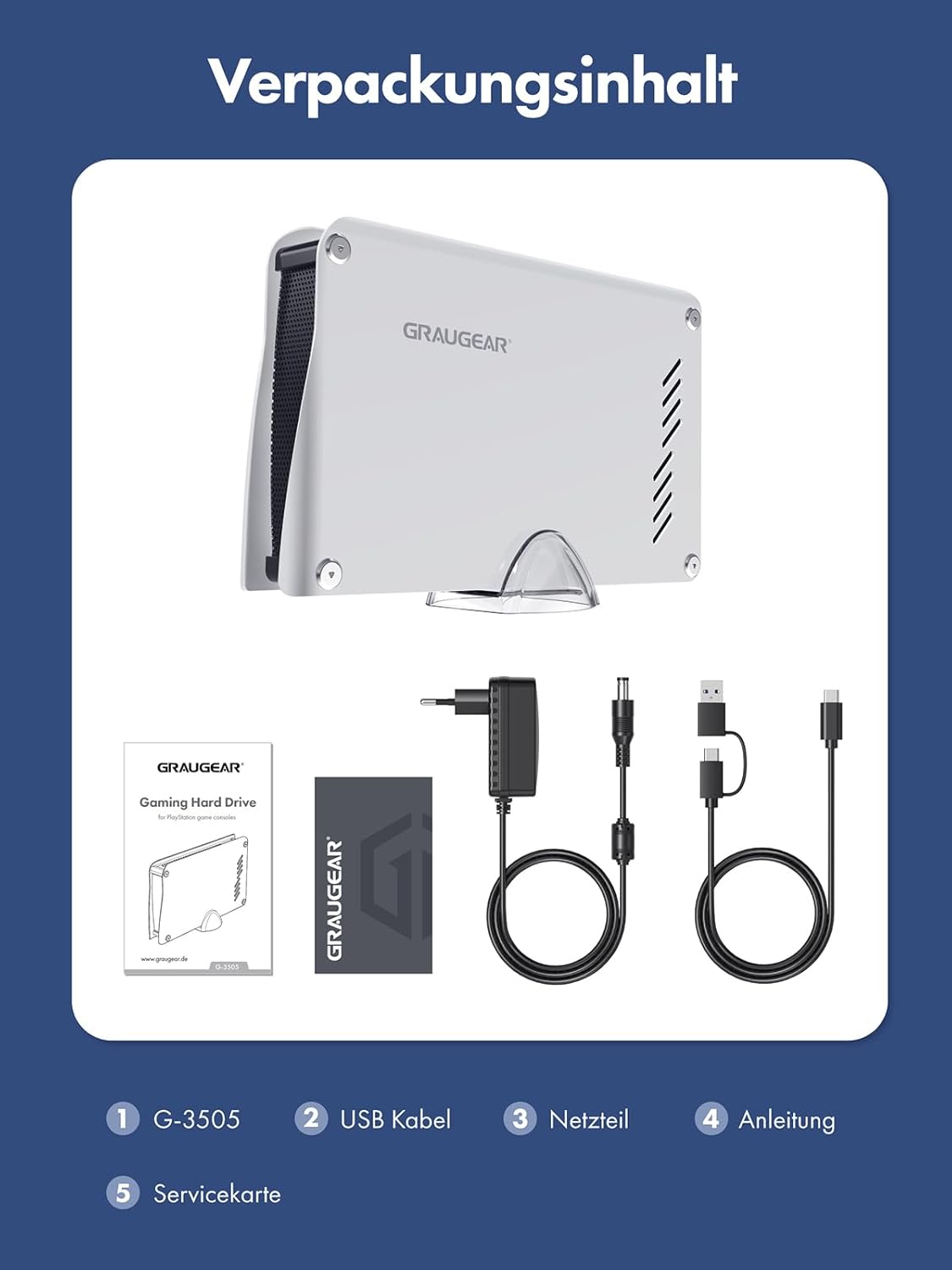
Image: Package contents including the GRAUGEAR G-3505 external hard drive, USB cable, power adapter, instruction manual, and service card.
Instruccions de configuració
Connecting the Hard Drive to your Console
- Place the GRAUGEAR external hard drive on a stable, flat surface near your PlayStation console. Ensure adequate ventilation around the device.
- Connect the power adapter to the hard drive's power input port (DC IN 12V) and then plug the adapter into a power outlet.
- Using the provided USB cable, connect one end (Type-C) to the USB Type-C port on the external hard drive.
- Connect the other end of the USB cable (Type-C or Type-A, depending on your console's available ports) to an available USB port on your PlayStation 5 or PlayStation 4 console.
- Turn on the external hard drive using the power switch located on the rear panel. The LED indicator on the front will illuminate.
- Your PlayStation console should detect the external hard drive. Follow the on-screen prompts to format the drive for use with your console. Nota: El format esborrarà totes les dades de la unitat.

Image: Detailed front and rear views of the GRAUGEAR external hard drive, labeling the LED, aluminum casing, power adapter connection, USB Type-C connection, and power switch.

Image: The GRAUGEAR external hard drive positioned next to a PlayStation 5 console, demonstrating its compatible design and connectivity.
Instruccions de funcionament
Storing and Playing Games
- PS5 Games: PS5 games can be stored on the external hard drive but must be transferred back to the console's internal SSD to be played. Use the console's storage settings to manage game locations.
- PS4 Games: PS4 games can be stored and played directly from the external hard drive. This allows you to free up internal storage on your PS5 or PS4 console.
- Transferring Games: Navigate to your console's storage settings to move games between the internal storage and the GRAUGEAR external hard drive.
Indicador LED
The integrated LED light indicates the operational status and data access activity of the hard drive. A steady light typically means the drive is powered on and idle, while a blinking light indicates data transfer.

Image: Visual representation of the LED indicator, the automatic 10-minute spin-down feature for power saving, and the versatile 2-in-1 USB cable.
Manteniment
Atenció General
- Keep the hard drive in a clean, dry environment, away from direct sunlight and extreme temperatures.
- Avoid placing heavy objects on the hard drive.
- No exposeu el dispositiu a aigua o altres líquids.
- Netegeu l'exterior amb un drap suau i sec. No utilitzeu productes químics agressius ni netejadors abrasius.
Dissipació de calor
The aluminum chassis is designed to aid in heat dissipation. Ensure that the ventilation slots are not blocked to maintain optimal operating temperature.

Imatge: Una explosió view of the GRAUGEAR external hard drive, illustrating its aluminum top cover and internal design optimized for cooling and heat dissipation.
Resolució de problemes
Problemes comuns i solucions
- Unitat no detectada:
- Ensure the power adapter is securely connected to both the hard drive and a power outlet.
- Verify the USB cable is firmly connected to both the hard drive and the console. Try a different USB port on the console.
- Ensure the hard drive's power switch is in the 'ON' position.
- Restart your PlayStation console.
- Velocitats de transferència lentes:
- Ensure you are using the provided USB 3.1 cable and connecting to a USB 3.0 or higher port on your console for optimal speed.
- Avoid running multiple data-intensive applications simultaneously on your console.
- La unitat es desconnecta aleatòriament:
- Comproveu si totes les connexions dels cables estan soltes.
- Ensure the hard drive is not overheating. Provide adequate ventilation.
- Avoid physical shocks or vibrations to the drive during operation.
- Cannot Play PS5 Games Directly:
- This is normal behavior for PS5 games. They must be transferred to the console's internal SSD to be played. The external drive is for storage only for PS5 titles. PS4 games can be played directly.
Especificacions
| Marca | GRAUGEAR |
| Número de model | 18096 |
| Sèrie | G-3505-4TB GRAUGEAR Satellite (Note: This model is 8TB as per product title) |
| Color | Blanc |
| Plataforma de maquinari | PS5 |
| Velocitat de rotació del disc dur | 7200 RPM |
| Mida del disc dur | 8 TB |
| Tecnologia de disc dur | Disc dur mecànic |
| Interfície de disc dur | Serial ATA |
| Interfície del maquinari | USB 3.1 Type C, USB 3.1 Type A, USB Type C |
| Tipus de connector | USB |
| Compatibilitat de dispositius | PS5, PS4 |
| Dimensions (L x A x A) | 20.7 x 3.2 x 12.5 cm |
| Característiques especials | Llum LED |
| Tipus d'instal·lació | Disc dur extern |
Garantia i Suport
For warranty information and technical support, please refer to the service card included in your package or visit the official GRAUGEAR website. Information regarding spare parts availability is currently unavailable.
Manufacturer: CHAB GmbH