Introducció
This manual provides essential information for the proper setup, operation, and maintenance of your replacement remote control for MLily Adjustable Bed Bases. Please read this manual thoroughly before use to ensure correct functionality and to avoid potential issues.
Nota important de compatibilitat: This remote control is specifically designed for MLily Adjustable Bed Bases that utilize a Richmat control box with model number HJC9. It is not a universal remote. Please ensure your existing remote is identical in appearance and your control box matches the specified model before attempting to pair or use this replacement.
Producte acabatview
The replacement remote control features an intuitive button layout for easy operation of your adjustable bed base.

Imatge: Frontal view del comandament a distància.
Botons de control remot:
- Cap amunt/avall: Ajusta la secció del capçal del llit.
- Peu amunt/avall: Ajusta la secció dels peus del llit.
- PIS: Torna el llit a una posició plana.
- M (Memory): Typically used to set or recall a favorite position. (Specific functionality may vary based on bed base model).
Instruccions de configuració i emparellament
Before using your new remote control, you must install batteries and pair it with your adjustable bed base's control box.
1. Instal·lació de la bateria:
The remote control requires 2 AAA batteries (not included). To install:
- Localitzeu el compartiment de la bateria a la part posterior del comandament a distància.
- Feu lliscar la tapa de la bateria.
- Introduïu 2 piles AAA, assegurant-vos de la polaritat correcta (+/-).
- Tanqueu la tapa de la bateria amb seguretat.

Image: Back of the remote control with battery compartment open.
2. Emparellatge del comandament a distància:
This remote is designed to pair with Richmat control box model HJC9. Follow these steps carefully:
- Power Cycle the Bed: Unplug the adjustable bed base from the power outlet. Wait for 5 seconds, then plug it back in.
- Localitzeu la caixa de control: Find the control box (often labeled Richmat HJC9) located under the bed base.
- Activate Pairing Mode on Control Box: Double-click the "Reset" button (or "Learn" / "Reset Coding" button) on the control box twice. The light on the control box should illuminate, indicating it's in pairing mode.
- Inicia l'emparellament al comandament a distància: On the remote control, simultaneously press and hold the "Head Up" button and the "Foot Up" button for 10 seconds.
- Confirmeu l'aparellament: Once you hear beeps from the control box, it indicates that the remote is successfully synced.
Important Pairing Notes:
- Pairing must be completed within 15 seconds of activating pairing mode on the control box. If 15 seconds pass, the light on the control box will go out, and you will need to unplug the power again and restart the process from Step 1.
- Ensure the light on the control box is on when attempting to pair.
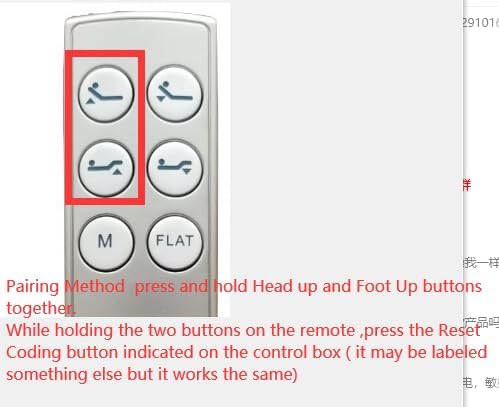
Image: Remote control pairing button combination.

Image: Diagram of the control box location and connections.
Instruccions de funcionament
Once paired, your remote control is ready for use. Simply press the corresponding buttons to adjust your bed base:
- Premeu el botó Dirigir button to raise the head section.
- Premeu el botó Cap avall button to lower the head section.
- Premeu el botó Peu Amunt button to raise the foot section.
- Premeu el botó Peu Avall button to lower the foot section.
- Premeu el botó PIS button to return both the head and foot sections to a flat, level position.
- El M (Memory) button can be used to save or recall a preferred position. Refer to your bed base's original manual for specific instructions on setting memory positions, as this functionality is controlled by the bed base itself.
Manteniment
Substitució de la bateria:
Replace batteries when the remote's response becomes sluggish or stops working. Always use 2 new AAA batteries. Follow the battery installation steps outlined in the "Setup" section.
Neteja:
Netegeu el comandament a distància amb un drap suau i sec. No utilitzeu netejadors líquids ni materials abrasius, ja que poden danyar la superfície o els components interns del comandament a distància.
Resolució de problemes
| Problema | Causa possible | Solució |
|---|---|---|
| El comandament a distància no respon. | Piles gastades o instal·lades incorrectament. | Canvieu les piles per piles AAA noves, assegurant-vos de la polaritat correcta. |
| Remote not controlling the bed. | Remote is not paired with the control box, or pairing was unsuccessful. | Perform the pairing procedure again, ensuring all steps are followed within the 15-second window. Verify your control box is Richmat HJC9. |
| Bed base not responding after power cycle. | Control box not fully reset or powered. | Ensure the bed is unplugged for at least 5 seconds before plugging back in. Double-check all power connections. |
| Remote buttons feel sticky or unresponsive. | Brutícia o restes sota els botons. | Clean the remote surface with a soft, dry cloth. Avoid liquid cleaners. |
Especificacions
| Característica | Detall |
|---|---|
| Model de producte | HJC9 (Remote Control) |
| Compatible Control Box | Richmat HJC9 (e.g., HJC25Z-0-0 NLP200 127780C250059) |
| Font d'alimentació | 2 piles AAA (no incloses) |
| Color | White / Light Gray |
| Màxim de dispositius compatibles | 1 (Adjustable Bed Base) |
| Fabricant | SZHKHXD |
| País d'origen | Xina |
Suport
If you encounter issues not covered in this manual or require further assistance, please contact the seller or manufacturer directly. Provide your product model number (HJC9) and a detailed description of the problem for faster support.
Nota: This remote is not universal. If your control box is not Richmat HJC9, this remote will not be compatible. It is recommended to verify your control box model before purchasing o buscant suport.


