
1. Introducció
This manual provides detailed instructions for the installation, operation, and maintenance of your Inefala Android 13 Car Stereo system, designed specifically for Toyota FJ Cruiser models manufactured between 2006 and 2022. Please read this manual thoroughly before installation and use to ensure proper function and to maximize your experience with the device.
The system features an Android 13 operating system, an 8-core CPU (AC8257), 4GB RAM, and 64GB ROM, offering a responsive and feature-rich in-car entertainment and navigation experience. Key functionalities include wireless/wired CarPlay and Android Auto, GPS navigation, Bluetooth 5.0, FM/RDS radio, and AHD backup camera support.
2. Contingut del paquet
Verifiqueu que tots els articles que s'enumeren a continuació s'inclouen al vostre paquet. Si falta algun article o està malmès, poseu-vos en contacte amb el vostre distribuïdor.
- 1 x Inefala Android Radio for Toyota FJ Cruiser
- 1 x cable d'alimentació
- 1 descodificador CANBUS
- 1 x RCA Harness
- 1 x Antena GPS
- 1 x AHD Backup Camera
- 1 x Cable d'entrada de la càmera posterior
- 1 x micròfon extern
- 2 x cables USB
- 1 x Installation Tool Set
3. Configuració i instal·lació
This unit is designed for direct replacement in Toyota FJ Cruiser models from 2006 to 2022. Professional installation is recommended. Ensure the vehicle's power is disconnected before beginning installation.
3.1 Comprovació de compatibilitat
Before installation, compare the power cable port on the provided harness with your vehicle's original wiring harness to ensure compatibility. The stereo comes with an in-dash head unit, wiring harness cables, CANBUS decoder, and a frame panel designed to integrate seamlessly with your FJ Cruiser's dashboard.
3.2 Passos d'instal·lació (General)view)
- Carefully remove the original factory radio and dashboard trim.
- Connect the provided power cable, CANBUS decoder, and RCA harness to the new head unit and the vehicle's wiring.
- Instal·leu l'antena GPS en un lloc amb llum clara view del cel.
- Route and connect the AHD backup camera and its input cable (if installing).
- Connecteu el micròfon extern per a trucades de mans lliures.
- Secure the new head unit into the dashboard opening and reassemble the trim.
- Torneu a connectar l'alimentació del vehicle i proveu-ne totes les funcions.
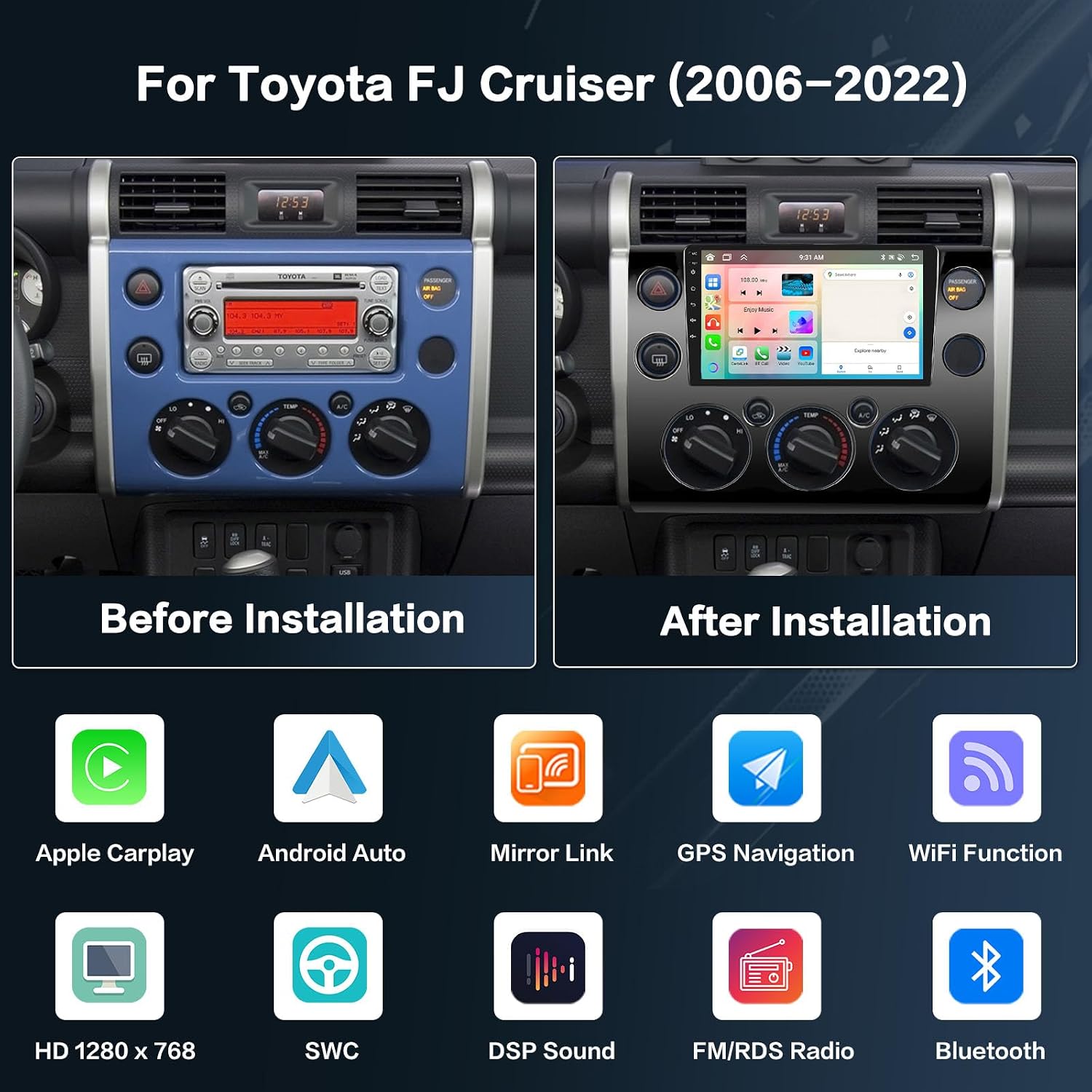
Imatge: Comparison of the Toyota FJ Cruiser dashboard before and after the installation of the Inefala Android 13 Car Stereo. The image shows the original factory radio on the left and the new 9-inch touchscreen unit integrated into the dashboard on the right, along with icons representing key features like Apple CarPlay, Android Auto, Mirror Link, GPS Navigation, WiFi Function, HD 1280x768 resolution, Steering Wheel Control (SWC), DSP Sound, FM/RDS Radio, and Bluetooth.
4. Instruccions de funcionament
4.1 CarPlay & Android Auto & Mirror Link
The system supports both wireless and wired CarPlay and Android Auto, providing seamless integration with your smartphone for navigation, music, calls, and messages. Mirror Link functionality is also available.
- Connexió sense fil: Connect via WiFi hotspot.
- Connexió per cable: Use your phone's original USB cable.
- Nota: Some Samsung phones may have limitations with Android Auto and Mirror Link. Some Huawei phones may have limitations with Android Auto.

Imatge: This image illustrates the wireless CarPlay, Android Auto, and Mirror Link functionalities. It shows a smartphone screen mirrored onto the car stereo display, with options for hotspot connection or USB/Bluetooth connection. Examples of applications like iHeartRadio, Telegram, SiriusXM, NPR One, Waze, Spotify, MLB, and WhatsApp are visible on the CarPlay interface, while Android Auto displays apps such as Exit, Map, Phone, Messages, NetEase Music, Spotify, TikTok, and YouTube.
4.2 GPS Navigation & WiFi Hotspot
The head unit includes a built-in GPS module. Navigation software like Waze and free offline maps can be utilized. Connect to a WiFi hotspot for online maps and to download additional applications from the Google Play Store, such as YouTube or TikTok.

Imatge: This image demonstrates the GPS navigation and WiFi hotspot capabilities. The top panel shows a navigation map with route guidance and points of interest. The bottom panel illustrates the WiFi hotspot function, allowing users to download various applications from the Play Store, including social media, streaming services, and games, enriching the in-car experience.
4.3 Hands-free Bluetooth & FM/RDS Radio
The system supports Bluetooth 5.0 for hands-free calling, phone book downloads, and music playback. The built-in microphone ensures clear communication. The stable FM/RDS radio allows you to preset up to 18 stations, providing access to channel broadcasts, weather forecasts, and real-time traffic conditions.
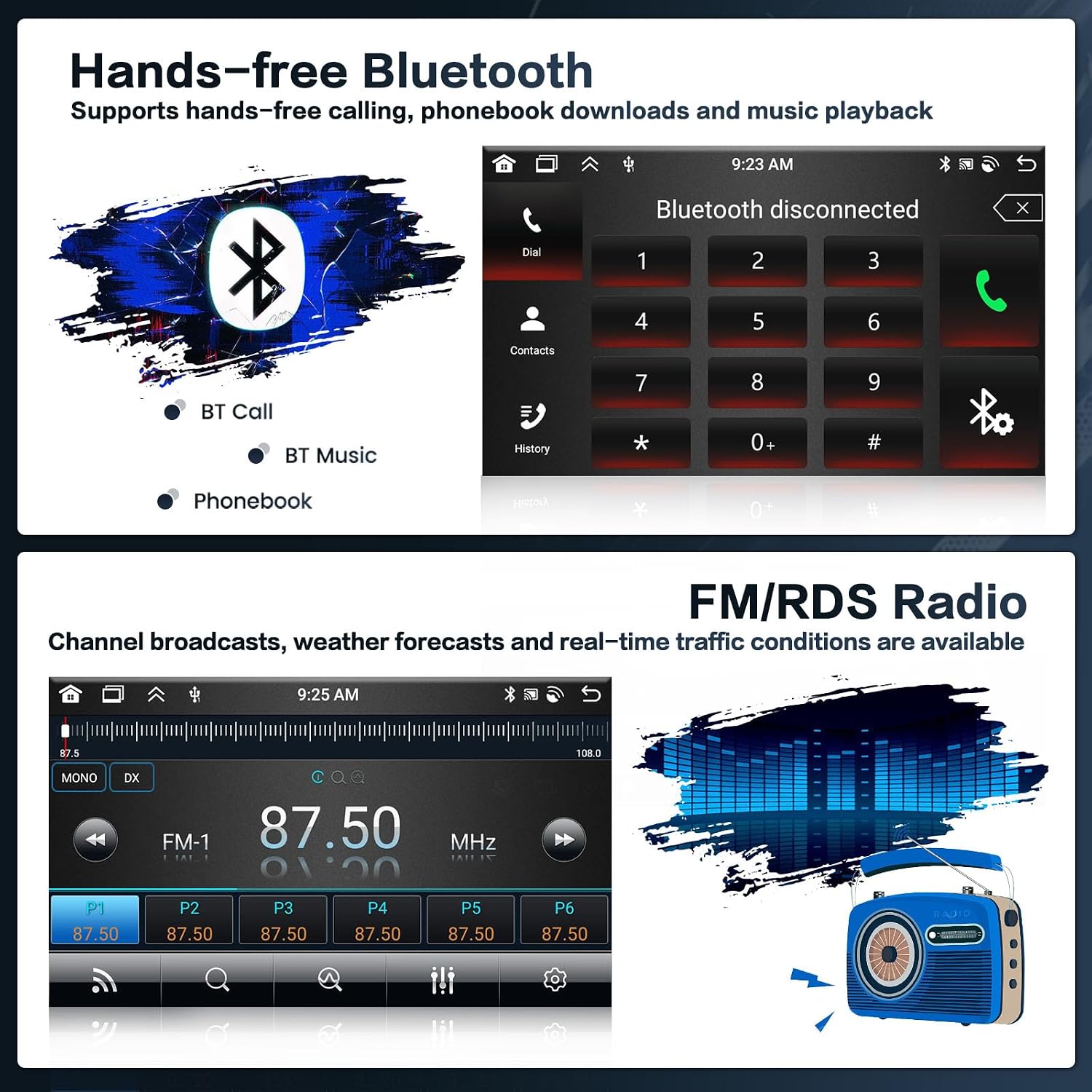
Imatge: This image highlights the hands-free Bluetooth and FM/RDS radio features. The top section displays the Bluetooth interface with options for BT Call, BT Music, and Phonebook, along with a dial pad. The bottom section shows the FM/RDS radio interface, indicating frequency tuning, preset stations (P1-P6), and signal strength, alongside a graphic equalizer representation and a vintage radio icon.
4.4 Control del volant
The unit supports your vehicle's original steering wheel controls. You can program the buttons to control various functions of the car stereo, such as volume, track skipping, mode selection, and answering calls. To configure, navigate to the "Steering Wheel Learning" section in the system settings.

Imatge: This image demonstrates the Steering Wheel Control and AHD Reversing Image features. The top panel shows a steering wheel with control buttons and an on-screen interface for learning and assigning functions like Mode, Power, Volume, Navi, Radio, and Frequency. The bottom panel displays a simulated view from an AHD backup camera, showing parking guidelines and a clear rear view, indicating the reversing image functionality.
4.5 AHD Reversing Camera
The system is equipped with an AHD backup camera. When the vehicle is shifted into reverse, the radio screen automatically displays the rear view, assisting with parking and maneuvering. The camera provides a clear AHD720 resolution image.
4.6 Personalització de la pantalla
Personalize your user interface with various display options:
- Fons: Choose from 19 different background options by touching the color circle in the lower-left corner of the screen.
- Temes d'escriptori: Long-press the main interface to switch between 59 available desktop themes.

Imatge: This image showcases the display customization options. The top panel illustrates 19 different wallpaper options, allowing users to change the background of their car stereo interface. The bottom panel demonstrates 59 various desktop themes, providing extensive personalization for the main screen layout and appearance.
5. Manteniment
To ensure the longevity and optimal performance of your Inefala car stereo, follow these maintenance guidelines:
- Neteja de pantalla: Feu servir un drap suau i sense borrissol per netejar suaument la pantalla tàctil. Eviteu productes de neteja abrasius o dissolvents que puguin danyar la pantalla.
- Actualitzacions de programari: Periodically check for software updates through the system's settings or the manufacturer's weblloc web per assegurar-vos que disposeu de les darreres funcions i correccions d'errors.
- Condicions ambientals: Eviteu exposar la unitat a temperatures extremes, a la llum solar directa durant períodes prolongats o a una humitat excessiva.
- Connexions de cable: Assegureu-vos que tots els cables estiguin connectats correctament. Les connexions soltes poden provocar problemes intermitents.
6. Solució De Problemes
Si teniu problemes amb l'estèreo del vostre cotxe, consulteu els següents problemes i solucions habituals:
- La unitat no s'encén:
- Comproveu totes les connexions d'alimentació i els fusibles.
- Assegureu-vos que el contacte del vehicle estigui engegat.
- Sense so:
- Verify volume settings are not muted or too low.
- Comproveu les connexions dels altaveus.
- Assegureu-vos que s'ha seleccionat la font d'àudio correcta.
- GPS Signal Lost/Inaccurate:
- Assegureu-vos que l'antena GPS tingui una visió clara view del cel.
- Check the GPS antenna connection.
- Problemes de connexió Bluetooth:
- Assegureu-vos que el Bluetooth estigui activat tant a l'estèreo com al telèfon.
- Suprimeix els emparellaments anteriors i torna a emparellar els dispositius.
- Reinicieu els dos dispositius.
- Càmera de marxa enrere no es mostra:
- Check the camera's power and video input connections.
- Assegureu-vos que el vehicle estigui en marxa enrere.
- System Freezes or Slows Down:
- Reinicieu la unitat.
- Tanca les aplicacions de fons innecessàries.
- Consider a factory reset (Note: This will erase all user data. The factory setting keyword is 1234).
7. Especificacions
| Característica | Detall |
|---|---|
| Sistema | Android 13 |
| CPU | 8-Core AC8257, 2.0GHz Main Frequency |
| Memòria (RAM + ROM) | 4 GB de RAM + 64 GB de ROM |
| Mida de la pantalla | 9 polzades |
| Resolució de pantalla | 1280*720 |
| Reproducció de vídeo | Supports 1920*1080P |
| Banda de ràdio | FM/RDS (Radio Chip: 8035) |
| Càmera posterior estàndard | AHD720 i CVBS |
| Poder AmpXip lificador | 7388 |
| Versió Bluetooth | 5.0 (BT/GPS/WIFI Chip: MT6631) |
| Descodificador de so | BU32107 |
| Opcions d'EQ | 36 bandes |
| Interfície USB | Doble USB |
| Pantalla dividida | Admet |
| Paraula clau de configuració de fàbrica | 1234 |
| Sistema de navegació per satèl·lit compatible | GLONASS, GPS, Galileo |
| Tecnologia de connectivitat | Bluetooth, USB, Wi-Fi |
| Entrada de la interfície humana | Micròfon, pantalla tàctil |
8. Garantia i Suport
Inefala products are designed for reliability and performance. For specific warranty details, please refer to the warranty card included with your product or visit the official Inefala website. If you require technical assistance, troubleshooting, or have questions regarding your product, please contact Inefala customer support through the contact information provided on their official weblloc web o a través de la vostra plataforma de compra.
Please have your model number (Inefala-A7343A3453H1MI2US53-C251) and purchase date ready when contacting support.