
1. Introducció
Thank you for choosing the isYoung Smart Bird Feeder with Camera. This device allows you to observe and interact with birds in your backyard through an intelligent camera system. Equipped with AI bird identification, solar power, and app control, it offers a unique bird-watching experience. This manual provides essential information for the proper setup, operation, and maintenance of your bird feeder.
2. Informació important de seguretat
Please read and follow these safety guidelines to ensure safe operation and prevent damage to the product or harm to wildlife.
- Ensure the feeder is securely mounted to prevent it from falling or being dislodged by animals or weather conditions.
- Avoid placing the feeder in areas where it may pose a hazard to birds, such as too close to windows or areas with high predator activity.
- Regularly clean the feeder to prevent the spread of diseases among birds.
- Do not use abrasive cleaners or harsh chemicals on any part of the feeder.
- Mantingueu el panell solar net per garantir un rendiment de càrrega òptim.
- Ensure the camera's rubber seal is properly seated after accessing the charging port or memory card slot to maintain its IP65 waterproof rating.
3. Contingut del paquet
Verifiqueu que tots els elements siguin presents al vostre paquet:
- Smart Bird Feeder Unit with Integrated Camera
- Solar Panel with USB-C Cable
- Mounting Bracket for Feeder
- Suport de muntatge per a panells solars
- Cable de càrrega USB-C
- Cargols d'instal·lació i ancoratges de paret
- Clau hexagonal (clau Allen)
- Restableix el pin
- Manual d'usuari
4. Producte acabatview
The isYoung Smart Bird Feeder G08mini is designed to provide an immersive bird-watching experience with advanced features.
Característiques principals:
- Identificació d'ocells amb IA: Capable of identifying over 10,000 bird species.
- 2K HD Video Camera: 1080p high-resolution with a 140° wide-angle lens for clear footage.
- Visió nocturna en color: Captures clear images and videos day and night.
- Detecció de moviment: Automatically records and sends notifications when birds are detected.
- Energia solar: Includes a 5W solar panel for continuous operation and reduced charging needs.
- Control intel·ligent d'aplicacions: Compatible with the "VicoHome" app (2.4GHz WiFi) for real-time viewing, two-way voice, and siren alarm.
- Emmagatzematge al núvol: Automatically uploads photos and videos to the cloud (30 days free trial included).
- Disseny impermeable: IP65 rated to protect the camera and seeds from rain.
- Large Seed Capacity: Holds 5.5 cups or 1.3 liters of bird seed.
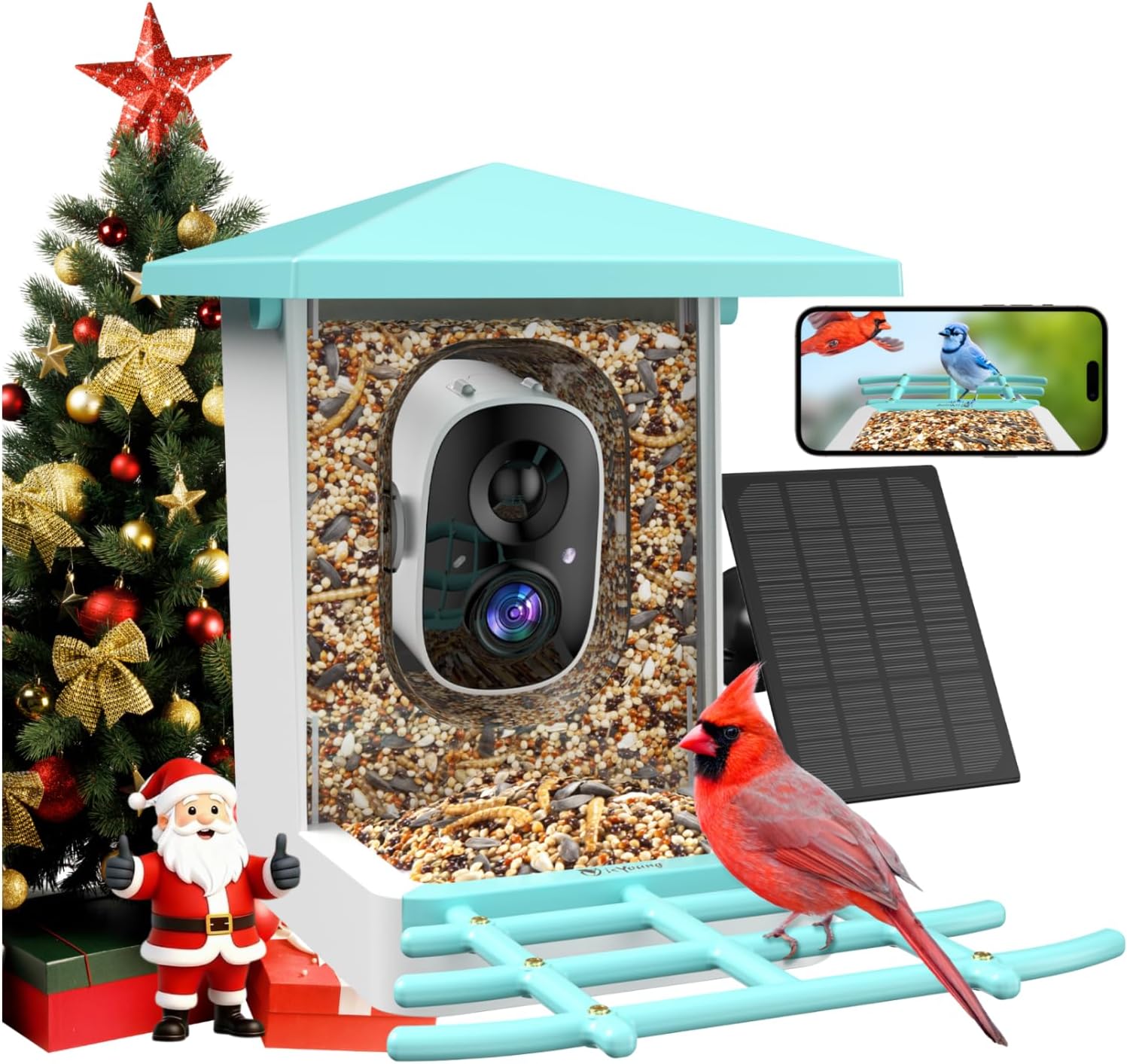
Image: The isYoung Smart Bird Feeder with Camera, showcasing its design and integrated camera.
5. Configuració i instal·lació
Follow these steps to assemble and install your smart bird feeder.
5.1 Desembalatge i muntatge inicial
Upon opening the box, you will find the main bird feeder unit, the solar panel, and a separate box containing accessories. The user manual is typically located at the top.
- Remove the user manual and protective foam inserts.
- Take out the main bird feeder unit.
- Open the accessory box to retrieve the solar panel, various mounting brackets, screws, a USB-C cable, a hex key, and a reset pin.
- Attach the perches and any additional feeders (e.g., water basin, hummingbird feeder) to the main unit. These typically snap into place.
5.2 Camera Preparation
- Gently push the camera module forward to access its ports.
- Remove the rubber cover to reveal the memory card slot (Micro SD card not included), USB-C charging port, power on/off button, and reset button.
- Insert a Micro SD card (if desired for local storage).
- Charge the camera fully using the provided USB-C cable before first use.
- Premeu el botó d'encesa per encendre la càmera.
5.3 Connexió a l'aplicació
- Download the "VicoHome" app from your smartphone's app store.
- Creeu un compte o inicieu sessió.
- Follow the in-app instructions to add your new device. This typically involves scanning a QR code displayed by the camera or connecting via Wi-Fi. Ensure your phone is connected to a 2.4GHz Wi-Fi network.
- Once connected, you will see the live feed from the camera in the app.
5.4 Opcions de muntatge
The feeder offers multiple installation options:
- Muntatge de pal: Use the L-shaped bracket to attach the feeder to a pole.
- Muntatge a l'arbre: Secure the feeder to a tree using the provided strap and bracket.
- Muntatge en paret: Attach the feeder to a wall using the appropriate bracket and screws.
The solar panel should be mounted in a location that receives direct sunlight for most of the day to ensure continuous charging. Connect the solar panel's USB-C cable to the camera's charging port, ensuring the rubber cover is securely closed around the cable to maintain weather resistance.

Image: Illustration of the 170° wide-angle view and various installation methods including pole, tree, and wall mounts.

Image: Depicts different mounting configurations for the smart bird feeder, including pole, tree, and wall mounts.
5.5 Omplir l'alimentador
Open the top lid of the feeder and pour in your desired bird seed. The feeder has a capacity of 5.5 cups or 1.3 liters.
Video: An unboxing and assembly guide for the G08-Smart Bird Feeder with Camera, demonstrating how to set up the components.
6. Funcionament
Utilize the "VicoHome" app to access and control your smart bird feeder.
6.1 Real-time Viewing i notificacions
- Open the VicoHome app to view a live stream from your bird feeder camera.
- Receive instant notifications on your phone when motion is detected, indicating a bird's presence.
6.2 AI Bird Identification
The camera's advanced AI can identify over 10,000 bird species. When a bird is detected, the app will attempt to identify the species and provide information.

Image: Demonstrates the AI feature identifying a bird species and displaying it on a smartphone screen.
6.3 Enregistrament i emmagatzematge de vídeo
- The camera automatically records video clips when motion is detected.
- Recordings are uploaded to the cloud (30 days free trial) and can also be stored on a local Micro SD card (if installed).
- Accés gravat footage through the app's library.

Image: A collage of images showing various birds captured by the feeder camera at different times of the year.
6.4 Two-Way Voice and Siren Alarm
- Use the two-way voice feature in the app to speak through the feeder's speaker.
- Activate the siren alarm from the app to deter unwanted visitors like squirrels.
6.5 Visió nocturna
The camera provides full-color night vision, allowing for clear observation of birds even in low-light conditions.

Image: Highlights the 6-layer Full HD optical lens and compares day and night vision quality, including color night vision.
Video: Shows various birds visiting the smart bird feeder, demonstrating its functionality in capturing wildlife.
7. Manteniment
Regular maintenance ensures the longevity and optimal performance of your bird feeder.
- Neteja: Periodically clean the feeder with mild soap and water to remove old seeds, droppings, and debris. Rinse thoroughly and allow to dry completely before refilling.
- Ompliment: Keep the seed reservoir filled to attract birds. The feeder has a 1.3-liter capacity.
- Panell solar: Wipe the solar panel regularly to remove dust, dirt, or leaves that may obstruct sunlight and reduce charging efficiency.
- Lent de la càmera: Gently clean the camera lens with a soft, lint-free cloth to ensure clear image quality.

Image: Highlights the IP65 weatherproof design of the feeder and the solar panel for continuous operation, along with the camera's charging port.
8. Solució De Problemes
If you encounter issues with your isYoung Smart Bird Feeder, refer to the following common solutions:
- Sense energia: Ensure the camera is fully charged. Check the solar panel for obstructions and ensure it receives adequate sunlight.
- Problemes de connexió Wi-Fi: Verify that your Wi-Fi network is 2.4GHz. Ensure the feeder is within range of your Wi-Fi router. Try restarting your router and the camera.
- App Connection Failure: Re-attempt the pairing process in the VicoHome app. Use the reset pin to reset the camera if necessary.
- Poca qualitat de vídeo: Clean the camera lens. Ensure there are no obstructions in front of the camera. Check your Wi-Fi signal strength.
- La detecció de moviment no funciona: Check the motion detection settings in the VicoHome app. Ensure the camera's view no està obstruït.
- Birds Not Visiting: Ensure the feeder is placed in a safe, visible location. Use fresh, high-quality bird seed.
For further assistance, please contact isYoung customer support.
9. Especificacions
| Característica | Detall |
|---|---|
| Marca | isYoung |
| Número de model | G08mini |
| Espècie objectiu | Hummingbird, BlueJay, Cardinal, Dove, Finch, Robin, Pigeon, Wren, Junco |
| Material | Acrilonitril butadiè estirè (ABS) |
| Característica especial | 360 Degree Perch |
| Tipus de muntatge | Autònom |
| Dimensions del producte | 14.84 cm de llargada x 10.5 cm d'amplada x 9.84 cm d'alçada |
| Font d'alimentació | Energia solar |
| Capacitat | 1.25 Liters (5.5 cups) |
| Pes de l'article | 4.05 lliures |
| Resolució de la càmera | 2K HD (1080p) |
| Càmera View Angle | Gran angular de 140° |
| Classificació impermeable | IP65 |
10. Garantia i Suport
For warranty information, product support, or to report any issues, please contact isYoung customer service through the contact details provided with your purchase or on the official isYoung website. Please have your model number (G08mini) and purchase details ready when contacting support.