
1. Introducció
This manual provides detailed instructions for the installation, operation, and maintenance of your LivTee Smart LED Car Interior Ambient Lighting Kit. This 6-in-1 kit features app control, RGB color options, music sync, and timer functions to enhance your vehicle's interior ambiance. Please read this manual thoroughly before installation and use to ensure proper function and safety.
2. Producte acabatview
The LivTee Smart LED Car Interior Ambient Lighting Kit is designed to provide customizable lighting for your vehicle's interior. It utilizes fiber optic strips and high-lumen LED chips for efficient and soft illumination. Control is managed via a mobile application, offering a wide range of colors and dynamic modes.
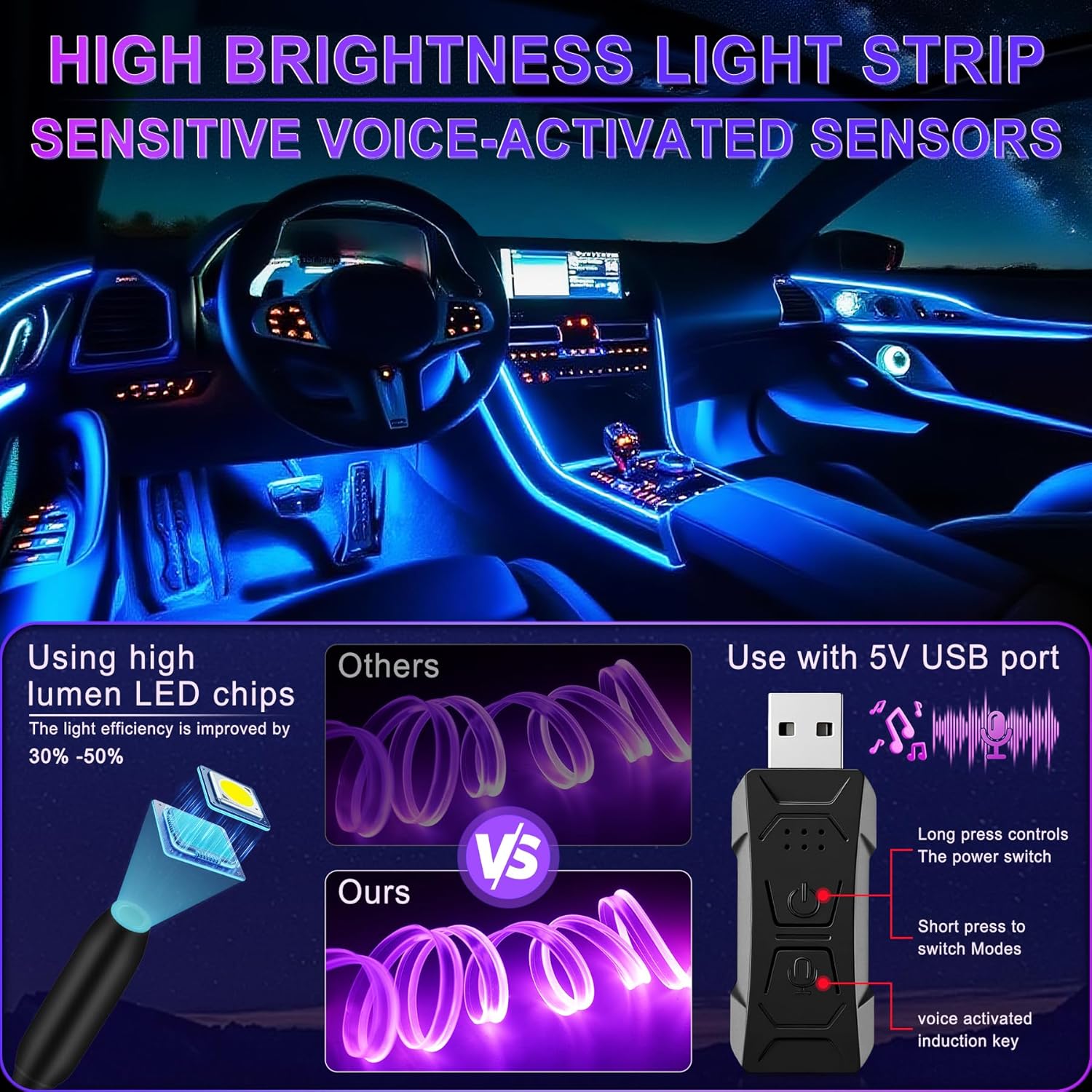
Imatge: Més deview of the LivTee Smart LED Car Interior Ambient Lighting Kit, showing the illuminated car interior, the USB controller, and the fiber optic light strips. It highlights high brightness LED chips and voice-activated sensors.
3. Contingut del paquet
Verifiqueu que tots els components siguin presents al vostre paquet:
- 6 x Illumination Devices (LED light sources)
- 6 x Black Wires (2x 6.6-feet for console/front doors, 2x 9.9-feet for rear doors)
- 5 x Transparent Tubes (3.3-feet each)
- 1 x Transparent Tube (9.9-feet)
- 1 x USB Controller (0.91" x 1.97")
- 1 x eina de palanca
- 1 x manual de producte
Nota: This kit does not include a remote control or a separate USB cable (the controller has an integrated USB plug).
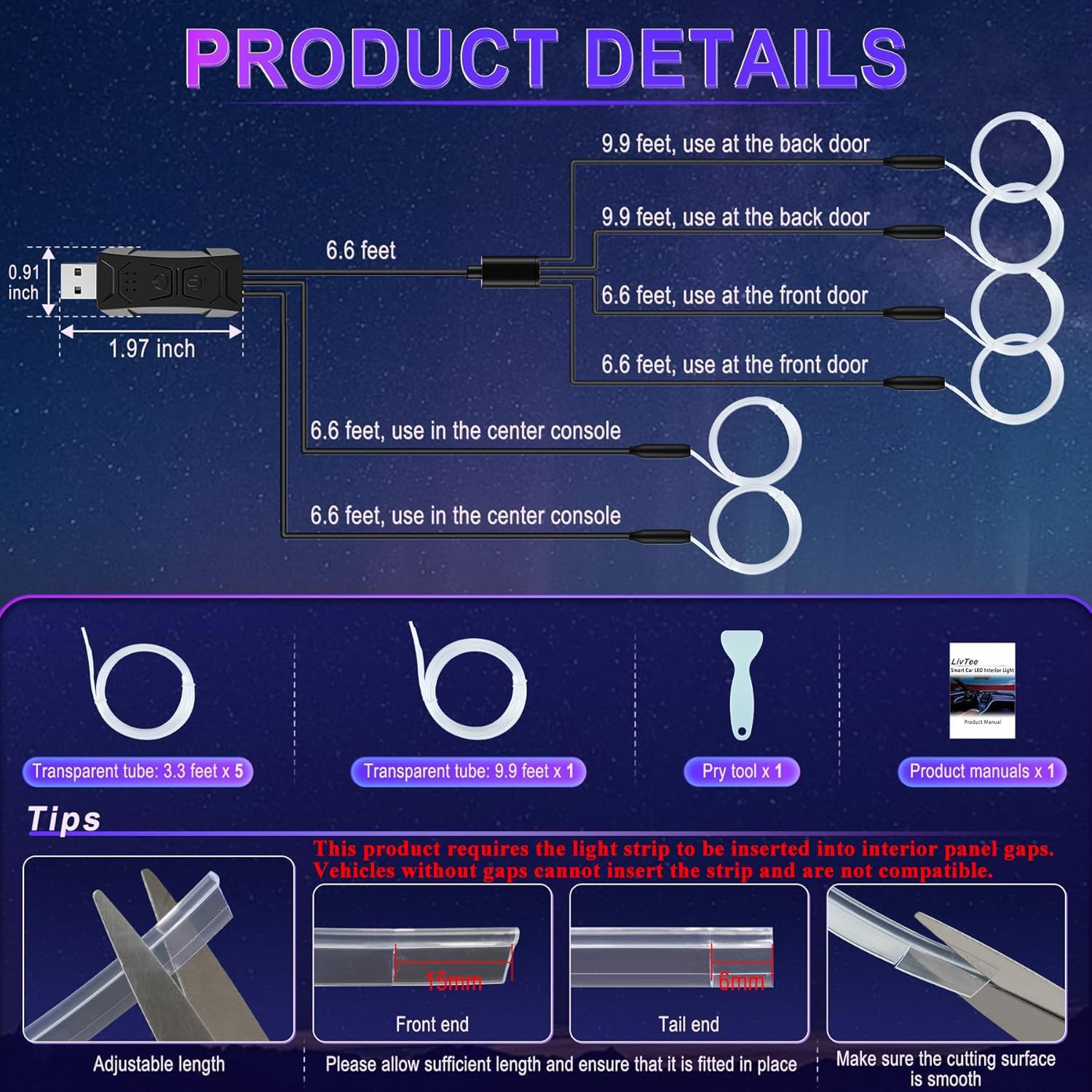
Imatge: Detallada view of the product components, including the USB controller with dimensions, various lengths of black wires, transparent fiber optic tubes, a pry tool, and the product manual. It also illustrates how to trim and seal the fiber optic tubes.
4. Informació de seguretat
- Ensure a stable 5V USB power supply. Power above 5V may damage the device.
- This product is compatible only with vehicles that have interior gaps for fiber optic strip insertion. It is not suitable for gap-free designs.
- Do not connect the transparent tube too tightly to the LED light source, as this may affect light brightness.
- Exercise caution when using the pry tool to avoid damaging your vehicle's interior.
- Keep all components away from water, as the product is not water resistant.
5. Configuració
5.1 Instal·lació de l'aplicació
- Scan the QR code provided in the product manual or on the packaging to download the control application.
- Install the application on your mobile device (iOS or Android).
- Follow the in-app instructions to connect to your LivTee LED Car Lights via Bluetooth.
5.2 Preparing Fiber Optic Tubes
- Measure the desired length for each section of your car's interior where you plan to install the lights.
- Cut the transparent fiber optic tubes to the appropriate lengths using scissors. Ensure the cutting surface is smooth.
- Trim the end of each transparent tube to a length of 6mm for proper connection to the illumination device.
- Insert a black sealing plug (provided) into the trimmed end of the tube to prevent light from escaping and ensure a clean finish.
6. Passos d'instal·lació
Before beginning, ensure your car has suitable interior gaps for the fiber optic strips. This kit is not suitable for gap-free designs.
- Connect the Transparent Tube: Gently connect the prepared transparent tube to the LED light source (illumination device). Do not connect too tightly to avoid affecting brightness.
- Insert into Gap: Use the provided pry tool to carefully insert the transparent tube into the interior gaps of your car (e.g., dashboard, door panels, center console).
- Cut Excess Tube: Once the tube is securely in place along the desired path, cut off any excess transparent tube.
- Trim and Seal: Trim the end of the tube to 6mm and insert a black stopper to prevent light leakage.
- Connectar l'alimentació: Plug the USB controller into a stable 5V USB port in your car.
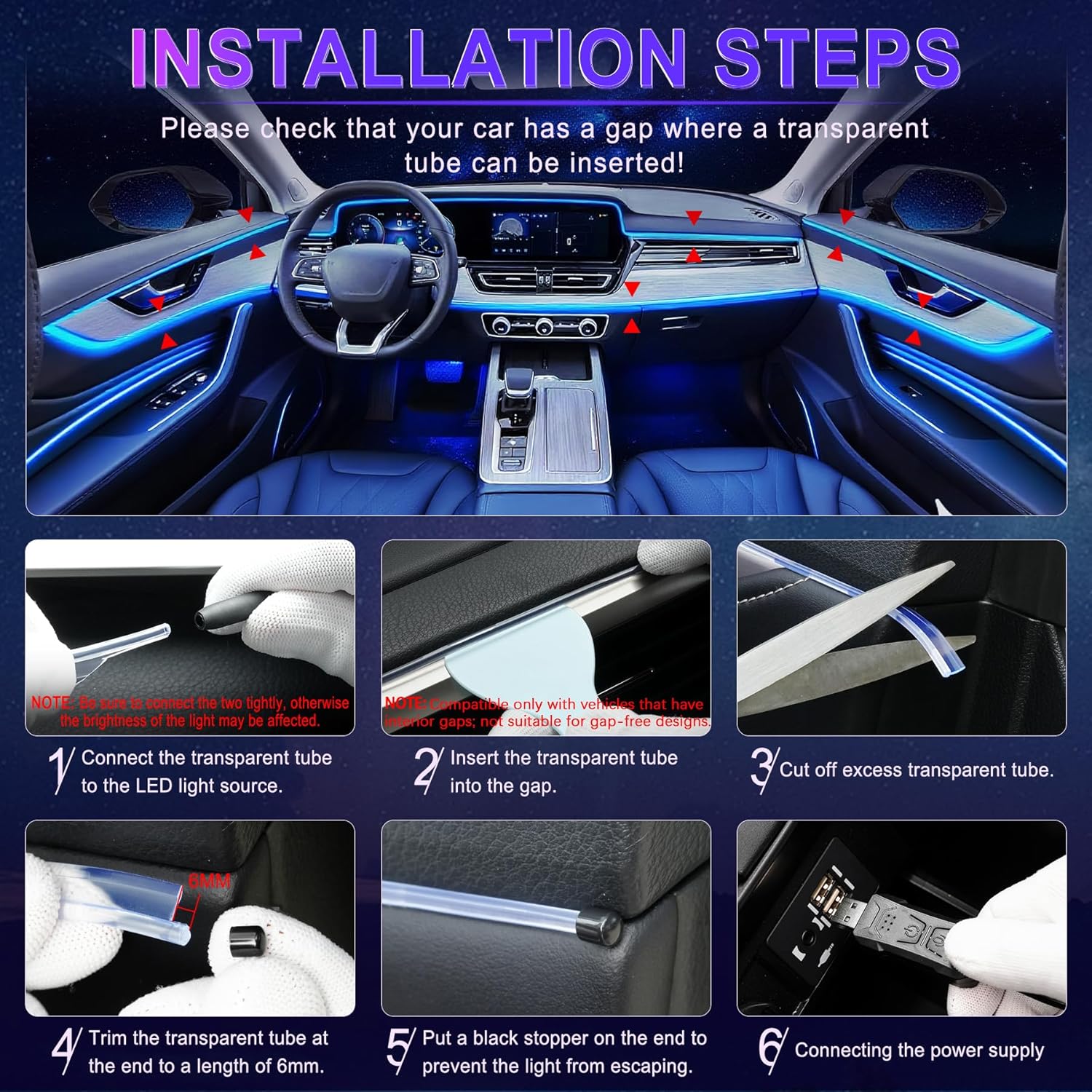
Image: Step-by-step visual guide for installing the LivTee LED car lights. It shows connecting the fiber optic tube to the light source, inserting the tube into car gaps using a pry tool, cutting excess tube, trimming the end to 6mm, inserting a black stopper, and connecting the USB power supply.
7. Instruccions de funcionament
7.1 USB Controller Functions
- Botó d'encesa: Long press to switch the LED lights on/off.
- Interruptor de mode: Short press to cycle through 29 dynamic color modes.
- Botó de control de so: Intelligently captures ambient music rhythm, making the lights synchronize with the melody.
7.2 App Control Functions
The mobile application provides comprehensive control over your LED car lights:
- Selecció de color RGB: Choose from 16 million colors to customize your interior ambiance.
- Ajust de brillantor: Adjust light brightness from 1% to 100%.
- Modes dinàmics: Select from 29 pre-set dynamic modes.
- Sincronització de música: Lights change according to the music rhythm detected by your phone's microphone or the controller's microphone.
- Funció de temporitzador: Set schedules for the lights to automatically turn on or off.
- Colors de bricolatge: Create and save your own custom color themes.
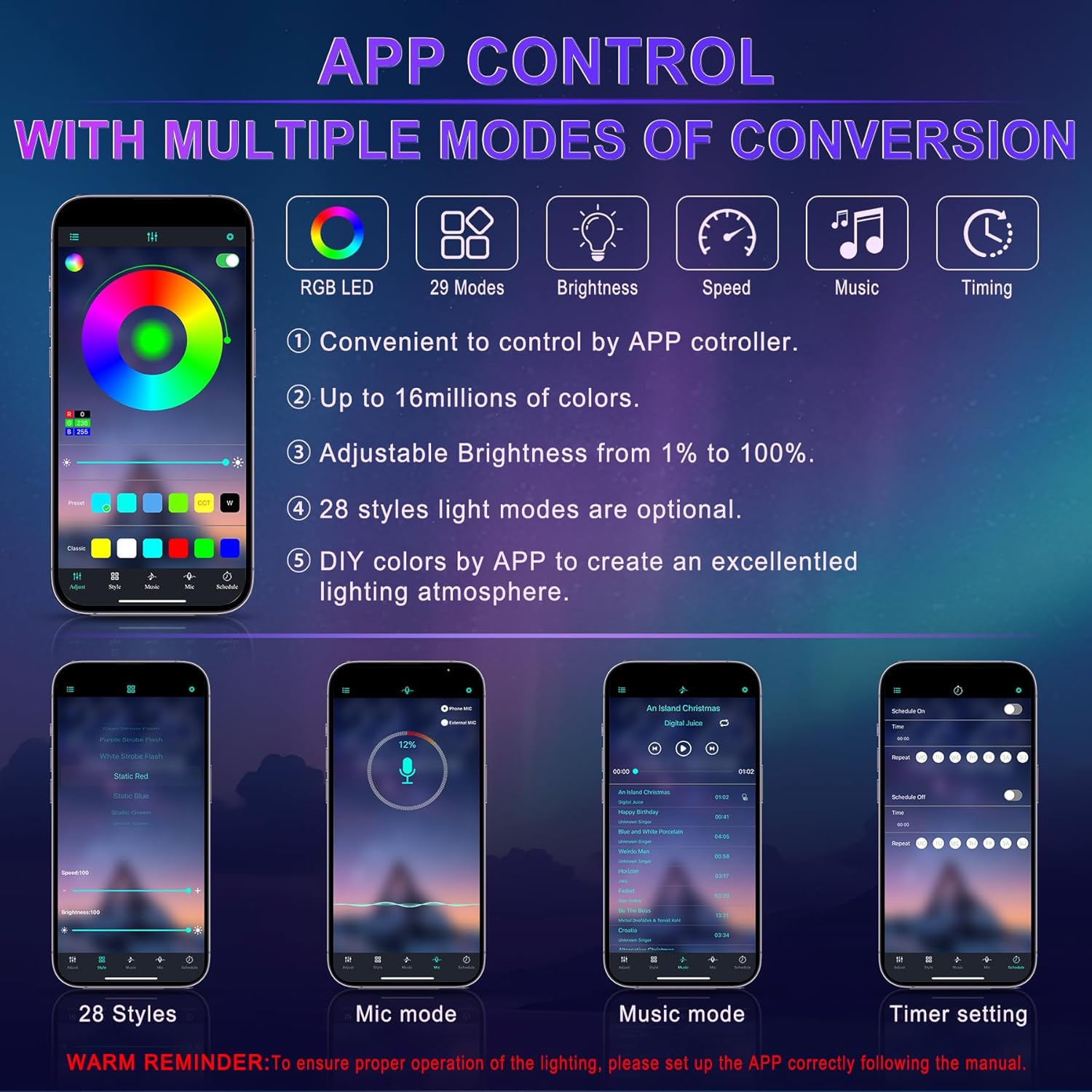
Image: Screenshot of the mobile application interface for controlling the LivTee LED car lights. It displays options for RGB color selection, 29 dynamic modes, brightness adjustment, speed control, music sync, and timer settings.
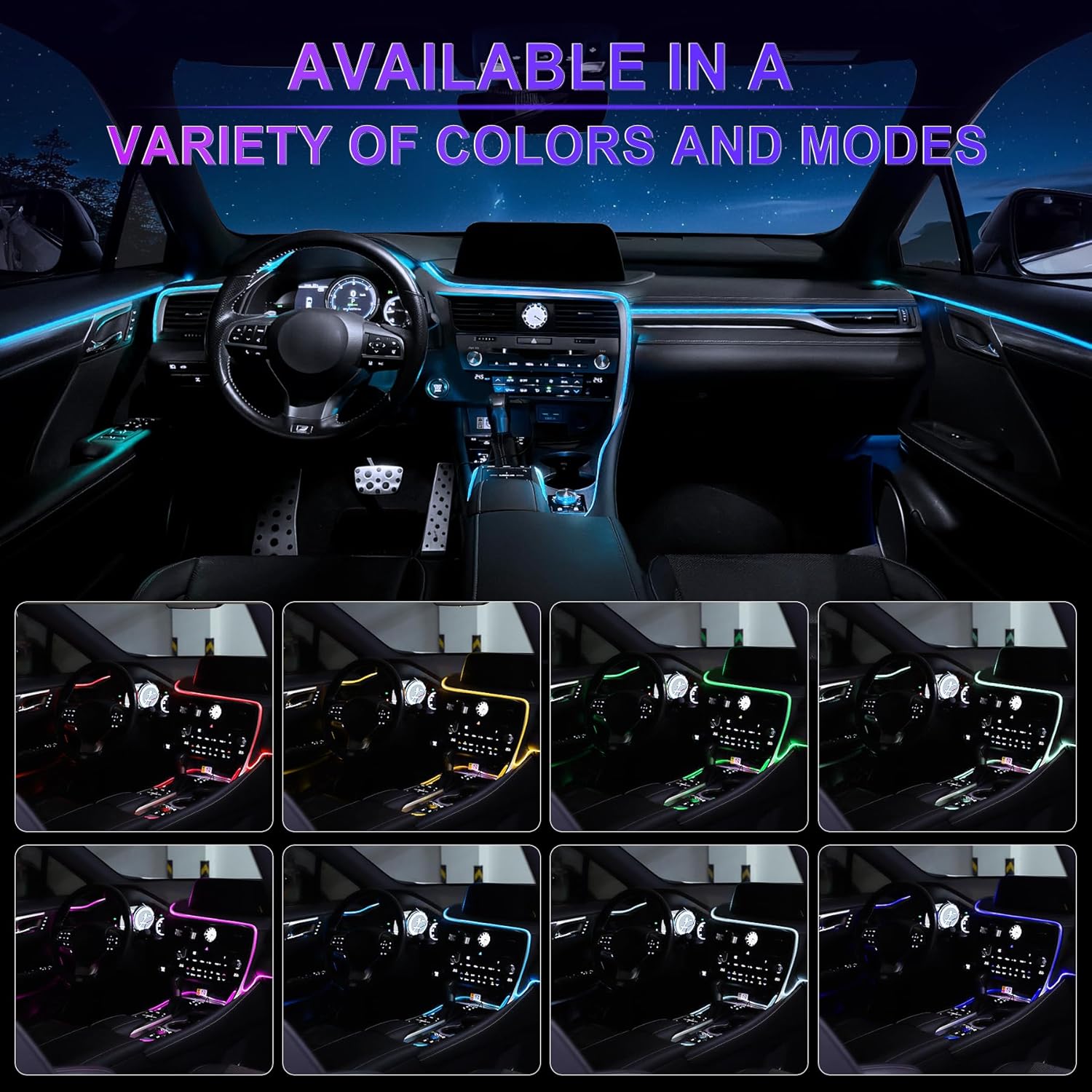
Image: A car interior illuminated with the LivTee LED lights, showcasing a variety of available colors and dynamic lighting modes.
8. Manteniment
- Comproveu regularment totes les connexions per assegurar-vos que són segures.
- Keep the fiber optic tubes clean to maintain optimal light output. Use a soft, dry cloth for cleaning.
- Avoid exposing the USB controller and light sources to excessive moisture or extreme temperatures.
9. Solució De Problemes
| Problema | Causa possible | Solució |
|---|---|---|
| Els llums no s'encenen. | No power, loose connection, or incorrect voltage. | Ensure USB controller is plugged into a stable 5V USB port. Check all connections between tubes and light sources. |
| Lights are dim or uneven. | Tube connected too tightly, damaged tube, or low power. | Ensure tubes are not overly compressed. Check for kinks or damage in the tubes. Verify power supply. |
| L'aplicació no es pot connectar als llums. | Bluetooth not enabled, app not paired, or interference. | Ensure Bluetooth is enabled on your device. Restart the app and try pairing again. Move closer to the controller. |
| La sincronització de música no funciona. | Microphone permissions denied or no music playing. | Grant microphone permissions to the app. Ensure music is playing at an audible volume. |
10. Especificacions
- Marca: LiveTee
- Número de model: LivTee-PLP-5050-1W
- Color: Fiber Optic Lights (Multi-Color RGB)
- Factor de forma: Tira
- Usos recomanats: Interior del vehicle
- Posició de la peça d'automòbil: Interior
- Voltage: 5 volts (CC)
- Tipus de font de llum: LED
- Material: Clorur de polivinil (PVC)
- Nivell de resistència a l'aigua: No resistent a l'aigua
- Nombre de peces: 6 (Illumination Devices)
- Light Source Length: 315 Inches (total fiber optic tube length)
- Tipus d'ajust per a automòbils: Universal Fit (for vehicles with interior gaps)
11. Garantia i Suport
For warranty information and customer support, please refer to the contact details provided on the product packaging or visit the official LivTee weblloc web. Assegureu-vos de conservar el comprovant de compra per a qualsevol reclamació de garantia.