
1. Introducció
The Allteq 2-Port HDMI Splitter allows you to connect a single HDMI source device to two HDMI display devices simultaneously. This device supports high-resolution video up to 4K@60Hz and 3D content, ensuring a clear and vibrant viewing experience. It is designed for various applications, including meeting rooms, presentations, and home cinema setups.
2. Contingut del paquet
Si us plau, comproveu el contingut del paquet en desembalar-lo. Si falta algun article o hi ha algun dany, poseu-vos en contacte amb el vostre distribuïdor.
- Allteq 2-Port HDMI Splitter
- Adaptador de corrent (pot variar segons la regió)
- Manual d'usuari (aquest document)
3. Producte acabatview
The Allteq HDMI Splitter features one HDMI input port and two HDMI output ports. It includes a built-in amplifier to maintain signal quality over longer cable distances.
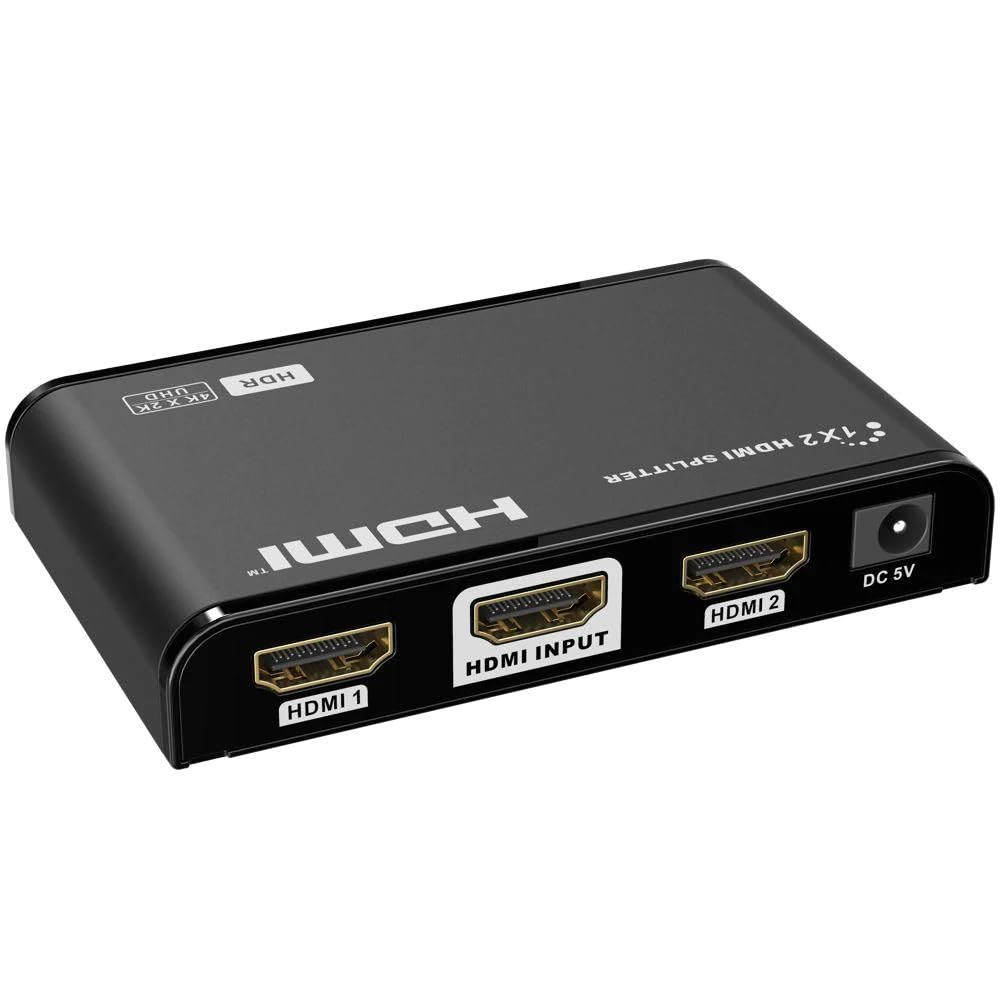
Imatge 1: Davant i darrere view of the Allteq 2-Port HDMI Splitter. The front typically features status indicators, while the back includes the HDMI input, two HDMI output ports, and the power input.
4. Configuració
Follow these steps to set up your Allteq HDMI Splitter:
- Apagueu els dispositius: Ensure all source devices (e.g., Blu-ray player, game console) and display devices (e.g., TV, monitor) are powered off before making connections.
- Connecteu la font HDMI: Connect an HDMI cable from your source device's HDMI output to the Entrada HDMI port on the Allteq splitter.
- Connecteu pantalles HDMI: Connecteu els cables HDMI des del SORTIDA HDMI 1 i SORTIDA HDMI 2 ports on the splitter to the HDMI input ports on your two display devices.
- Connectar l'alimentació: Connecteu l'adaptador de corrent proporcionat a DC 5V power input on the splitter, then plug the adapter into a power outlet.
- Dispositius d'encesa: Power on your display devices first, then your HDMI source device. The splitter will automatically detect the signal.
5. Funcionament
The Allteq HDMI Splitter operates automatically once all connections are made and devices are powered on. It duplicates the HDMI signal from your source to both connected displays.
- Distribució del senyal: The splitter will send the same audio and video signal to both connected displays.
- Coincidència de resolució: The splitter will output the highest common resolution supported by both connected displays and the source. If displays have different resolutions, the output resolution will be limited by the display with the lower capability.
- Amplificació: El incorporat amplifier ensures signal integrity for HDMI cables up to 30 meters in length.
6. Manteniment
To ensure the longevity and optimal performance of your Allteq HDMI Splitter, follow these maintenance guidelines:
- Neteja: Feu servir un drap suau i sec per netejar el dispositiu. No utilitzeu netejadors líquids ni aerosols.
- Medi ambient: Keep the splitter in a cool, dry place, away from direct sunlight, heat sources, and excessive moisture.
- Ventilació: Assegureu-vos una ventilació adequada al voltant del dispositiu per evitar el sobreescalfament.
- Manipulació: Eviteu deixar caure o sotmetre el dispositiu a forts impactes.
7. Solució De Problemes
If you encounter issues with your Allteq HDMI Splitter, refer to the following common problems and solutions:
- Sense imatge/so:
- Ensure all HDMI cables are securely connected to both the splitter and the devices.
- Verify the power adapter is correctly connected to the splitter and a working power outlet.
- Check that the correct HDMI input is selected on your display devices.
- Try connecting the source directly to a display to confirm the source and display are working correctly.
- Prova amb diferents cables HDMI.
- Poor Picture Quality/Flickering:
- Ensure you are using high-quality HDMI cables, especially for 4K resolutions or longer distances.
- Reduce the cable length if possible. The splitter supports up to 30 meters, but shorter cables often provide better signal integrity.
- Check the resolution settings on your source device.
- Només una pantalla funciona:
- Verify the HDMI cable for the non-working display is properly connected and functional.
- Test the non-working display with a different HDMI source or cable.
8. Especificacions
| Marca | Allteq |
| Model | B0CQW4KCZ2 |
| Color | Negre |
| Tipus de connector | HDMI |
| Nombre de Ports | 1 entrada, 2 sortides |
| Versió HDMI | 1.4 (compatible) |
| Resolució màxima | 4K@60Hz |
| Suport 3D | Sí |
| Longitud màxima del cable | 30 meters (with ampmés viu) |
| Dispositius compatibles | Monitor, Televisió |
| Ús específic | Meeting rooms, presentations, home cinemas, connecting multiple devices to one screen |
9. Garantia i Suport
The Allteq HDMI Splitter comes with a 5 any de garantia. For warranty claims or technical support, please contact your retailer or the manufacturer directly. Keep your proof of purchase for warranty validation.