
Spigen ArcPack 30000mAh Power Bank PA2303 User Manual
Model: PA2303
Introducció
Thank you for choosing the Spigen ArcPack 30000mAh Power Bank. This device is designed to provide reliable and fast charging for your electronic devices on the go. Please read this manual carefully before using the product to ensure safe and optimal performance.
Informació de seguretat
- No exposeu el banc d'energia a temperatures extremes, a la llum solar directa ni al foc.
- Eviteu deixar caure, colpejar o desmuntar el dispositiu.
- Mantenir allunyat de l'aigua i altres líquids.
- No l'utilitzeu si el banc d'energia està danyat o inflat.
- Mantenir fora de l'abast dels nens.
- Desfeu-vos del banc d'energia d'acord amb la normativa local.
Contingut del paquet
The Spigen ArcPack 30000mAh Power Bank package includes:
- 1 x Spigen ArcPack 30000mAh Power Bank
- 1 x Type-C to C Cable (1m)
- 1 x Bossa
- 1 x Manual d'usuari
Producte acabatview i Configuració
Familiarize yourself with the ports and indicators on your power bank.

Davant view of the Spigen ArcPack Power Bank showing the two USB-C ports (Input/Output) and one USB-A port (Output), with their respective maximum wattages.
Ports:
- Ports USB-C (x2): These ports support both input (charging the power bank) and output (charging devices) with up to 20W PD3.0.
- USB-A Port (x1): This port supports output (charging devices) with up to 22.5W QC3.0.
Indicadors LED:
The power bank features LED indicator lights to show the remaining battery level and charging status.
Instruccions de funcionament
Carregant el Power Bank
- Connect the included Type-C to C cable to one of the USB-C ports on the power bank.
- Connecteu l'altre extrem del cable a un carregador de paret USB compatible (no inclòs).
- The LED indicators will illuminate to show the charging progress. When all LEDs are solid, the power bank is fully charged.
Carregant els teus dispositius
The Spigen ArcPack Power Bank can charge up to three devices simultaneously.

The Spigen ArcPack Power Bank connected via a USB-C cable to charge a smartphone, demonstrating its charging function.
- Connecta el cable de càrrega del dispositiu al port de sortida corresponent del banc d'alimentació (USB-A o USB-C).
- Connecteu l’altre extrem del cable al dispositiu.
- El banc d'energia començarà a carregar el dispositiu automàticament. Els indicadors LED mostraran el nivell de bateria restant.
- For optimal fast charging, use a compatible cable and ensure your device supports PD3.0 or QC3.0.
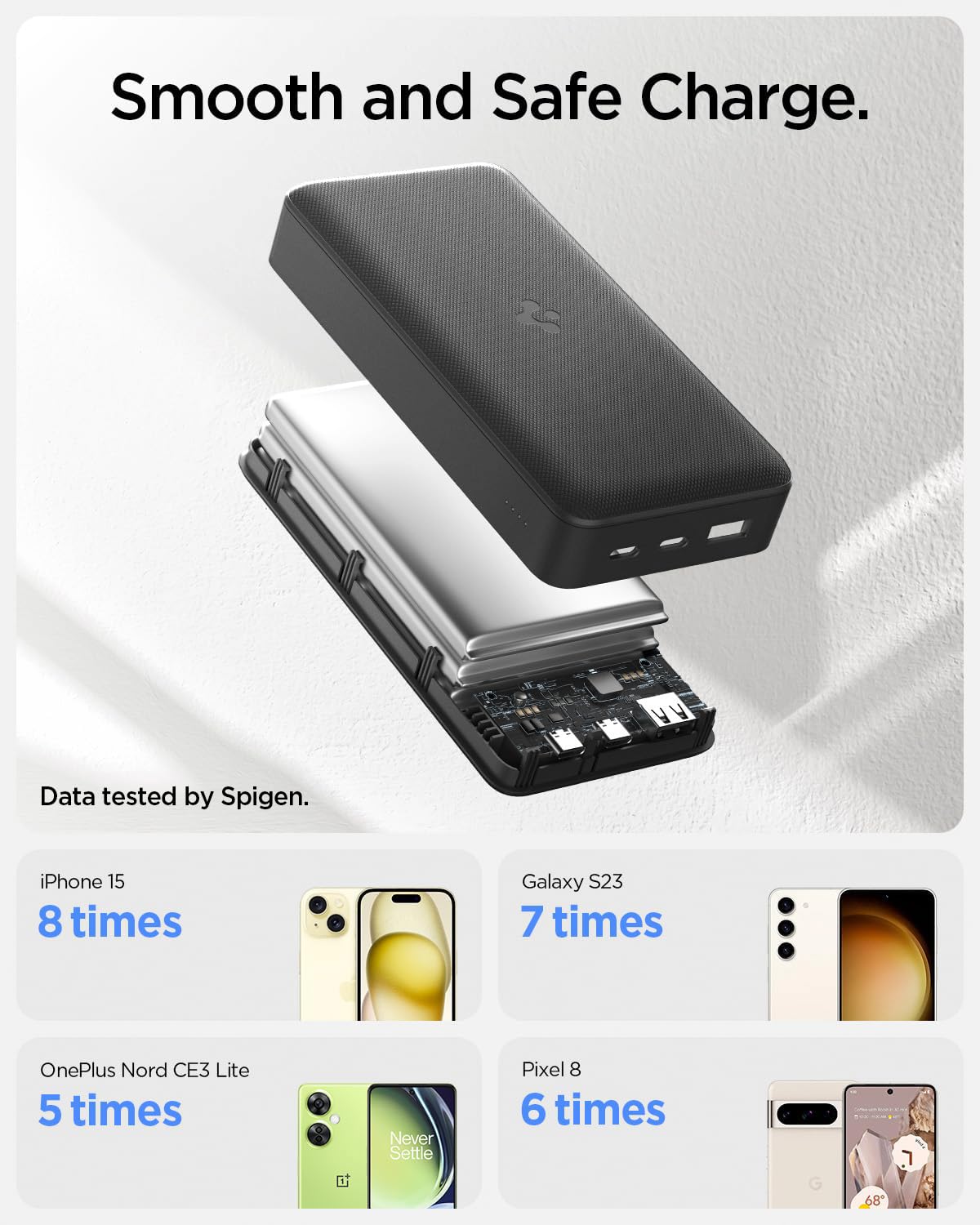
An illustration demonstrating the charging capacity of the 30000mAh power bank for various devices, including iPhone 15, Galaxy S23, OnePlus Nord CE3 Lite, and Pixel 8.
Compatibilitat universal
The power bank is compatible with a wide range of mobile phones, tablets, and wearable devices.

An image illustrating the universal compatibility of the power bank with various mobile, tablet, and wearable devices from brands like Apple, Samsung, OnePlus, and Google.
Manteniment
- Netegeu el banc d'energia amb un drap suau i sec. No utilitzeu productes químics agressius ni materials abrasius.
- Guardeu el banc d'energia en un lloc fresc i sec quan no l'utilitzeu.
- To prolong battery life, fully charge the power bank at least once every three months if it is not used regularly.
- Use the included shock-proof pouch for protection during transport.

The included shock-proof pouch for the power bank, shown both empty and with the power bank inside a pocket.
Resolució de problemes
| Problema | Causa possible | Solució |
|---|---|---|
| El banc d'energia no es carrega | Charging cable is faulty or not properly connected. Wall charger is not working or incompatible. | Check cable connections. Try a different USB-C cable. Use a different wall charger. |
| El dispositiu no es carrega des del banc d'energia | Power bank battery is depleted. Charging cable is faulty or not properly connected. Device is incompatible. | Recharge the power bank. Check cable connections. Try a different charging cable. Ensure your device is compatible. |
| Càrrega lenta | Cable is not fast-charging compatible. Device does not support fast charging. Multiple devices charging simultaneously (multi-output max 15W). | Use a high-quality, fast-charging compatible cable. Ensure your device supports PD3.0/QC3.0. Charge devices individually for maximum speed. |
| El banc d'energia s'escalfa durant l'ús | Normal operation during high-speed charging. | This is normal. If it becomes excessively hot, discontinue use and contact support. |
Especificacions
| Característica | Detall |
|---|---|
| Número de model | PA2303 |
| Capacitat de la bateria | 30000 mAh |
| Sortida màxima | 22.5W (USB-A), 20W (USB-C) |
| Multi-Output Max | 15W |
| Ports d'entrada | 2 x USB Type-C (PD3.0) |
| Ports de sortida | 2 x USB Type-C (PD3.0), 1 x USB Type-A (QC3.0) |
| Característiques especials | Fast Charging, LED Indicator Lights, Over Charging Protection |
| Dimensions | 18.1 x 11.6 x 3.6 cm |
| Pes | 553 g |
| Compliment de seguretat | Passed 11 reliability tests including Over-Heat, Drop, and Over-Current. Complies with 16 Safety Criteria. |

An infographic detailing the 11 reliability tests passed by the power bank, including ESD Shock, High & Low Temperature, Drop Test, and Over-Current Test, ensuring guaranteed safety.
Garantia i Suport
The Spigen ArcPack 30000mAh Power Bank comes with a 12 mesos de garantia des de la data de compra.
For warranty claims, technical support, or any inquiries regarding your product, please contact Spigen customer service through their official website or the retailer where the product was purchased. Please have your proof of purchase and product model number (PA2303) ready.