
1. Introducció
This manual provides detailed instructions for the installation, operation, and maintenance of your Ortis Smart WiFi Pool Timer Switch, Model KJ-023. This device is designed to automate the control of above-ground pool pumps, filters, and landscape lights using WiFi connectivity and the Smart Life application. It offers convenient remote control and scheduling capabilities to optimize energy usage and simplify management of your outdoor equipment.
2. Informació de seguretat
- Seguretat elèctrica: Ensure the timer is connected to a properly grounded 120V, 15A, 60Hz electrical outlet. Do not exceed the maximum load capacity of 15A for the dual sockets.
- Ús exterior: For outdoor installations, always use a weatherproof enclosure or add a waterproof cover to protect the timer from direct exposure to rain, snow, and excessive moisture.
- Proximitat de l'aigua: Do not immerse the device in water. Ensure it is installed at a safe distance from the pool or other water sources to prevent electrical hazards.
- Inspecció: Regularly inspect the timer, power cord, and connected appliance plugs for any signs of damage. Discontinue use if any damage is observed.
- Nens i animals de companyia: Mantingueu el dispositiu fora de l'abast dels nens i les mascotes.
3. Contingut del paquet
Si us plau, comproveu el paquet per veure si hi ha els elements següents:
- Ortis Smart WiFi Pool Timer Switch (Model KJ-023)
- Manual d'instruccions
4. Producte acabatview
The Ortis Smart WiFi Pool Timer Switch features a durable design with dual outlets for connecting multiple devices. It includes physical buttons for manual control and LED indicators for status. The device is designed for easy integration with smart home systems.
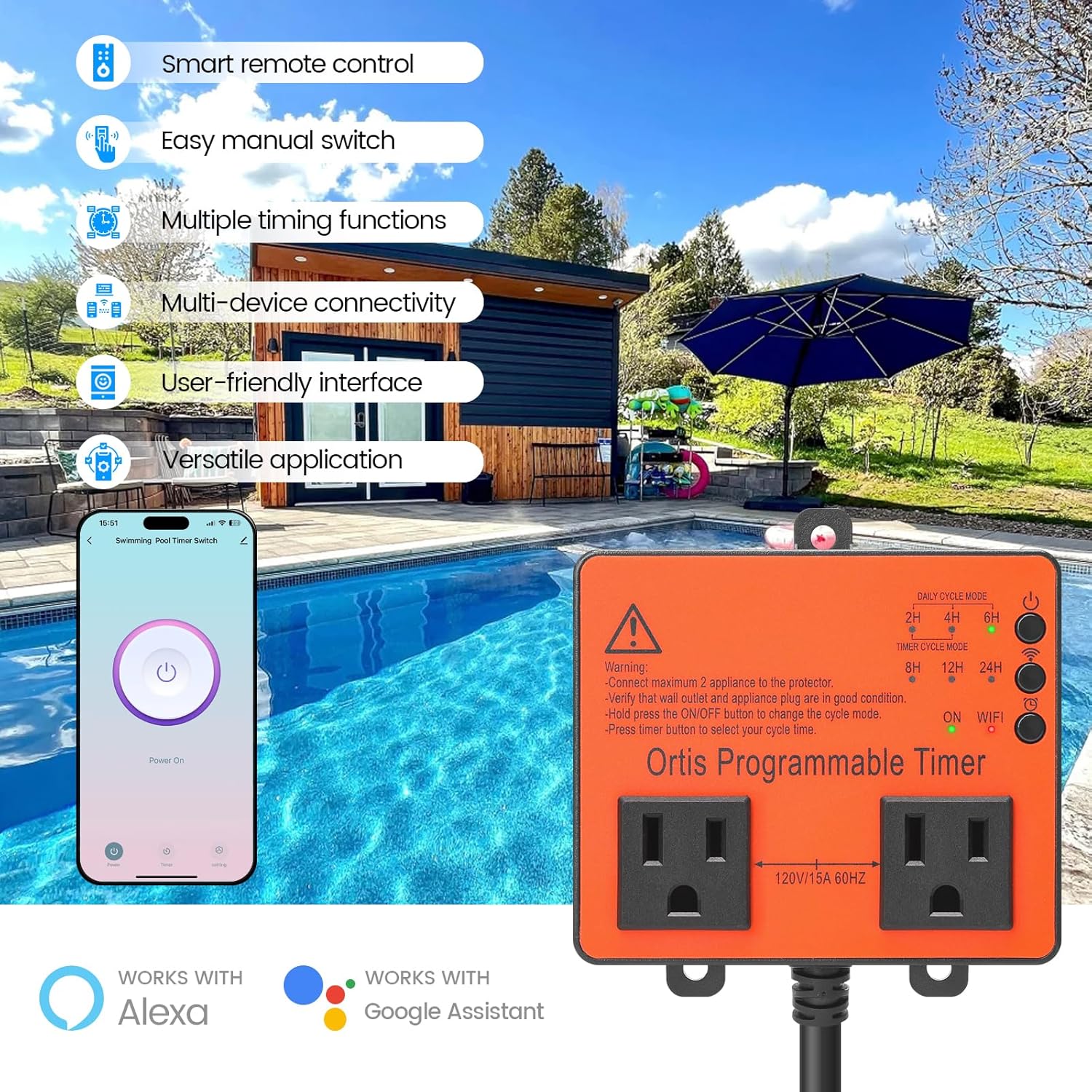
Figure 4.1: Ortis Smart WiFi Pool Timer Switch with key features.

Figure 4.2: Physical dimensions of the Ortis Smart WiFi Pool Timer Switch.
5. Configuració
5.1 Descàrrega i instal·lació d'aplicacions
To utilize the smart features of your Ortis Pool Timer, download the GeniLife App (or Smart Life App) on your smartphone. The app is available for both iOS and Android devices.
Video 5.1: Instructions on how to use the GeniLife App for iOS devices, covering initial setup and pairing.
5.2 Emparellament de dispositius
- Ensure your smartphone's Bluetooth, WiFi (2.4GHz network), and cellular data are enabled.
- Open the GeniLife App and log in or create an account.
- On the timer switch, press and hold the pairing button (usually indicated by a WiFi icon) until the indicator light flashes rapidly, indicating it's in pairing mode.
- In the app, tap the '+' icon to add a new device. The app should automatically discover the timer.
- Follow the on-screen prompts to confirm the device and enter your 2.4GHz WiFi network password.
- Once successfully paired, the device will appear in your app's device list.

Figure 5.2: Timer buttons and app interface for pairing and control.
5.3 Instal·lació física
The Ortis Smart WiFi Pool Timer Switch offers two installation methods:
- Muntatge de cargols: Use appropriate screws to mount the timer securely to a wall or suitable surface.
- Adhesive Hook: For temporary or lighter applications, an adhesive hook can be used to hang the timer.
Ensure the installation location is protected from direct weather exposure if not using a weatherproof enclosure.

Figure 5.3: Two installation methods for the timer switch.
6. Instruccions de funcionament
6.1 Control manual
The timer switch features an ON/OFF button on the unit itself. Press this button to manually toggle the power to the connected devices. The indicator lights will show the current status.
6.2 Control de l'aplicació Smart Life
The GeniLife App (or Smart Life App) provides comprehensive control over your timer switch:
- Comandament ON/OFF: Turn connected devices on or off from anywhere using your smartphone.
- Múltiples modes de cronometratge: Set up various schedules to automate your devices.
- Daily Cycle Mode: Program devices to turn on/off at specific times each day.
- Timer Cycle Mode: Set devices to run for a specific duration (e.g., 2H, 4H, 6H, 8H, 12H, 24H).
- Horari setmanal: Create custom schedules for different days of the week.
- Correcció del temps: The app includes functionality for time synchronization to ensure accurate scheduling.

Figure 6.1: App interface for setting various timing schedules.

Figura 6.2: Example of dual socket usage for multiple devices.
6.3 Integració del control per veu
The Ortis Smart WiFi Pool Timer Switch is compatible with popular voice assistants such as Amazon Alexa and Google Assistant. After linking your GeniLife account to your voice assistant, you can control the timer using simple voice commands.
- Example Ordres:
- "Alexa, turn on the pool timer."
- "Hey Google, turn off the pool pump."

Figura 6.3: Integració del control per veu amb assistents intel·ligents.
7. Manteniment
- Neteja: Disconnect the timer from the power outlet before cleaning. Use a soft, dry cloth to wipe the surface. Do not use liquid cleaners or sprays.
- Protecció a l'aire lliure: If installed outdoors, regularly check the weatherproof enclosure or cover for integrity to ensure continued protection against environmental elements.
- Emmagatzematge: Quan no l'utilitzeu durant períodes prolongats, guardeu el temporitzador en un lloc fresc i sec, allunyat de la llum solar directa i de temperatures extremes.
8. Solució De Problemes
If you encounter issues with your Ortis Smart WiFi Pool Timer Switch, refer to the following common problems and solutions:
| Problema | Causa possible | Solució |
|---|---|---|
| Device not pairing/connecting to WiFi | Incorrect WiFi password, 5GHz WiFi network, device too far from router, Bluetooth/cellular data off. | Ensure you are using a 2.4GHz WiFi network. Verify WiFi password. Move the device closer to the router. Confirm Bluetooth and cellular data are enabled on your phone during pairing. Reset the device and try pairing again. |
| Device goes offline frequently | Weak WiFi signal, network interference. | Improve WiFi signal strength (e.g., use a WiFi extender). Reduce interference from other electronic devices. Ensure the device is within optimal range of your router. |
| La funció del temporitzador no funciona | Incorrect schedule settings, device losing power. | Double-check your schedule settings in the GeniLife App. Ensure the device has a stable power supply. If power is interrupted, some schedules may need to be re-verified. |
| Device feels hot during operation | Overload, poor ventilation. | Ensure the total current drawn by connected appliances does not exceed 15A. Provide adequate ventilation around the device. If overheating persists, discontinue use and contact support. |
| No power to connected appliances | Timer is off, power outage, falla interna. | Check if the timer is manually turned on or scheduled to be on. Verify the wall outlet has power. If the issue persists, the device may have an internal fault. |
9. Especificacions
- Número de model: KJ-023
- Marca: Ortis
- Color: Taronja
- Material: Plàstic
- Dimensions del producte (P x A x A): 2.3" x 2.5" x 4.1"
- Entrada Voltage: 120 V
- Valoració actual: 15A (Max total for dual sockets)
- Freqüència: 60 Hz
- Nombre de configuracions: 2 (Daily Cycle, Timer Cycle)
- Compatibilitat amb la llar intel·ligent: Smart Life App, Alexa, Google Assistant
10. Garantia i Suport
For warranty information or technical support, please refer to the contact details provided with your purchase or visit the official Ortis weblloc web. Conserveu el rebut de compra com a comprovant de compra per a qualsevol reclamació de garantia.


