
Introducció
This manual provides comprehensive instructions for the operation and maintenance of your COLSUR S29 multi-functional device. This device integrates a Bluetooth speaker, FM radio, digital alarm clock, 15W wireless charger, and a dimmable LED night light. Please read this manual thoroughly before use to ensure proper functionality and to maximize your user experience.

Image: The COLSUR S29 device, showcasing its integrated features including the wireless charging pad, LED light bar, and digital display.
Contingut del paquet
Verifiqueu que tots els elements siguin presents al paquet:
- COLSUR S29 Multi-Functional Device
- Power Adapter (Qualcomm Quick Charge 3.0 compatible)
- Cable de dades tipus C
- Manual d'usuari (aquest document)

Image: The COLSUR S29 device, power adapter, and Type-C data cable, illustrating the items included in the package.
Configuració
Initial Charging and Power Connection
- Desembalar: Traieu amb cura tots els components de l'embalatge.
- Connectar l'alimentació: Connect the provided Type-C data cable to the device's power input port and the other end to the power adapter. Plug the adapter into a wall outlet.
- Càrrec inicial: For first-time use, charge the device for at least 5 minutes to activate the internal battery. The device has a 2500mAh rechargeable battery.
- Col·locació: Place the device on a stable, flat surface. Ensure the radio antenna (located at the bottom) is not obstructed for optimal FM reception.
Identificació de components
Imatge: Una explosió view of the COLSUR S29 device, highlighting the mobile phone wireless charging area, LED light bar, phone stand, Bluetooth speaker, FM radio, alarm clock display, power adapter, and Type-C data cable.
- Mobile Phone Wireless Charging Area: Top surface for wireless charging.
- Barra de llum LED: Integrated light source with adjustable brightness.
- Suport del telèfon: Ranura a la part superior per subjectar un telèfon intel·ligent.
- Altaveu Bluetooth: Fabric-wrapped speaker grille.
- Ràdio FM: Integrated function with external antenna.
- Alarm Clock Display: Front-facing LED digital time display.
- Botons de control: Located on the top panel (e.g., D/SNOOZE, MODE, SWITCH, BT, FM, Volume +/-).
- Coixinets de silicona: On the bottom for stability.
- Diffusion Holes: On the bottom for sound and heat dissipation.
- Antena de ràdio: Integrated into the bottom for FM reception.
Instruccions de funcionament
1. Encendre/apagar
Manteniu premut el botó PODER button (if available, otherwise refer to the 'SWITCH' button for mode changes) to turn the device on or off. The digital display will illuminate upon power-on.
2. Setting the Time and Alarm
- Configuració de l'hora: Premeu el botó MODE button until the time display flashes. Use the Volum +/- buttons to adjust hours and minutes. Press MODE de nou per confirmar.
- Configuració d'alarma: Premeu el botó ALARMA button (or long-press MODE if no dedicated alarm button) until the alarm time flashes. Use Volum +/- to set the desired alarm time. Press ALARMA (o MODE) de nou per confirmar.
- Activació d'alarma: Ensure the alarm icon is displayed on the screen to confirm it is active.
- Funció de posposar: Quan soni l'alarma, premeu breument el botó D/SNOOZE button to activate snooze for an additional 5 minutes.
- Desactivació d'alarma: To turn off the alarm, press any button other than D/SNOOZE, or let it ring for its full duration.

Image: The COLSUR S29 device on a bedside table, displaying the time and illustrating the snooze function for the alarm clock.
3. Mode d'altaveu Bluetooth
- Activa el Bluetooth: Premeu el botó BT button or cycle through modes using the MODE button until "BT" appears on the display. The device will enter pairing mode, indicated by a flashing Bluetooth icon.
- Maridatge: On your smartphone or other Bluetooth-enabled device, search for "COLSUR S29" (or similar name) in the Bluetooth settings and select it to pair. A confirmation sound will indicate successful pairing.
- Reproducció: Once paired, you can play audio from your device through the COLSUR S29 speaker. Use the Volum +/- buttons on the COLSUR S29 or your connected device to adjust the volume (0-16 levels).
- Interval: The Bluetooth 5.0 connection offers a wireless range of up to 33 feet (10 meters).

Image: A person enjoying music from the COLSUR S29 Bluetooth speaker, illustrating its high-fidelity sound capabilities.
4. Mode de ràdio FM
- Activa la ràdio FM: Premeu el botó FM button or cycle through modes using the MODE fins que aparegui "FM" a la pantalla.
- Escaneig automàtic: Premeu llargament el botó FM botó per escanejar i desar automàticament les emissores de ràdio disponibles.
- Sintonització manual: Premeu breument Volum +/- botons per canviar entre les emissores desades.
- Ajust de volum: Utilitza el Volum +/- buttons to adjust the radio volume (0-16 levels).
- Antena: Ensure the device is placed in an open area for optimal signal reception. The integrated antenna is located at the bottom.
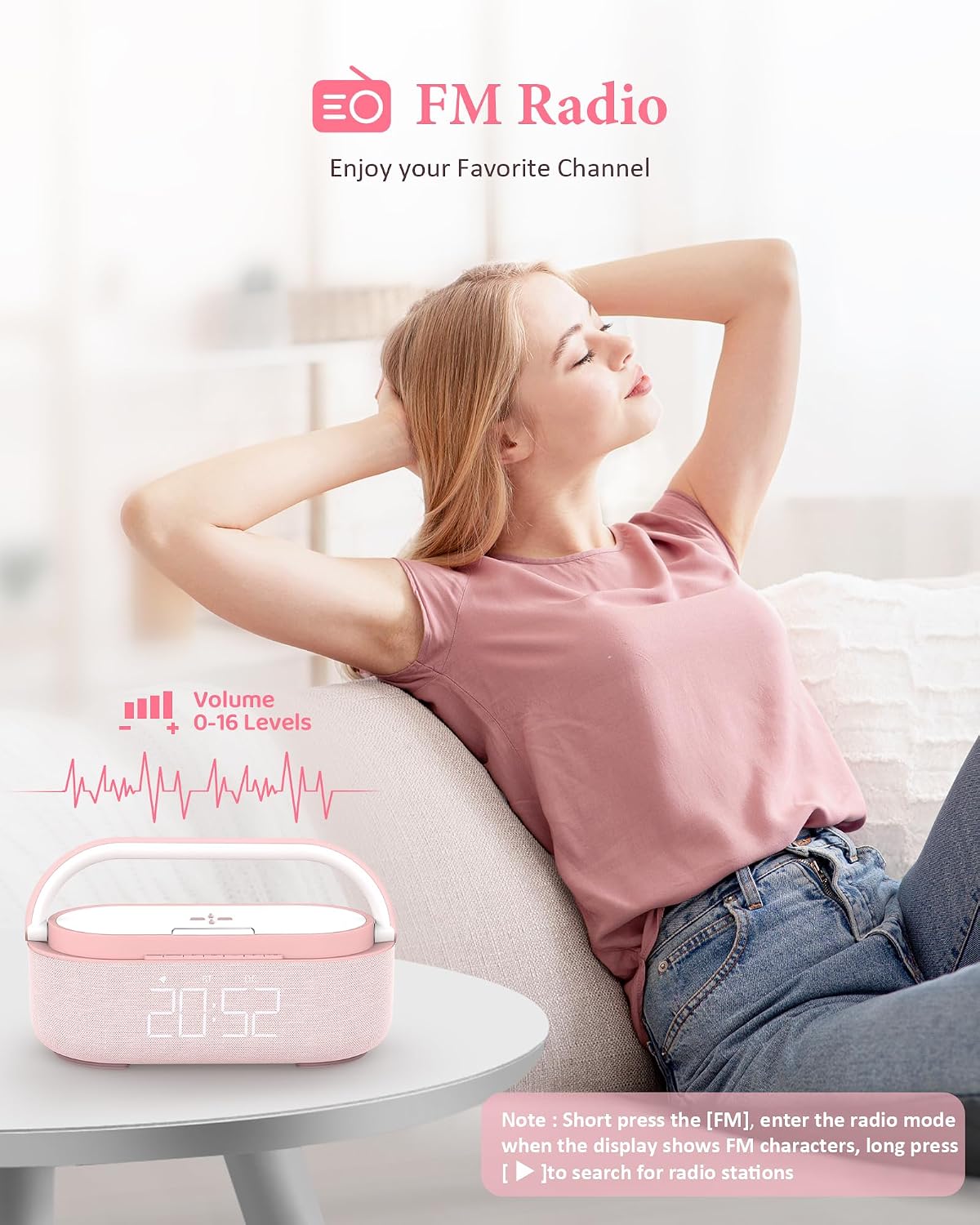
Image: A person relaxing while listening to the COLSUR S29 FM radio, demonstrating the device's radio functionality and volume control.
5. Càrrega sense fil
- Requisit d'energia: The wireless charging function requires the device to be connected to a power source via the provided adapter.
- Col·locació: Place your Qi-compatible smartphone or AirPods on the designated wireless charging area on top of the device.
- Indicador de càrrega: A charging indicator (e.g., a lightning bolt icon on your phone screen) will appear to confirm charging has begun.
- Compatibilitat: Supports 15W fast wireless charging for compatible iOS and Android devices.
- Nota important: For optimal charging, ensure your phone case is less than 5mm thick and does not contain metal, magnetic attachments, or credit cards.

Image: A smartphone wirelessly charging on the COLSUR S29 device, demonstrating the charging function and its compatibility with various devices.

Image: A diagram illustrating the universal compatibility of the COLSUR S29 wireless charging feature with various iPhone, Samsung, and Google Pixel models, as well as AirPods. It also shows examples of phone cases that may interfere with charging (magnetic, phone holder, metal, credit card).
6. Dimmable LED Night Light
- Activar/Desactivar: Premeu el botó LLUM button (or a dedicated button for the LED light) to turn the night light on or off.
- Ajusta la brillantor: Premeu breument LLUM button repeatedly to cycle through 4 levels of brightness: Off, Dim, Medium, and High.

Image: A visual representation of the COLSUR S29's 4-level adjustable LED night light, showing the light bar in Off, Dim, Medium, and High brightness settings, with the digital clock display also adjusting brightness.
7. Phone Holder Function
The integrated groove on the top surface of the device serves as a phone stand, allowing you to prop up your smartphone for hands-free viewing while charging or listening to music. The phone holder is designed to be 180° adjustable for various viewangles d'ajust.

Image: A person exercising while using the COLSUR S29 as a phone holder, demonstrating the 180° adjustable phone stand feature.
Manteniment
- Neteja: Use a soft, dry cloth to clean the device. Do not use abrasive cleaners, solvents, or harsh chemicals.
- Exposició líquida: Avoid exposing the device to water or excessive moisture. If liquid spills on the device, immediately disconnect power and allow it to dry completely before reuse.
- Emmagatzematge: Guardeu el dispositiu en un lloc fresc i sec, allunyat de la llum solar directa i de temperatures extremes.
- Cura de la bateria: To prolong battery life, avoid fully discharging the battery frequently. Charge the device regularly, especially if not used for extended periods.
Resolució de problemes
| Problema | Causa possible | Solució |
|---|---|---|
| El dispositiu no s'encén. | Bateria baixa o sense connexió a l'alimentació. | Connect the device to power using the provided adapter and cable. Ensure the power outlet is functional. Charge for at least 5 minutes. |
| La càrrega sense fil no funciona. | Device not connected to power; phone case too thick or contains metal; phone not Qi-compatible; phone misaligned. | Ensure the device is plugged in. Remove phone case or any metallic objects. Reposition the phone on the charging pad. Verify phone supports Qi wireless charging. |
| L'altaveu Bluetooth no s'emparella. | Device not in pairing mode; Bluetooth disabled on source device; too far from source device; interference. | Ensure the COLSUR S29 is in Bluetooth pairing mode ("BT" flashing). Enable Bluetooth on your source device. Move closer to the speaker (within 33ft). Disconnect other Bluetooth devices. |
| Mala recepció de ràdio FM. | Obstruction of antenna; weak signal in location. | Relocate the device to an open area, away from large metal objects or other electronics that may cause interference. |
| L'alarma no sona. | Alarma no configurada o activada; volum massa baix. | Verify the alarm time is set correctly and the alarm icon is displayed. Increase the device volume. |
Especificacions
| Marca | COLSUR |
| Número de model | S29 |
| Tipus de visualització | LED digital |
| Tecnologia de connectivitat | Bluetooth 5.0, Sense fil |
| Sortida de càrrega sense fils | 15 W (màx.) |
| Capacitat de la bateria | 2500 mAh |
| LED Light Brightness Levels | 4 (Off, Dim, Medium, High) |
| Característiques dels altaveus | Dual Speakers, Rich Bass, 33ft Wireless Range |
| Alarm Clock Features | Adjustable Volume (0-16 levels), Dual Snooze Mode |
| Font d'alimentació | Battery Powered, Electrical (via Type-C) |
| Dimensions del producte | 7.8 cm d'amplada x 2 cm d'alçada (aproximadament) |
| Pes de l'article | 2.31 lliures |
| Material | Acrilonitril butadiè estirè (ABS) |
Garantia i Suport
COLSUR products are designed for reliability and performance. For specific warranty details, please refer to the warranty card included with your purchase or visit the official COLSUR website. If you encounter any issues or require technical assistance, please contact COLSUR customer support through the contact information provided on the product packaging or the official weblloc.
Nota: Please charge the product for 5 minutes when you first receive it.