
TMT KP
TMT KeyPad P2 Wireless Keypad User Manual
Model: KP | Brand: TMT
Introducció
The TMT KeyPad P2 is a robust, wireless keyless entry system designed for automatic swing gate openers. Featuring a durable metal body and an IPX4 waterproof rating, it provides secure and convenient access control for outdoor environments. This manual provides essential information for installation, operation, and maintenance of your KeyPad P2.
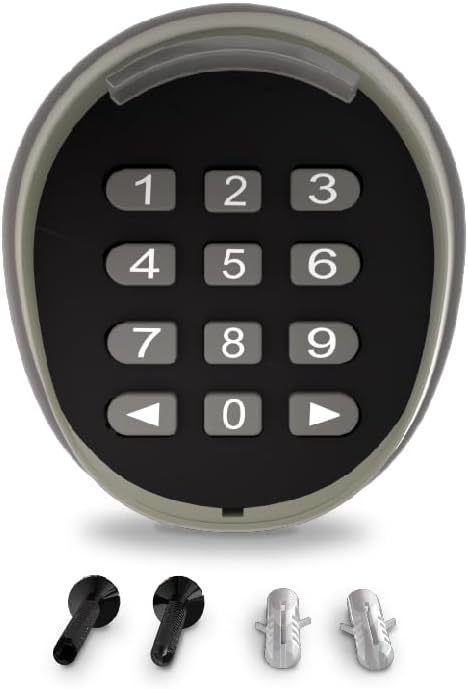
Image: TMT KeyPad P2 Wireless Keypad, showing the numeric keypad and included mounting hardware.
Característiques clau
- High-Quality Durable Material: Superior metal body for exceptional durability against outdoor elements, ideal for diverse outdoor placement.
- Fàcil d'instal·lar: Transforms your door into a smart automatic gate with basic household tools. All necessary hardware included.
- Outdoor Wireless Control: Completely wireless operation, allowing effortless installation at any suitable location within a 150 ft transmission range.
- Outstanding Waterproof Rating: IPX4 rating provides protection against water splashes, ensuring accurate code input even in low-light conditions.
- Secure & Convenient: Configure up to 2 customized passwords with streamlined entry, offering a blend of security and ease.

Image: Visual representation of KeyPad P2 features: 2 Customized Passwords, 4-Digit access codes, Provisional Password Enabled, and Stylish LED Lights.
Contingut del paquet
The TMT KeyPad P2 package includes the following items:
- One (1) TMT Keypad P2 unit
- Installation kit (screws and expansion bolts)
- Manual d'usuari

Image: Diagram illustrating the P2 Keypad and Expansion Bolts included in the package.
Configuració i instal·lació
The TMT KeyPad P2 is designed for straightforward installation. Follow these steps for proper setup:
- Prepareu la superfície de muntatge: Choose a suitable location within 150 ft of your gate opener's receiver. Ensure the surface is flat and stable.
- Disassemble the Keypad: Carefully take off the surface panel, unscrew the case, and remove the back cover to access the PCBA (Printed Circuit Board Assembly).
- Mount the Back Plate: Use the provided screws and expansion bolts to securely attach the back cover to your chosen mounting surface.
- Reassemble the Keypad: Once the back plate is mounted, reattach the PCBA, case, and surface panel.
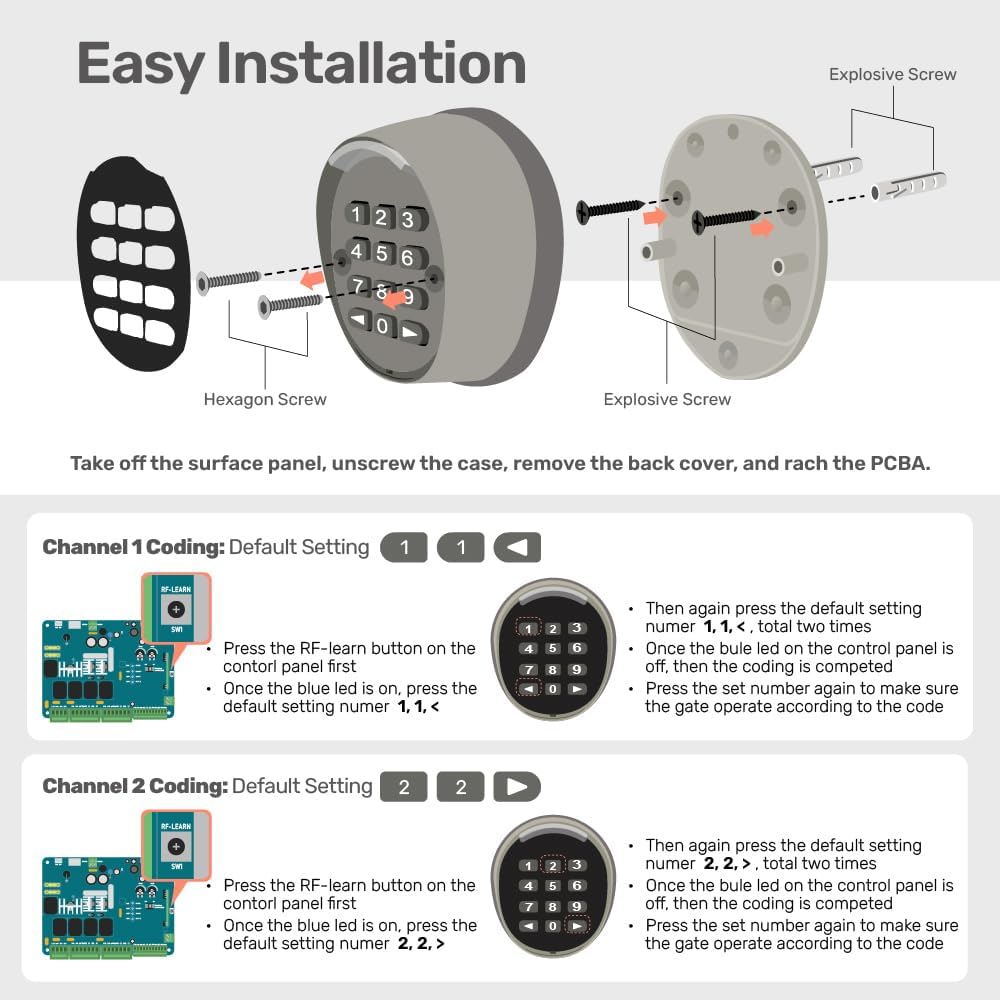
Image: Step-by-step diagram illustrating how to disassemble the keypad, remove the back cover, and access the internal components for installation.
For visual guidance, refer to the installation video (if available from the manufacturer) or the detailed diagrams provided in this manual.
Instruccions de funcionament
The KeyPad P2 allows for secure and convenient access using customized passwords. Follow these steps to program and operate your keypad:
Programming Access Codes (Coding)
The KeyPad P2 supports two channels for programming, allowing for different access codes or control of different gate functions.
Channel 1 Coding: Default Setting 1, 1, <
- 1. Press the RF-learn button on the control panel first.
- 2. Once the blue LED is on, press the default setting number 1, 1, < al teclat.
- 3. Then again press the default setting number 1, 1, <, a total of two times.
- 4. Once the blue LED on the control panel is off, the coding is completed.
- 5. Press the set number again to make the gate operate according to the code.
Channel 2 Coding: Default Setting 2, 2, >
- 1. Press the RF-learn button on the control panel first.
- 2. Once the blue LED is on, press the default setting number 2, 2, > al teclat.
- 3. Then again press the default setting number 2, 2, >, a total of two times.
- 4. Once the blue LED on the control panel is off, the coding is completed.
- 5. Press the set number again to make the gate operate according to the code.
Image: Detailed instructions for programming Channel 1 and Channel 2 access codes, showing the keypad and a control board with an RF-learn button.
Funcionament diari
To operate your gate using the KeyPad P2:
- Enter your programmed 4-digit access code.
- The keypad's LED lighting cues will confirm accurate input.
- The gate will operate according to the programmed function for that code.

Image: The TMT P2 keypad with a blue LED light indicating successful input, ensuring visibility and confirmation.
Manteniment
The TMT KeyPad P2 is designed for minimal maintenance due to its durable construction and IPX4 waterproof rating. To ensure optimal performance and longevity:
- Neteja: Periodically wipe the keypad surface with a soft, damp drap per eliminar la brutícia i les restes. Eviteu productes de neteja o dissolvents abrasius.
- Substitució de la bateria: While the product description states "Batteries Included? No" and "Batteries Required? No", it's important to note that wireless devices typically require power. If your specific model requires batteries (e.g., for the keypad's wireless transmission), refer to the product packaging or a more detailed manual for battery type and replacement instructions.
- Inspeccionar per danys: Regularly check the keypad for any signs of physical damage, such as cracks or loose components, especially after severe weather conditions.
Resolució de problemes
If you encounter issues with your TMT KeyPad P2, consider the following common troubleshooting steps:
- El teclat no respon:
- Ensure the keypad is within the specified transmission range (up to 150 ft) of the gate opener's receiver.
- Verify that the keypad has power (if battery-operated, check/replace batteries).
- Check for any obstructions between the keypad and the receiver that might interfere with the wireless signal.
- Gate Not Opening/Closing After Code Entry:
- Confirm that the access code was entered correctly.
- Re-attempt the programming steps for the specific channel (Channel 1 or Channel 2) to ensure the code is properly learned by the gate opener's control panel.
- Ensure the gate opener itself is functioning correctly and has power.
- LED Light Not Illuminating:
- This could indicate a power issue (if battery-operated, check/replace batteries) or a fault with the keypad.
If problems persist, please contact TMT customer support for further assistance.
Especificacions
| Atribut | Detall |
|---|---|
| Fabricant | TMT Automation Inc |
| Número de part | KP |
| Pes de l'article | 4.6 unces |
| Dimensions del producte | 2.9 x 2.9 x 1.55 polzades |
| País d'origen | Xina |
| Número de model de l'article | KP |
| Color | black and silver |
| Components inclosos | One P2 Keypad |
| Piles incloses? | No |
| Necessites piles? | No |
| ASIN | B0CRHCBZ8P |
| Data de primera disponibilitat | 4 de gener de 2024 |
Garantia i Suport
The TMT KeyPad P2 comes with a 12 mesos de garantia des de la data de compra, que cobreix defectes de fabricació i avaries en condicions d'ús normal. Conserveu el comprovant de compra per a reclamacions de garantia.
TMT Automation Inc. is committed to providing reliable local service and support. For technical assistance, troubleshooting, or warranty inquiries, please contact TMT customer service through the official TMT weblloc web o el vostre punt de compra.


Images: Demonstrating ease of installation, the product's origin (Designed in Taiwan), and the keypad's mounted appearance.
Ask a question about this manual
Ask about setup, troubleshooting, compatibility, parts, safety, or missing instructions. Manuals+ will review the question and use this page’s manual context to help answer it.