
MekedeTech Android Car Radio Stereo GPS Navigation
User Manual for Volvo S40, C30, C70
Model: 8-Core 8+256G
1. Introducció
This manual provides detailed instructions for the installation, setup, and operation of your MekedeTech Android Car Radio Stereo GPS Navigation system. This unit is designed to upgrade the in-car entertainment and navigation experience for compatible Volvo models.
Please read this manual thoroughly before installation and use to ensure proper function and to avoid damage.
2. Compatibilitat del vehicle
This Android car radio is compatible with the following Volvo models:
- Volvo S40: 2004-2012
- Volvo C30: 2006-2013
- Volvo C70: 2005-2013
Nota important: Vehicle dashboard design varies. Please verify your car's dashboard matches the 'Can be Installed' configuration shown below.

Image: Dashboard compatibility check. The top image shows a dashboard where the unit can be installed, featuring a specific vent and console layout. The bottom image shows a dashboard where the unit cannot be installed, indicating a different vent and console design.
3. Contingut del paquet
Si us plau, comproveu el paquet per veure si hi ha els elements següents:
- Android Head Unit (9-inch IPS Touch Screen)
- Kit de tauler
- Cable d'alimentació
- Cable RCA
- Cable de càmera de marxa enrere
- Cables USB
- Muntatge del cotxe
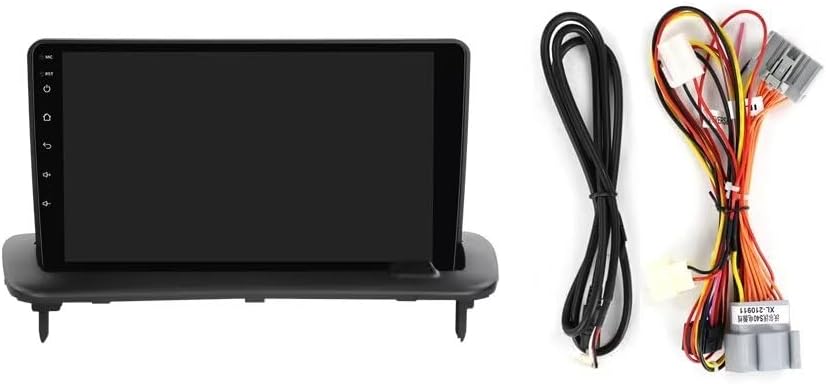
Image: The main Android head unit with its 9-inch screen is shown on the left. On the right, a bundle of various connection cables, including power, RCA, reversing camera, and USB cables, are displayed.
4. Instal·lació
The installation process is designed to be plug-and-play for compatible Volvo models. It is recommended to have the installation performed by a qualified professional if you are not familiar with car audio system installations.
- Preparació: Desconnecteu el terminal negatiu de la bateria del cotxe abans de començar qualsevol treball elèctric.
- Treure la unitat original: Traieu amb cura la ràdio del cotxe i el revestiment del tauler de control existents.
- Connecteu el cablejat: Connect the provided power cable, RCA cable, reversing camera cable, and USB cables to the new head unit and the car's wiring harness. Ensure all connections are secure.
- Unitat principal de muntatge: Install the new Android head unit into the dashboard using the provided dash kit and car mount.
- Funcionalitat de prova: Reconnect the car battery and test the unit's basic functions before fully reassembling the dashboard.
- Torneu a muntar: Securely reattach all dashboard trim pieces.

Imatge: A view of the MekedeTech Android head unit seamlessly integrated into a Volvo S40/C30/C70 dashboard after installation, showing the large screen in place of the original radio.

Image: A side-by-side comparison. The left image shows the original car dashboard with the factory radio ('Before Installing'). The right image shows the same dashboard with the MekedeTech Android head unit installed ('After Installing'), highlighting the upgrade.
5. Configuració
Després d'una instal·lació correcta, seguiu aquests passos per a la configuració inicial:
- Arrencada inicial: Turn on your vehicle's ignition. The unit will power on and display the Android system boot screen.
- Idioma i regió: Segueix les instruccions que apareixen a la pantalla per seleccionar la configuració d'idioma i regió que prefereixis.
- Connexió de xarxa: Connect to a Wi-Fi network or insert a 4G SIM card (if applicable) to enable internet access. This is crucial for app downloads, updates, and online navigation.
- Configuració del sistema: Navigate to the 'Settings' menu to configure display, sound, GPS, and other system preferences.
- Cooling Fan (if applicable): Ensure the cooling fan is properly connected and functioning to prevent overheating, especially during prolonged use or in hot climates.

Image: This image provides an overview of the unit's internal components (Octa-Core CPU, 8GB RAM, 256GB ROM, Android System) and highlights the importance of the cooling fan for temperature management. It also illustrates basic setup steps within the Android interface, showing navigation to device and sound settings.
6. Instruccions de funcionament
6.1. CarPlay sense fil i Android Auto
The unit supports both wireless CarPlay (for iOS devices) and wired/wireless Android Auto (for Android devices), allowing seamless integration of your smartphone's features.
- Wireless CarPlay (iOS System):
- Connect your iPhone to the head unit via Bluetooth.
- On the head unit, open the 'Car Link' application.
- Wait for the connection to establish. CarPlay will launch automatically. (Can also be connected via USB Cable)
- Wireless Android Auto (Android System):
- Connect your Android phone to the head unit via Bluetooth.
- On the head unit, open the 'Car Link' application.
- Wait for the connection to establish. Android Auto will launch automatically. (Can also be connected via USB Cable)
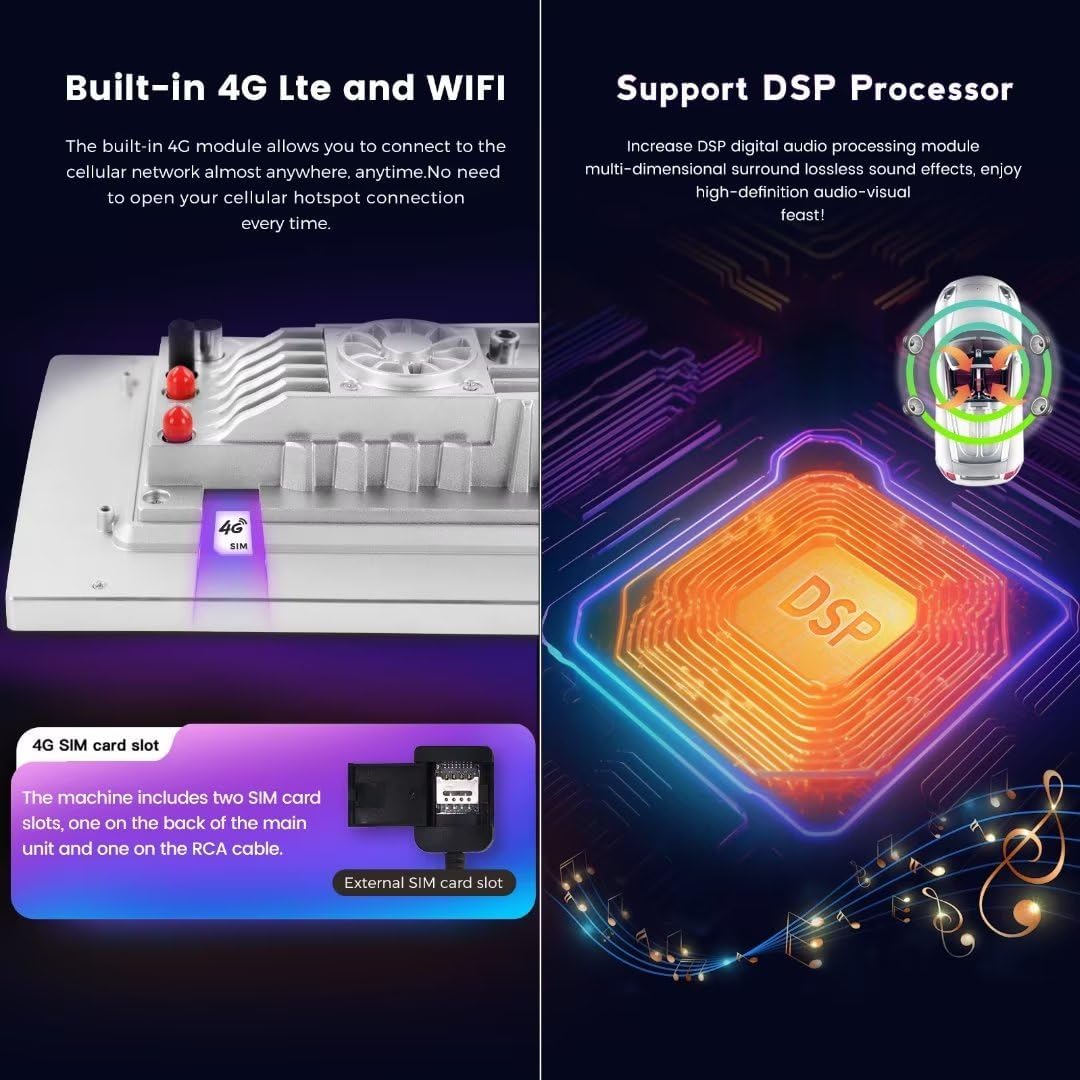
Image: This image displays the user interface for both Apple CarPlay and Android Auto on the head unit's screen. It also provides step-by-step instructions for connecting iOS devices (Wireless Car-Play) and Android devices (Wireless Auto) via Bluetooth and the 'Car Link' application.
6.2. 4G LTE and WiFi Connectivity
The unit features built-in 4G LTE and WiFi modules for internet access. You can connect to the internet via a Wi-Fi hotspot or by inserting a 4G SIM card directly into the unit.
- WiFi: Go to 'Settings' > 'Network & Internet' > 'Wi-Fi' to connect to available networks.
- 4G LTE: Insert a 4G SIM card into the designated slot. The unit has two SIM card slots: one on the back of the main unit and one on the RCA cable.
6.3. Processador DSP
The integrated Digital Signal Processor (DSP) enhances audio quality, providing multi-dimensional surround sound and a high-definition audio-visual experience. Adjust DSP settings in the 'Sound' menu to customize your audio output.
6.4. Navegació GPS
The unit comes with built-in GPS navigation and supports worldwide maps. Access navigation applications from the main menu. Ensure an internet connection for real-time traffic updates and map downloads.
6.5. Control del volant
The unit retains original steering wheel control functions, allowing you to switch songs, channels, and adjust volume without taking your hands off the steering wheel for safer operation.
7. Manteniment
- Neteja: Feu servir un drap suau i sec per netejar la pantalla i la unitat. Eviteu productes de neteja o dissolvents abrasius.
- Actualitzacions de programari: Periodically check for system software updates via the 'Settings' menu to ensure optimal performance and access to new features.
- Temperatura: Avoid exposing the unit to extreme temperatures. The built-in cooling fan helps manage internal temperatures during operation.
8. Solució De Problemes
- Sense energia: Check all power cable connections and the car's fuse box. Ensure the car battery is properly connected.
- Sense so: Verify speaker connections, volume settings, and audio output mode. Check DSP settings.
- Problemes amb el senyal GPS: Assegureu-vos que l'antena GPS estigui instal·lada correctament i que tingui una vista clara view of the sky. Check internet connection for map data.
- La pantalla tàctil no respon: Prova de reiniciar la unitat. Si el problema persisteix, pot ser necessari restablir les dades de fàbrica (nota: això esborrarà totes les dades de l'usuari).
- Problemes de connexió amb CarPlay/Android Auto: Ensure Bluetooth is enabled on both the phone and the head unit. Check the 'Car Link' app and ensure your phone's operating system is up to date. Try connecting with a USB cable.
- Sobreescalfament: Ensure the cooling fan is operating correctly. Avoid blocking ventilation openings.
9. Especificacions
| Sistema | OS Android 13 |
| CPU | 8-Core A53 1.8GHz |
| Memòria | 8 GB de RAM, 256 GB de ROM |
| Mida de la pantalla | 9 polzades |
| Resolució de visualització | 1280x720 IPS Touch Screen |
| Potència de sortida | 4 * 50W |
| Connectivitat | Built-in 4G LTE, WiFi Module, Bluetooth 5.0 |
| Característiques especials | Wireless CarPlay, Wired/Wireless Android Auto, DSP Sound System, GPS Navigation, Steering Wheel Control |
| Suport de format d'àudio | APE/FLAC/WAV/MP3/WMA, etc. |
| Suport de format de vídeo | MKV/RMVB/AVI/MP4/MDV, etc. |
| Suport de format d'imatge | PNG/JPEG/JPG/GIF/WBMP/BNP, etc. |
| Tipus de muntatge | Muntatge al quadre de comandament |
10. Garantia i Suport
Aquest producte ve amb un 1 anys de garantia from the date of purchase. For warranty claims or technical support, please contact MekedeTech customer service or the seller directly.
Venedor: Mekedetech
For further assistance, please refer to the contact information provided with your purchase or visit the official MekedeTech store page on Amazon.
