
Skyking WT8807
Wintact WT8807 Carbon Dioxide Meter User Manual
Model: WT8807 | Brand: Skyking
1. Introducció
The Wintact WT8807 Carbon Dioxide Meter is a high-quality CO2 detector designed for accurate measurement and stable performance in industrial settings. It features excellent sensitivity and repeatability, ensuring reliable safety monitoring. The device is constructed with high-strength engineering plastics and compound non-slip rubber, providing dust and explosion-proof properties, high strength, and a comfortable handfeel.
This manual provides detailed instructions for the setup, operation, maintenance, and troubleshooting of your WT8807 CO2 Meter. Please read it thoroughly before using the device to ensure proper and safe operation.
2. Característiques del producte
- Measuring Range: 0-10000µmol/mol (equivalent to 0-10000 PPM).
- Enregistrament de dades i review function, capable of continuously recording up to 7605 data points.
- Integrated charging function for convenience.
- Two distinct alarm forms: audible sound and visual light indicators.
- Color-screen display for a user-friendly interface and clear data presentation.
- Equipped with high-quality gas sensors for precision.
- Durable shell made of high-strength engineering plastics and non-slip rubber.
3. Contingut del paquet
Upon unpacking your Wintact WT8807 Carbon Dioxide Meter, please verify that all the following components are included:
| Nom de l'accessori | Quantitat |
|---|---|
| Carbon Dioxide Monitor (with Alligator clips) | 1 PCS |
| Cable de càrrega USB | 1 PCS |
| Manual d'instruccions | 1 PCS |
Nota: This device is equipped with a rechargeable battery. If the product does not power on upon receipt, please connect it to the adapter for charging before initial use.
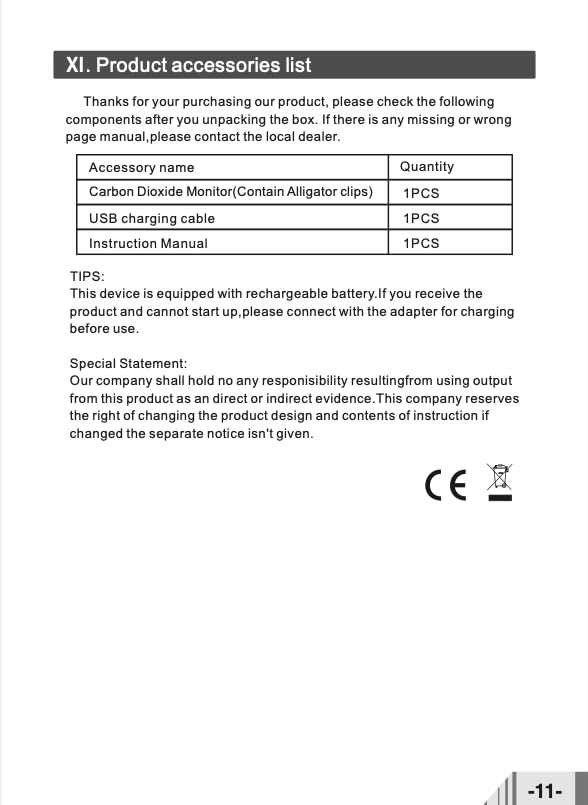
Figure 1: Product Accessories List
This image displays a table listing the standard accessories included with the Wintact WT8807 Carbon Dioxide Meter, such as the monitor itself, a USB charging cable, and the instruction manual.
4. Dispositiu acabatview i Configuració
4.1. Components del dispositiu

Figura 2: Frontal View of WT8807 CO2 Meter
This image shows the front of the Wintact WT8807 CO2 Meter, highlighting its color display, control buttons (power, navigation, enter), and the sensor area at the bottom.
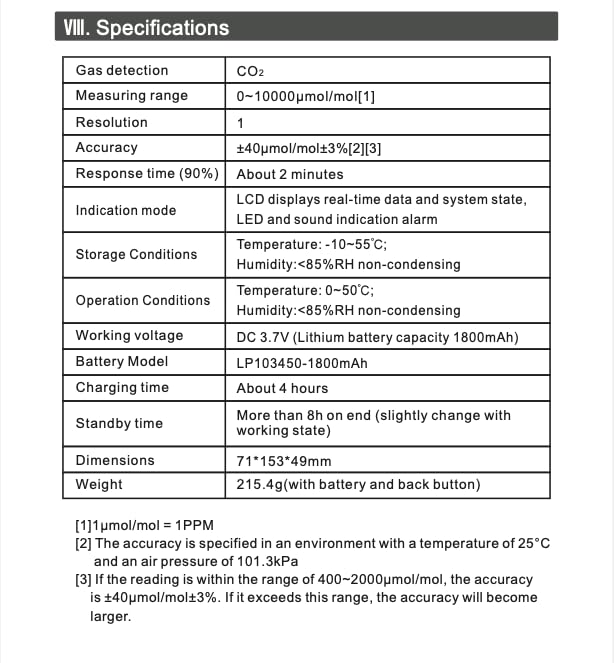
Figura 3: Esquena View of WT8807 CO2 Meter
This image displays the back of the Wintact WT8807 CO2 Meter, featuring a sturdy belt clip for portability and a product label with basic specifications.
4.2. Configuració inicial i càrrega
- Desembalatge: Carefully remove the WT8807 CO2 Meter and all accessories from the packaging.
- Càrrec inicial: Before first use, connect the provided USB charging cable to the device and a suitable USB power adapter (not included). Allow the device to charge for approximately 4 hours to ensure a full battery. The device can be used while charging.
- Encès: Press and hold the power button (usually marked with a power symbol) until the color screen illuminates.
5. Instruccions de funcionament
5.1. Main Interface and Measurement
Upon powering on, the device will display the main interface, showing real-time CO2 concentration. The color screen provides clear readings and system status.

Figure 4: CO2 Measurement Display
This image illustrates the main measurement screen of the WT8807, displaying the current CO2 concentration (e.g., 561 µmol/mol), along with maximum, minimum, and average readings, and set upper and lower alarm thresholds.
La pantalla normalment mostra:
- Current CO2 concentration (large central number).
- Maximum (max), Minimum (min), and Average (avg) recorded values.
- Upper and Lower alarm thresholds.
- Battery indicator and current time.
5.2. Data Logging and Review Funció
The WT8807 can continuously record up to 7605 data points. To access and manage recorded data:
- Navigate to the "View" or "Record" section from the main menu using the navigation buttons.
- The device will display a list of recorded data, typically showing the record number, start time, total duration, and interval.
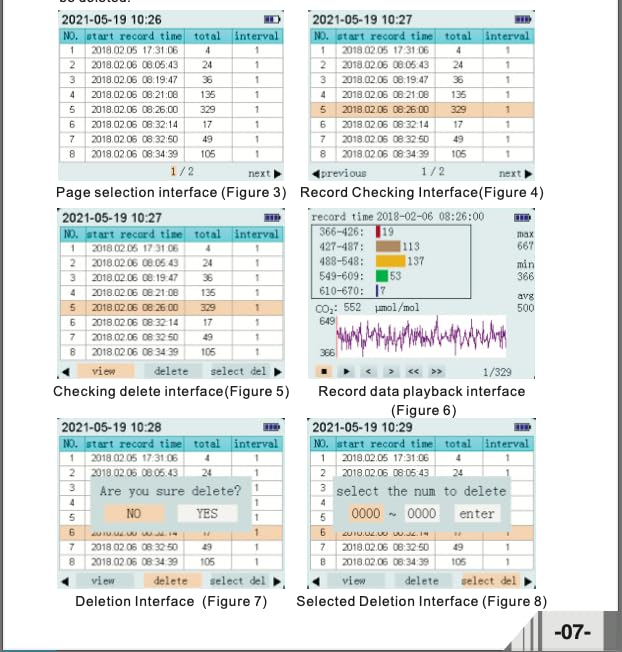
Figure 5: Data Logging Interface (Page Selection)
This image shows a screen from the WT8807's data logging feature, presenting a list of recorded data entries with columns for record number, start time, total duration, and interval. Navigation options like "previous" and "next" are visible.

Figure 6: Record Data Playback Interface
This image displays the data playback screen, showing a graphical representation of CO2 levels over time, along with numerical data points and statistical information like max, min, and average values for the selected record.
From the data review interface, you can typically:
- View: Select a specific record to view its detailed data, including a graphical representation.
- Suprimeix: Delete individual records or select multiple records for deletion.
5.3. Funcions d'alarma
The WT8807 features both sound and light alarms to alert users when CO2 levels exceed or fall below predefined thresholds. These thresholds can typically be adjusted in the device's settings menu.
- Alarma sonora: A distinct sound will be emitted when an alarm condition is met.
- Alarma visual: The device's display or an indicator light will change to visually signal an alarm.
Refer to the device's on-screen menu for specific instructions on setting alarm thresholds and managing alarm behaviors.
6. Manteniment
Proper maintenance ensures the longevity and accuracy of your Wintact WT8807 CO2 Meter.
- Neteja: Feu servir un drap suau i sec per netejar l'exterior del dispositiu. No utilitzeu productes de neteja abrasius ni dissolvents.
- Emmagatzematge: When not in use for extended periods, store the device in a cool, dry place within the specified storage conditions (Temperature: -10~55°C; Humidity: <85%RH non-condensing).
- Cura de la bateria: Recharge the battery regularly, even if the device is not in frequent use, to maintain battery health. Avoid fully discharging the battery for prolonged periods.
- Calibració: While the device is factory calibrated, periodic calibration may be required for optimal accuracy, especially after prolonged use or exposure to extreme conditions. Refer to the device's on-screen calibration menu for instructions or consult a qualified technician.
7. Solució De Problemes
This section addresses common issues you might encounter with your WT8807 CO2 Meter.
7.1. El dispositiu no s'encén
- Bateria esgotada: Connect the device to a USB power source using the provided cable and allow it to charge for at least 30 minutes before attempting to power on again.
- Cable/adaptador de càrrega: Ensure the USB charging cable and power adapter are functioning correctly. Try a different cable or adapter if available.
7.2. Lectures inexactes
- Condicions ambientals: Ensure the device is operating within its specified operating conditions (Temperature: 0~50°C; Humidity: <85%RH non-condensing). Extreme conditions can affect accuracy.
- Obstrucció del sensor: Check if the sensor inlet is clear of dust or debris.
- Calibració: The device may require recalibration. Follow the calibration procedure in the device's settings or consult the manufacturer.
7.3. Alarms Not Functioning
- Configuració d'alarma: Verify that the alarm thresholds are set correctly in the device's settings menu.
- Volum/Brillo: Check if the alarm volume is not muted or the display brightness is too low to notice visual alarms.
If you encounter issues not covered here, please refer to the contact information in the Support section.
8. Especificacions
Detailed technical specifications for the Wintact WT8807 Carbon Dioxide Meter:
| Paràmetre | Valor |
|---|---|
| Detecció de gasos | CO2 |
| Interval de mesura | 0~10000µmol/mol (0~10000 PPM) |
| Resolució | 1 µmol/mol |
| Precisió | ±40µmol/mol ±3% (at 25°C, 101.3KPa) |
| Temps de resposta (90%) | Uns 2 minuts |
| Mode d'indicació | LCD real-time data, LED and sound alarm |
| Condicions d'emmagatzematge | Temperature: -10~55°C; Humidity: <85%RH non-condensing |
| Condicions de funcionament | Temperature: 0~50°C; Humidity: <85%RH non-condensing |
| Voltage | DC 3.7V |
| Model de bateria | LP103450-1800mAh (Lithium battery) |
| Temps de càrrega | Unes 4 hores |
| Temps d'espera | More than 8 hours (varies with working state) |
| Dimensions del producte | 71 x 153 x 49 mm |
| Pes de l'article | 215.4g (with battery and back button) |
| Fabricant | Shenzen Electronic Co |
| País d'origen | Xina |
Note on Accuracy: If the reading is within the range of 400~2000µmol/mol, the accuracy may vary slightly.

Figura 7: Especificacions detallades del producte
This image presents a table detailing the technical specifications of the Wintact WT8807, including gas detection type, measuring range, resolution, accuracy, response time, operating conditions, battery information, and physical dimensions.
9. Garantia i Suport
9.1. Declaració especial
Our company holds no responsibility for any liability resulting from using the output of this product as direct or indirect evidence. The company reserves the right to change the product design and contents of this instruction manual without prior notice.
9.2. Atenció al client
For technical assistance, troubleshooting beyond this manual, or warranty inquiries, please contact your local dealer or the manufacturer, Skyking Instruments. Refer to your purchase documentation for specific contact details.
Ask a question about this manual
Ask about setup, troubleshooting, compatibility, parts, safety, or missing instructions. Manuals+ will review the question and use this page’s manual context to help answer it.