
1. Producte acabatview
The ACAGALA KWS-302 series is an 8-in-1 multi-function AC energy meter designed for comprehensive monitoring of electrical parameters. It features a clear color screen for real-time data display and is engineered for standard DIN rail mounting, ensuring straightforward installation in various electrical setups.
This device measures and displays eight key electrical parameters:
- Voltage (V)
- Corrent (A)
- Active Power (KW)
- Timing (Hours)
- Electric Energy (Kwh)
- Temperatura (°C)
- Freqüència (Hz)
- Factor de potència (PF)
All models in the KWS-302 series include a power-off memory function, retaining data even after power interruptions. The KWS-302WF and KWS-302L models also feature under-voltage i sobrevoltage protection. The KWS-302WF model uniquely offers Tuya WiFi connectivity for remote monitoring and control via a mobile application.

Figura 1: Frontal view of the ACAGALA KWS-302 8in1 Power Meter, showing the color display and terminals.

Figure 2: Illustration highlighting the multi-functional design of the KWS-302 series, capable of measuring various electrical parameters.
2. Informació de seguretat
Please read all safety instructions carefully before installation and operation. Failure to follow these instructions may result in electric shock, fire, or damage to the device.
- Risc elèctric: Installation and wiring must be performed by qualified personnel in accordance with local electrical codes and regulations.
- Desconnexió d'alimentació: Always disconnect power to the circuit before installing or servicing the meter.
- Voltage and Current Limits: No excedeixi el vol especificattage (170-270V) and current (0-63A) ratings of the device.
- Només per a ús interior: This device is designed for indoor use in a dry environment. Avoid exposure to moisture, dust, or extreme temperatures.
- Cablejat adequat: Ensure all connections are secure and correctly wired to prevent short circuits or malfunction.
3. Contingut del paquet
En obrir el paquet, comproveu que tots els elements hi siguin presents i que no estiguin danyats:
- 1 x ACAGALA KWS-302 Series 8in1 Energy Meter
4. Especificacions
| Paràmetre | Especificació |
|---|---|
| Model | KWS-302, KWS-302L, KWS-302WF |
| Material | ABS+PC+VO |
| Voltage Interval de mesura | 170-270V |
| Interval de mesura actual | 0-63A |
| Rang de mesura de potència | 0-17 kW |
| Timing Measurement Range | 0-999 hores |
| Electricity Measurement Range | 0-9999 Kwh |
| Interval de temperatura | 20-150 °C |
| Interval de mesura de freqüència | 50-60 Hz |
| Factor de potència | 0.00-1.00PF |
| Memòria de fallada elèctrica | Yes (All models) |
| Baix voltage Protecció | Yes (KWS-302WF, KWS-302L), None (KWS-302) |
| Sobrevoltage Protecció | Yes (KWS-302WF, KWS-302L), None (KWS-302) |
| Connectivitat WiFi | Yes (KWS-302WF), None (KWS-302L, KWS-302) |
| Mida de l'article | 66 mm x 66 mm x 82 mm (aprox. 2.60 polzades x 2.60 polzades x 3.23 polzades) |
| Weight (KWS-302) | 182 g (6.42 unces) |
| Weight (KWS-302L) | 213 g (7.51 unces) |
| Weight (KWS-302WF) | 215 g (7.58 unces) |
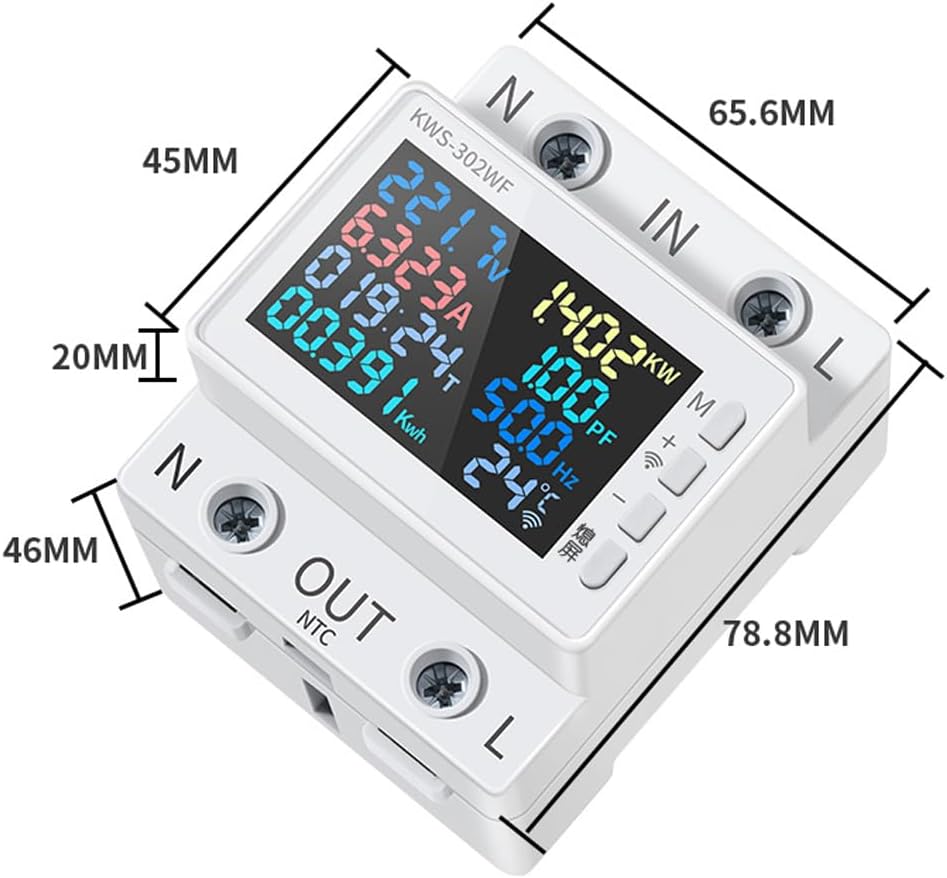
Figure 3: Detailed dimensions of the KWS-302 series power meter.
5. Instal·lació (Configuració)
5.1 Guide Rail Mounting
The KWS-302 series is designed for standard DIN rail installation. This snap-on mounting method requires no screws, making installation convenient and efficient.
- Ensure the DIN rail is securely mounted in your electrical panel.
- Align the meter's mounting clips with the DIN rail.
- Premeu el mesurador fermament contra el rail fins que encaixi al seu lloc.

Figure 4: Illustration of the snap-on guide rail installation process.
5.2 Cablejat
ADVERTIMENT: Ensure all power is disconnected before performing any wiring. Incorrect wiring can cause damage to the device or electrical hazards.
- Identify the 'IN' (Input) and 'OUT' (Output) terminals on the meter.
- Connect the incoming AC power supply (Live 'L' and Neutral 'N') to the 'IN' terminals.
- Connect the load (device to be monitored) to the 'OUT' terminals, ensuring Live 'L' and Neutral 'N' connections are correct.
- Tighten all terminal screws securely to prevent loose connections.

Figure 5: Diagram illustrating the electrical input and output wiring connections for safe operation.
6. Funcionament
6.1 Interfície de visualització
Once powered on, the color screen will display various electrical parameters simultaneously. The layout is designed for clear readability, showing values such as voltage, current, power, energy consumption, and more.
6.2 Funcions dels botons
The meter features several buttons on its side for interaction:
- Botó 'M': Typically used to cycle through different display modes or access menu options.
- Botons '+' i '-': Used for navigation within menus, adjusting settings, or clearing specific data (e.g., Kwh).
- Screen-off Button: Allows you to turn off the display while the meter continues to function and record data. Press again to reactivate the screen.
6.3 APP Control (KWS-302WF Model Only)
The KWS-302WF model integrates Tuya WiFi for remote monitoring and control via a smartphone application. This functionality allows users to view real-time data, track historical consumption, and manage settings from anywhere with an internet connection.
- Descarrega l'aplicació: Cerca the 'Tuya Smart' or 'Smart Life' app in your mobile app store and install it.
- Registra't/Iniciar sessió: Creeu un compte o inicieu sessió al vostre compte existent.
- Afegeix un dispositiu: Follow the in-app instructions to add your KWS-302WF meter. This typically involves putting the meter into pairing mode (refer to the meter's display for instructions) and connecting it to your home WiFi network.
- Monitorització remota: Un cop connectat, pots view all measured parameters remotely on your phone.
- APP Timing Function: Utilize the app's timing function to set countdowns or schedule power on/off times for connected loads.

Figure 6: The KWS-302WF model demonstrating mobile application control capabilities.

Figure 7: The mobile application's timing function, allowing users to schedule power operations.

Figura 8: Example of controlling multiple KWS-302WF meters through a single mobile application interface.
7. Manteniment
The ACAGALA KWS-302 series power meter requires minimal maintenance.
- Neteja: Use a soft, dry cloth to clean the exterior of the device. Do not use abrasive cleaners, solvents, or immerse the device in water.
- Sense peces reparables per l'usuari: The device contains no user-serviceable parts. Do not attempt to open or repair the meter, as this will void the warranty and may pose a safety risk.
- Condicions ambientals: Assegureu-vos que l'entorn operatiu es mantingui dins dels rangs de temperatura i humitat especificats per allargar la vida útil del dispositiu.
8. Solució De Problemes
If you encounter issues with your ACAGALA KWS-302 power meter, refer to the following troubleshooting guide:
| Problema | Causa possible | Solució |
|---|---|---|
| No display/Device not powering on | No power supply; Loose wiring; Faulty device | Check power connections; Ensure wiring is secure; Contact support if power is confirmed and device remains off. |
| Incorrect readings (Voltage, Current, etc.) | Incorrect wiring; Device operating outside specified ranges; External interference | Verify wiring against the diagram; Ensure measured values are within 170-270V and 0-63A; Relocate device if interference is suspected. |
| APP connection failure (KWS-302WF only) | Incorrect WiFi password; Weak WiFi signal; Meter not in pairing mode; App issues | Verify WiFi password; Ensure meter is within WiFi range; Put meter into pairing mode as per app instructions; Restart app and meter. |
| Under/Over-voltage protection tripping frequently (KWS-302WF, KWS-302L only) | Unstable power supply; Protection thresholds set too narrow | Consult an electrician to check power supply stability; Adjust protection thresholds if configurable via app (KWS-302WF) or device settings. |
9. Garantia i Suport
Informació de la garantia: Specific warranty terms and conditions for the ACAGALA KWS-302 series power meter may vary. Please refer to the documentation provided at the time of purchase or contact your retailer for detailed warranty information.
Suport tècnic: For technical assistance, troubleshooting beyond this manual, or inquiries regarding your device, please contact the seller or manufacturer directly. Have your product model and purchase details ready when seeking support.