Introducció
This manual provides essential instructions for the Pioneer Dedicated Home Theater Remote Control, model AXD7731. It covers basic setup, operation, maintenance, and troubleshooting to ensure optimal use with your compatible Pioneer home theater system. Please note that this product is a remote control only, and an instruction manual for the original home theater system or batteries for the remote are not included.
Configuració
1. Instal·lació de la bateria
El comandament a distància requereix dues piles AAA (no incloses). Segueix aquests passos per instal·lar-les:
- Localitzeu la tapa del compartiment de la bateria a la part posterior del comandament a distància.
- Feu lliscar la coberta cap avall o premeu el pestell i aixequeu-la per obrir-la.
- Introduïu dues piles AAA, assegurant-vos que els terminals positiu (+) i negatiu (-) s'alineïn correctament amb les marques de l'interior del compartiment.
- Torneu a col·locar la tapa del compartiment de la bateria, fent-la lliscar fins que faci clic de manera segura.
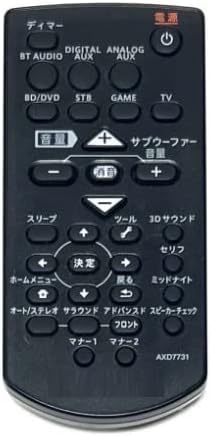
Image: The Pioneer AXD7731 remote control. The battery compartment is typically located on the back, requiring two AAA batteries.
2. Ús inicial
Once batteries are installed, the remote control should be ready for immediate use with compatible Pioneer home theater systems. No complex pairing or programming is typically required for dedicated replacement remotes. Point the remote directly at your home theater receiver or device and press the desired function button.
Instruccions de funcionament
This section outlines the general functions of the buttons on your AXD7731 remote control. Button layouts may vary slightly depending on the specific home theater model, but core functions remain consistent.
Imatge: Frontal view of the Pioneer AXD7731 remote control, displaying its array of control buttons.
- POTÈNCIA: Turns the home theater system ON or OFF.
- SELECCIONADOR D'ENTRADES: Cycles through available audio/video input sources (e.g., HDMI 1, HDMI 2, Optical, Coaxial).
- VOLUM +/-: Increases or decreases the master volume level.
- MUT: Silencia la sortida d'àudio. Premeu de nou per restaurar el so.
- MENU / HOME: Accesses the system's main menu or returns to the home screen.
- NAVIGATION (Up/Down/Left/Right) & ENTER: Serveix per navegar pels menús i confirmar les seleccions.
- RETURN / BACK: Torna al menú o pantalla anterior.
- PLAYBACK CONTROLS (Play, Pause, Stop, Fast Forward, Rewind, Skip): Controls media playback for connected devices (e.g., Blu-ray player, media server).
- SOUND MODE / SURROUND: Selects different audio processing modes or surround sound settings.
- TUNER (AM/FM): Switches to radio tuner mode and allows station selection.
For detailed functions of specific buttons, refer to the original instruction manual of your Pioneer home theater system.
Manteniment
Neteja del comandament a distància
Per mantenir l'aspecte i la funcionalitat del comandament a distància:
- Netegeu la superfície amb un drap suau i sec.
- Per a la brutícia tossuda, lleugerament dampNetegeu el drap amb aigua o un netejador suau i no abrasiu. No ruixeu el netejador directament sobre el comandament a distància.
- Avoid using harsh chemicals, solvents, or abrasive cleaning pads, as these can damage the remote's finish or internal components.
Canvi de bateria
Replace batteries when the remote control becomes unresponsive or its range decreases significantly. Always replace both batteries at the same time with new AAA batteries. Do not mix old and new batteries, or different types of batteries.
Emmagatzematge
When not in use for extended periods, remove the batteries to prevent leakage and potential damage to the remote control.
Resolució de problemes
Si teniu problemes amb el comandament a distància, proveu les solucions següents:
| Problema | Causa possible | Solució |
|---|---|---|
| El control remot no funciona. |
|
|
| Alguns botons no responen. |
|
|
| El remot funciona de manera intermitent. |
|
|
Especificacions
| Característica | Detall |
|---|---|
| Número de model | AXD7731 |
| Marca | Generic (Dedicated for Pioneer) |
| Dispositiu compatible | Sistemes de cinema a casa |
| Color | Negre |
| Requisits de bateria | AAA x 2 (Not included) |
| Nombre de botons | 25 |
| Dimensions del paquet | 15 x 12 x 2 cm |
| Pes de l'article | 100 g |
Garantia i Suport
As this product is often sold as a replacement part, specific warranty information or a dedicated support manual may not be included. For warranty details, technical support, or further assistance, please refer to the original documentation provided with your Pioneer home theater system or visit the official Pioneer support website. If purchased from a third-party seller, please consult their return and warranty policies.