
1. Introducció
Thank you for choosing the Dexnor Keyboard Case. This manual provides essential information for setting up, operating, and maintaining your new keyboard case. Designed to enhance your Samsung Galaxy Tab experience, this case features a magnetic attachment, a precise multi-touch trackpad, a 7-color backlit QWERTZ keyboard, and convenient S Pen storage. Please read this manual thoroughly before use to ensure optimal performance and longevity of your device.
2. Compatibilitat
This keyboard case is exclusively designed for the following Samsung Galaxy Tab models:
- Samsung Galaxy Tab S10 Lite (Model SM-X400, SM-X406B)
- Samsung Galaxy Tab S10 FE 10.9" 2025 (Model SM-X520, SM-X526, SM-X526B)
- Samsung Galaxy Tab S9 FE 10.9" 2023 (Model SM-X510/SM-X516B/SM-X518U)
- Samsung Galaxy Tab S9 11" 2023 (Model SM-X710/SM-X716B/SM-X718U)
Note: This case is NOT compatible with Samsung Galaxy Tab S9+/S9 FE+ 12.4" or Samsung Galaxy Tab S11 (2025) 11". Please verify your tablet model before purchase.

Figure 2.1: Compatible and incompatible tablet models.
3. Contingut del paquet
Si us plau, comproveu el paquet per veure si hi ha els elements següents:
- Dexnor Keyboard Case
- Cable de càrrega USB-C
- Guia d'inici ràpid
- Manual d'usuari (aquest document)
4. Configuració
4.1 Attaching Your Tablet
The keyboard case features a strong magnetic hinge for secure attachment. Simply align your Samsung Galaxy Tab with the magnetic area on the case. The tablet will snap into place, transforming your device into a laptop-like setup.

Figure 4.1: Magnetic attachment and adjustable viewangle de ing.
4.2 Pairing the Keyboard via Bluetooth
- Ensure the keyboard is sufficiently charged.
- Turn on the keyboard by pressing the power button (usually located on the side or top edge of the keyboard). The indicator light will flash, indicating it's in pairing mode.
- On your Samsung Galaxy Tab, go to Configuració > Dispositius connectats > Bluetooth i activa el Bluetooth.
- Your tablet will search for available devices. Select "Dexnor Keyboard" (or similar name) from the list.
- Follow any on-screen prompts to complete the pairing process. Once paired, the indicator light on the keyboard will stop flashing.
5. Instruccions de funcionament
5.1 Ajust ViewAngles
The robust aluminum alloy hinge allows for flexible viewing angles, transforming your tablet into a versatile workstation. Adjust the tablet's position to your preferred angle for typing, reading, or viewing contingut.

Figure 5.1: Tablet in floating cantilever position for optimal viewing.
5.2 Multi-Touch Trackpad
The integrated high-precision multi-touch trackpad supports various gestures for seamless navigation. Use multi-finger gestures for actions such as scrolling, swiping, and zooming, enhancing your productivity.

Figure 5.2: Multi-touch trackpad for precise control.
Teclat retroil·luminat 5.3
The keyboard features 7 different backlight colors and 3 adjustable brightness levels for comfortable typing in any lighting condition. Use the dedicated backlight key (often a sun icon or Fn + light key combination) to cycle through colors and adjust brightness.

Figure 5.3: Backlit QWERTZ keyboard with adjustable colors.
5.4 S Pen Holder
The case provides two convenient locations for your S Pen: an integrated magnetic holder within the keyboard for secure storage and a cutout slot at the rear of the case for charging and additional storage. This design ensures quick access and prevents loss.
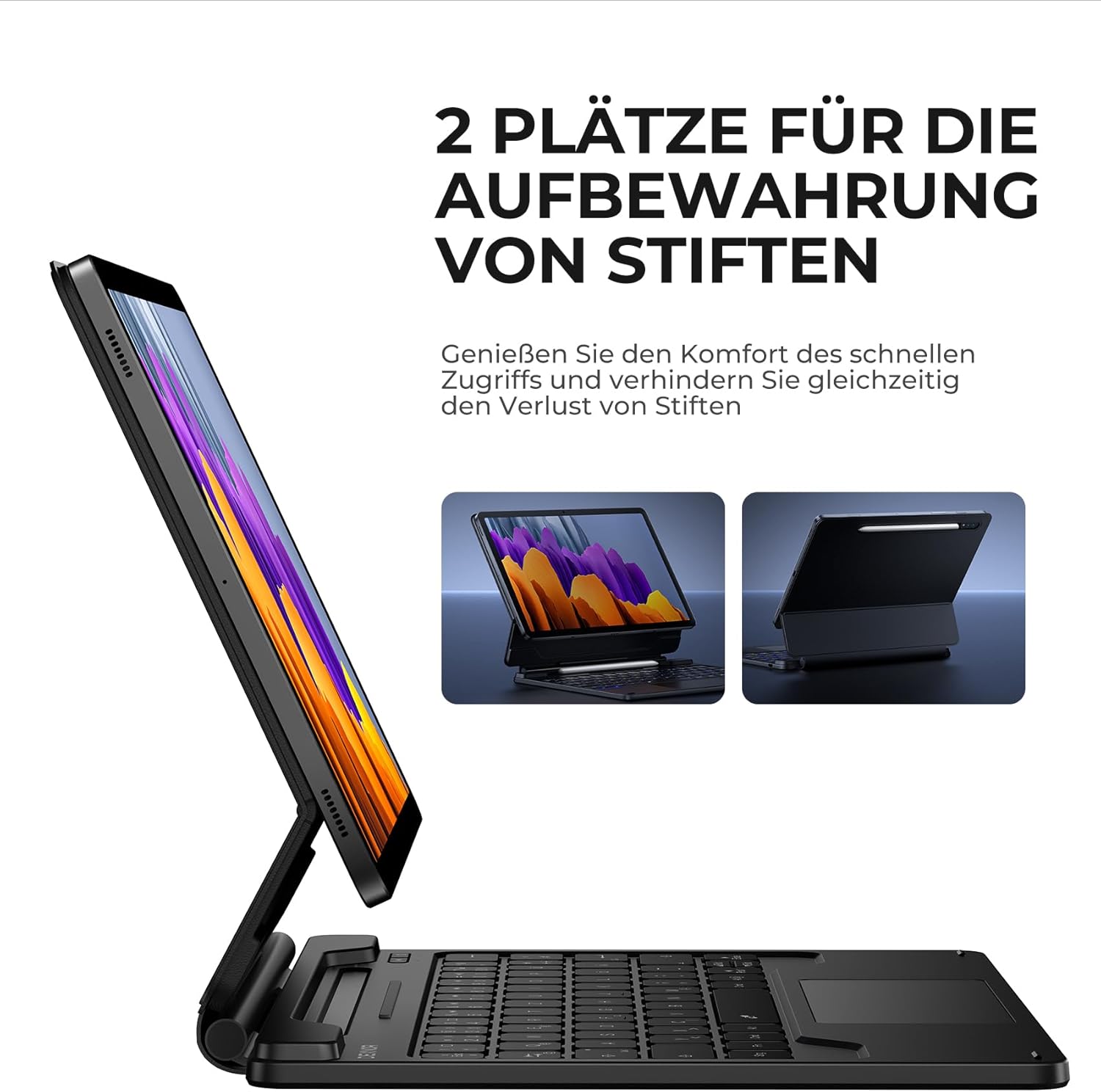
Figure 5.4: Dual S Pen storage options.
5.5 DEX Mode
Combine your tablet with the keyboard case and activate Samsung DEX mode to transform your tablet into a desktop-like experience. This allows for enhanced multitasking and productivity, similar to a traditional laptop setup.
5.6 tecles de drecera
The keyboard includes a series of convenient shortcut keys for quick control over media playback, volume, and other tablet functions. Refer to the keyboard layout for specific key functions.

Figure 5.5: Keyboard layout with shortcut keys.
5.7 Automatic Sleep/Wake Function
The case supports automatic sleep/wake functionality. Closing the case will put your tablet to sleep, and opening it will wake it up, conserving battery life for both your tablet and the keyboard.
6. Càrrega del teclat
The keyboard is equipped with a long-lasting 650 mAh battery. To charge the keyboard:
- Connect the provided USB-C charging cable to the charging port on the keyboard.
- Connecteu l'altre extrem del cable a un adaptador de corrent USB (no inclòs) o al port USB d'un ordinador.
- The charging indicator light will illuminate during charging and turn off once fully charged. A full charge takes approximately 3.5 hours.
A single charge provides up to 200 hours of working time and 1200 hours of standby time.

Figure 6.1: USB-C charging port.
7. Manteniment
To ensure the longevity and optimal performance of your Dexnor Keyboard Case:
- Neteja: Utilitzeu un suau, damp cloth to wipe the exterior of the case. For the keyboard keys, use a soft, dry cloth or a specialized keyboard cleaner. Avoid harsh chemicals or abrasive materials.
- Emmagatzematge: When not in use for extended periods, store the keyboard case in a cool, dry place. Ensure the case is closed to protect the tablet and keyboard.
- Eviteu líquids: Mantingueu el teclat allunyat de líquids per evitar danys als components interns.
- Manejar amb cura: While durable, avoid dropping the case or subjecting it to excessive force.
8. Solució De Problemes
8.1 El teclat no es connecta
- Comproveu la bateria: Assegureu-vos que el teclat estigui carregat.
- Torna a emparellar: Delete the keyboard from your tablet's Bluetooth device list and attempt to pair it again (refer to Section 4.2).
- Reinicieu els dispositius: Restart both your tablet and the keyboard.
- Interferència: Allunyeu-vos d'altres dispositius sense fil que puguin causar interferències.
8.2 Trackpad Not Responding
- Comprova la connexió: Assegureu-vos que el teclat estigui connectat correctament mitjançant Bluetooth.
- Neteja el trackpad: Assegureu-vos que la superfície del trackpad estigui neta i lliure de residus.
- Reinicia: Restart the keyboard and tablet.
8.3 La retroiluminació no funciona
- Comproveu la bateria: Low battery can affect backlight functionality. Charge the keyboard.
- Activa/desactiva la retroiluminació: Press the backlight key (or Fn + backlight key) to ensure it's not turned off or at the lowest brightness setting.
8.4 Problemes de càrrega
- Comproveu el cable: Ensure the USB-C cable is securely connected to both the keyboard and the power source. Try a different USB-C cable if available.
- Font d'alimentació: Proveu un altre adaptador d'alimentació o port USB.
9. Especificacions
| Marca | Dexnor |
| Número de model | DK005 |
| Tecnologia de connectivitat | Bluetooth |
| Característiques especials | Multi-Touch Trackpad, Backlit Keyboard, S Pen Holder |
| Dispositius compatibles | Samsung Galaxy Tab S10 Lite 10.9", Samsung Galaxy Tab S9 11", Samsung Galaxy Tab S9 FE/S10 FE 10.9" |
| Composició de la bateria | Ió de liti |
| Capacitat de la bateria | 650 mAh |
| Temps de càrrega | Aprox. 3.5 hores |
| Temps de treball | Fins a 200 hores |
| Temps d'espera | Fins a 1200 hores |
| Disposició del teclat | QWERTZ (alemany) |
| Dimensions del producte | 25.9L x 20.5W x 1.9H cm |
10. Garantia i Suport
Dexnor provides a 1-year manufacturer's warranty for this product. Additionally, lifetime technical support is available.
For warranty claims, technical assistance, or any product-related inquiries, please contact Dexnor customer support through the retailer's platform or visit the official Dexnor weblloc per obtenir informació de contacte.
