
1. Producte acabatview
The Weuaste YS-Carplay-04 is a motorcycle DVR system designed to enhance your riding experience with integrated smart features and recording capabilities. It features a 5.5-inch IPS touchscreen display, dual 1080p HD cameras for front and rear recording, and supports wireless Apple CarPlay and Android Auto. The system is built to withstand various weather conditions, offering IP66 waterproofing and operation in a wide temperature range.

Image: The Weuaste Motorcycle DVR screen showing both Wireless CarPlay and Wireless Android Auto interfaces, demonstrating its smart connectivity features.
Característiques principals:
- Apple CarPlay i Android Auto sense fil: Seamless integration with your smartphone for navigation, music, calls, and messaging.
- Dual 1080p HD Cameras: Front and rear cameras provide high-definition video recording with loop recording functionality and full-color night vision.
- Pantalla tàctil IPS de 5.5 polzades: Responsive and easy-to-use display, visible even in bright sunlight.
- Siri & Google Voice Control: Access voice assistants for hands-free operation.
- IP66 Waterproof & Durable Design: Engineered to withstand various weather conditions and temperatures from -4°F to 158°F.
- Connectivitat Wi-Fi i Bluetooth: For data transfer, phone pairing, and accessory connection.
- Suport de targeta TF: Includes a 128GB TF card for ample storage of video recordings.
2. Contingut del paquet
Before installation, please verify that all components listed below are present in your package.
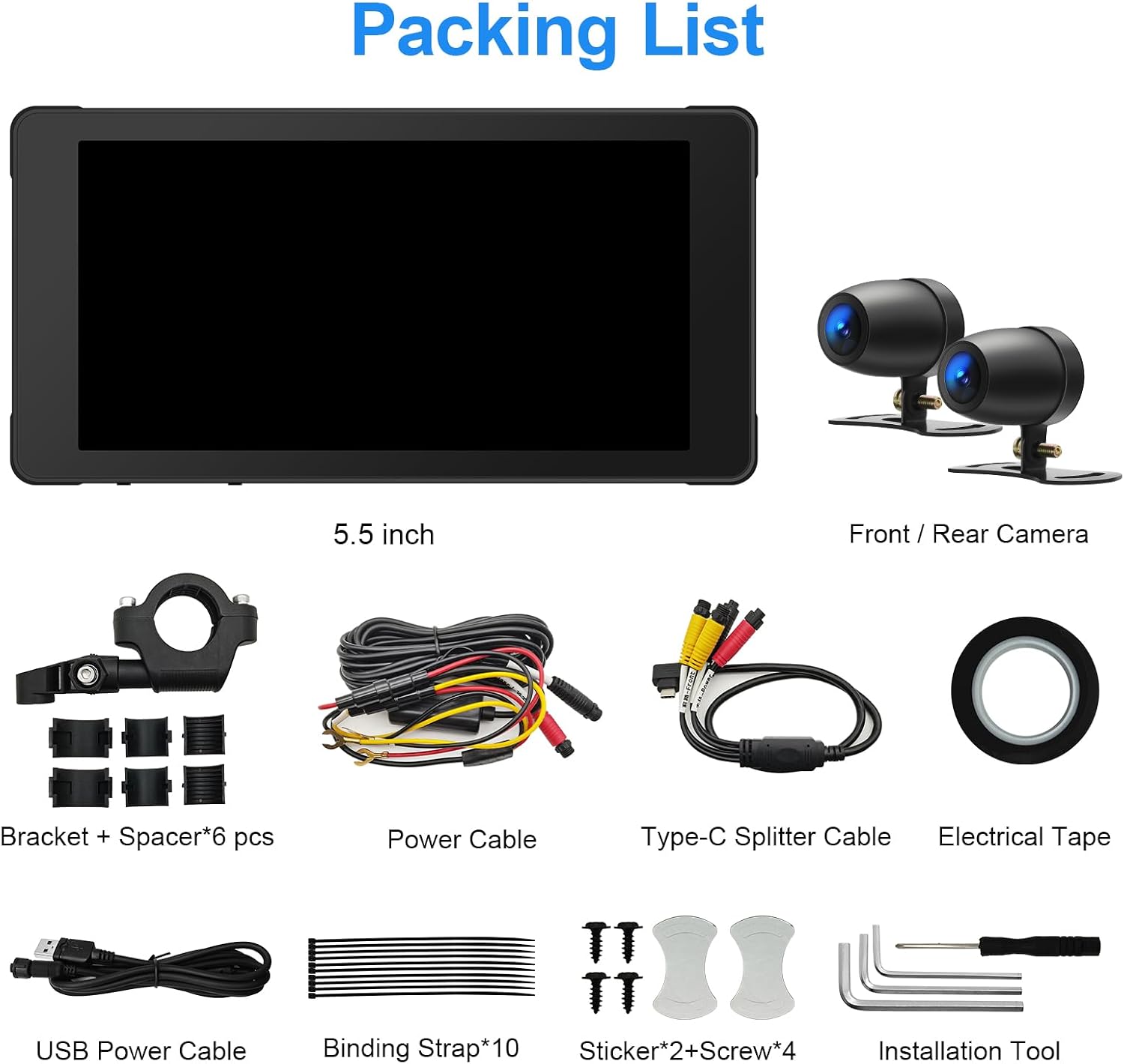
Image: A visual representation of the complete packing list, including the main unit, cameras, cables, and mounting hardware.
- 5.5-inch IPS Touchscreen Display Unit
- Front Camera (1080p)
- Rear Camera (1080p)
- Mounting Bracket + Spacers (6 pcs)
- Cable d'alimentació
- Type-C Splitter Cable
- Cable d'alimentació USB
- Binding Straps (10 pcs)
- Stickers + Screws (4 pcs)
- Installation Tools (Allen wrenches, etc.)
- Cinta elèctrica
- Targeta TF de 128 GB (preinstal·lada o per separat)
3. Configuració i instal·lació
Careful installation is crucial for optimal performance and safety. It is recommended to route wires neatly and securely.
3.1 Identificació de components

Imatge: Detallada view of the main display unit, highlighting the Microphone Receiving Hole, Type-C Power Plug, Light Sensor, and SD Card Slot Hole.
- Microphone Receiving Hole: Per a entrada de veu.
- Type-C Power Plug: Main power input for the device.
- Sensor de llum: Automatically adjusts screen brightness.
- SD Card Slot Hole: Insert the TF card here for video storage.
3.2 Muntatge de la unitat de visualització
- Select a suitable location on your motorcycle handlebars for the display unit. Ensure it does not obstruct your view o controls.
- Use the provided mounting bracket and spacers to securely attach the display unit. Adjust the angle for optimal visibility.
3.3 Installing the Cameras

Imatge: Primer pla view of the two 1080P dual cameras, designed for front and rear installation on a motorcycle.
- Munteu la càmera frontal en una posició que proporcioni una visió clara i sense obstacles view del camí per davant.
- Munta la càmera posterior per capturar la view behind your motorcycle. Consider locations that minimize vibration and offer protection from debris.
- Route the camera cables securely along the motorcycle frame, away from moving parts and heat sources. Use binding straps to keep cables tidy.
3.4 Connexió d'alimentació
- Connect the main power cable to your motorcycle's power source (e.g., battery or ignition-switched power). Ensure correct polarity.
- Connect the Type-C power plug from the display unit to the power cable.
- Use the USB power cable for initial setup or testing if a temporary power source is needed. This is not intended for permanent installation.
3.5 Inserció de la targeta TF
- Locate the SD Card Slot Hole on the display unit.
- Insert the provided 128GB TF card into the slot until it clicks into place. Ensure it is inserted correctly to avoid damage.
4. Instruccions de funcionament
4.1 Engegada/apagada
- The device typically powers on automatically with the motorcycle's ignition.
- To manually power off, press and hold the power button (if available) or disconnect power.
4.2 Funcionament de la pantalla tàctil
The 5.5-inch IPS touchscreen is highly responsive and can be operated even with gloves. Navigate through menus and applications by tapping and swiping.
4.3 CarPlay sense fil i Android Auto
- Assegureu-vos que el Bluetooth i el Wi-Fi del vostre telèfon intel·ligent estiguin activats.
- On the DVR, navigate to the CarPlay or Android Auto section.
- Segueix les instruccions que apareixen a la pantalla per emparellar el telèfon mitjançant Bluetooth. Un cop emparellat, el sistema establirà una connexió Wi-Fi per a la funcionalitat CarPlay/Android Auto.
- Access navigation, music, calls, and other compatible apps directly from the DVR screen.
4.4 Control del volant

Image: The steering wheel control unit, showing buttons for Motorcycle Battery Voltage Display, Cycle Button / Answer the Phone, Camera Button / Hang up the Phone, and Main Interface Button.
The wired remote control provides convenient access to key functions without needing to touch the screen.
- Motorcycle Battery Voltage Visualització: Shows current battery voltage.
- Cycle Button / Answer the Phone: Used to cycle through modes or answer incoming calls.
- Camera Button / Hang up the Phone: Activates camera functions or ends calls.
- Main Interface Button: Returns to the main menu or home screen.
4.5 Enregistrament de vídeo
The dual cameras continuously record footage. The system supports seamless loop recording, overwriting the oldest files when the TF card is full. Recorded videos are stored on the 128GB TF card.
4.6 Siri & Google Voice
When connected to Apple CarPlay or Android Auto, you can utilize Siri or Google Voice for hands-free commands. Activate the voice assistant through the touchscreen interface or your paired smartphone.
5. Manteniment
The Weuaste YS-Carplay-04 is designed for durability and minimal maintenance.
5.1 Resistència a la intempèrie

Image: The DVR unit shown on a motorcycle in sunny, rainy, and cold conditions, illustrating its IP66 waterproof rating and ability to function between -4°F and 158°F.
- The device has an Classificació impermeable IP66, protecting it from dust and powerful water jets.
- It is designed to operate reliably in temperatures ranging from -4 °F a 158 °F (-20 °C a 70 °C).
- Regularly wipe the screen and camera lenses with a soft, damp cloth to remove dirt and ensure clear visibility. Avoid abrasive cleaners.
5.2 Gestió de targetes TF
- Periodically check the TF card for important recordings.
- Format the TF card every few months to maintain optimal recording performance and prevent data corruption. Refer to the device settings for the formatting option.
6. Solució De Problemes
If you encounter issues with your Weuaste YS-Carplay-04 DVR, refer to the following common problems and solutions.
6.1 El dispositiu no s'encén
- Comproveu les connexions d'alimentació: Ensure all power cables are securely connected to the motorcycle's power source and the DVR unit. Verify correct polarity.
- Test Power Source: If possible, test the DVR with an alternative, known-good 12V power source (e.g., a different motorcycle or a bench power supply) to rule out issues with your motorcycle's wiring harness.
- Inspect Wiring Harness: Look for any visible damage, cuts, or loose connections in the supplied wiring harness.
6.2 La pantalla es congela o deixa de respondre
- Reinicieu el dispositiu: Desconnecteu i torneu a connectar l'alimentació per dur a terme un restabliment complet.
- Check TF Card: A faulty or full TF card can sometimes cause system instability. Try removing the TF card or replacing it with another one.
- Actualització de programari: Comproveu el del fabricant website for any available firmware updates that might resolve software-related issues.
6.3 Cameras Not Recording or Poor Quality
- Comproveu les connexions de la càmera: Ensure both front and rear camera cables are securely plugged into the main unit.
- Lents netes: Wipe camera lenses with a soft cloth to remove dirt, dust, or water spots.
- TF Card Issues: Ensure the TF card is properly inserted, not full, and formatted correctly. A slow or corrupted TF card can affect recording quality.
6.4 Problemes de connexió de CarPlay/Android Auto
- Bluetooth i Wi-Fi: Confirm that Bluetooth and Wi-Fi are active on both your smartphone and the DVR.
- Oblida el dispositiu: On your smartphone, forget the DVR from your Bluetooth settings and attempt to re-pair.
- Update Phone OS: Assegureu-vos que el sistema operatiu del vostre telèfon intel·ligent estigui actualitzat.
7. Especificacions
| Número de model | YS-Carplay-04 |
| Marca | Weuaste |
| Mida de la pantalla | 5.5 inches IPS Touchscreen |
| Resolució de gravació de vídeo | 1080p (càmeres duals) |
| Connectivitat | Bluetooth, USB, Wi-Fi |
| Característiques especials | Apple CarPlay, Android Auto, Siri & Google Voice, Waterproof (IP66), Touchscreen |
| Tipus de memòria | Targeta TF |
| Targeta de memòria inclosa | 128 GB |
| Temperatura de funcionament | -4 °F a 158 °F (-20 °C a 70 °C) |
| Mètode de control | Touch, Wired Remote Control |
| Tipus de vehicle compatible | Motocicleta |
| UPC | 658362216227 |
8. Garantia i Suport
Warranty information for the Weuaste YS-Carplay-04 Motorcycle DVR is not provided within this manual. For details regarding warranty coverage, technical support, or service, please refer to the manufacturer's official weblloc web o contacteu directament amb el seu servei d'atenció al client. Conserveu el rebut de compra com a comprovant de compra.