
1. Introducció
Gràcies per la compraasing the Kaiser Professional 15-inch Speaker System, Model GEM-9520. This manual provides essential information for the safe and efficient operation of your new speaker system. Please read it thoroughly before use and retain it for future reference.
2. Informació de seguretat
- Font d'alimentació: Feu servir només l'adaptador de corrent especificat. Assegureu-vos que el volumtage coincideix amb la vostra font d'alimentació local.
- Aigua i humitat: Do not expose the speaker to water, rain, or high humidity. Avoid placing liquid-filled objects on the speaker.
- Ventilació: Ensure adequate ventilation around the speaker. Do not block any ventilation openings.
- Calor: Mantingueu l'altaveu allunyat de fonts de calor com ara radiadors, registres de calor, estufes o altres aparells que produeixin calor.
- Neteja: Desconnecteu l'alimentació abans de netejar. Feu servir un drap sec i suau. No utilitzeu netejadors líquids ni netejadors en aerosol.
- Manteniment: No intenteu atendre aquest producte vosaltres mateixos. Consulteu tots els serveis a personal de servei qualificat.
- Col·locació: Place the speaker on a stable, flat surface or securely mount it on the provided tripod. Avoid placing it in direct sunlight or near strong magnetic fields.
3. Contingut del paquet
Verifiqueu que tots els elements siguin presents al paquet:
- Kaiser GEM-9520 Professional 15-inch Speaker System
- Micròfon per cable
- Trípode d'altaveu
- Cable d'alimentació
- Manual d'usuari (aquest document)

Image: Kaiser GEM-9520 speaker system with included microphone and tripod stand.
4. Producte acabatview
The Kaiser GEM-9520 is a versatile 15-inch professional speaker system designed for various audio applications. It features multiple input options, LED lighting, and a robust design.
Panell frontal
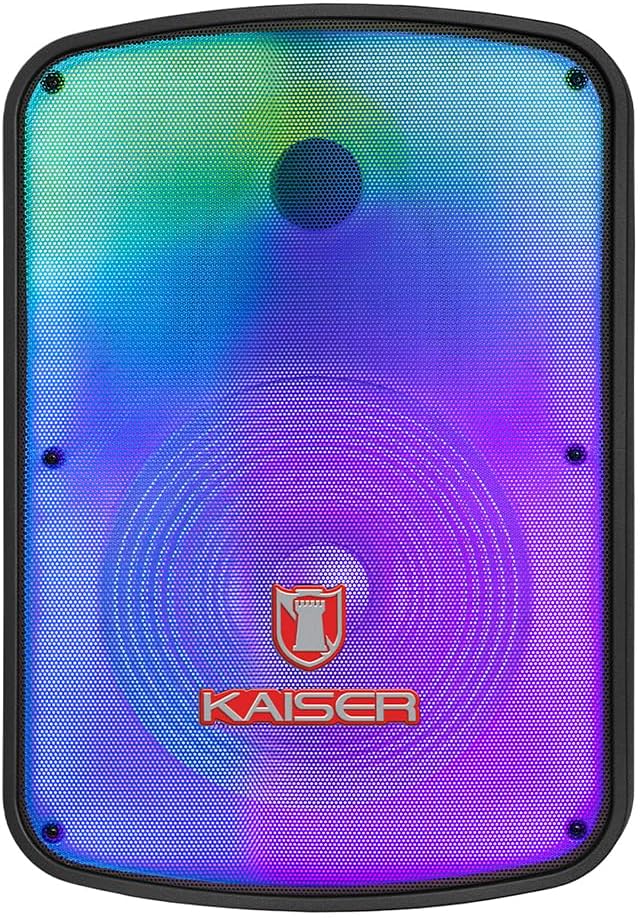
Imatge: Frontal view of the Kaiser GEM-9520 speaker, showcasing the 15-inch driver and integrated LED lighting.
Tauler de control posterior
The rear panel houses all input/output connections and control knobs.

Imatge: Part posterior view of the Kaiser GEM-9520 speaker, displaying the control panel with various inputs and adjustments.

Imatge: Detallada view of the control panel, showing the display, volume, equalizer, and input ports.
Included Microphone and Tripod

Image: The wired microphone included with the Kaiser GEM-9520 speaker system.
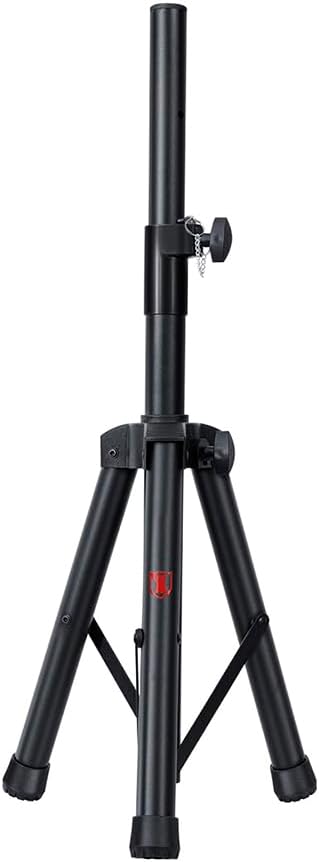
Image: The adjustable tripod stand for mounting the speaker.
5. Configuració
5.1 Desembalatge i col·locació inicial
- Traieu amb cura tots els components de l'embalatge.
- Place the speaker on a flat, stable surface or prepare for tripod mounting.
5.2 Tripod Assembly and Speaker Mounting
- Unfold the tripod legs and extend them to a stable position. Ensure all locking mechanisms are secure.
- Adjust the height of the tripod to your desired level and secure the locking pin and knob.
- Carefully lift the speaker and place its bottom mounting hole onto the tripod pole. Ensure it is seated firmly.

Image: Close-up of the tripod stand, showing its adjustable components.
5.3 Power Connection and Initial Charge
- Connect the provided power cable to the speaker's power input port on the rear panel.
- Connecteu l'altre extrem del cable d'alimentació a una presa de corrent adequada.
- For optimal battery life, fully charge the speaker before its first use. The charging time is approximately 3 hours.
6. Instruccions de funcionament
6.1 Encès/Apagat
Locate the power switch on the rear control panel. Flip it to the 'ON' position to power on the speaker. Flip it to 'OFF' to power off.
6.2 Selecció del mode
Press the 'MODE' button on the control panel to cycle through available input modes: Bluetooth, USB, Micro SD, AUX, and FM Radio.
6.3 Volume and Equalizer Controls
- Volum: Rotate the 'VOLUME' knob to adjust the overall output volume.
- Treble (Agudos): Use the 'AGUDOS' knob to adjust the high-frequency response.
- Bass (Bajos): Use the 'BAJOS' knob to adjust the low-frequency response.
6.4 Connexió Bluetooth
- Switch the speaker to Bluetooth mode. The display will show 'BLUE' and a pairing indicator will flash.
- Al dispositiu mòbil (telèfon intel·ligent, tauleta, ordinador portàtil), activeu el Bluetooth i cerqueu els dispositius disponibles.
- Select 'Kaiser GEM-9520' (or similar name) from the list.
- Un cop emparellat, l'altaveu emetrà un so de confirmació i l'indicador Bluetooth deixarà de parpellejar.
6.5 USB/Micro SD Playback
- Insert a USB flash drive or Micro SD card (pre-loaded with MP3 audio files) al port respectiu.
- The speaker will automatically switch to USB/Micro SD mode and begin playback. If not, press the 'MODE' button.
- Use the playback controls (Play/Pause, Next/Previous Track) on the control panel to manage your music.
6.6 Entrada AUX
- Connect an external audio device (e.g., MP3 player, computer) to the 'AUX' input port on the speaker using a 3.5mm audio cable.
- Switch the speaker to AUX mode using the 'MODE' button.
- Controla la reproducció i el volum des del dispositiu connectat.
6.7 Ús del micròfon
- Connect the wired microphone to the 'MIC' input port on the rear panel.
- Adjust the microphone volume using the 'VOL MIC' knob.
- Adjust the echo effect using the 'ECO' knob.

Image: Close-up of the wired microphone, showing its ON/OFF switch.
6.8 Microphone Audio Priority Function
This function automatically lowers the background music volume when the microphone is in use, making the voice clearer and more prominent. To activate/deactivate this function, refer to the specific button or switch on the control panel labeled for 'Mic Priority' or similar.

Image: Diagram illustrating the microphone audio priority function, which lowers music volume when the microphone is active.
6.9 KSR-LINK Function
The KSR-LINK function allows you to wirelessly connect two compatible Kaiser speakers for a stereo sound experience. Refer to the specific instructions for KSR-LINK pairing, usually involving pressing a dedicated button on both speakers simultaneously.
7. Manteniment
- Neteja: Wipe the speaker's exterior with a soft, dry cloth. Do not use abrasive cleaners, waxes, or solvents.
- Emmagatzematge: Quan no l'utilitzeu durant períodes prolongats, guardeu l'altaveu en un lloc fresc i sec, allunyat de la llum solar directa i de temperatures extremes.
- Cura de la bateria: Per allargar la durada de la bateria, eviteu descarregar-la completament amb freqüència. Torneu a carregar l'altaveu regularment, fins i tot si no l'esteu fent servir.
8. Solució De Problemes
| Problema | Causa possible | Solució |
|---|---|---|
| Sense poder | Cable d'alimentació no connectat; Bateria descarregada; Interruptor apagat. | Assegureu-vos que el cable d'alimentació estigui ben connectat i endollat. Carregueu la bateria. Gireu l'interruptor d'alimentació a la posició "ON". |
| Sense so | Volum massa baix; Mode d'entrada incorrecte; Dispositiu extern no reproduint. | Increase the master volume. Select the correct input mode. Ensure the connected device is playing and its volume is up. |
| Bluetooth no connectat | Speaker not in pairing mode; Device too far; Previously paired device connected. | Ensure speaker is in Bluetooth pairing mode. Move device closer to speaker. Disconnect from other Bluetooth devices. |
| El micròfon no funciona | Microphone not connected; Microphone volume too low; Microphone switch off. | Ensure microphone is securely plugged in. Increase 'VOL MIC' knob. Turn the microphone's ON/OFF switch to 'ON'. |
| Mala recepció de ràdio FM | Weak signal; No external antenna. | Reposition the speaker. Extend any built-in antenna or connect an external one if available. |
9. Especificacions
| Característica | Especificació |
|---|---|
| Model | GEM-9520 |
| Potència de sortidatage | 25000 watts (PMPO) |
| Mida de l'altaveu | 15 polzades |
| Font d'alimentació | Bateria |
| Durada de la bateria (mitjana) | 6 hores |
| Temps de càrrega | 3 hores |
| Tecnologia de connectivitat | AUX, Bluetooth, USB |
| Entrades d'àudio | Microphone, USB, Micro SD, 3.5 mm, 6.3 mm |
| Característiques especials | High-resolution audio, LED light, USB port, Microphone Audio Priority, KSR-LINK |
| Tipus de muntatge | Floor Mount (Tripod included) |
| Material | Plàstic |
| Dimensions del producte (L x A x A) | 45 x 35 x 64 cm |
| Pes del producte | 10.85 kg |
10. Garantia i Suport
This Kaiser product is covered by a manufacturer's warranty. For specific warranty terms and conditions, please refer to the warranty card included in your product packaging or contact Kaiser customer support. For technical assistance or service inquiries, please visit the official Kaiser weblloc o poseu-vos en contacte amb el seu departament d'atenció al client.