
blafili blafili B3
Manual d'usuari del receptor de música B3 Professional XLR Bluetooth v5.1
Model: blafili B3 | Brand: blafili
Introducció
The blafili B3 is a professional-grade Bluetooth v5.1 music receiver designed to stream high-quality audio from your smart devices to various audio systems. Featuring LDAC and aptX HD support, a built-in ESS DAC, and multiple output options including Analog RCA, Digital Optical, and Coaxial, it is ideal for audio mixers, DJ speakers, and PA systems. This manual provides comprehensive instructions for setting up, operating, and maintaining your blafili B3 receiver.
Què s'inclou
Si us plau, comproveu el contingut del paquet per assegurar-vos que hi hagi tots els elements:
- 1 x blafili B3 Bluetooth Receiver
- 1 x Removable RP-SMA Antenna
- 1 x USB to USB-C Power Cable (Note: Power Adapter NOT INCLUDED)
- 1 x Optical Cable (Note: RCA Cable & Coaxial Cable NOT INCLUDED)
- 4 x Self-Adhesive Feet Bumpers
- 1 x Guia d'inici ràpid

Figure 1: Included Accessories. The image displays the blafili B3 main unit, a detachable Bluetooth antenna, a TOSLINK optical cable, and a USB-C power cable, illustrating the items found within the product packaging.
Configuració
Follow these steps for initial setup of your blafili B3 receiver:
- Connecteu l'antena: Screw the removable RP-SMA antenna into the "ANT" port on the rear of the blafili B3 unit. Ensure it is securely fastened for optimal signal reception.
- Connexió d'alimentació: Connect the provided USB to USB-C power cable to the USB-C port on the blafili B3. Connect the other end to a USB DC 5V power adapter (not included). The unit will automatically power on when USB voltage es subministra.
- Connexió de sortida d'àudio: Choose your desired audio output method to connect the blafili B3 to your audio system (e.g., AV receiver, amplifier, powered speakers).
- Sortida XLR: Use XLR cables (not included) to connect to professional audio equipment.
- Sortida RCA: Use RCA cables (not included) to connect to consumer audio equipment.
- Optical Output (Toslink): Use the included optical cable to connect to devices with an optical input. Note: The optical port is output only; it does not support optical input.
- Sortida coaxial: Use a coaxial cable (not included) to connect to devices with a coaxial input.
All XLR, RCA, Coaxial, and Optical outputs are active simultaneously, allowing for flexible connectivity.
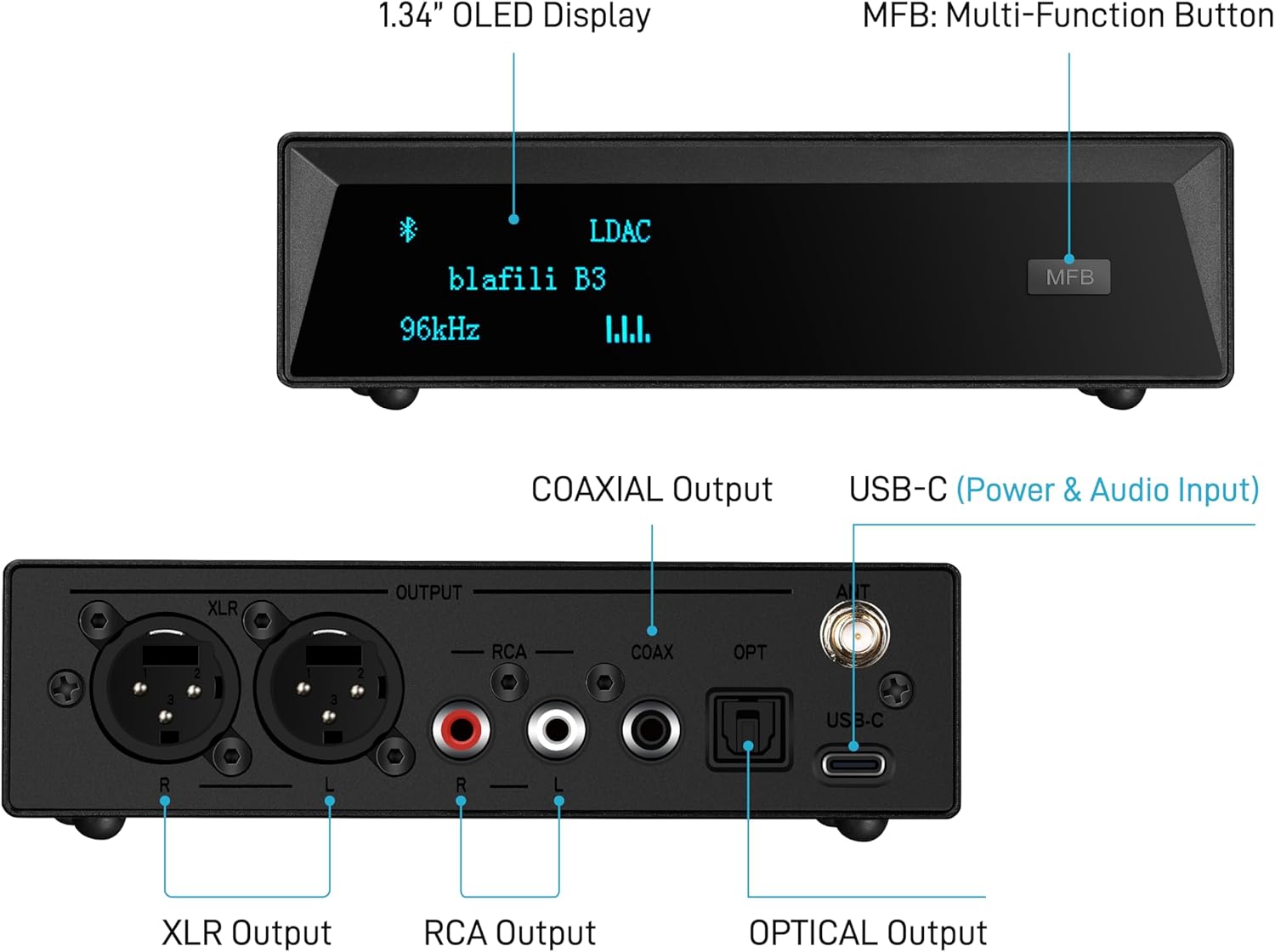
Figure 2: Rear Panel Connections. This image highlights the various output and input ports on the blafili B3, including XLR, RCA, Coaxial, Optical, USB-C for power and audio, and the antenna connector.
Instruccions de funcionament
Emparellament Bluetooth
The blafili B3 is designed for straightforward Bluetooth pairing:
- Encès: Ensure the blafili B3 is powered on. The OLED display on the front will illuminate.
- Activa el Bluetooth: Al dispositiu font (telèfon intel·ligent, tauleta, ordinador), activeu el Bluetooth i cerqueu els dispositius disponibles.
- Select "blafili B3": Locate and select "blafili B3" from the list of available Bluetooth devices. The device will automatically pair.
- Confirmeu la connexió: Once paired, the OLED display on the blafili B3 will show the connected codec (e.g., LDAC, aptX HD) and the current samptaxa de ling.
Nota: The blafili B3 does not produce any audible tones when pairing or unpairing, ensuring a silent user experience.
USB DAC Functionality
The blafili B3 can also function as a USB Digital-to-Analog Converter (DAC) for your computer:
- Connexió a l'ordinador: Use a USB-C cable (not included, but the power cable can be used if it supports data) to connect the blafili B3 to your laptop, PC, or tablet.
- Instal·lació del controlador: The blafili B3 is a plug-and-play device and typically does not require special drivers for basic functionality on most operating systems.
- Selecciona la sortida d'àudio: On your computer, select the blafili B3 as the audio output device.
The USB DAC supports up to 16bit 48kHz audio resolution. When both Bluetooth and USB audio inputs are active, the Bluetooth input takes precedence.

Figure 3: USB-C 2-in-1 Function. This image illustrates the dual functionality of the USB-C port for both power input and PC USB DAC audio input.
Funcions avançades
Custom Bluetooth Broadcast Names and Passcodes
For specialized applications, the blafili B3 offers customization options:
- Custom Name: The Bluetooth broadcast name can be customized (up to 12 characters, letters or numbers only) to meet specific requirements.
- Passcode Protection: By default, blafili B3 devices do not have passcodes. However, a specific 4-digit numeric passcode can be set to prevent unauthorized connections.
Nota: Custom orders for these features can only be placed at blafili.com, or you can request the necessary software and instructions from blafili via email to reprogram the device yourself.
Long Range Connectivity
The blafili B3 is designed for extended wireless range:
- Receives Bluetooth signals wirelessly up to 33 meters (100 feet).
- Features a removable Bluetooth antenna (RP-SMA connector) which can be upgraded for even longer streaming distances if needed.

Figure 4: Long Range Bluetooth. This diagram illustrates the extended wireless range capability of the blafili B3, reaching up to 30 meters or 100 feet, supported by its high-gain Bluetooth antenna.
Especificacions tècniques
| Característica | Detall |
|---|---|
| Dimensions del producte | 3 x 5.6 x 1.5 polzades |
| Pes de l'article | 8.4 unces |
| Número de model | blafili B3 |
| Marca | blafili |
| Tecnologia de connectivitat | Bluetooth, Coaxial, Optical, RCA, XLR |
| Versió Bluetooth | v5.1 |
| Còdecs Bluetooth compatibles | LDAC, aptX HD, aptX Low Latency, aptX, SBC, AAC |
| Chipset DAC | ESS ES9018K2M |
| Xipset Bluetooth | Qualcomm QCC5125 |
| USB DAC Audio Resolution | Up to 16bit 48kHz |
| Mode de sortida d'àudio | estèreo |
| Característiques especials | Built-In Bluetooth, Display, Hi Res Audio, Music Streaming, USB Port |
| Dispositius compatibles | Desktop, Home Theater, Laptop, Smartphone, Tablet |
| Color | Negre |
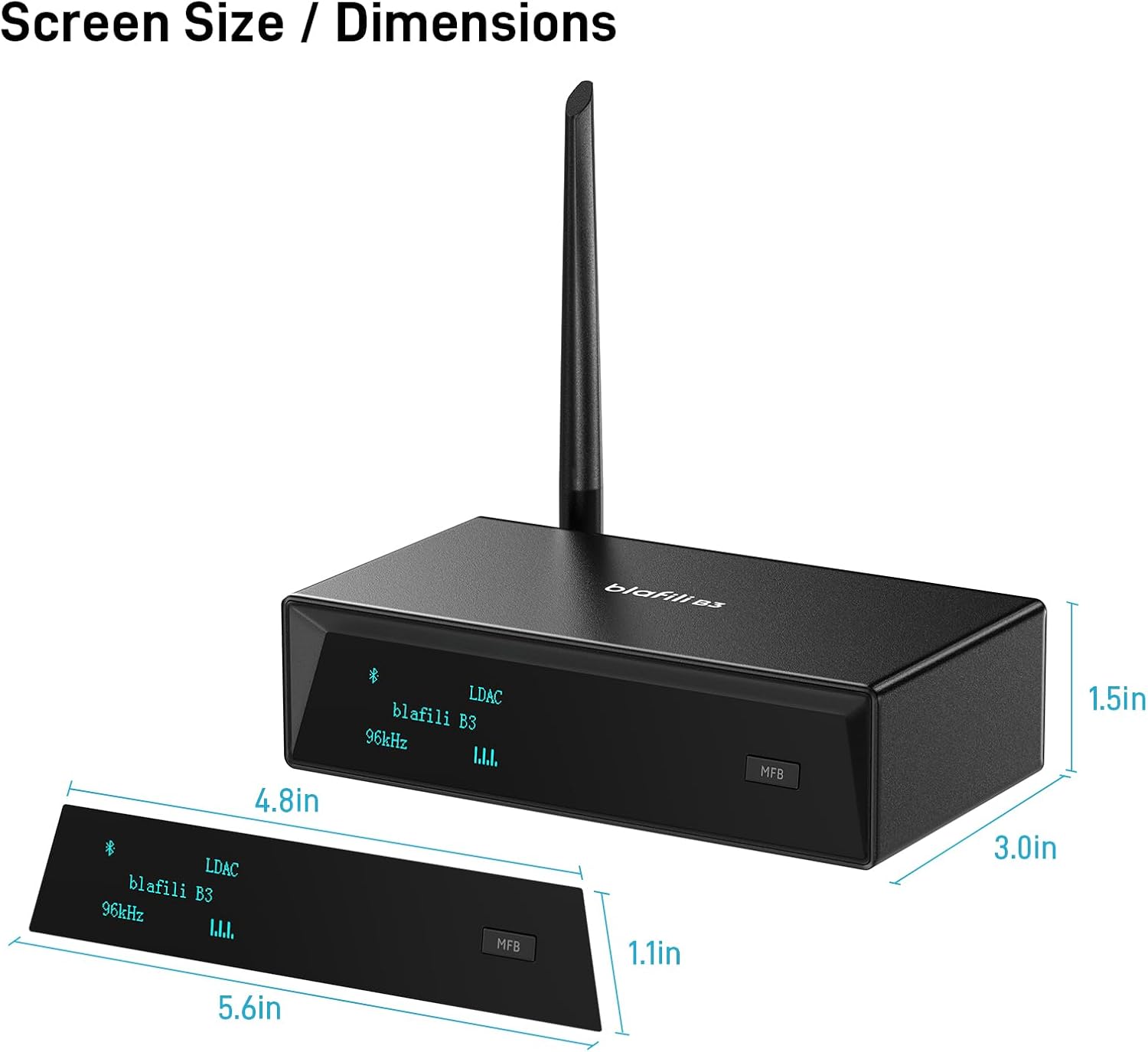
Figure 5: Product Dimensions. This image provides a visual representation of the blafili B3's physical dimensions, including the main unit and its OLED display.
Resolució de problemes
If you encounter issues with your blafili B3, please refer to the following common solutions:
- Difficulty Syncing with TV: The blafili B3 can only connect to one device at a time. If you are having trouble connecting to your TV, ensure Bluetooth is turned off on any other devices that may have previously connected to the B3.
- Connection Issues with Wireless Mic System: If using a wireless microphone system, turn off the wireless microphone before attempting to connect to the blafili B3.
- No es pot emparellar: The blafili B3 is a Bluetooth receptor, not a Bluetooth transmissor. It cannot pair and connect with Bluetooth headsets, Bluetooth speakers, or other Bluetooth receivers. It is designed to receive audio from a source device (like a smartphone) and output it to a wired audio system.
Product Clarifications
- XLR Housing Material: The XLR connector housing is made of aluminum, not plastic. The main body of the blafili B3 is constructed from ABS material.
- Tones During Pairing/Unpairing: blafili B3 products do not produce any audible tones when pairing or unpairing.
- USB-C Audio Compatibility: The blafili B3 is compatible with USB-C audio entrada (for PC DAC functionality), not USB-C audio sortida.
Manteniment
To ensure the longevity and optimal performance of your blafili B3:
- Neteja: Use a soft, dry cloth to clean the exterior of the unit. Avoid using harsh chemicals or abrasive cleaners.
- Col·locació: Place the unit on a stable, flat surface away from direct sunlight, heat sources, and excessive moisture. Ensure adequate ventilation around the device.
- Cura de l'antena: Handle the antenna with care. If removed, store it safely to prevent damage.
- Apagar: Disconnect the power cable if the unit will not be used for an extended period.
Garantia i Suport
For warranty information and technical support, please refer to the official blafili website or contact their customer service directly. The Quick Start Guide included in your package may also contain specific warranty details.
You can also find additional resources and contact information on the blafili Store on Amazon.
Documents relacionatsblafili B3


Ask a question about this manual
Ask about setup, troubleshooting, compatibility, parts, safety, or missing instructions. Manuals+ will review the question and use this page’s manual context to help answer it.