
1. Introducció
About Your Benro KH25PC Video Tripod Kit
The Benro KH25PC Video Tripod Kit is engineered to provide stable and precise support for videographers using DSLR, mirrorless, and compact camcorders. Its robust aluminum construction and fluid head are designed for smooth camera movements, making it suitable for various video production needs.

Image: The Benro KH25PC Video Tripod Kit in its fully extended position, showcasing the twin-leg design, fluid head, and pan handle.
2. Components del producte
Your Benro KH25PC Video Tripod Kit includes the following essential components:
- Professional Aluminum Twin-Leg Tripod
- Cap de fluid
- Mànec de paella
- Mid-Level Spreader
- Placa d'alliberament ràpid
- Estoig de transport encoixinat

Image: The Benro KH25PC Video Tripod Kit in its compact, folded state, ready for transport or storage.
3. Instruccions de configuració
Desembalatge i configuració inicial
- Remove from Carrying Case: Carefully remove the tripod kit from its padded carrying case.
- Estirar les cames: Release the leg locks and extend the twin-tube aluminum legs to the desired height. Ensure all leg locks are securely fastened.
- Adjust Mid-Level Spreader: Position the mid-level spreader to stabilize the tripod legs.
- Attach Fluid Head: Ensure the fluid head is securely mounted to the tripod base.
- Attach Quick-Release Plate to Camera: Secure the quick-release plate to the base of your camera using the appropriate screw.
- Muntar la càmera: Slide the camera with the attached quick-release plate onto the fluid head until it locks into place. Verify it is secure.
- Attach Pan Handle: Insert the pan handle into its designated slot on the fluid head and tighten the locking mechanism.

Image: The Benro KH25PC tripod fully extended with a camera attached, demonstrating its readiness for use.

Imatge: Un primer pla view of the leg lock mechanism on the tripod, highlighting its secure design.
Video: Benro KH Video Tripods Overview
Video: An official Benro video providing an overview of the KH series video tripods, including setup and key features.
4. Instruccions de funcionament
Ajust de l'alçada i l'estabilitat
- Ajust de l'alçada de la cama: Use the flip-lock design on each leg section to extend or retract the legs. Ensure each section is locked firmly before use.
- Mid-Level Spreader: The mid-level spreader enhances stability. Adjust its position to achieve the desired leg angle and footprint.
- Peus de goma: The tripod features rubber feet for enhanced grip on various indoor and outdoor surfaces.
Fluid Head Operation
- Control de panoràmica i inclinació: The fluid head offers smooth pan and tilt movements. Use the pan handle to guide your camera.
- Drag Adjustment: The fluid head features fixed pan/tilt drag for consistent, controlled motion.
- Sistema de contrapesa: A pre-set counterbalance system assists in balancing your camera, preventing accidental forward or backward tilts.
- Nivell: Utilize the integrated bubble level on the fluid head to ensure your camera is perfectly level.
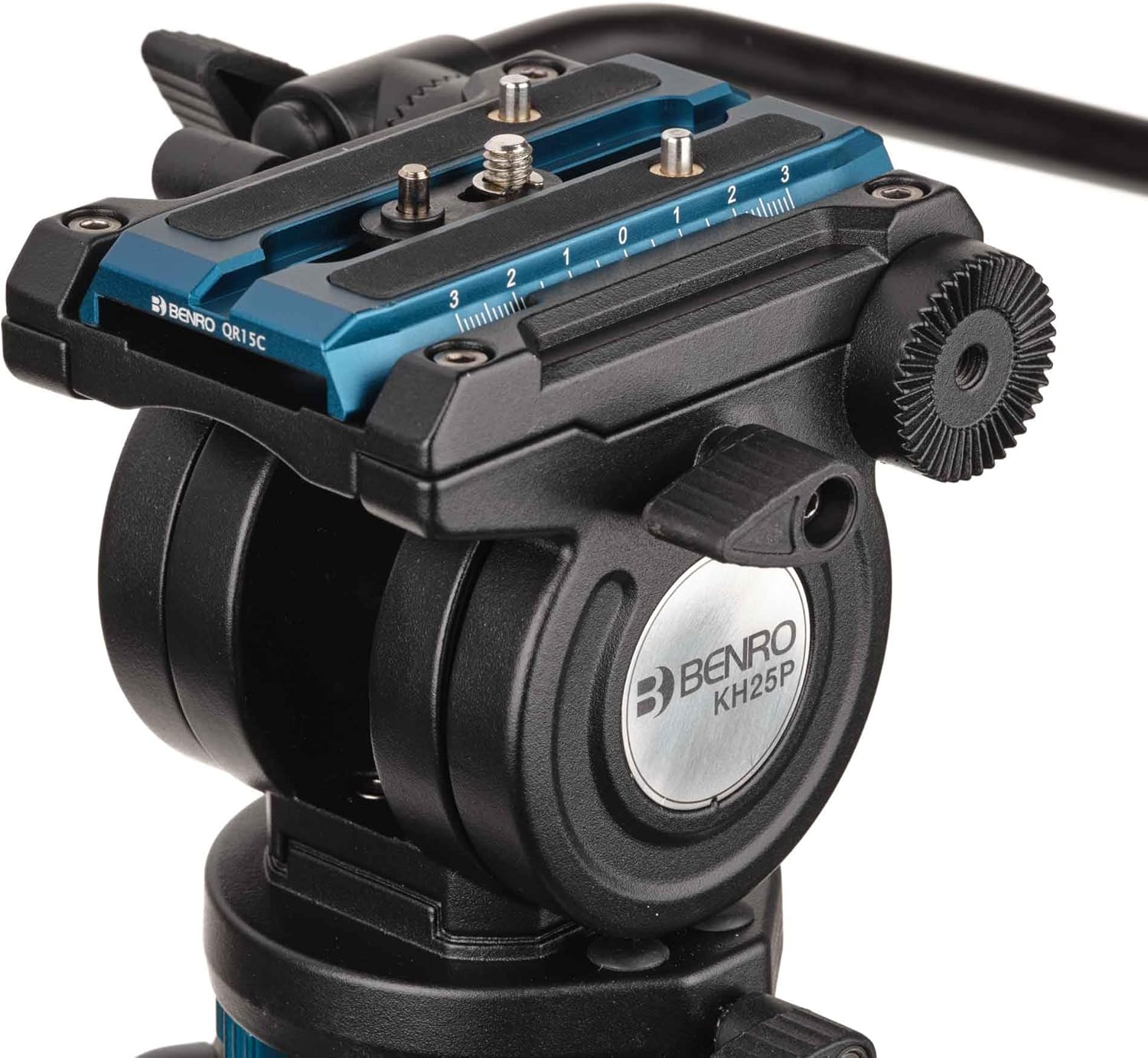
Imatge: Una imatge detallada view of the fluid head, showing the pan handle attachment and control knobs for smooth camera operation.

Image: A close-up of the quick-release plate mechanism on the fluid head, illustrating how a camera is securely mounted.
Video: Super Smooth Pan & Tilt Demonstration
Video: A demonstration of the fluid head's smooth pan and tilt capabilities, highlighting its performance for video recording.
5. Manteniment
- Neteja: Netegeu el trípode amb un drap suau i sec després de cada ús. Per a la brutícia resistent, utilitzeu un drap lleugerament sec.amp drap i sabó suau, després assecar-lo bé.
- Lubricació: Periodically check moving parts for smooth operation. Do not over-lubricate; consult Benro support if lubrication is required.
- Emmagatzematge: Store the tripod in its padded carrying case in a cool, dry place away from extreme temperatures and humidity.
- Inspecció: Regularly inspect all screws, levers, and locks for tightness and wear. Tighten any loose components.
6. Solució De Problemes
Problemes comuns i solucions
- Trípode inestable:
Solució: Ensure all leg locks are fully engaged and the mid-level spreader is properly extended. Check that the fluid head is securely attached to the tripod base. - Jerky Pan/Tilt Movements:
Solució: Verify that the camera is correctly balanced on the fluid head. Ensure all locking mechanisms for pan and tilt are sufficiently loosened for movement, but not completely disengaged if drag is desired. - Camera Not Securing to Fluid Head:
Solució: Confirm the quick-release plate is correctly attached to your camera and fully inserted into the fluid head's receiver. Ensure the locking lever on the fluid head is engaged.
For issues not listed here, please contact Benro customer support.
7. Especificacions
| Característica | Detall |
|---|---|
| Model | KH25PC |
| Marca | Benro |
| Material | Alumini |
| Pes de l'article | 7.75 lliures |
| Límit de pes | 11 lliures |
| Altura màxima | 61.61 polzades |
| Dimensions del producte | 6.69 x 6.69 x 61.61 polzades |
| Tipus de capçal de trípode | Pan Heads |
8. Garantia i Suport
Informació de la garantia
A standard limited warranty of 3 years is provided from the date of purchase for the original owner. If the product is registered online, the warranty is extended by an additional 2 years, totaling 5 years, in applicable regions.
Atenció al client
For further assistance, technical support, or warranty claims, please visit the official Benro weblloc o contactar amb el seu departament d'atenció al client.