1. Introducció
Thank you for choosing the Generic Monster Open Ear AC500 Bluetooth Earbuds. This manual provides essential information for setting up, operating, and maintaining your new earbuds. Please read this manual thoroughly before use to ensure optimal performance and longevity of your device.
2. Producte acabatview
Contingut del paquet:
- Monster Open Ear AC500 Bluetooth Earbuds (Left and Right)
- Estoig de càrrega
- Cable de càrrega USB
- Manual d'usuari
Característiques principals:
- 13mm Large Unit & Composite Titanium Diaphragm: Ofereix un àudio potent i clar.
- Transmissió direccional del so: Ensures minimal sound leakage for private listening.
- Ergonomic Curved Ear Clip Design: Provides a stable and comfortable fit for extended wear.
- AI Intelligent Call Noise Reduction: Effectively reduces environmental noise during calls.
- IPX5 Waterproof and Sweatproof: Resists sweat and light splashes, ideal for sports.
- Durada de la bateria ampliada: Approximately 6 hours of playback per charge, with up to 30 hours total with the charging case.
- Bluetooth 5.3: Per a una connectivitat sense fil estable i eficient.
- ENC Denoising & HiFi Sound: Enhances audio clarity and quality.

Image: The Monster Open Ear AC500 Bluetooth Earbuds shown with their sleek charging case. The earbuds feature an open-ear design with a secure ear clip.
3. Configuració
3.1 Càrrega dels auriculars i l'estoig
- Col·loca els auriculars a l'estoig de càrrega, assegurant-te que estiguin correctament col·locats.
- Connect the USB charging cable to the charging port on the case and plug the other end into a USB power adapter (not included) or a computer's USB port.
- Els indicadors lluminosos de la carcassa mostraran l'estat de càrrega. Un cop carregada completament, els llums indicaran que s'ha completat o s'apagaran.
- A full charge provides approximately 6 hours of playback for the earbuds, with the charging case extending total battery life to about 30 hours.

Image: An illustration highlighting the extended battery life of the earbuds, showing 1 hour charging duration, 6 hours playback duration, and 30 hours standby time with the charging case.
3.2 Vinculació Bluetooth
- Assegureu-vos que els auriculars estiguin carregats.
- Obre l'estoig de càrrega. Els auriculars entraran automàticament en mode d'emparellament, cosa que s'indicarà amb una llum intermitent als auriculars.
- Al dispositiu (telèfon intel·ligent, tauleta, etc.), aneu a la configuració de Bluetooth.
- Cerca new devices and select "Monster AC500" (or similar name) from the list of available devices.
- Once connected, the earbud indicator light will stop flashing, and you will hear a confirmation tone.
- Els auriculars es tornaran a connectar automàticament a l'últim dispositiu emparellat quan es treguin de l'estoig, si el Bluetooth està activat al dispositiu.
4. Instruccions de funcionament
4.1 Encès/Apagat
- Encès: Obriu la funda de càrrega i els auriculars s'encendran automàticament.
- Apagar: Torneu a col·locar els auriculars a l'estoig de càrrega i tanqueu la tapa. S'apagaran automàticament i començaran a carregar-se.
4.2 Reproducció de música
- Reproduir/pausa: Toqueu qualsevol dels auriculars una vegada.
- Pista següent: Fes doble toc a l'auricular dret.
- Pista anterior: Fes doble toc a l'auricular esquerre.
- Pujar el volum: Toca tres vegades l'auricular dret.
- Baixar el volum: Toca tres vegades l'auricular esquerre.
4.3 Gestió de trucades
- Respondre/Finalitzar la trucada: Toqueu qualsevol dels auriculars una vegada.
- Rebutja la trucada: Manteniu premut qualsevol dels auriculars durant 2 segons.
4.4 Assistent de veu
- Activa l'Assistent de veu: Prem i mantén premut qualsevol dels auriculars durant 3 segons (per exemple, Siri, Google Assistant).
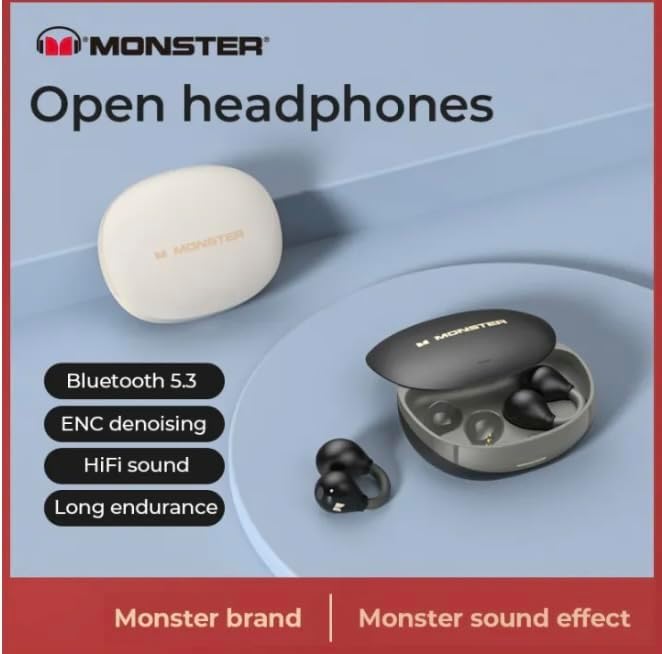
Image: A graphic highlighting key features such as Bluetooth 5.3, ENC denoising, HiFi sound, and long endurance, emphasizing the 'Monster' brand experience.

Image: An illustration demonstrating the AI intelligent noise reduction algorithm, which effectively reduces ambient noise and wind noise using a double microphone array beamforming technology.

Image: A detailed diagram showing the internal components responsible for pure original sound, including the 13mm super large unit, composite titanium metal diaphragm, and OFC high-purity multi-track voice coil.

Image: A woman wearing the Monster Open Ear AC500 Bluetooth Earbuds, demonstrating their secure and comfortable fit during physical activity.
5. Manteniment
5.1 Neteja
- Netegeu suaument els auriculars i l'estoig de càrrega amb un drap suau, sec i sense borrissol.
- No utilitzeu netejadors abrasius, alcohol ni dissolvents químics.
- Assegureu-vos que els contactes de càrrega dels auriculars i de la funda estiguin nets i secs.
5.2 Emmagatzematge
- Guardeu els auriculars a la funda de càrrega quan no els feu servir per protegir-los i mantenir-los carregats.
- Avoid storing in extreme temperatures (hot or cold) or in highly humid environments.
5.3 Resistència a l'aigua (IPX5)
The earbuds are IPX5 waterproof, meaning they are protected against low-pressure water jets from any direction. They are resistant to sweat and light rain, but are not designed for submersion in water or use during swimming. Ensure the earbuds are dry before placing them back into the charging case.

Image: A visual representation of the IPX5 professional waterproof performance, indicating the highly sealed body effectively resists invasion from water, rainwater, and makeup water.
6. Solució De Problemes
- Auriculars que no s'emparellan:
Ensure earbuds are charged. Turn off and on Bluetooth on your device. Forget the device from your Bluetooth list and try pairing again. - No se sent cap so d'un auricular:
Place both earbuds back into the charging case, close the lid, wait a few seconds, then take them out again. Check if both are connected. - Problemes de càrrega:
Ensure the charging cable is securely connected. Check if the charging contacts on both earbuds and case are clean and free of debris. Try a different USB port or power adapter. - Volum baix o qualitat de so deficient:
Adjust the volume on both your device and the earbuds. Ensure the earbuds are properly seated in your ears.
7. Especificacions
| Característica | Descripció |
|---|---|
| Marca | Genèric |
| Número de model | 001 |
| ASIN | B0CTD15YT8 |
| Col·locació de l'orella | Orella oberta |
| Factor de forma | A l'orella |
| Control de soroll | Active Noise Cancellation (AI Intelligent Call Noise Reduction) |
| Versió Bluetooth | 5.3 |
| Resistència a l'aigua | IPX5 |
| Temps de reproducció | Aprox. 6 hores (auriculars), 30 hores (amb estoig de càrrega) |
| Mida del controlador | 13 mm |
| Fabricant | mezone |
| Color | negre |
| Data de primera disponibilitat | 26 de gener de 2024 |
8. Garantia i Suport
This product is covered by a manufacturer's warranty. For specific warranty terms and conditions, please refer to the documentation provided at the time of purchase or contact your retailer.
For technical support, troubleshooting assistance, or warranty claims, please contact the seller or manufacturer directly. Please have your product model number (001) and ASIN (B0CTD15YT8) ready when contacting support.


