
1. Introducció
Welcome to the user manual for your ZOMBIES CAT Transformers TF-T06 Wireless Earbuds. This guide provides detailed instructions on how to set up, operate, maintain, and troubleshoot your new earbuds. Please read this manual carefully to ensure optimal performance and longevity of your device.
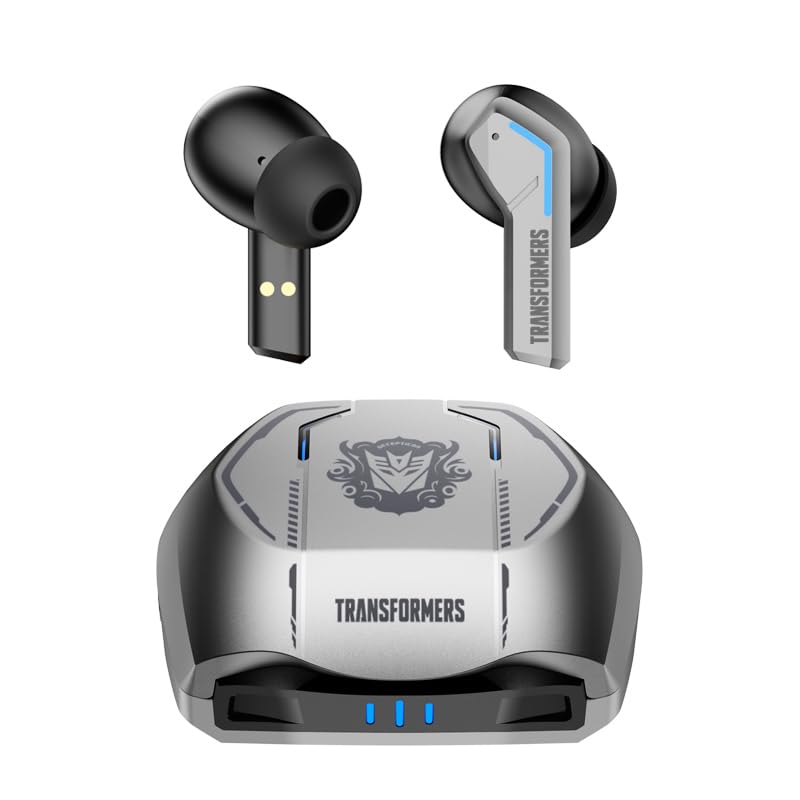
Image 1.1: The Transformers TF-T06 Wireless Earbuds and their charging case.
2. Contingut del paquet
Verifiqueu que tots els elements siguin presents al vostre paquet:
- Transformers In-Ear Headphones (2 units)
- Earbuds Charging Case (1 unit)
- Cable de càrrega tipus C (1 unitat)
- Manual d'usuari (Aquest document)

Image 2.1: The TF-T06 Earbuds, charging case, and packaging.
3. Producte acabatview
3.1 Earbud Design and Ergonomics
The TF-T06 earbuds are designed for a comfortable and secure fit within the ear, ensuring stability during various activities. Their lightweight and skin-friendly construction allows for extended wear without discomfort.

Image 3.1: An earbud shown in an ear, highlighting its ergonomic design for comfortable wear.
3.2 Controls tàctils intel·ligents
Each earbud features a touch-sensitive area for controlling various functions without needing to access your connected device. The controls are intuitive and responsive.

Image 3.2: Visual representation of the smart touch control functions on the earbuds.
- Reproduir/pausa: Un sol toc a qualsevol dels auriculars.
- Pista següent: Toqueu dues vegades l'auricular dret.
- Pista anterior: Toqueu dues vegades l'auricular esquerre.
- Pujar el volum: Toqueu tres vegades l'auricular dret.
- Baixar el volum: Toqueu tres vegades l'auricular esquerre.
- Respondre/Finalitzar la trucada: Toqueu un sol cop a qualsevol dels auriculars durant una trucada entrant o activa.
- Rebutja la trucada: Premeu i manteniu premut qualsevol dels auriculars durant 2 segons durant una trucada entrant.
- Activa l'Assistent de veu: Prem i mantén premut qualsevol dels auriculars durant 2 segons (quan no estiguis en una trucada).
4. Configuració
4.1 Càrrega dels auriculars i l'estoig
Abans del primer ús, carregueu completament els auriculars i l'estoig de càrrega.
- Col·loca els auriculars a l'estoig de càrrega. Assegura't que estiguin correctament col·locats; els contactes magnètics els mantindran al seu lloc.
- Connecteu el cable de càrrega tipus C al port de càrrega de la funda i l'altre extrem a un adaptador de corrent USB (no inclòs).
- The indicator lights on the charging case will illuminate to show charging status. A full charge typically takes approximately 3 hours for the case.
- Once fully charged, disconnect the charging cable. The earbuds will charge automatically when placed in the powered case.
4.2 Emparellament inicial amb un dispositiu
The TF-T06 earbuds feature one-step pairing for convenience.
- Obre l'estoig de càrrega. Els auriculars s'encendran automàticament i entraran en mode d'emparellament.
- Al telèfon intel·ligent, la tauleta o un altre dispositiu compatible amb Bluetooth, navegueu fins a la configuració de Bluetooth.
- Cerca dispositius disponibles i seleccioneu "TF-T06" de la llista.
- Un cop connectats, sentireu una confirmació audible i els auriculars estaran llestos per al seu ús.

Image 4.1: The earbuds in their open charging case, indicating they are ready for Bluetooth pairing.
Nota: After the initial pairing, the earbuds will automatically connect to the last paired device when removed from the charging case, provided Bluetooth is enabled on the device and it is within range.
5. Instruccions de funcionament
5.1 Encès/Apagat
- Encès: Obriu l'estoig de càrrega o manteniu premuda la zona tàctil dels dos auriculars durant 3 segons.
- Apagar: Torneu a col·locar els auriculars a l'estoig de càrrega i tanqueu la tapa, o premeu i manteniu premuda la zona tàctil d'ambdós auriculars durant 5 segons.
5.2 Reproducció de música
Use the smart touch controls as described in Section 3.2 to manage your music.
5.3 Gestió de trucades
Handle incoming and active calls using the smart touch controls as described in Section 3.2. The built-in ENC noise-cancelling microphone ensures clear communication.
5.4 Assistent de veu
Activate your device's voice assistant (e.g., Siri, Google Assistant) by pressing and holding the touch area on either earbud for 2 seconds (when not on a call).
5.5 Qualitat del so
The TF-T06 earbuds feature 10mm double-layer diaphragm drivers, delivering powerful bass, clear midrange, and bright treble for a high-fidelity audio experience.

Image 5.1: An illustration of the 10mm dynamic driver, responsible for the earbud's sound quality.
6. Manteniment
- Neteja: Netegeu regularment els auriculars i l'estoig de càrrega amb un drap suau, sec i sense borrissol. No utilitzeu netejadors abrasius ni dissolvents.
- Resistència a l'aigua: The earbuds have an IPX4 waterproof rating, meaning they are resistant to splashing water and sweat. Do not submerge them in water or expose them to heavy rain. Ensure they are dry before placing them back in the charging case.
- Emmagatzematge: Quan no els utilitzeu, guardeu els auriculars a la seva funda de càrrega per protegir-los i mantenir-los carregats. Guardeu-los en un lloc fresc i sec, allunyat de temperatures extremes.
- Cura de la bateria: Per allargar la durada de la bateria, evita descarregar completament els auriculars i l'estoig de càrrega amb freqüència. Carrega'ls regularment, fins i tot si no els fas servir constantment.
7. Solució De Problemes
If you encounter issues with your TF-T06 earbuds, refer to the following common solutions:
- Auriculars que no s'emparellan:
- Assegureu-vos que els dos auriculars estiguin carregats.
- Desactiva el Bluetooth del dispositiu i torna'l a activar.
- Forget "TF-T06" in your device's Bluetooth settings and attempt to pair again.
- Reinicieu el vostre dispositiu.
- Només funciona un auricular:
- Assegureu-vos que els dos auriculars estiguin carregats.
- Place both earbuds back into the charging case, close the lid, wait a few seconds, then open the lid and remove them.
- Try resetting the earbuds (refer to specific reset instructions if available in a separate quick start guide, or try forgetting the device and re-pairing).
- Sense so o volum baix:
- Comprova el nivell de volum tant dels auriculars com del dispositiu connectat.
- Assegureu-vos que els auriculars estiguin connectats correctament al dispositiu.
- Netegeu qualsevol residu de la malla de l'altaveu dels auriculars.
- Problemes de càrrega:
- Assegureu-vos que el cable de càrrega estigui connectat correctament tant a la carcassa com a la font d'alimentació.
- Prova un cable de càrrega o un adaptador de corrent diferent.
- Netegeu els contactes de càrrega dels auriculars i de l'interior de la funda.
8. Especificacions
| Nom del model | TF-T0602 |
| Marca | ZOMBIES CAT |
| Tecnologia de connectivitat | Sense fil (Bluetooth 5.3) |
| Versió Bluetooth | 5.3 |
| Tipus de controlador d'àudio | Controlador dinàmic (10 mm) |
| Durada de la bateria (total amb funda) | Fins a 30 hores |
| Temps de reproducció dels auriculars (càrrega única) | 3-4 hores |
| Temps de càrrega | Approx. 3 Hours (Case) |
| Mètode de control | Toca |
| Nivell de resistència a l'aigua | IPX4 (impermeable) |
| Cancel·lació de soroll | ENC (Environmental Noise Cancellation) Mic |
| Dispositius compatibles | Most Bluetooth-enabled devices (smartphones, tablets, laptops, smartwatches) |
| Distància màxima de funcionament | 10 metres |
| Pes de l'article | 132 g |
| Dimensions del producte | 3.3 x 2.18 x 1.83 cm |
9. Garantia i Suport
Per obtenir informació sobre la garantia i assistència al client, consulteu la documentació proporcionada en el moment de la compra o poseu-vos en contacte amb el vostre distribuïdor. Conserveu el comprovant de compra per a qualsevol reclamació de garantia.


