
Introducció
This manual provides detailed instructions for the proper use and maintenance of your Levenhuk Atom DNB250 Digital Day and Night Vision Binoculars. Please read this manual thoroughly before operating the device to ensure optimal performance and longevity. The Levenhuk Atom DNB250 offers high-definition imaging for both day and night observations, featuring optical and digital magnification, infrared illumination, and recording capabilities.
Contingut del paquet
Desembaleu la caixa amb cura i assegureu-vos que tots els elements que s'enumeren a continuació hi siguin presents i en bon estat. Si hi ha algun element que falti o que estigui malmès, poseu-vos en contacte amb el vostre distribuïdor.
- Levenhuk Atom DNB250 Digital Night Vision Binoculars
- Bossa de transport
- Corretja per al coll
- Bateria recarregable extraïble
- Cable USB-Type C
- Tovallola de neteja
- Manual d'usuari
- Targeta de garantia
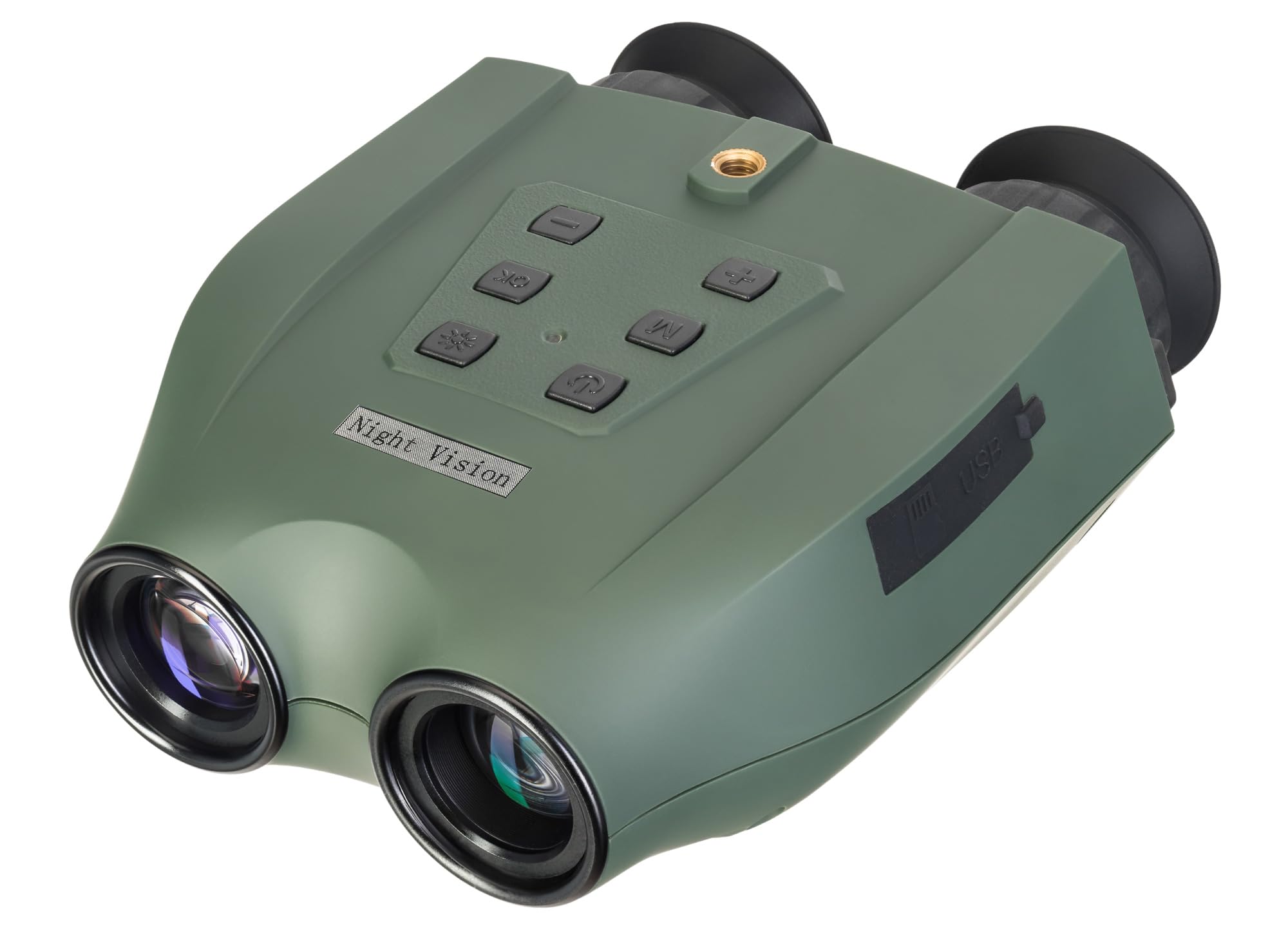
Image: Levenhuk Atom DNB250 Digital Night Vision Binoculars with all included accessories laid out.
Producte acabatview
Controls i Ports

Imatge: Superior view of the binoculars highlighting the control panel.
- Botó d'encesa: Encén o apaga el dispositiu.
- Botó IR: Activates and adjusts the infrared illuminator brightness levels.
- Botó D'acord: Confirms selections and takes photos/starts video recording.
- Botó de menú: Accedeix al menú de configuració del dispositiu.
- Zoom In/Up Button (+): Increases digital magnification or navigates up in menus.
- Zoom Out/Down Button (-): Decreases digital magnification or navigates down in menus.

Imatge: Lateral view of the binoculars showing the USB-C port and microSD card slot.
- Ranura per a targeta MicroSD: For inserting a memory card (up to 128GB, not included) to store photos and videos.
- Port USB tipus C: For charging the device and transferring data to a computer.
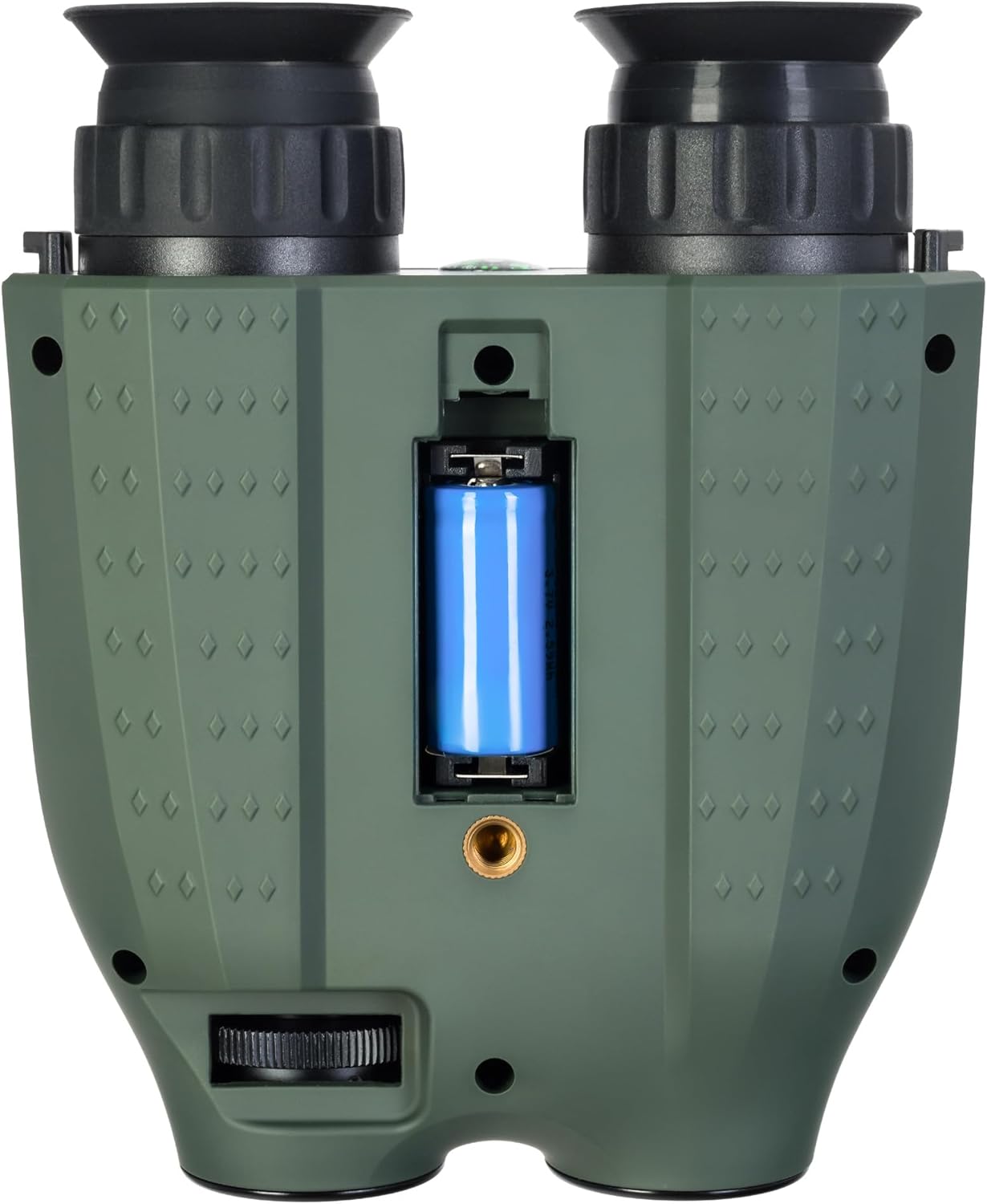
Imatge: Part inferior view of the binoculars showing the battery compartment and tripod mounting thread.
- Compartiment de la bateria: Houses the removable rechargeable battery.
- Tripod Mounting Thread: Allows attachment to a standard tripod.
Configuració
1. Instal·lació de la bateria
- Localitzeu el compartiment de la bateria a la part inferior del dispositiu.
- Obriu la coberta del compartiment.
- Insert the provided rechargeable battery, ensuring correct polarity.
- Tanqueu bé la tapa del compartiment de la bateria.
2. Instal·lació de la targeta de memòria
A microSD card (up to 128GB) is required for storing photos and videos. It is not included in the package.
- Localitza la ranura per a targetes microSD al lateral del dispositiu.
- Introduïu suaument la targeta microSD a la ranura fins que encaixi al seu lloc.
- To remove, press the card inward until it springs out.
3. Carregant la bateria
Before first use, fully charge the battery. The device can be charged using the supplied USB Type-C cable.
- Connect the USB Type-C cable to the device's USB port.
- Connect the other end of the cable to a USB power source (e.g., computer, wall adapter - not included).
- L'indicador de càrrega mostrarà l'estat de càrrega.
Funcionament
1. Encès / apagat
- To power on, press and hold the Power Button until the display activates.
- To power off, press and hold the Power Button again until the display shuts down.
2. Ajust del focus
Adjust the focus by rotating the eyepiece rings until the image appears clear on the internal displays.
3. Magnification (Optical and Digital Zoom)
The device features 6x optical magnification and up to 8x digital zoom.
- Utilitza el Zoom In (+) i Zoom Out (-) buttons to adjust the digital magnification.
4. Infrared (IR) Illumination
The infrared illuminator enhances visibility in low-light or complete darkness. It has three brightness levels.
- Premeu el botó Botó IR to cycle through the IR brightness levels (Low, Medium, High, Off).
- The IR illuminator automatically adapts to lighting conditions.
5. Enregistrament de fotos i vídeos
The built-in recorder captures observations as photos (JPG, up to 8000x6000px) and videos (AVI, up to 2560x1440px).
- To take a photo: Press the Botó D'acord una vegada.
- To start video recording: Press and hold the Botó D'acord. Press again to stop recording.
- Captured media is stored on the inserted microSD card.
6. Modes de visualització
The binoculars are equipped with two color IPS screens that can be used together or separately.
- Day shooting provides full-color images.
- Night shooting provides monochrome images for enhanced visibility in darkness.
Vídeo: Un overview of the Levenhuk Atom DNB250 Digital Night Vision Binoculars, demonstrating key features such as night vision range, magnification, high-resolution screen, photo/video capture, IR illumination, battery life, and mounting options.
Opcions de muntatge
The Levenhuk Atom DNB250 can be used handheld or mounted for stable observation.
- Muntatge del trípode: The device features a standard tripod mounting thread on its base, allowing it to be attached to a tabletop tripod (included) or any compatible full-size tripod for extended, stable viewing i gravació.
- Muntatge del casc: The NVD can also be mounted on a helmet for hands-free operation (helmet mount not included).
Manteniment i cura
- Neteja: Use the provided cleaning wipe to gently clean the lenses and external surfaces. Avoid abrasive materials or harsh chemicals.
- Emmagatzematge: When not in use, store the binoculars in the carrying pouch in a cool, dry place, away from direct sunlight and extreme temperatures.
- Cura de la bateria: Traieu la bateria si el dispositiu no s'utilitzarà durant un període prolongat.
- Durabilitat: The device features a lightweight and durable ABS plastic body with a polymer coating for increased damage resistance and a reliable grip.
Resolució de problemes
| Problema | Causa possible | Solució |
|---|---|---|
| El dispositiu no s'encén. | Low or uncharged battery; incorrectly installed battery. | Charge the battery; ensure battery is installed with correct polarity. |
| La imatge és borrosa. | Ajust incorrecte de l'enfocament. | Adjust the eyepiece rings until the image is clear. |
| No es poden gravar fotos/vídeos. | No microSD card; full microSD card; faulty microSD card. | Insert a microSD card; delete old files or use a new card; try a different card. |
| Poor night vision performance. | IR illuminator off or on low setting. | Increase IR brightness using the IR button. |
Especificacions
| Característica | Detall |
|---|---|
| Número de model | 83055 |
| Ampliació òptica | 6x |
| Zoom digital | 1-8x |
| Diàmetre de la lent objectiu | 21.3 mm |
| Gamma de visió nocturna | Fins a 300 metres |
| Day Vision Range | Fins a 1000 metres |
| Il·luminador d'infrarojos | Yes, with 3 brightness levels |
| Resolució fotogràfica | Up to 8000 x 6000px (JPG) |
| Resolució de vídeo | Up to 2560 x 1440px (AVI) |
| Suport per a targetes de memòria | MicroSD fins a 128 GB (no inclòs) |
| Tipus de bateria | Removable 700mAh rechargeable battery |
| Battery Life (Night) | Up to 2 hours (IR activated) |
| Battery Life (Day) | Fins a 10 hores |
| Material | Acrilonitril butadiè estirè (ABS) |
| Tipus de muntatge | Muntatge de trípode |
| Dimensions (L x A x A) | 17 x 7 x 17.5 cm |
| Pes | 700 grams |
Garantia i Suport
Levenhuk provides a lifetime warranty for all elements of this device, reflecting its commitment to high quality and standards. For warranty claims or technical support, please refer to the warranty card included in your package or visit the official Levenhuk weblloc.