
1. Introducció
The Pronomic DX-50 USB MKII is a professional 4-channel DJ mixer designed for a wide range of applications, including discos, parties, restaurants, and presentations. Its user-friendly design ensures that both experienced and less experienced users can fully utilize its features. This manual provides detailed instructions for setting up, operating, and maintaining your mixer.
Key features include a recording function, integrated Bluetooth interface, USB player with transport controls, and multiple input channels.
2. Instruccions de seguretat importants
- Llegeix les instruccions: Read all safety and operating instructions before using the product.
- Instruccions de conservació: Conserveu les instruccions de seguretat i funcionament per a futures consultes.
- Compte amb les advertències: Respecteu totes les advertències del producte i de les instruccions d'ús.
- Seguiu les instruccions: Seguiu totes les instruccions de funcionament i ús.
- Aigua i humitat: Do not use this apparatus near water (e.g., bathtub, washbowl, kitchen sink, laundry tub, wet basement, or swimming pool).
- Ventilació: No bloquegeu cap obertura de ventilació. Instal·leu-ho d'acord amb les instruccions del fabricant.
- Calor: No instal·leu a prop de cap font de calor com ara radiadors, registres de calor, estufes o altres aparells (inclosos amplificadors) que produeixen calor.
- Fonts d'alimentació: Use only power sources specified by the manufacturer.
- Protecció del cable d'alimentació: Eviteu que el cable d'alimentació sigui trepitjat o pessigat, especialment als endolls, els endolls i el punt on surten de l'aparell.
- Neteja: Netegeu només amb un drap sec.
- Manteniment: No intenteu reparar aquest producte vosaltres mateixos, ja que obrir o treure les cobertes us pot exposar a un risc perillós de voltage o altres perills. Demaneu tot el servei a personal de servei qualificat.
3. Contingut del paquet
Please check that all items listed below are included in your package. If any items are missing or damaged, contact your dealer immediately.
- Pronomic DX-50 USB MKII DJ Mixer
- Adaptador de corrent (CA 12V)
- USB Stick (32 GB, if included in your specific bundle)
- Manual d'usuari (aquest document)
4. Producte acabatview
Familiarize yourself with the various controls and connections on your DX-50 USB MKII mixer.
4.1 Controls del panell frontal
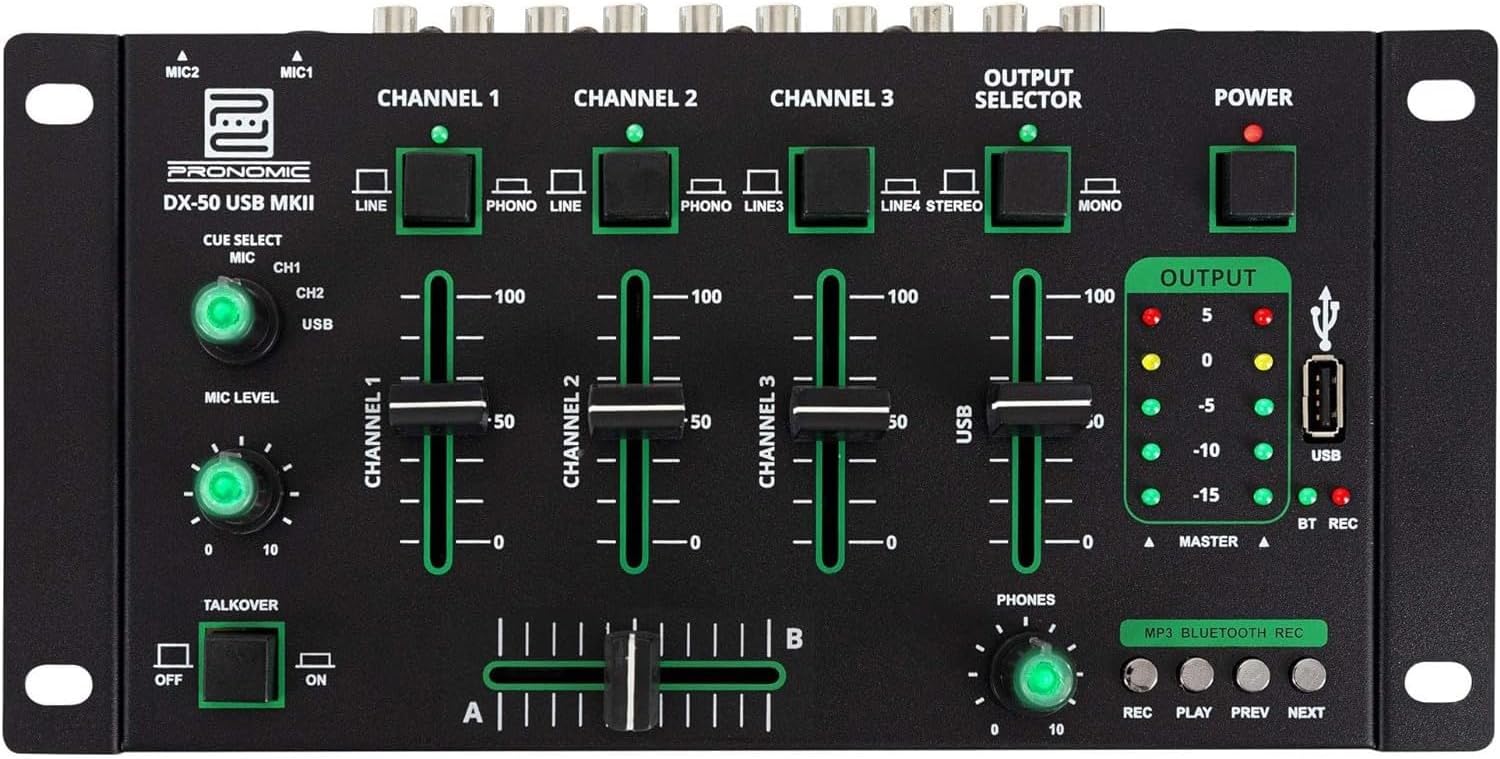
- MIC 1/2 Inputs: Connecteu els micròfons.
- Channel 1-4 Input Selectors: Switch between LINE, PHONO, or USB/Bluetooth inputs for each channel.
- Faders de canals: Adjust the volume level for each channel.
- CUE Select Buttons: Route specific channels to the headphone output for monitoring.
- MIC Level Knob: Adjust the volume of the microphone inputs.
- Talkover Switch: Activates the talkover function, which automatically lowers music volume when speaking into the microphone.
- Output Selector: Choose between Stereo or Mono master output.
- Interruptor d'alimentació: Encén/apaga el mesclador.
- Mesuradors de nivell de sortida: LED indicators showing the master output level.
- Port USB: Connect a USB drive for MP3 playback and recording.
- MP3/Bluetooth/REC Player Controls: Buttons for Play/Pause, Previous, Next, and Record functions for the integrated player.
- Phones Level Knob: Ajusta el volum de la sortida dels auriculars.
- Crossfader (A/B): Blends between channels assigned to A and B.
4.2 Connexions del panell posterior

- AC 12V Power Input: Connecteu aquí l'adaptador de corrent proporcionat.
- Sortida PHONES: Jack de 6.3 mm per connectar auriculars.
- MASTER OUT L/R (RCA): Connect to your main amplifier o altaveus alimentats.
- Channel 1 & 2 Inputs (RCA Line/Phono): Connect turntables (Phono) or other line-level devices (CD players, media players). Use the front panel selector to switch.
- Channel 3 & 4 Inputs (RCA Line): Connect line-level devices.
- MIC 1 & 2 Inputs (6.3mm Jack): Connecteu els micròfons.
5. Configuració
Follow these steps to set up your Pronomic DX-50 USB MKII mixer:
- Connexió d'alimentació: Ensure the mixer's power switch is in the OFF position. Connect the supplied AC 12V power adapter to the "AC 12V" input on the rear panel of the mixer. Plug the adapter into a suitable power outlet.
- Master Output Connection: Connect the "MASTER OUT L/R" RCA outputs on the rear panel to the inputs of your amplifier o altaveus alimentats.
- Connexió del dispositiu d'entrada:
- Tocadiscos: Connect turntables to the "CHANNEL 1" or "CHANNEL 2" RCA inputs. Set the corresponding input selector on the front panel to "PHONO".
- CD Players/Line Devices: Connect CD players, media players, or other line-level devices to "CHANNEL 1", "CHANNEL 2", "CHANNEL 3", or "CHANNEL 4" RCA inputs. Set the corresponding input selector on the front panel to "LINE".
- Micròfons: Connect microphones to the "MIC 1" or "MIC 2" 6.3mm jack inputs on the rear panel.
- Connexió d'auriculars: Connect your headphones to the "PHONES" 6.3mm jack on the rear panel.
- USB Drive (Optional): If using a USB drive for playback or recording, insert it into the "USB" port on the front panel.
- Encès: Once all connections are made, switch the mixer's power switch to the ON position. The power indicator LED will illuminate.
6. Instruccions de funcionament
6.1 Mescla bàsica
- Seleccioneu l'entrada: For each channel, use the input selector switch (LINE/PHONO/USB/BT) to choose the desired audio source.
- Adjust Channel Volume: Use the vertical faders for each channel to adjust its individual volume level.
- Sortida mestra: Monitor the "OUTPUT" LED meters and adjust the master volume knob (if present, otherwise rely on channel faders and amplifier volume) to achieve a suitable overall output level without clipping.
- Crossfader: Use the crossfader to smoothly transition between channels assigned to A and B. Channels 1 and 2 are typically assigned to the crossfader.
6.2 Ús del micròfon
- Connect your microphone to one of the MIC inputs on the rear panel.
- Adjust the "MIC LEVEL" knob on the front panel to control the microphone's volume.
- Talkover Function: Activate the "TALKOVER" switch to automatically reduce the volume of the music when you speak into the microphone. This is useful for announcements.
6.3 Reproducció i gravació USB
- Reproducció USB: Inseriu una unitat USB que contingui MP3 files into the "USB" port. Select "USB" as the input source for the dedicated USB channel. Use the "PLAY/PAUSE", "PREV", and "NEXT" buttons to control playback.
- Gravació USB: Press the "REC" button to start recording the master output to the connected USB drive. Press "REC" again to stop recording. Ensure your USB drive has sufficient free space and is formatted correctly (FAT32 is commonly supported).
6.4 Connectivitat Bluetooth
- Activa el Bluetooth: Select "BT" as the input source for the dedicated Bluetooth channel. The mixer will enter pairing mode.
- Parella el dispositiu: On your Bluetooth-enabled device (smartphone, tablet, etc.), search for available Bluetooth devices. Select "Pronomic DX-50 USB MKII" (or similar name) from the list to pair.
- Reproduir àudio: Once paired, you can play audio from your device through the mixer. Control playback from your device or using the mixer's transport controls (if supported by your device).
6.5 Monitorització amb auriculars
- Connect headphones to the "PHONES" output.
- Use the "CUE SELECT" buttons to choose which channels you want to monitor in your headphones without affecting the main output.
- Adjust the "PHONES" level knob to set your desired headphone volume.
7. Manteniment
- Neteja: Disconnect the power before cleaning. Use a soft, dry cloth to wipe the surface of the mixer. Do not use liquid cleaners, aerosols, or solvents.
- Emmagatzematge: Guardeu la batedora en un lloc fresc i sec, allunyat de la llum solar directa i de temperatures extremes.
- Fader and Knob Care: Avoid excessive force when operating faders and knobs. Periodically check for dust or debris accumulation around moving parts.
- Gestió de cables: Ensure cables are not kinked or strained, which can lead to damage.
8. Solució De Problemes
| Problema | Causa possible | Solució |
|---|---|---|
| Sense poder | Power adapter not connected; Power switch off; Faulty power outlet. | Check power adapter connection; Ensure power switch is ON; Try a different power outlet. |
| No sound from main output | Master volume too low; Amplifier/speakers off or disconnected; Incorrect input selection; Channel faders down. | Increase master volume; Check amplifier/speaker connections and power; Verify correct input selected for channels; Raise channel faders. |
| No hi ha so dels auriculars | Headphone volume too low; Headphones not connected; No CUE selected. | Increase PHONES level; Connect headphones properly; Press CUE button for desired channel. |
| Bluetooth no emparellat | Mixer not in pairing mode; Device too far; Interference. | Ensure BT input is selected; Bring device closer; Restart mixer and device. |
| La reproducció USB no funciona | Unitat USB no inserida correctament; Incorrecte file format; USB drive not formatted correctly. | Torneu a inserir la unitat USB; assegureu-vos files are MP3; Format USB drive to FAT32. |
9. Especificacions
| Model | Pronomic DX-50 USB MKII |
| Nombre de canals | 4 |
| Tecnologia de connectivitat | Bluetooth, USB |
| Entrada d'àudio | RCA (line/phono), 6.3mm microphone, Bluetooth, USB |
| Tipus de connector de sortida | RCA (Master Out), 6.3mm (Phones) |
| Font d'alimentació | Electric Cable (AC 12V adapter) |
| Dimensions (without corner brackets and controls) | 222 x 129 x 28 mm (amplada x profunditat x alçada) |
| Total Dimensions (with corner brackets and controls) | 267 x 136 x 51 mm (amplada x profunditat x alçada) |
| Pes | 790 g |
10. Garantia i Suport
Per obtenir informació sobre la garantia i assistència tècnica, consulteu la documentació que s'inclou amb la compra o poseu-vos en contacte amb el vostre distribuïdor. Conserveu el comprovant de compra per a qualsevol reclamació de garantia.
For further assistance, you may also visit the official Pronomic weblloc o poseu-vos en contacte amb el seu departament d'atenció al client.


