
Introducció
This manual provides detailed instructions for the installation, operation, and maintenance of your YOUTHINK 12V 24V Auto Solar Charge Controller. This device is designed to manage the power flow from your solar panel to your battery, ensuring efficient charging and protecting your battery from overcharge and over-discharge. It features an industrial-grade master chip for precise control, a large LCD display for monitoring, and dual USB outputs for charging external devices.

Imatge: Frontal view of the YOUTHINK Solar Charge Controller, showing the LCD screen, control buttons, USB ports, and terminal connections.
Característiques del producte
- High Accuracy Chip: Equipped with an industrial-grade master chip for precise charge and discharge parameter control. Supports light control and delay control functions.
- Pantalla LCD gran: Provides clear monitoring of charging and discharging data, including temperature, current, and accumulated electricity generated/discharged.
- Sortida USB dual: Features two USB output interfaces with a maximum current of 2.5A, suitable for charging phones and other USB devices.
- Comprehensive Protection Functions: Built-in overcurrent, short circuit, open circuit, and reverse connection protection. These are self-recovery features, ensuring the controller remains undamaged. Includes an anti-backflow circuit and ultra-low heat design.
- Aplicació àmplia: Suitable for various solar power systems, including solar RVs, household setups, and industrial field monitoring.
Configuració i instal·lació
Proper installation is crucial for the safe and efficient operation of your solar charge controller. Please follow these steps carefully:
- Preparació per a la instal·lació: Ensure all components (solar panel, battery, load) are disconnected. Choose a dry, well-ventilated location for the controller, away from direct sunlight and moisture.
- Connecteu la bateria: First, connect the battery to the charge controller. Ensure correct polarity (+ to + and - to -). The controller will detect the battery voltage (12V or 24V) automatically.
- Connecteu el panell solar: Next, connect the solar panel to the charge controller. Again, observe correct polarity. The LCD display should show charging activity if the panel is receiving sunlight.
- Connect the Load: Finally, connect your DC load (e.g., lights, fans) to the load terminals of the controller. Ensure correct polarity.
Notes importants de seguretat:
- Always connect the battery first and disconnect it last.
- Ensure all connections are tight to prevent loose contacts and overheating.
- Do not connect an inverter directly to the load terminals of the controller.
- The controller is designed for lead-acid batteries (OPEN, AGM, GEL). Do not use it with other battery types unless specified.

Imatge: Lateral view of the YOUTHINK Solar Charge Controller, highlighting the input and output terminal connections for solar panels, battery, and DC load.
Instruccions de funcionament
The YOUTHINK solar charge controller features a user-friendly LCD display and three control buttons for easy operation.
Informació de la pantalla LCD:
The large LCD display cycles through various parameters, providing real-time data on your system's performance:
- Voltage: Vol actualtage de la bateria connectada.
- Corrent de càrrega: Current flowing from the solar panel to the battery.
- Corrent de descàrrega: Current drawn by the connected DC load.
- Temperatura de la bateria: Internal temperature of the controller, indicative of ambient temperature.
- Accumulated Electricity Generated: Total energy harvested from the solar panel.
- Accumulated Electricity Discharged: Total energy consumed by the load.
Funcions del botó:
The controller has three buttons:
- Botó de menú: Press to cycle through display modes and enter/exit parameter settings.
- Botó amunt: Used to increase values or navigate up in menus.
- Botó avall: Used to decrease values or navigate down in menus.
Configuració dels paràmetres:
To adjust parameters such as charge voltage, tall de descàrrega voltage, or load control mode:
- Manteniu premut el botó Menú button for 5 seconds to enter the parameter setting mode.
- Utilitza el Up i Avall buttons to navigate between parameters.
- Premeu el botó Menú button once to select a parameter for editing. The value will flash.
- Utilitza el Up i Avall botons per ajustar el valor.
- Premeu el botó Menú botó de nou per confirmar el nou valor.
- Manteniu premut el botó Menú button for 5 seconds to exit the setting mode.
Sortida USB:
The dual USB ports provide 5V/2.5A output for charging compatible devices. These ports are active when the controller is powered on.
Manteniment
To ensure the longevity and optimal performance of your YOUTHINK solar charge controller, regular maintenance is recommended:
- Comproveu les connexions: Periodically inspect all wiring connections to ensure they are secure and free from corrosion. Loose connections can cause voltaggotes de líquids i sobreescalfament.
- Netegeu el controlador: Keep the controller clean and free from dust and debris. Use a dry cloth to wipe the exterior. Do not use liquids or abrasive cleaners.
- Ventilació: Ensure the installation area remains well-ventilated to prevent overheating, especially during periods of high charging or discharging.
- Inspecció de la bateria: Regularly check your battery for signs of damage, corrosion, or swelling. Ensure battery terminals are clean.
- Condicions ambientals: Protect the controller from extreme temperatures, direct sunlight, and moisture.
Resolució de problemes
Si teniu problemes amb el controlador de càrrega solar, consulteu els següents problemes i solucions habituals:
| Problema | Causa possible | Solució |
|---|---|---|
| No Display / Controller Not Working | Bateria no connectada o polaritat invertida; Volum de la bateriatage massa baix. | Comproveu les connexions i la polaritat de la bateria. Assegureu-vos del volum de la bateria.tage is above 8V for 12V systems or 16V for 24V systems. |
| La bateria no es carrega | Solar panel not connected or reverse polarity; Insufficient sunlight; Solar panel fault; Open circuit in wiring. | Check solar panel connections and polarity. Ensure adequate sunlight. Inspect solar panel and wiring for damage. |
| La càrrega no funciona | Càrrega no connectada o polaritat invertida; Volum de la bateriatage massa baix (tall de càrrega); Protecció contra sobrecàrrega activada. | Check load connections and polarity. Charge battery. Reduce load or check for short circuits. |
| Els ports USB no es carreguen | Controller not powered; Device not compatible; USB cable fault. | Ensure controller is powered by battery. Try a different USB device or cable. |
| Sobreescalfament | Mala ventilació; Càrrega o corrent de càrrega excessiu. | Ensure proper airflow around the controller. Reduce load or check for system imbalances. |
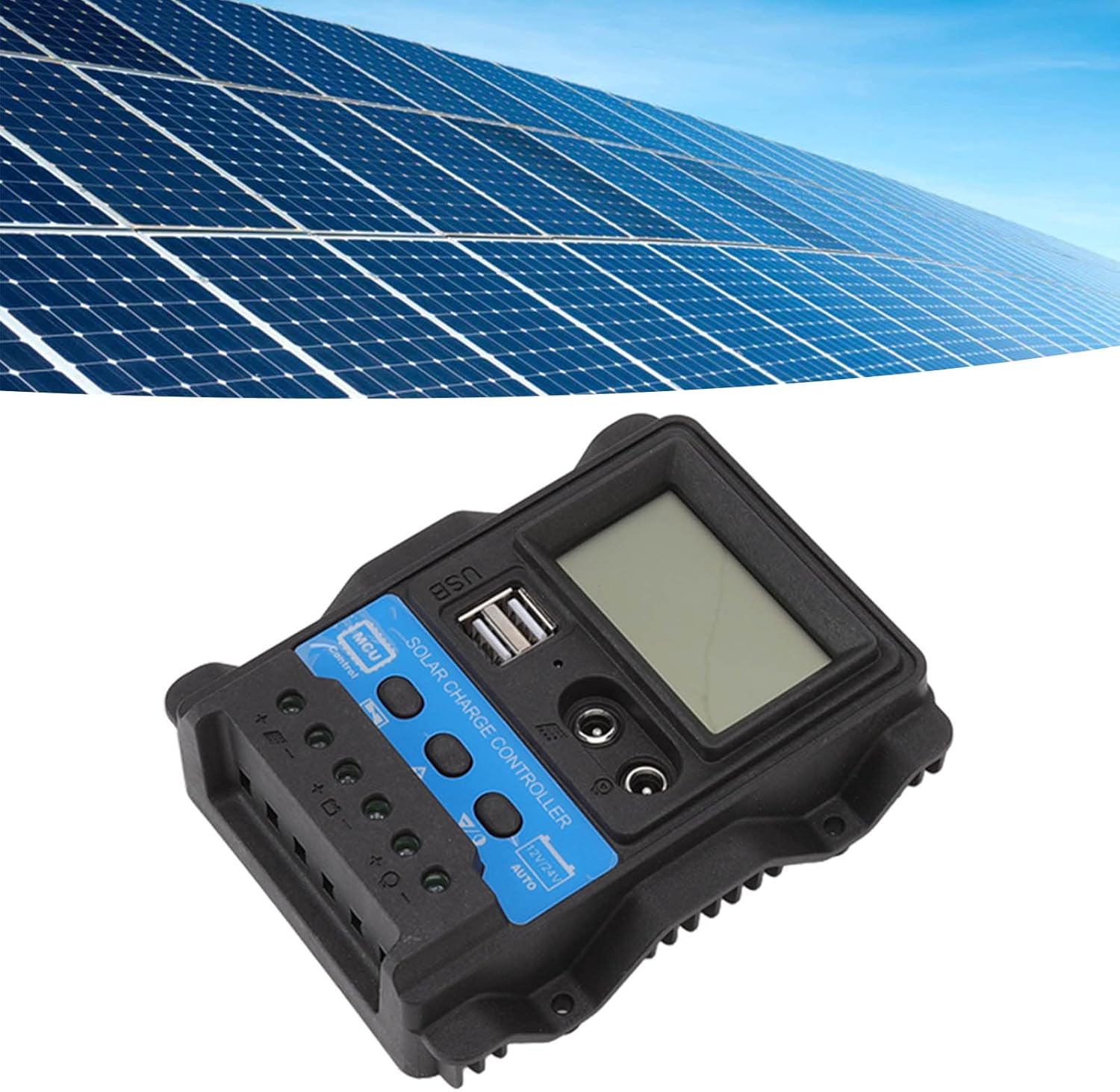
Image: The YOUTHINK Solar Charge Controller integrated into a solar power system with solar panels in the background.
Especificacions
| Paràmetre | Valor |
|---|---|
| Model | K1688 |
| Volum del sistematage | 12V / 24V Automatic Adaptation |
| Maximum Photovoltaic Voltage | 23V (for 12V system), 46V (for 24V system) |
| Lifting Voltage | 14.4V (12V system), 28.8V (24V system) |
| Vol. De càrregatage | 13.7V (default, adjustable) (12V system), 27.4V (default, adjustable) (24V system) |
| Descàrrega de tall voltage | 10.7V (default, adjustable) (12V system), 21.4V (default, adjustable) (24V system) |
| Descàrrega Recuperació Voltage | 12.6V (default, adjustable) (12V system), 25.2V (default, adjustable) (24V system) |
| Recuperació de càrrega Voltage | 13V (12V system), 26V (24V system) |
| Light Control Light On Threshold | 8V for photovoltaic panel (with delay) (12V system), 16V for photovoltaic panel (with delay) (24V system) |
| Light Control Light Off Threshold | 8V for photovoltaic panel (with delay) (12V system), 16V for photovoltaic panel (with delay) (24V system) |
| Material | ABS |
| Dimensions | 12.5 x 10 x 3 cm (4.92 x 3.94 x 1.18 polzades) |
| Pes de l'article | Aprox. 202 g (7.13 oz) |
| Sortida USB | Dual USB, 5V/2.5A Max |
Garantia i Suport
YOUTHINK products are designed for reliability and performance. For specific warranty details and technical support, please refer to the warranty card included with your product or contact YOUTHINK customer service through the retailer where the product was purchased. Please have your model number (K1688) and purchase date available when contacting support.