
T10M Pro+
Vortex T10M Pro+ Tablet User Manual
Model: T10M Pro+
1. Introducció
Thank you for choosing the Vortex T10M Pro+ Tablet. This manual will guide you through the features and functions of your new device, ensuring a smooth and enjoyable user experience. Please read this manual carefully before using your tablet.
Què hi ha a la caixa
Upon unboxing your Vortex T10M Pro+ Tablet, please verify that all the following items are present:
- Vortex T10M Pro+ Tablet
- Carregador
- Protector de pantalla
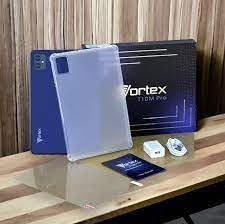
Image: Contents of the Vortex T10M Pro+ Tablet box. This includes the tablet, a clear protective case, the power adapter, and a screen protector, all neatly arranged on a wooden surface.
2. Producte acabatview
Familiarize yourself with the physical components and key features of your Vortex T10M Pro+ Tablet.
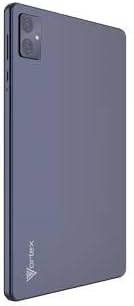
Imatge: Part posterior view of the Vortex T10M Pro+ Tablet. The tablet has a sleek, dark finish with the 'Vortex' logo subtly placed at the bottom. The camera module is visible in the upper left corner.

Imatge: Detallada view of the back of the Vortex T10M Pro+ Tablet, highlighting its specifications. Printed details include '10.1-inch Brilliant Display', '5MP Front Camera', '8MP Rear Camera', 'MTK6766 Processor', 'Quad-Core, 4GB+64GB', '5000mAh Mega Battery', and 'Android 12'.
3. Configuració
3.1. Càrrega del dispositiu
Before first use, fully charge your tablet. Connect the provided charger to the tablet's charging port and plug it into a power outlet. The battery indicator on the screen will show charging progress.
3.2. Inserció de la targeta SIM/MicroSD
The Vortex T10M Pro+ supports 4G LTE connectivity and expandable storage. To insert a SIM card (for mobile data) or a microSD card (for additional storage):
- Localitza la safata de la targeta SIM/microSD al lateral de la tauleta.
- Feu servir l'eina d'expulsió de la SIM proporcionada per obrir la safata.
- Carefully place the SIM card(s) and/or microSD card into the designated slots, ensuring correct orientation.
- Empenyeu suaument la safata cap a dins de la tauleta fins que encaixi al seu lloc.
3.3. Engegada inicial
Press and hold the Power button located on the side of the tablet until the Vortex logo appears. Follow the on-screen prompts to complete the initial setup, including language selection, Wi-Fi connection, and Google account setup.
4. Instruccions de funcionament
4.1. Navegació bàsica
Your tablet runs on Android 13.0. Use touch gestures for navigation:
- Toca: Selecciona un element o obre una aplicació.
- Llisca: Desplaçar-se per pantalles o llistes.
- Pessiga per fer zoom: Apropa o allunya les fotos i web pàgines.
- Premsa llarga: Accedir a menús contextuals o moure icones.
4.2. Connexió a Wi-Fi
Per connectar-se a una xarxa Wi-Fi:
- Vés a Configuració > Xarxa i Internet > Internet.
- Activa la Wi-Fi.
- Seleccioneu la xarxa desitjada de la llista i introduïu la contrasenya si se us demana.
4.3. Ús de dades mòbils (4G LTE)
If you have inserted a valid SIM card with an active data plan:
- Vés a Configuració > Xarxa i Internet > SIM.
- Ensure Mobile data is enabled for your SIM.
4.4. Funcionament de la càmera
La tauleta té una càmera posterior de 8 MP i una càmera frontal de 5 MP.
- Obriu l'aplicació Càmera.
- Toqueu el botó de l'obturador per fer una foto.
- Canvia entre la càmera frontal i la posterior amb la icona de commutació de la càmera.
4.5. Managing Storage
Your tablet comes with 64GB of internal storage. You can expand this using a microSD card up to 128GB. To view ús d'emmagatzematge, aneu a Configuració > Emmagatzematge.
5. Manteniment
5.1. Neteja
Feu servir un drap suau i sense borrissol per netejar la pantalla i el cos de la tauleta. Eviteu utilitzar productes químics agressius o materials abrasius.
5.2. Actualitzacions de programari
Comproveu periòdicament si hi ha actualitzacions de programari per assegurar-vos que la tauleta tingui les funcions i els pegats de seguretat més recents. Aneu a Configuració > Sistema > Actualització del sistema.
5.3. Cura de la bateria
Per allargar la durada de la bateria:
- Eviteu temperatures extremes.
- No deixeu que la bateria es descarregui completament amb freqüència.
- Desendolleu el carregador un cop la bateria estigui plena.
6. Solució De Problemes
Aquesta secció tracta problemes habituals que podeu trobar amb la vostra tauleta.
| Problema | Possible solució |
|---|---|
| La tauleta no s'encén | Assegureu-vos que la bateria estigui carregada. Premeu i manteniu premut el botó d'engegada durant almenys 10-15 segons per forçar un reinici. |
| Problemes de connexió Wi-Fi | Reinicia la tauleta i el router Wi-Fi. Oblida't de la xarxa a la configuració i torna a connectar-te. |
| Les aplicacions són lentes o es bloquegen | Close background apps. Clear app cache (Settings > Apps > [App Name] > Storage > Clear cache). Restart the tablet. |
| Storage full message | Elimineu-les innecessàries files or apps. Move media to a microSD card. |
7. Especificacions
Detailed technical specifications for the Vortex T10M Pro+ Tablet.
| Característica | Especificació |
|---|---|
| Nom del model | T10M Pro+ Tablet (Unlocked) Blue 10.1" 64GB 4GB GSM 4G LTE + Wifi 8MP |
| Mida de la pantalla | 10.1 polzades |
| Resolució de pantalla màxima | 1280 x 800 píxels |
| Freqüència d'actualització | 120 Hz |
| Processador | MediaTek, 2 GHz |
| RAM | 4 GB |
| Emmagatzematge intern | 64 GB |
| Emmagatzematge ampliable | MicroSD (fins a 128 GB) |
| Sistema operatiu | Android 13.0 |
| Càmera posterior | 8 MP |
| Càmera frontal | 5 MP |
| Connectivitat | 4G LTE, Wi-Fi, Bluetooth, GPS |
| Tipus de bateria | Ió de liti |
| Durada mitjana de la bateria | 18 hores |
| Dimensions del producte | 10.1 x 5 x 3 polzades |
| Color | Negre |
8. Informació de la garantia
This product is covered by a manufacturer's warranty. Please refer to the warranty card included with your purchase or visit the manufacturer's official weblloc web per obtenir els termes i condicions detallats sobre la cobertura de la garantia, la durada i el procés de reclamacions.
9. Suport
For further assistance, technical support, or service inquiries, please contact the manufacturer's customer support. Contact information can typically be found on the product packaging, the manufacturer's weblloc web o la documentació de la garantia.
Ask a question about this manual
Ask about setup, troubleshooting, compatibility, parts, safety, or missing instructions. Manuals+ will review the question and use this page’s manual context to help answer it.