
1. Producte acabatview
The Generic Wireless Bluetooth Headphones AH-806 are designed to provide a high-fidelity audio experience with the convenience of wireless connectivity. Featuring a foldable design for portability and a built-in microphone for calls, these headphones are suitable for various uses including gaming, music, and sports.
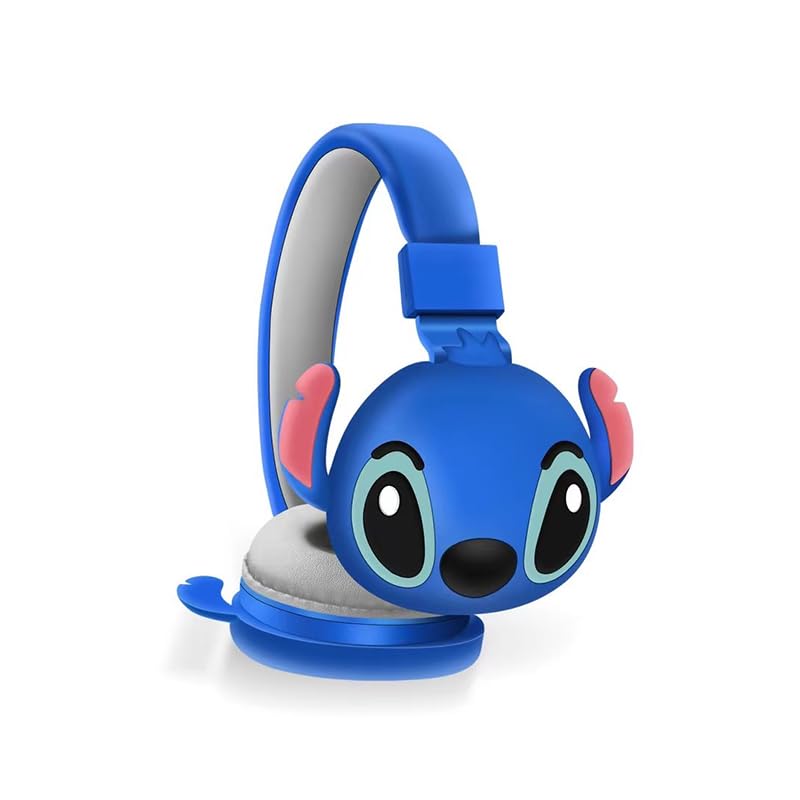
Imatge 1.1: Frontal view of the AH-806 Wireless Bluetooth Headphones, featuring a blue color and a Stitch character design on the earcups.
Característiques principals:
- Disseny de plegat: Conveniently folds for easy portability and storage in bags or suitcases, making it an ideal companion for travel.
- So estèreo HIFI: Equipped with a 13mm driver diameter for high-fidelity stereo sound, suitable for various audio content.
- Micròfon integrat: Enables hands-free calling and communication.
- Cancel·lació passiva de soroll: Oversize earcups provide passive noise reduction for an immersive listening experience.
- Ús versàtil: Designed for video games, general audio listening, HiFi audio, and sports activities.
2. Contingut del paquet
Marqueu la casella per als elements següents:
- 1 x Wireless Bluetooth Headphones AH-806
- 1 x Manual d'usuari (aquest document)
- 1 x Charging Cover
- 1 x adaptador USB tipus C

Image 2.1: Packaging of the AH-806 Headphones, illustrating the product and its accessories.
3. Guia de configuració
3.1. Càrrega dels auriculars
- Localitza el port de càrrega USB tipus C als auriculars.
- Connect the provided USB Type-C adapter to the charging port.
- Plug the other end of the USB cable into a compatible USB power source (e.g., computer USB port, wall adapter).
- The LED indicator on the headphones will illuminate to show charging status. It will typically turn off or change color once fully charged.
Note: For optimal battery life, fully charge the headphones before first use.
3.2. Emparellament Bluetooth
- Assegureu-vos que els auriculars estiguin completament carregats.
- Encès: Premeu i manteniu premut el botó d'engegada dels auriculars fins que l'indicador LED parpellegi, cosa que indica el mode d'emparellament.
- Activa el Bluetooth: On your device (smartphone, tablet, laptop), go to the Bluetooth settings and ensure Bluetooth is turned on.
- Cerca Dispositius: Your device will scan for available Bluetooth devices. Look for "AH-806" or a similar name in the list.
- Connectar: Select "AH-806" from the list to initiate the connection. Once connected, the LED indicator on the headphones may change to a solid light or flash slowly.
- You are now ready to use your headphones.
Si se us demana una contrasenya, introduïu "0000" (quatre zeros).
4. Instruccions de funcionament
4.1. Encendre/apagar
- Encès: Premeu i manteniu premut el botó d'engegada durant aproximadament 3 segons fins que l'indicador LED s'encengui.
- Apagar: Premeu i manteniu premut el botó d'engegada durant aproximadament 5 segons fins que l'indicador LED s'apagui.
4.2. Reproducció de música
- Reproduir/pausa: Press the Multi-function button (often the Power button or a dedicated Play/Pause button) once.
- Pista següent: Press and hold the Volume Up button or a dedicated Next Track button.
- Pista anterior: Press and hold the Volume Down button or a dedicated Previous Track button.
- Pujar el volum: Premeu breument el botó de pujar el volum.
- Baixar el volum: Premeu breument el botó per baixar el volum.
4.3. Gestió de trucades
- Respondre/Finalitzar la trucada: Press the Multi-function button once during an incoming call to answer, and once again to end the call.
- Rebutja la trucada: Press and hold the Multi-function button for approximately 2 seconds during an incoming call to reject it.
- Torna a marcar l'últim número: Premeu dues vegades el botó multifunció.
4.4. Folding Design
The headphones feature a foldable design for enhanced portability. Gently fold the earcups inwards towards the headband until they are compact. This reduces the overall size of the headphones, making them easier to store and carry.
5. Manteniment i cura
- Neteja: Use a soft, dry, lint-free cloth to clean the headphones. Do not use abrasive cleaners, alcohol, or chemical solvents, as these may damage the surface.
- Emmagatzematge: When not in use, store the headphones in a cool, dry place, away from direct sunlight and extreme temperatures. Utilize the folding feature to save space.
- Eviteu l'aigua: Aquests auriculars no són impermeables. Eviteu l'exposició a l'aigua, la humitat o l'excés d'humitat.
- Manejar amb cura: Do not drop, disassemble, or attempt to repair the headphones yourself. This may void the warranty and cause damage.
6. Solució De Problemes
| Problema | Possible solució |
|---|---|
| Els auriculars no s'engeguen. | Ensure the headphones are fully charged. Connect them to a power source using the provided USB Type-C adapter. |
| No es pot emparellar amb un dispositiu Bluetooth. |
|
| Sense so o amb un volum baix. |
|
| El so està distorsionat o intermitent. |
|
7. Especificacions
| Característica | Detall |
|---|---|
| Nom del model | AH-806 |
| Tecnologia de connectivitat | Sense fil |
| Tecnologia de comunicació sense fils | Bluetooth |
| Material | Plàstic, Teixit |
| Usos específics per al producte | Gaming, Music, Sport |
| Dispositius compatibles | Telèfons intel·ligents, tauletes, ordinadors portàtils, ordinadors de sobretaula, consoles de jocs |
| Característica del cable | Sense Cable |
| Mètode de control | Remot |
| Nombre d'articles | 1 |
| Tipus de controlador d'àudio | Controlador dinàmic (13 mm) |
| Forma de l'auricular | Sobre l'orella |
| Fabricant | MOPIKI |
| Característiques especials | Noise Cancellation (Passive) |
| Color | r.blau |
| Col·locació de l'orella | Sobre l'orella |
| Factor de forma | Sobre l'orella |
8. Garantia i Suport
This product is manufactured by MOPIKI. For specific warranty information, please refer to the documentation provided at the time of purchase or contact your retailer.
For technical support or inquiries, please contact the retailer or manufacturer directly. Keep your purchase receipt as proof of purchase.
Note: As per the provided product information, specific warranty details are not available in this manual.