
1. Introducció
Thank you for choosing the Havit KB851L Mechanical Gaming Keyboard. This manual provides essential information for setting up, operating, and maintaining your keyboard. Please read these instructions carefully before use to ensure optimal performance and longevity of your device.
2. Producte acabatview
The Havit KB851L is a wired mechanical gaming keyboard designed for performance and durability. It features responsive blue mechanical switches, vibrant RGB backlighting, and robust PBT keycaps. Its ergonomic design aims to provide a comfortable typing experience for extended use.
Característiques principals:
- Interruptors blaus mecànics: Provides tactile feedback and an audible click for precise keystrokes.
- Retroil·luminació RGB: Customizable lighting effects to enhance your gaming setup.
- Tecles PBT de doble tret: Durable keycaps with legends that won't fade, offering superior feel and lighting transmission.
- Full Anti-Ghosting (N-Key Rollover): Ensures every keypress is registered accurately, even during intense gaming sessions.
- Full Metal Panel Design: Enhances durability and provides a premium feel.
- Disseny ergonòmic: Features a stepped keycap design and adjustable arc for comfortable typing angles.
- Dreceres multimèdia: 12 dedicated multimedia function keys for quick access to controls.
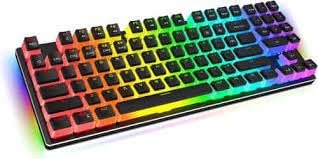
Imatge 2.1: Frontal view of the Havit KB851L Mechanical Gaming Keyboard, showcasing its layout and RGB backlighting.
3. Configuració
Follow these steps to set up your Havit KB851L Mechanical Gaming Keyboard:
- Descomprimir el teclat: Carefully remove the keyboard and any included accessories from its packaging.
- Connexió a l'ordinador: Plug the USB cable of the keyboard into an available USB port on your computer (PC or Mac).
- Instal·lació del controlador: The keyboard is plug-and-play. Your operating system (Windows 2000/XP/Vista/Win7/Win8/Win10 or Mac) should automatically detect and install the necessary drivers. No additional software installation is typically required for basic functionality.
- Funcionalitat de prova: Open a text editor or browser and test typing to ensure all keys are functioning correctly.
4. Instruccions de funcionament
Ús bàsic:
- El teclat funciona com un teclat QWERTY estàndard.
- The 104 keys include a full numeric keypad and standard function keys.
Modes d'il·luminació RGB:
The Havit KB851L features various RGB lighting modes. Specific key combinations are used to cycle through modes, adjust brightness, and change speed. Refer to the keyboard's function key legends or a dedicated software (if available) for detailed instructions on lighting customization.
Funcions multimèdia:
The keyboard includes 12 multimedia shortcut keys, typically accessed by pressing the Fn key in combination with the F1-F12 keys. These shortcuts allow quick control over media playback, volume, and other system functions.
- Fn + F1-F12: Access various multimedia controls (e.g., play/pause, stop, previous/next track, volume up/down, mute, web browser, email, calculator, search).
5. Manteniment
Un manteniment adequat garanteix la longevitat i el rendiment del teclat:
- Neteja: Regularly clean the keyboard with a soft, dry cloth. For deeper cleaning, use compressed air to remove dust and debris from between the keycaps. You may carefully remove keycaps using a keycap puller (not included) to clean underneath.
- Eviteu líquids: The keyboard is not water-resistant. Avoid spilling liquids on it. If a spill occurs, immediately disconnect the keyboard and allow it to dry completely before reconnecting.
- Emmagatzematge: Guardeu el teclat en un lloc fresc i sec, allunyat de la llum solar directa i de temperatures extremes.
6. Solució De Problemes
If you encounter issues with your Havit KB851L keyboard, try the following troubleshooting steps:
- El teclat no respon:
- Assegureu-vos que el cable USB estigui ben connectat tant al teclat com a l'ordinador.
- Prova de connectar el teclat a un port USB diferent de l'ordinador.
- Reinicieu l'ordinador.
- Claus que no es registren:
- Check for any physical obstructions under the keycaps.
- Assegureu-vos que el teclat estigui net i lliure de brutícia.
- La il·luminació RGB no funciona:
- Assegureu-vos que el teclat estigui connectat i alimentat correctament.
- Try cycling through the lighting modes using the designated function keys.
- Check if any lighting software is installed and configured correctly (if applicable).
Si el problema persisteix després d'intentar aquests passos, poseu-vos en contacte amb l'atenció al client.
7. Especificacions
| Característica | Especificació |
|---|---|
| Marca | Havit |
| Número de model | KB851L |
| Tecnologia de connectivitat | Cable USB |
| Dispositius compatibles | Portàtil, PC, Mac |
| Descripció del teclat | Mechanical Gaming Keyboard with Numeric Keypad |
| Usos recomanats | Gaming, Multimedia Editing |
| Característiques especials | Backlit, Ergonomic Design |
| Color de llum de fons | RGB (Red, Green, Blue Model) |
| Color | Negre |
| Estil | Modern |
| Dimensions del producte (LxWxH) | 36 x 13 x 4.2 cm (aprox. 359.7 x 129.7 x 41.6 mm) |
| Nombre de claus | 104 |
| Font d'alimentació | Alimentat per USB |
| Tipus de canvi | Clicky (Blue Switches) |
| Disposició del teclat | QWERTY |
| Orientació de la mà | Ambidextre |
| Nivell de resistència a l'aigua | No resistent a l'aigua |
| Material de claus | PBT (tereftalat de polibutilè) |
| Vida clau | 50,000,000 premses |
| Longitud del cable | 1500 mm |
| Vol. Operatiutage | 5V ± 0.5V |
| Corrent de funcionament | 200 mA |
| Components inclosos | Cable USB |
8. Garantia i Suport
The Havit KB851L Mechanical Gaming Keyboard comes with a garantia d'un any from the date of purchase. This warranty covers manufacturing defects under normal use. It does not cover damage caused by misuse, accidents, unauthorized modifications, or improper maintenance.
For technical support, warranty claims, or further assistance, please contact your retailer or the manufacturer's customer service. Keep your proof of purchase for warranty validation.