
1. Introducció
Gràcies per la compraasing the ulafbwur 8082T Digital Desk Clock. This device combines a digital clock with a weather forecast station, perpetual calendar, and displays humidity and temperature. Its LED color screen provides clear readability. This manual provides detailed instructions for setup, operation, and maintenance to ensure optimal performance and longevity of your device.
2. Informació de seguretat
- No exposeu el dispositiu a temperatures extremes, llum solar directa ni humitat elevada.
- Eviteu deixar caure o sotmetre el dispositiu a forts impactes.
- No intenteu desmuntar ni reparar el dispositiu vosaltres mateixos. Encarregueu tot el manteniment a personal qualificat.
- Use only the specified power source (USB cable or AA batteries).
- Mantenir fora de l'abast dels nens.
- Eliminar les bateries segons la normativa local.
3. Contingut del paquet
Si us plau, comproveu el contingut del paquet en obrir-lo:
- 1 x ulafbwur 8082T Digital Desk Clock
- 1 x cable USB
- 1 x Manual d'usuari (aquest document)
Nota: Les piles AA no estan incloses i s'han de comprar per separat.
4. Producte acabatview
The ulafbwur 8082T Digital Desk Clock features a comprehensive display and intuitive controls.
4.1 Pantalla frontal
The LED color screen displays time, date, day of the week, weather forecast icon, indoor temperature, and humidity.
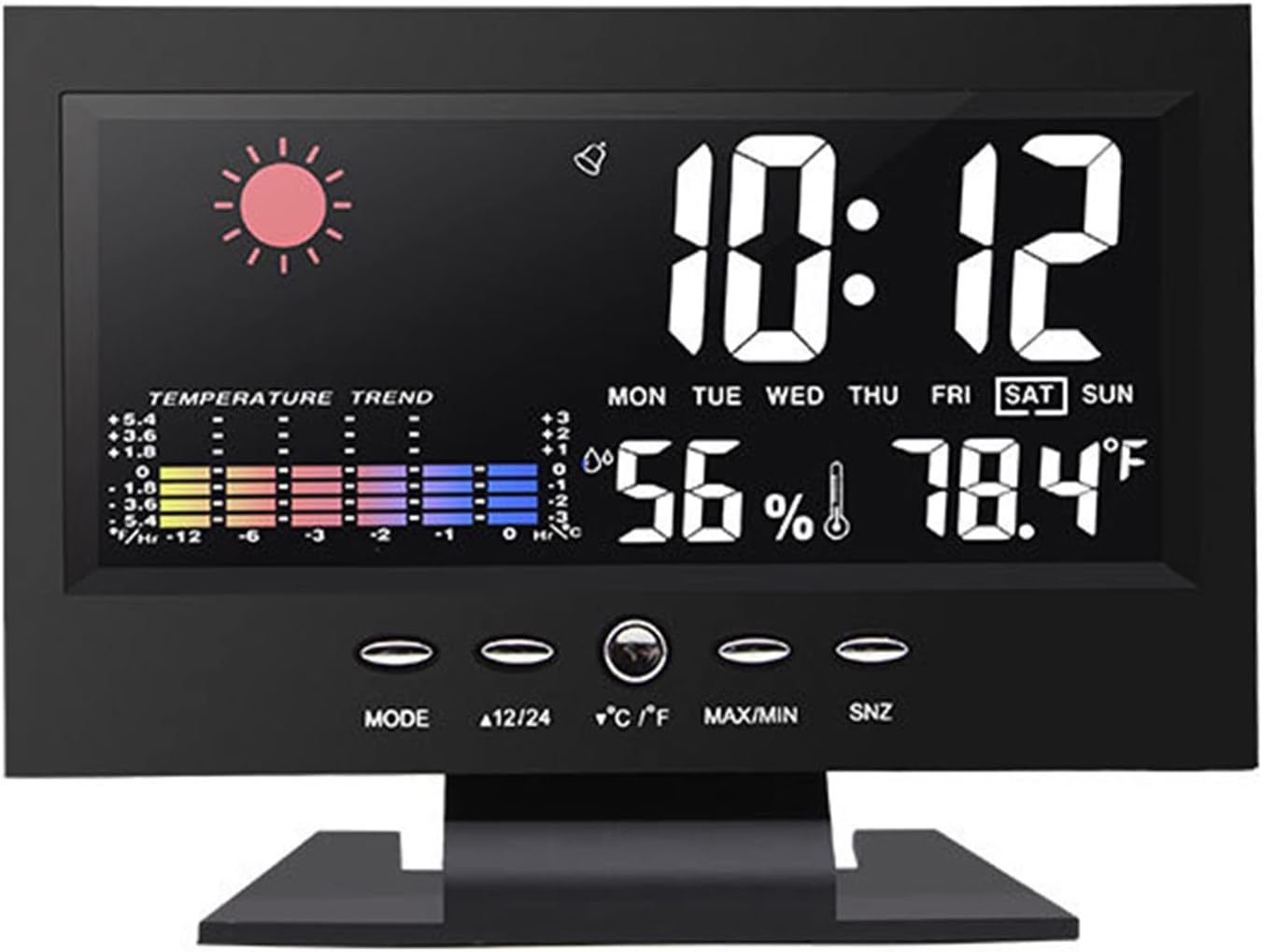
Figura 1: Frontal view of the ulafbwur 8082T Digital Desk Clock, showing time, date, weather, temperature, and humidity.
4.2 botons de control
The clock features several control buttons located below the display for easy adjustment:
- Mode: Used to switch between display modes and enter setting modes.
- 12/24: Alterna entre els formats de 12 hores i 24 hores.
- °C/°F: Canvia la visualització de la temperatura entre Celsius i Fahrenheit.
- MÀXIM / MÍN: Displays maximum and minimum temperature/humidity records.
- SNZ (Snooze): Activates the snooze function during an alarm.
4.3 Panell posterior
The rear panel houses the battery compartment and power input.

Figura 2: posterior view of the clock, illustrating the battery compartment for two AA batteries and the DC 4.5V power input.
5. Configuració
5.1 Alimentació del dispositiu
The clock can be powered by either the included USB cable or two AA batteries (not included).
- Ús de l'alimentació USB: Connect the provided USB cable to the DC 4.5V port on the back of the clock and plug the other end into a compatible USB power adapter (not included) or a USB port. The backlight will remain on when powered by USB.
- Ús de piles: Open the battery compartment on the back of the clock. Insert two AA batteries, ensuring correct polarity (+/-). Close the compartment. Note: When powered by batteries, the backlight will not remain continuously on to conserve power. It will illuminate briefly when a button is pressed.
5.2 Configuració inicial
Upon first power-up, the clock may display default settings. Follow the operating instructions to set the correct time, date, and other preferences.
6. Instruccions de funcionament
6.1 Configuració de l'hora i la data
- Manteniu premut el botó MODE button for approximately 3 seconds to enter time setting mode. The year display will start flashing.
- Utilitza el 12/24 or ° C / ° F buttons to adjust the flashing value (e.g., year).
- Premeu MODE again to confirm the setting and move to the next item (month, day, hour, minute).
- Repeat steps 2 and 3 until all time and date settings are complete.
- Premeu MODE one last time or wait for 15 seconds for the clock to exit setting mode automatically.
6.2 Configuració de l'alarma
- Des de la visualització normal de l'hora, premeu la tecla MODE botó una vegada per mostrar l'hora de l'alarma.
- Manteniu premut el botó MODE button for approximately 3 seconds. The alarm hour will start flashing.
- Utilitza el 12/24 or ° C / ° F botons per ajustar l'hora de l'alarma.
- Premeu MODE again to confirm and move to the alarm minute. Adjust using 12/24 or ° C / ° F.
- Premeu MODE de nou per confirmar i sortir del mode de configuració de l'alarma.
- Per activar/desactivar l'alarma, premeu el botó 12/24 button while the alarm time is displayed. An alarm icon will appear/disappear on the screen.
6.3 Funció de repetició
Quan soni l'alarma, premeu el botó SNZ button to activate the snooze function. The alarm will temporarily stop and sound again after a few minutes (default snooze duration is typically 5 minutes, but may vary). To turn off the alarm completely, press any other button.
6.4 Selecció de format de 12/24 hores
En el mode de visualització de l'hora normal, premeu el botó 12/24 button to toggle between 12-hour (with AM/PM indicator) and 24-hour time formats.
6.5 Celsius/Fahrenheit Selection
En el mode de visualització normal, premeu el botó ° C / ° F button to switch the temperature display between Celsius and Fahrenheit.
6.6 MAX/MIN Temperature and Humidity Records
Premeu el botó MAX/MIN botó per view the maximum recorded temperature and humidity. Press it again to view the minimum recorded temperature and humidity. Press a third time to return to the current display. The records are typically reset daily or when the device is reset.

Figura 3: Detallada view of the color screen display, highlighting temperature and humidity readings.
7. Manteniment
- Neteja: Netegeu la superfície del rellotge amb un drap suau i sec. No utilitzeu productes de neteja abrasius ni dissolvents.
- Substitució de la bateria: If using batteries, replace them when the display dims or functions become erratic. Ensure correct polarity.
- Emmagatzematge: Si guardeu el rellotge durant un període prolongat, traieu-ne les piles per evitar fuites.
8. Solució De Problemes
| Problema | Causa possible | Solució |
|---|---|---|
| La pantalla està en blanc o tènue. | No power, low batteries, or USB cable not connected. | Ensure USB cable is securely connected or replace AA batteries. Note: Backlight is not continuous on battery power. |
| L'hora/data és incorrecta. | Not set correctly after power-up or power interruption. | Follow "Setting Time and Date" instructions in Section 6.1. |
| L'alarma no sona. | L'alarma no està activada o el volum és massa baix (si és ajustable). | Assegureu-vos que es mostri la icona de l'alarma. Torneu a comprovar la configuració de l'hora de l'alarma. |
| Inaccurate temperature/humidity. | Device placed near heat sources, vents, or in direct sunlight. | Relocate the clock to a stable environment away from extreme conditions. Allow time for readings to stabilize. |
9. Especificacions
- Model: 8082T
- Material: ABS
- Tipus de visualització: LED Color Screen
- Format horari: 12/24 Hour Switchable
- Interval de dates: 2002-2099 (Perpetual Calendar)
- Interval de temperatura: De 0 °C a 50 °C (32 °F a 122 °F)
- Font d'alimentació: 2 x AA Batteries (not included) or USB Cable (DC 4.5V)
- Dimensions del producte: Approximately 14.5cm x 11cm x 5.5cm (5.71" x 4.33" x 2.17")

Figure 4: Product dimensions of the ulafbwur 8082T Digital Desk Clock.
10. Garantia i Suport
This product comes with a standard manufacturer's warranty. For specific warranty details, please refer to the documentation provided at the time of purchase or contact your retailer. For technical support or inquiries, please reach out to the ulafbwur customer service department through your purchase platform.