
Valeton GP-100 Violet
Valeton GP-100 Violet Multi-Effects Processor User Manual
Model: GP-100 Violet
Introducció
The Valeton GP-100 Violet is a compact and powerful multi-effects processor designed for guitar and bass players. It integrates a comprehensive suite of effects, amp models, and cabinet simulations, along with essential tools like a looper, drum machine, and USB audio interface. This manual provides detailed instructions for setting up, operating, and maintaining your GP-100 Violet to help you unlock its full potential.

Figure 1: The Valeton GP-100 Violet Multi-Effects Processor, showcasing its compact design and included footswitch toppers.
Configuració
Desembalatge i inspecció inicial
Upon opening the package, ensure all components are present and in good condition. The standard package includes:
- Valeton GP-100 Violet Multi-Effects Processor
- cable USB
- Power Adapter (DC 9V, 500mA - Note: May be sold separately or included depending on region/bundle. Verify packaging.)
Connexió del dispositiu
The GP-100 Violet offers various input and output options for versatile connectivity. Refer to the diagram below for common connection setups.

Figure 2: Rear panel connections of the GP-100 Violet. From left to right: Guitar Input, Left/Mono and Right Outputs, Aux Input, Headphone Output, USB Port, and DC 9V Power Input.
- Connexió d'alimentació: Connect the DC 9V power adapter (500mA minimum, center negative) to the "DC IN" jack on the rear panel.
- Entrada d'instrument: Plug your guitar or bass into the "INPUT" jack (1/4" TS) on the rear panel.
- Sortida d'àudio:
- For stereo output to an amplifier or mixer, use the "L/MONO" and "R" 1/4" TS output jacks.
- For silent practice, connect headphones to the "PHONES" 1/8" TRS jack.
- Entrada auxiliar: Connect external audio sources (e.g., MP3 player, phone) to the "AUX IN" 1/8" TRS jack for practice along with backing tracks.
- Connexió USB: Connect the GP-100 to your computer using the provided USB cable for audio recording, firmware updates, and software editing.
Once all connections are secure, you can power on the unit. Ensure your amplifier or monitoring system is set to a low volume before powering on the GP-100 to avoid sudden loud noises.
Operating the GP-100 Violet
Controls bàsics i interfície
The GP-100 features an intuitive interface with a clear LCD display, navigation knobs, and footswitches for hands-on control.

Figure 3: The compact size of the GP-100 Violet, designed for portability and ease of use.
- Pantalla LCD: Shows current patch name, effect block status, parameters, and menu navigation.
- Pom codificador: Used for navigating menus, selecting options, and adjusting parameter values. Press to confirm selections.
- Pedals: Two footswitches control patch changes, effect on/off, looper functions, and tuner activation.
- Pedal d'expressió: Controls volume, wah, or other assignable parameters in real-time.
Efectes i Amp Modelatge
The GP-100 boasts a powerful HD Digital Modeling System, offering a wide array of tones:
- 140 Built-in Effects: Includes a variety of guitar, bass, and acoustic effects.
- 45 Legendary Amp Models: Recreations of classic and modern ampaixecadors.
- 40 IR Cabinet Simulations: High-quality impulse responses for realistic cabinet tones.
- 3rd Party IR Support: Import up to 20 user IRs to expand your tonal palette.
You can adjust the signal chain with up to 9 simultaneous effect blocks, allowing for complex and customized sound design.

Figure 4: Customize your signal chain by arranging various effects and models to create unique sounds.
Funció Looper
The built-in looper allows for up to 90 seconds of recording time, perfect for practice, songwriting, or live performance.
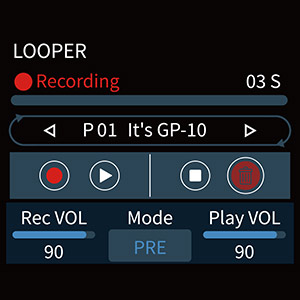
Figure 5: The looper interface on the GP-100 display, showing recording, playback, and volume controls.
Access the looper via the footswitches or menu. Controls typically include Record, Play/Stop, Undo, and Clear.
Ritmes de bateria
Practice with 100 built-in drum rhythms covering various genres. Adjust tempo (BPM) and volume to suit your needs.
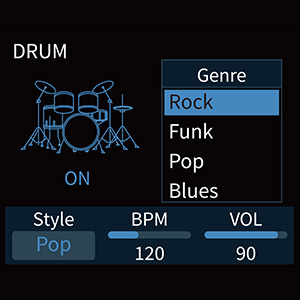
Figure 6: The drum machine interface, allowing selection of different genres and adjustment of BPM and volume.
Sintonitzador
The integrated tuner provides accurate chromatic tuning. Activate it via a dedicated footswitch function or menu option.
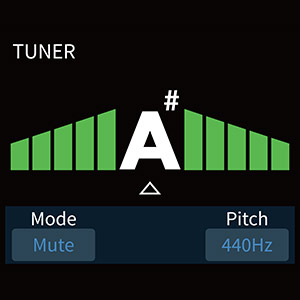
Figure 7: The tuner display, indicating pitch and tuning accuracy.
USB Audio Interface and Software
The GP-100 functions as a USB 2.0 audio interface, allowing direct recording to your computer (Mac/Windows) with stereo audio streaming. It also supports OTG (On-The-Go) for direct connection to iOS/Android mobile devices.
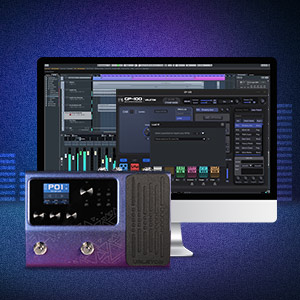
Figure 8: The GP-100 Violet connected to a computer, demonstrating its compatibility with dedicated software for sound editing and preset management.
Free Mac/Windows software is available for comprehensive sound editing and preset management, providing a visual interface for deeper customization.
Manteniment
Neteja
To maintain the appearance and functionality of your GP-100, regularly wipe the unit with a soft, dry cloth. Avoid using abrasive cleaners, solvents, or waxes, as these can damage the finish and internal components.
Emmagatzematge
When not in use for extended periods, store the GP-100 in a cool, dry place away from direct sunlight, extreme temperatures, and high humidity. Disconnect the power adapter and all cables before storage.
Actualitzacions de firmware
Valeton may release firmware updates to improve performance, add features, or fix bugs. Check the official Valeton website periodically for the latest firmware and instructions on how to update your GP-100 via the USB connection.
Resolució de problemes
If you encounter issues with your GP-100 Violet, refer to the following common troubleshooting steps:
| Problema | Causa possible | Solució |
|---|---|---|
| Sense sortida de so | Incorrect cable connections, low volume settings, incorrect input/output selection. |
|
| So distorsionat | Input level too high, incorrect gain staging, faulty cables. |
|
| La unitat no s'encén | Incorrect power adapter, loose power connection. |
|
| Problemes de connexió USB | Driver issues, faulty USB cable, incorrect USB port. |
|
If the problem persists after trying these steps, please contact Valeton customer support for further assistance.
Especificacions
| Característica | Detall |
|---|---|
| A/D/A Converter | Àudio d'alt rendiment de 24 bits |
| Sampfreqüència ling | 44.1 kHz |
| SNR | 110 dB |
| Maximum Simultaneous Effects | 9 |
| Impedància d'entrada | 1M ohms |
| Impedància d'entrada auxiliar | 10 k ohms |
| Sortides esquerra/dreta | 1/4" Unbalanced (TS) |
| Left/Right Output Impedance | 1 k ohms |
| Sortida d'auriculars | 1/8" Stereo (TRS) |
| Impedància de sortida dels auriculars | 47 ohms |
| Port USB | USB 2.0 tipus B |
| Especificació de gravació USB | Sample Rate: 44.1 kHz, Bit Depth: Supports 16-bit or 24-bit |
| Dimensions (L x P x A) | 198 mm x 134 mm x 28 mm (7.8 x 5.3 x 1.1 polzades) |
| Pes de la unitat | 800 g (1.76 lliures) |
| Requisits d'alimentació | DC 9V, 500mA (center negative) |
| Tipus de material | Metall |
Garantia i Suport
For information regarding warranty coverage, please refer to the warranty card included with your product or visit the official Valeton website. For technical support, product inquiries, or service, please contact Valeton customer support through their official channels.
Valeton Official Weblloc: www.valeton.net
Ask a question about this manual
Ask about setup, troubleshooting, compatibility, parts, safety, or missing instructions. Manuals+ will review the question and use this page’s manual context to help answer it.