
1. Introducció
This manual provides essential information for the installation, operation, and maintenance of your FERMAX Smart Video Intercom Kin FMX1445. Please read this manual thoroughly before using the device to ensure proper functionality and safety. Keep this manual for future reference.
2. Informació de seguretat
Instruccions importants de seguretat:
- Assegureu-vos que totes les connexions elèctriques compleixin els codis i les normatives locals.
- Installation should be performed by qualified personnel to prevent electrical shock or damage to the device.
- No exposeu el dispositiu a temperatures extremes, humitat o llum solar directa.
- Avoid placing the device near sources of strong electromagnetic interference.
- No intenteu obrir ni reparar el dispositiu vosaltres mateixos. Envieu totes les tasques de manteniment a personal de servei qualificat.
- Clean the device only with a soft, dry cloth. Do not use liquid or aerosol cleaners.
3. Contingut del paquet
Verifiqueu que tots els elements siguin presents al paquet:
- FERMAX Smart Video Intercom Kin FMX1445 Outdoor Panel
- Suport de muntatge i cargols
- Connectors de cablejat
- Manual d'usuari (aquest document)
- Guia d'inici ràpid

Image 1: FERMAX Smart Video Intercom Kin FMX1445 outdoor panel. This image shows the main unit with its camera, screen, and card reader.
4. Producte acabatview
The FERMAX Smart Video Intercom Kin FMX1445 is an advanced video intercom system designed for secure access control and communication. Key features include:
- Càmera d'alta resolució: Provides clear video feed of visitors.
- Pantalla integrada: Shows welcome messages, time, and call status.
- Àudio bidireccional: Enables communication with visitors.
- Connectivitat Wi-Fi: Allows remote access and control via a smartphone application.
- Detecció de moviment: Alerts users to activity at the entrance.
- Control d'accés: Supports various methods for entry, such as card readers or facial recognition (depending on specific model configuration).
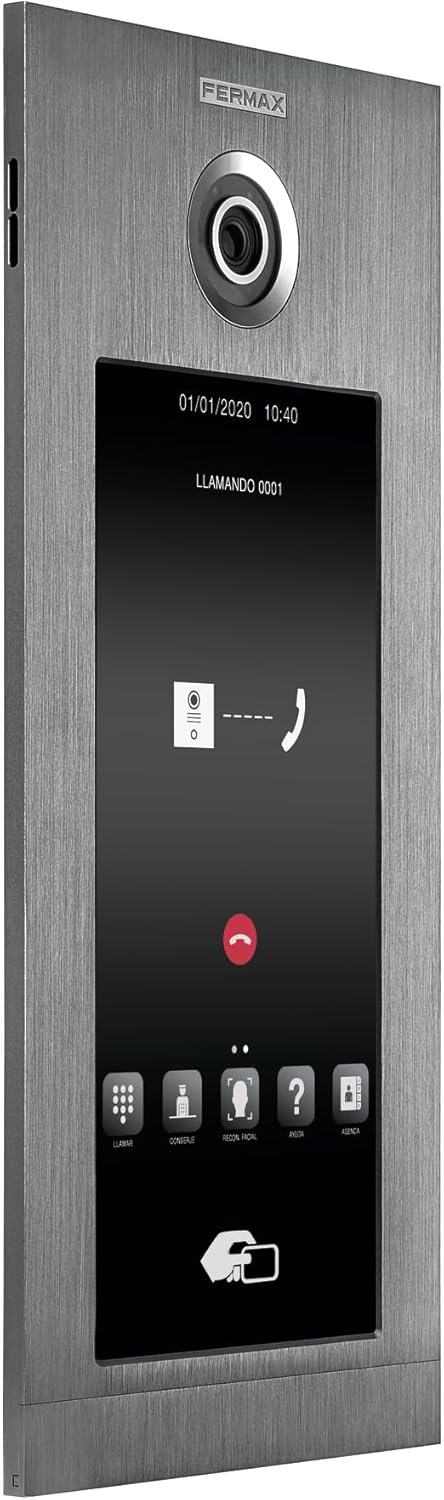
Image 2: Screen interface of the intercom during a call. This image displays the digital keypad, call buttons, and facial recognition option on the screen.
5. Configuració i instal·lació
Proper installation is crucial for the optimal performance of your FERMAX Smart Video Intercom. It is recommended that installation be performed by a professional electrician or installer.
5.1. Mounting the Outdoor Panel
- Choose a suitable location for the outdoor panel, typically near the main entrance, at a height that allows the camera to capture visitors' faces clearly.
- Feu servir el suport de muntatge proporcionat com a plantilla per marcar els punts de perforació a la paret.
- Perfora forats i insereix tacs de paret si cal.
- Fixeu el suport de muntatge a la paret amb els cargols proporcionats.
- Route necessary wiring through the wall opening to the back of the panel.

Image 3: FERMAX Smart Video Intercom Kin FMX1445 installed on a wall next to an entrance. This image demonstrates a typical installation scenario.
5.2. Connexions elèctriques
- Connect the power supply wires to the designated terminals on the intercom panel. Refer to the wiring diagram in the Quick Start Guide for specific connections.
- Connect the lock control wires to your electric door strike or gate opener.
- Assegureu-vos que totes les connexions estiguin segures i aïllades.
5.3. Configuració de xarxa (Wi-Fi)
- Power on the intercom unit.
- Follow the on-screen prompts or refer to the Quick Start Guide to connect the device to your local Wi-Fi network.
- Download the FERMAX app on your smartphone or tablet.
- Register an account and add your intercom device by following the in-app instructions. This typically involves scanning a QR code on the device or entering a serial number.
6. Instruccions de funcionament
6.1. Contestar una trucada
- When a visitor presses the call button on the outdoor panel, your indoor monitor (if applicable) and smartphone app will receive a notification.
- On the indoor monitor, press the "Answer" button to establish two-way audio and video communication.
- On the smartphone app, tap the notification to open the app and answer the call.
6.2. Granting Access
- During an active call, press the "Unlock" button on your indoor monitor or smartphone app to remotely open the connected door or gate.
- For card access models, present a registered access card to the reader on the outdoor panel.
6.3. Alertes de detecció de moviment
- The intercom is equipped with motion detection. When motion is detected, you may receive a notification on your smartphone app.
- Adjust motion detection sensitivity and notification settings within the FERMAX app.

Image 4: A person interacting with the FERMAX Smart Video Intercom. This image illustrates the user experience with the device.
7. Manteniment
- Neteja: Wipe the outdoor panel and screen with a soft, damp drap. No utilitzeu productes de neteja abrasius, dissolvents ni productes químics agressius.
- Actualitzacions de firmware: Periodically check the FERMAX app for available firmware updates to ensure optimal performance and security. Follow the in-app instructions for updating.
- Comprovació de connectivitat: Regularly verify that your intercom is connected to your Wi-Fi network and that the app is receiving notifications.
8. Solució De Problemes
| Problema | Causa possible | Solució |
|---|---|---|
| Sense energia a la unitat. | Power cable disconnected or power outage. | Check power connections. Verify power supply is active. |
| No es pot connectar a la Wi-Fi. | Incorrect Wi-Fi password, weak signal, or router issue. | Ensure correct password. Move router closer or use a Wi-Fi extender. Restart router. |
| No hi ha vídeo ni àudio durant una trucada. | Network issue, camera/microphone malfunction. | Check network connection. Restart the intercom. If problem persists, contact support. |
| El pany de la porta no s'obre. | Wiring issue, lock malfunction, or incorrect settings. | Verify lock wiring. Test the lock independently. Check app settings for lock control. |
| No s'han rebut alertes de moviment. | Motion detection disabled, app notifications off, or network issue. | Enable motion detection in the app. Check phone notification settings. Ensure stable network connection. |
9. Especificacions
| Característica | Detall |
|---|---|
| Model | FMX1445 |
| Marca | FERMAX |
| Tecnologia de comunicació sense fils | Wi-Fi |
| Tipus d'alerta | Només moviment |
| Recompte d'unitats | 1.0 recompte |
| Fabricant | FERMAX |
| ASIN | B0CVZZPW1 |
10. Garantia i Suport
FERMAX products are designed for reliability and performance. For specific warranty details, please refer to the warranty card included with your product or visit the official FERMAX website. For technical support, troubleshooting assistance, or service inquiries, please contact FERMAX customer support through their official channels.
Recursos en línia: For additional information, FAQs, and software downloads, please visit the FERMAX Store on Amazon or the official FERMAX weblloc.