
1. Introducció
This manual provides essential instructions for the safe operation, maintenance, and troubleshooting of your Yeedi Cube Robot Vacuum and Mop. Please read this manual thoroughly before using the product and retain it for future reference. The Yeedi Cube is designed to provide an automated cleaning experience, combining vacuuming and mopping with self-emptying, self-washing, and self-drying capabilities.
2. Informació de seguretat
Per reduir el risc de lesions o danys, llegiu i seguiu totes les precaucions de seguretat. Aquest aparell és només per a ús domèstic.
- No permeteu que els nens juguin amb el robot.
- Assegureu-vos que la potència voltage matches the rating label on the charging station.
- No feu funcionar el robot en ambients humits ni a prop de materials inflamables.
- Mantingueu els cabells, la roba solta, els dits i totes les parts del cos lluny de les obertures i les parts mòbils.
- Do not pick up large objects, sharp objects, or liquids with the robot.
- Always disconnect the robot from the charging station before cleaning or performing maintenance.
- Utilitzeu només accessoris i accessoris especificats pel fabricant.
3. Contingut del paquet
Verifiqueu que tots els elements siguin presents al paquet:
- Yeedi Cube Robotic Vacuum Cleaner x 1
- Cube Station x 1
- Edge Brushes x 2
- Mopping Pad x 1
- Water Tank Plug x 1
- Manual d'usuari (aquest document)
4. Producte acabatview
Familiarize yourself with the components of your Yeedi Cube system.

Figura 4.1: The Yeedi Cube Robot Vacuum and Mop docked in its charging station, with a smartphone displaying the companion app interface. This image illustrates the complete system, including the robot, the self-cleaning station, and the digital control interface.
4.1. Cube Station Features
The Cube Station is the central hub for your robot, providing self-emptying, self-washing, and hot air drying functionalities.

Figura 4.2: Un detallat view of the Yeedi Cube Station, emphasizing its three core functions: self-emptying of the dustbin, self-washing of the mop pads, and hot air drying of the mop pads to prevent odors and humidity.
4.2. Robot Vacuum and Mop
The robot features powerful suction, sonic mopping, and intelligent navigation.

Figura 4.3: The underside of the Yeedi Cube Robot Vacuum, showing its dual edge brushes designed to sweep debris from corners and edges, along with its main brush for effective vacuuming.
5. Configuració
5.1. Desembalatge i col·locació
- Remove all packaging materials and protective films from the robot and the Cube Station.
- Place the Cube Station on a hard, level surface against a wall. Ensure there is at least 0.5 meters (1.6 feet) of clear space on both sides and 1.5 meters (4.9 feet) in front of the station.
- Connect the power adapter to the Cube Station and plug it into a wall outlet.
5.2. Càrrega inicial
Place the robot onto the Cube Station. Ensure the charging contacts on the robot align with those on the station. The robot will begin charging automatically. For first-time use, fully charge the robot before operation (approximately 6 hours).
5.3. Descàrrega i connexió de l'aplicació
- Download the "yeedi" app from the App Store (iOS) or Google Play Store (Android).
- Open the app and follow the on-screen instructions to create an account and add your Yeedi Cube.
- Assegureu-vos que la vostra xarxa Wi-Fi sigui de 2.4 GHz per a una connexió correcta.
5.4. Mapping Your Home
After connecting to the app, initiate a mapping run. The robot will navigate your home to create a detailed map, which is essential for efficient cleaning and setting up custom cleaning areas.

Figura 5.1: An illustration of the Yeedi app's multi-map saving feature, showing how the robot can store and manage maps for different floors or areas of a home.
6. Instruccions de funcionament
6.1. Modes de neteja
The Yeedi Cube offers various cleaning modes accessible via the app:
- Només aspiradora: Per a la recollida de deixalles seques.
- Només fregona: For wet cleaning with the mop pads. Ensure the water tank is filled.
- Aspiradora i fregona: Aspiració i fregada simultànies.
- Neteja de la zona: Select specific rooms or zones on the map for cleaning.
- Neteja de punts: Direct the robot to clean a small, concentrated area.
6.2. Sonic Mopping Technology
The robot utilizes sonic vibrations (up to 2,500 times per minute) to effectively scrub floors. Ensure the water tank is filled with clean water before mopping operations.

Figura 6.1: The Yeedi Cube Robot Vacuum in action, illustrating its sonic mopping capability with visible water trails, indicating the high-frequency vibration for effective floor scrubbing.
6.3. Automatic Mop Lifting
The Yeedi Cube can automatically lift its mop pads by 8mm when detecting carpets, preventing them from getting wet during combined vacuuming and mopping tasks.
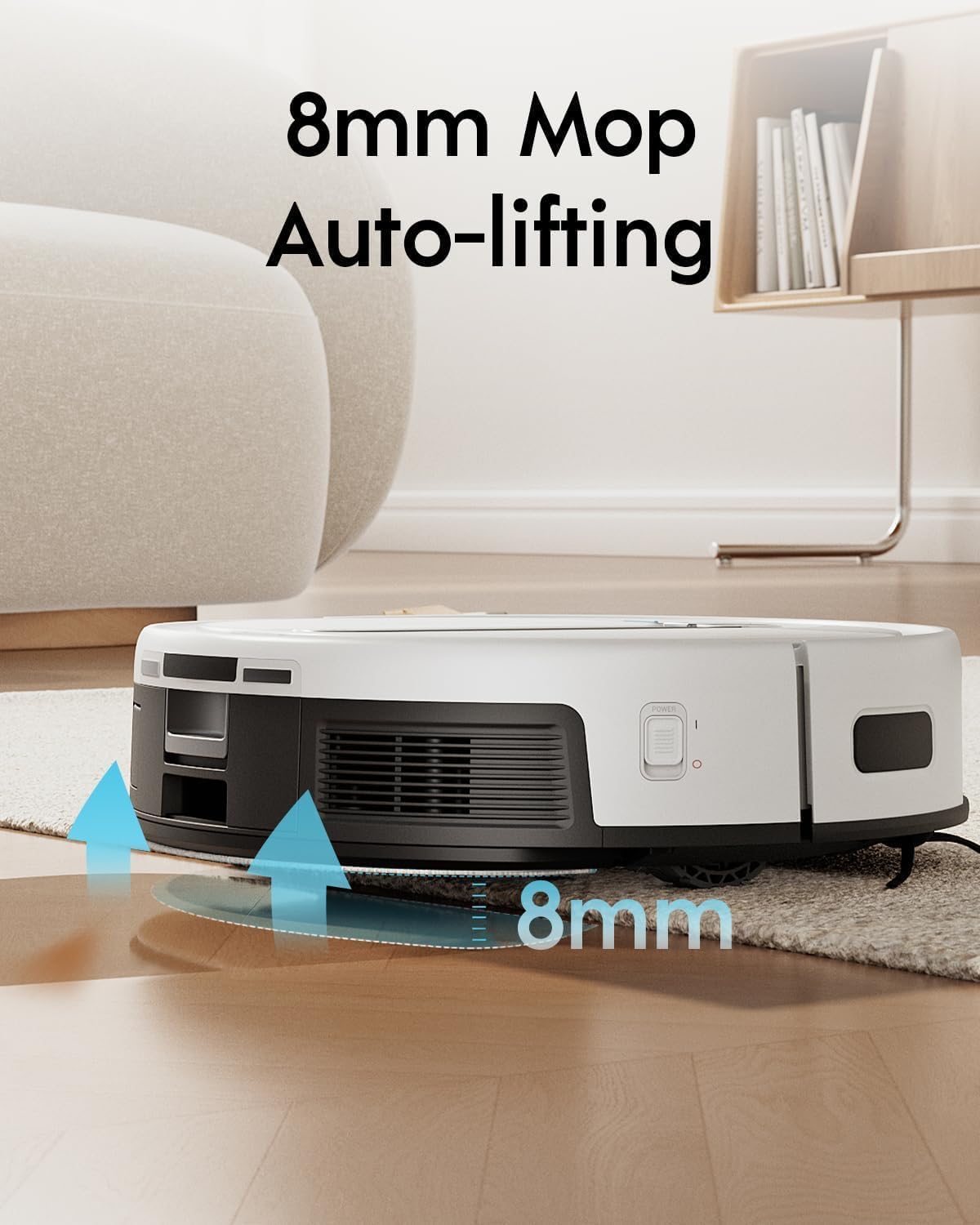
Figura 6.2: The Yeedi Cube Robot Vacuum positioned over a carpet, with arrows indicating the 8mm automatic mop lifting mechanism, designed to keep carpets dry during mopping operations.
6.4. Self-Emptying, Self-Washing, and Self-Drying
The Cube Station manages these functions automatically:
- Autobuidament: After each cleaning cycle, the robot returns to the station to automatically empty its dustbin into a sealed bag within the station.
- Self-Washing: During and after mopping tasks, the station washes the robot's mop pads with clean water.
- Self-Drying: After washing, the station uses 104°F (40°C) hot air to dry the mop pads, preventing mildew and odors.
6.5. Scheduling and Virtual Boundaries
Use the yeedi app to set cleaning schedules, define no-go zones, and create virtual walls to restrict the robot from certain areas.
7. Manteniment
Regular maintenance ensures optimal performance and extends the lifespan of your Yeedi Cube.
7.1. Paperera i filtre
- Buidat: The robot automatically empties its internal dustbin into the station's dust bag. Replace the station's dust bag when full (approximately every 60 days, depending on usage).
- Filtre de neteja: The robot's internal filter (sponge type) should be cleaned regularly (weekly) and replaced every 3-6 months.
7.2. Mop Pads and Water Tanks
- Fregones: The station self-washes the mop pads. Periodically remove and hand-wash or machine-wash the mop pads for a deeper clean. Replace worn mop pads as needed.
- Dipòsit d'aigua neta: Refill the clean water tank in the Cube Station as needed.
- Dipòsit d'aigua bruta: Empty the dirty water tank in the Cube Station after each mopping cycle or when prompted by the app. Clean the tank to prevent buildup.
7.3. Pinzells
- Pinzell principal: Remove the main brush cover and main brush. Use the cleaning tool to remove hair and debris. Clean weekly.
- Edge Brushes: Check edge brushes for wear or entanglement. Remove and clean them, or replace if damaged. Clean monthly.
7.4. Sensors i contactes de càrrega
- Wipe all sensors (cliff sensors, anti-collision sensors) and charging contacts on both the robot and the station with a clean, dry cloth monthly.
8. Solució De Problemes
Refer to this section for common issues and their solutions. For more detailed troubleshooting, consult the yeedi app or customer support.
| Problema | Causa possible | Solució |
|---|---|---|
| El robot no es carrega. | Charging contacts are dirty or misaligned. Power cable is disconnected. | Clean charging contacts on both robot and station. Ensure power cable is securely plugged in. |
| El robot es queda encallat sovint. | Obstacles in the cleaning path. Sensors are dirty. | Clear cables, rugs, and small objects. Clean all sensors. Update map if necessary. |
| Poor vacuuming performance. | Dustbin full. Main brush or edge brushes tangled. Filter clogged. | Empty dustbin/replace dust bag. Clean main and edge brushes. Clean or replace filter. |
| Poor mopping performance or water leakage. | Water tank empty or improperly installed. Mop pads dirty or worn. | Fill clean water tank. Ensure water tank plug is securely inserted. Clean or replace mop pads. |
| Problemes de connexió de l'aplicació. | Incorrect Wi-Fi password. Robot too far from router. 5GHz Wi-Fi network. | Verify Wi-Fi password. Move robot closer to router. Ensure 2.4GHz Wi-Fi is used. Reset Wi-Fi on robot if needed. |
9. Especificacions
| Característica | Detall |
|---|---|
| Marca | yeedi |
| Nom del model | yeedi cube |
| Dimensions del producte | 50.8L x 45.6W x 43H Centimetres (Robot and Station) |
| Pes de l'article | 17.3 kg |
| Temps d'execució | Fins a 3 hores |
| Capacitat del dipòsit d'aigua | 1 Liter (Robot), 3.5 Liters (Station) |
| Característiques especials | Auto-Docking, Self-Emptying, Self-Washing, Hot Air Drying, 8mm Auto Mop-Lifting, Sonic Mopping, Visual and Laser Fusion Navigation |
| Tipus de controlador | Control d'aplicacions |
| Recomanació de superfície | Hard Floor, Low-Pile Carpet |
| Tipus de filtre | Esponja |
| Models compatibles | Amazon Echo (for voice control) |
10. Garantia i Suport
Your Yeedi Cube Robot Vacuum and Mop comes with a limited warranty. For specific warranty terms and conditions, please refer to the warranty card included in your product packaging or visit the official yeedi website. For technical support, troubleshooting assistance, or to order replacement parts, please contact yeedi customer service through their official website or the yeedi app.
Assistència en línia: www.yeedi.com


