
1. Introducció
Thank you for choosing the Sharp 50FQ5EG 50-inch QLED 4K Google TV. This manual provides essential information for setting up, operating, maintaining, and troubleshooting your new television. Please read it thoroughly before use and keep it for future reference.
Característiques principals:
- 50-inch QLED 4K Ultra HD Display with 144 Hz Refresh Rate
- Google TV Operating System with Google Assistant and Chromecast built-in
- Harman/Kardon Hybrid Speaker System with Dolby Atmos
- Dolby Vision IQ, HDR10, HLG Support
- Multiple Connectivity Options: 4 x HDMI 2.1, 2 x USB, Bluetooth 5.3, Wi-Fi, Ethernet
- Frameless Aluminum Design
Components inclosos:
- Sharp 50FQ5EG Television
- Pedestal
- Control remot (requereix 2 piles AAA, incloses)
- Manual d'instruccions
- Cable d'alimentació
2. Informació de seguretat
Per garantir un funcionament segur i evitar danys, observeu les següents precaucions de seguretat:
- Font d'alimentació: Connect the TV only to an AC 220V, 50Hz power outlet. Do not overload power outlets.
- Ventilació: Assegureu-vos que hi hagi una ventilació adequada al voltant del televisor. No bloquegeu les obertures de ventilació.
- Líquid i humitat: Do not expose the TV to rain, moisture, or dripping/splashing liquids. Do not place objects filled with liquids on the TV.
- Fonts de calor: Keep the TV away from heat sources such as radiators, heat registers, stoves, or other heat-producing appliances.
- Neteja: Desendolleu el televisor de la presa de corrent abans de netejar-lo. Feu servir un drap suau i sec. No utilitzeu netejadors líquids ni aerosols.
- Manteniment: No intenteu atendre aquest producte vosaltres mateixos. Consulteu tots els serveis a personal de servei qualificat.
- Nens: Supervise children to ensure they do not play with the TV or remote control.
3. Configuració
3.1 Desembalatge
Traieu amb cura el televisor i tots els accessoris de l'embalatge. Conserveu els materials d'embalatge per a futurs transports o reparacions.
3.2 Attaching the Pedestal Stand
If you are not wall-mounting the TV, attach the included pedestal stand:
- Col·loqueu el televisor cara avall sobre una superfície suau i plana per evitar que la pantalla es faci malbé.
- Alineeu els components del suport amb els forats de muntatge de la part inferior del televisor.
- Fixeu el suport amb els cargols proporcionats. Assegureu-vos que el suport estigui ben fixat abans de col·locar el televisor en posició vertical.

Imatge: Primer pla view of the TV's pedestal stand and integrated Harman/Kardon speakers.
3.3 Muntatge a la paret (opcional)
The Sharp 50FQ5EG supports VESA wall mounts with a standard of 200 x 200 mm. Use M6 screws (not included) with a length appropriate for your wall mount bracket. Consult a professional for wall mounting to ensure safety and proper installation.
3.4 Connexió de perifèrics
Connect your external devices to the TV's ports. The TV features 4 HDMI 2.1 ports, 2 USB ports, Ethernet, and an optical audio output.
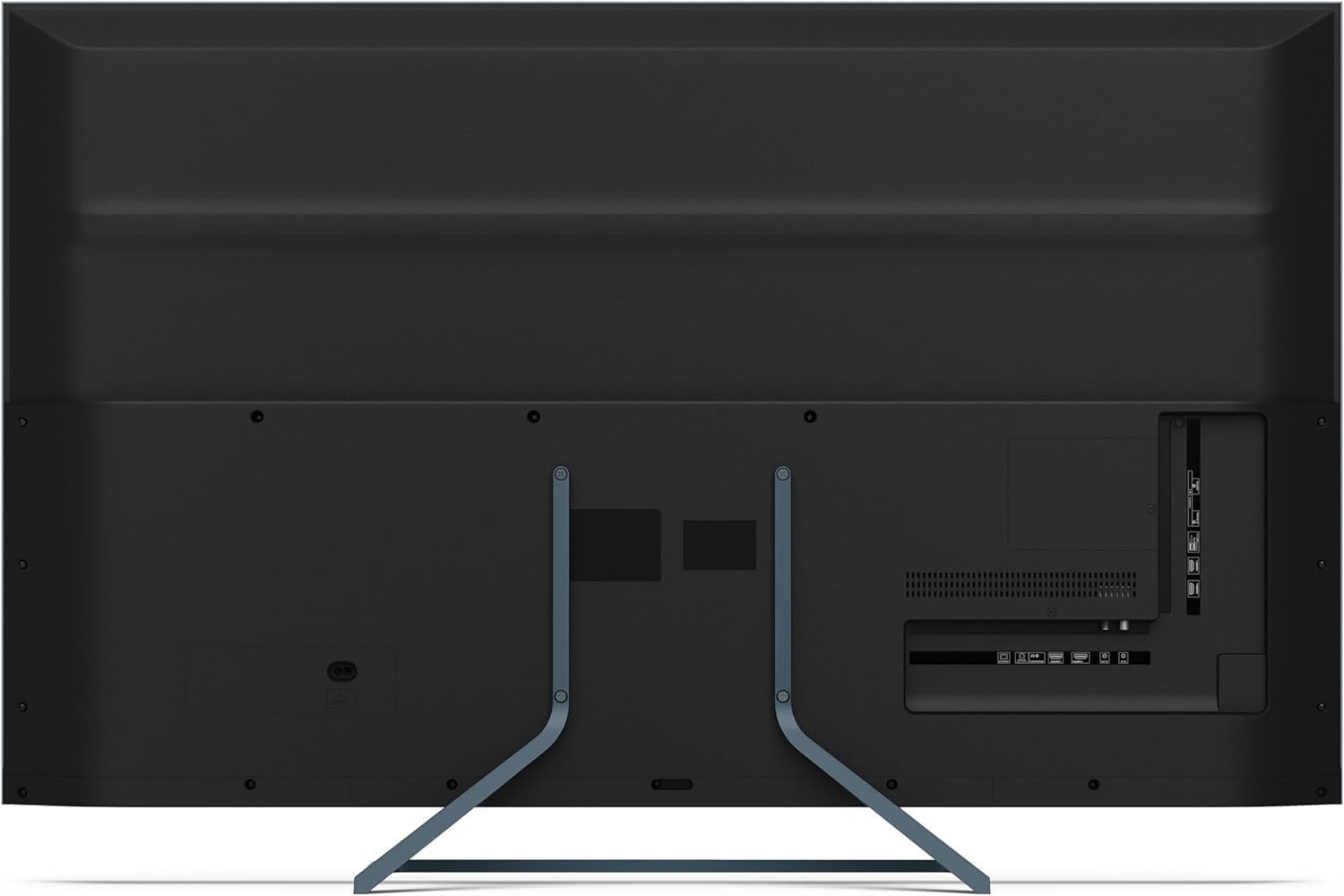
Imatge: Part posterior view of the television displaying the arrangement of HDMI, USB, and other connectivity ports.
- HDMI: Connect Blu-ray players, game consoles, or set-top boxes. HDMI 2.1 supports eARC and ALLM for enhanced audio and gaming.
- USB: Connecteu dispositius d'emmagatzematge USB per a la reproducció de contingut multimèdia.
- Ethernet: Per a una connexió a Internet per cable.
- Potència: Connecteu el cable d'alimentació al televisor i després a una presa de corrent.
3.5 Engegada inicial i configuració de Google TV
- Connecteu el televisor a una presa de corrent.
- Premeu el botó d'engegada del comandament a distància o del televisor.
- The TV will guide you through the initial setup process, including language selection, network connection (Wi-Fi or Ethernet), and Google account sign-in.
- Vinculació de control remot: During initial setup, you may need to pair the Bluetooth remote control. Follow the on-screen instructions, typically involving pressing specific buttons on the remote simultaneously.
4. Funcionament del televisor
4.1 Control remot
The included remote control uses Bluetooth for enhanced functionality. It allows navigation, voice control via Google Assistant, and quick access to various features.
4.2 Interfície de Google TV
The Google TV interface organizes your content from various streaming services and apps. Use the remote's directional pad to navigate through menus, select apps, and browse content.

Image: The television screen showing the Google TV home interface with recommended content and installed applications.
4.3 Configuració de la imatge
Your Sharp 50FQ5EG TV features advanced picture technologies:
- QLED Q-Colour: Provides vibrant and accurate color reproduction.
- 4K Ultra HD: Delivers sharp and detailed images.
- Freqüència de refresc de 144 Hz: Ensures smooth motion, especially beneficial for gaming and fast-paced content.
- Dolby Vision IQ, HDR10, HLG: Supports various High Dynamic Range formats for enhanced contrast and brightness.
- AQUOS Motion: Improves motion clarity by reducing blur.
- Eco Sensor: Ajusta automàticament la brillantor en funció de les condicions de llum ambiental.
Access picture settings through the TV's menu to customize brightness, contrast, color, and other display options.
4.4 Configuració de so
The TV is equipped with a Harman/Kardon Hybrid Speaker System and supports Dolby Atmos for immersive audio.
- Harman/Kardon Speakers: Delivers clear sound with powerful bass.
- Dolby Atmos: Provides a three-dimensional audio experience.
Adjust sound modes, equalizer settings, and volume levels via the TV's audio menu.
4.5 Connectivitat
- Wi-Fi/Ethernet: Connecta't a la teva xarxa domèstica per accedir a Internet i reproduir en temps real.
- Bluetooth 5.3: Connecteu auriculars sense fil, barres de so o altres dispositius compatibles amb Bluetooth.
- Google Cast: Cast content from your mobile devices or computer directly to the TV.
4.6 Ús d'aplicacions
The Google TV platform provides access to a wide range of applications from the Google Play Store, including:
- Netflix, Amazon Prime Video, HBO, Disney+, Movistar+, DAZN, Atresmedia
- KODI, IPTV, Steamlink, Twitch, VLC, YouTube
- Puffin TV Browser, Spotify, Deezer, TuneIn Radio
Navigate to the 'Apps' section on the Google TV home screen to browse, download, and manage your applications.
5. Manteniment
5.1 Neteja del televisor
- Pantalla: Netegeu suaument la pantalla amb un drap suau i sense borrissol. Per a marques difícils, netegeu lleugerament.ampNetegeu el drap amb aigua o un netejador de pantalles especialitzat (apliqueu-lo al drap, no directament a la pantalla).
- Cos: Netegeu el marc i el suport del televisor amb un drap suau i sec.
- No utilitzi: Abrasive cleaners, alcohol, benzene, or thinners, as these can damage the TV's surface.
5.2 Actualitzacions de programari
El televisor pot rebre actualitzacions de programari per millorar el rendiment i afegir noves funcions. Assegureu-vos que el televisor estigui connectat a Internet per rebre aquestes actualitzacions automàticament o comproveu-les manualment al menú de configuració.
6. Solució De Problemes
Si teniu problemes amb el televisor, consulteu els problemes i solucions més comuns següents:
| Problema | Possible solució |
|---|---|
| Sense poder | Check if the power cable is securely connected to the TV and the wall outlet. Ensure the outlet has power. Try a different outlet. |
| No hi ha imatge, però hi ha so | Comproveu la font d'entrada. Assegureu-vos que els dispositius externs estiguin encesos i connectats correctament. Proveu un altre cable HDMI. |
| No hi ha so, però hi ha imatge | Check the volume level. Ensure mute is not activated. Check audio output settings (e.g., internal speakers, external soundbar). |
| El control remot no respon | Replace the batteries. Ensure there are no obstructions between the remote and the TV. Re-pair the Bluetooth remote if necessary (refer to initial setup). |
| No es pot connectar a la Wi-Fi | Check your router and modem. Ensure the Wi-Fi password is correct. Try restarting the TV and your router. |
| Apps Not Working/Freezing | Ensure the TV has a stable internet connection. Try clearing the app's cache or reinstalling the app. Restart the TV. |
Si el problema persisteix després de provar aquestes solucions, poseu-vos en contacte amb l'atenció al client.
7. Especificacions

Image: Technical drawing illustrating the width, height, and depth of the television with and without its stand.
| Característica | Especificació |
|---|---|
| Número de model | 50FQ5EG |
| Mida de la pantalla | 50 polzades |
| Tecnologia de visualització | QLED, LED |
| Resolució | 4K Ultra HD (3840 x 2160) |
| Freqüència d'actualització | 144 Hz |
| Suport HDR | Dolby Vision IQ, HDR10, HLG |
| Sistema operatiu | Google TV |
| Sortida d'àudio | 2.1 Channel Harman/Kardon Speakers, 15W Max Power, Dolby Atmos |
| Connectivitat | 4 x HDMI 2.1, 2 x USB 2.0, Bluetooth 5.3, Wi-Fi, Ethernet |
| Estàndard de muntatge VESA | 200 x 200 mm |
| Dimensions amb suport (A x A x P) | 113.22 x 73.89 x 23.2 cm |
| Dimensions sense suport (A x A x P) | 113.22 x 66.87 x 6.0 cm |
| Pes (sense suport) | 11.5 kg |
| Consum d'energia (en funcionament) | 84 watts |
| Consum anual d'energia | 64 kWh/any |
| Mètode de control | Voice (Google Assistant), Remote Control |
| Color | Anthracite Grey Aluminum |
8. Garantia i Suport
8.1 Informació de la garantia
This Sharp 50FQ5EG television comes with a Garantia limitada. Please refer to the warranty card included with your product or visit the official Sharp weblloc web per obtenir informació detallada sobre els termes i condicions pel que fa a la cobertura, la durada i els procediments del servei.
8.2 Atenció al client
For technical assistance, troubleshooting beyond this manual, or warranty claims, please contact Sharp customer support. Contact details can typically be found on the Sharp official weblloc web o a la documentació que s'inclou amb el televisor.


