Introducció
Gràcies per la compraasing the XDOBO KING MAX 140W Portable Wireless Speaker. This manual provides essential information for setting up, operating, maintaining, and troubleshooting your speaker. Please read this manual thoroughly before use to ensure optimal performance and longevity of your device.
Informació de seguretat
- No exposeu l'altaveu a temperatures extremes, llum solar directa ni humitat elevada.
- Keep the speaker away from water and liquids, despite its IPX5 rating, to prevent damage.
- No desmunteu, repareu ni modifiqueu el dispositiu vosaltres mateixos. Envieu totes les tasques de manteniment a personal qualificat.
- Use only the specified charging cable and power supply (Type C 5V3A) to avoid damage or fire.
- Eviteu escoltar a nivells de volum elevats durant períodes prolongats per evitar danys auditius.
- Mantenir fora de l'abast dels nens.
Contingut del paquet
Si us plau, comproveu el paquet per veure si hi ha els elements següents:
- 1 x XDOBO KING MAX Speaker
- 1 x Cable de càrrega (Tipus C)
- 1 x cable d'àudio
- 1 x manual d'instruccions
- 1 x corretja
- 2 x micròfons

Image: The XDOBO KING MAX speaker shown with its two accompanying wireless microphones, illustrating the complete product package.
Producte acabatview
Controls i Ports
Familiarize yourself with the various input and control options available on your speaker:
- BT (Bluetooth): Per a la transmissió d'àudio sense fil.
- Ranura per a targetes TF: For playing audio directly from a MicroSD card.
- USB Flash Disk Port: For playing audio directly from a USB drive.
- 3.5mm AUX Line Input: For wired audio connection from external devices.
- 6.5mm Audio Cable Input: For connecting additional audio sources or instruments.
- Entrades de micròfon: Dedicated ports for the wireless microphones.
- Botó d'encesa: Per encendre/apagar l'altaveu.
- Controls de volum: To adjust the speaker's output volume.
- Botó de mode: To switch between different playback modes.
- TWS Button (Key III): For connecting two speakers in True Wireless Stereo mode.
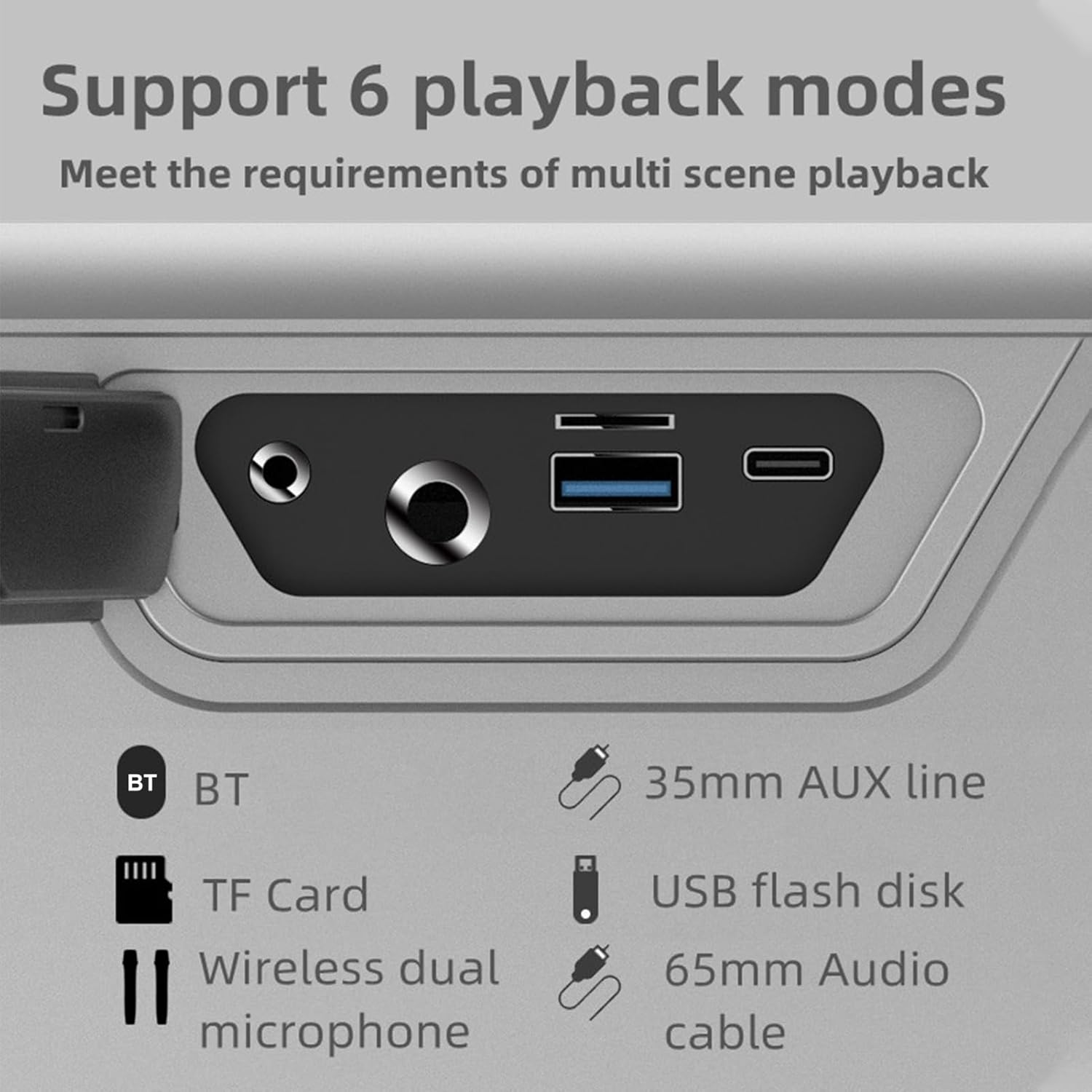
Imatge: Un primer pla view of the speaker's rear panel, highlighting the BT, TF Card, Wireless Dual Microphone, 3.5mm AUX line, USB flash disk, and 6.5mm Audio cable input ports.
Configuració
1. Carregant l’altaveu
Before first use, fully charge the speaker. Connect the provided Type-C charging cable to the speaker's charging port and the other end to a 5V/3A power adapter (not included). The charging time is approximately 9 hours for a full charge. The battery capacity is 36000mAh (7.4V).
2. Configuració del micròfon
The speaker comes with two UHF wireless karaoke microphones. To use them, ensure they are charged (if applicable) and powered on. They should automatically connect to the speaker when both devices are on and within range. Refer to the microphone's individual instructions for specific pairing details if needed.

Image: The XDOBO KING MAX speaker and its two wireless microphones are displayed on a wooden table, ready for use in a home setting.
Instruccions de funcionament
1. Encendre/apagar
Premeu i manteniu premut el botó d'engegada per encendre o apagar l'altaveu.
2. Bluetooth Pairing (BT Mode)
- Engega l'altaveu. Entrarà automàticament en mode d'emparellament Bluetooth.
- Activa el Bluetooth al teu dispositiu (telèfon intel·ligent, tauleta, etc.).
- Cerca "XDOBO KING MAX" (or similar name) in your device's Bluetooth list and select it to connect.
- Once connected, the speaker will indicate successful pairing. The effective Bluetooth distance is up to 18 meters in open areas.
3. Mode TWS (True Wireless Stereo)
If you have two XDOBO KING MAX speakers, you can connect them for a stereo sound experience. TWS mode is supported only in Bluetooth mode.
- Assegureu-vos que tots dos altaveus estiguin encesos i no connectats a cap altre dispositiu Bluetooth.
- On either speaker, click the TWS button (often labeled as 'III' or a dedicated TWS icon).
- The speakers will automatically search and pair with each other. Once connected, they will function as a stereo pair.
- Now, connect your device to one of the speakers via Bluetooth as described above. Audio will play through both speakers in stereo.

Image: A visual representation of two XDOBO KING MAX speakers wirelessly connected to create a stereo sound system, emphasizing the TWS (True Wireless Stereo) functionality.
4. Canvi de modes de reproducció
Press the Mode button to cycle through the available playback modes:
- Bluetooth (BT)
- Targeta TF
- Disc flash USB
- AUX Input (3.5mm or 6.5mm)
- Karaoke Mode (with microphones)
Supported audio formats include APE, FLAC, WAV, and MP3.
5. Ús del micròfon (karaoke)
Turn on the wireless microphones. They will automatically connect to the speaker. Adjust the microphone volume and echo effects (if available on the speaker or microphone) for your karaoke experience. The speaker supports full frequency, voice, and subwoofer sound effect modes, enhancing your audio and vocal performance.
6. Output Phone Charging
The speaker supports output phone charging. You can use the USB port to charge your mobile device while the speaker is on, utilizing its large battery capacity.
Manteniment
- Neteja: Feu servir un drap suau i sec per netejar la superfície de l'altaveu. No utilitzeu productes de neteja abrasius ni dissolvents.
- Emmagatzematge: Guardeu l'altaveu en un lloc fresc i sec quan no l'utilitzeu. Eviteu temperatures extremes.
- Cura de la bateria: To prolong battery life, charge the speaker fully at least once every three months if not used regularly. Avoid completely draining the battery frequently.
- Resistència a l'aigua: The IPX5 rating means it can resist a sustained, low-pressure water jet spray. Do not submerge the speaker in water. Ensure all port covers are securely closed before exposure to water.
Resolució de problemes
| Problema | Causa possible | Solució |
|---|---|---|
| L'altaveu no s'encén | Bateria baixa; el botó d'engegada no s'ha premut correctament | Carregueu l'altaveu; premeu i manteniu premut el botó d'engegada durant uns segons |
| Sense so | Volum massa baix; Mode incorrecte; Dispositiu no connectat | Increase volume; Switch to correct playback mode (BT, AUX, TF, USB); Reconnect device |
| Connexió Bluetooth inestable | Too far from device; Obstacles; Interference | Move speaker closer to device (within 18M); Remove obstacles; Avoid strong electromagnetic interference |
| El micròfon no funciona | Microphone off; Low microphone battery; Not paired | Turn on microphone; Charge microphone; Re-pair microphone with speaker |
| L'aparellament de TWS ha fallat | Speakers already connected to other devices; Not in BT mode | Disconnect speakers from other devices; Ensure both are in BT mode before TWS pairing |
Especificacions

Image: A graphic detailing the technical specifications and parameters of the XDOBO KING MAX speaker, including BT version, power, waterproof rating, and battery life.
| Característica | Especificació |
|---|---|
| Versió BT | V5.2 |
| Potència nominal | 140W |
| Classificació impermeable | IPX5 |
| Ràtio senyal / soroll | 75 dB |
| Interval de resposta de freqüència | 20 Hz - 20 kHz |
| Distorsió | ≤1% |
| Effective Distance (BT) | 18M (àrea oberta) |
| Font d'alimentació d'entrada | Type C 5V3A |
| Temps de joc | 4-12 hours (varies by volume and content) |
| Temps de càrrega | Unes 9 hores |
| Capacitat de la bateria | 36000mAh 7.4V (Built-in lithium battery) |
| Connexió TWS | BT |
| Modes d'efectes de so | Full frequency, Voice, Subwoofer |
| Output Phone Charging | Admet |
| Formats suportats | APE, FLAC, WAV, MP3 |
| Modes de treball | BT, TF card, USB flash disk, AUX cable, Karaoke |
| Mida del producte | 255 x 125 x 255 mm |
| Pes del producte | 4476 g |
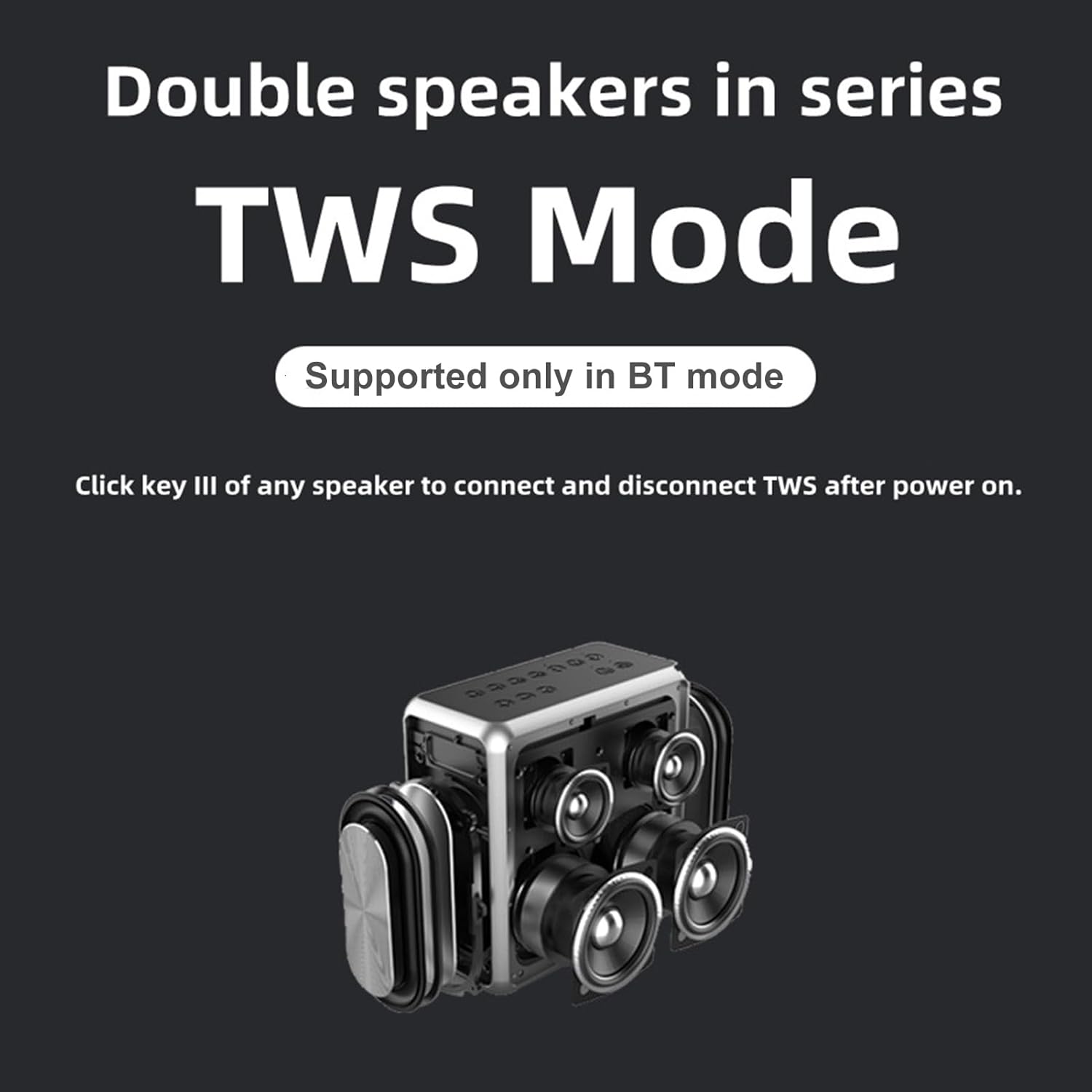
Image: A technical drawing illustrating the length, width, and height measurements of the XDOBO KING MAX speaker.
Garantia i Suport
This product comes with a standard manufacturer's warranty. Please refer to the warranty card included in your package for specific terms and conditions. For technical support, troubleshooting assistance, or warranty claims, please contact the retailer or manufacturer's customer service. Keep your purchase receipt as proof of purchase.


