
1. Introducció
This manual provides detailed instructions for the assembly, operation, maintenance, and troubleshooting of your FLEXISPOT E6 MAX Electric Height Adjustable Standing Desk. Please read this manual thoroughly before assembly and use to ensure safe and efficient operation of your desk.
The FLEXISPOT E6 MAX features a durable bamboo desktop, a robust dual-motor system for smooth height adjustments, and a programmable control panel for personalized ergonomic settings. It is designed to support a healthy and productive workspace.

Image: The FLEXISPOT E6 MAX standing desk in an office setup, showcasing its bamboo desktop and black frame with integrated control panel.
2. Informació de seguretat
Instruccions importants de seguretat:
Always use the height adjustment feature slowly and carefully to prevent injury. Do not exceed the weight capacity of 352 pounds to ensure stability and safety.
- Ensure all cables are properly managed and secured to prevent entanglement during height adjustments.
- Mantingueu els nens i les mascotes allunyats de l'escriptori durant el funcionament.
- No seure ni parar sobre el marc de l'escriptori.
- Eviteu col·locar líquids directament sobre el tauler de control o a prop de components elèctrics.
- Inspeccioneu regularment tots els elements de fixació i connexions per assegurar-vos que estiguin ben fixats.
- If any unusual noise or movement occurs, discontinue use and contact support.
3. Contingut del paquet
Verify that all components are present before beginning assembly. If any parts are missing or damaged, please contact FLEXISPOT customer support.
- Bamboo Desktop (48"x24" Whole-Piece)
- Black Frame (Dual Motor, 3-Stage Legs)
- Control Panel with Digital Display and Memory Presets
- Adaptador d'alimentació i cable
- Maquinari de muntatge (cargols, perns, etc.)
- Assembly Tools (Hex keys, etc.)
- Complimentary Accessories:
- Velcro Straps (for cable management)
- Set of Wheels (casters)
- Cable Manager (under-desk clip)

Image: Complimentary accessories included with the desk, such as Velcro straps, a set of wheels, and a cable manager.
4. Muntatge i muntatge
Assembly typically requires 1-2 hours. While it is possible to assemble alone, having a second person can make the process easier due to the weight of the components.
- Desempaquetar components: Traieu amb cura totes les peces de l'embalatge i col·loqueu-les sobre una superfície neta i suau per evitar ratllades.
- Muntar el marc de l'escriptori: Follow the included assembly guide to connect the crossbar, side brackets, and lifting columns. Ensure all bolts are tightened securely.
- Attach Feet/Casters: Decide whether to install the included casters (wheels) or the standard leveling feet.
- If installing casters, note that the lowest desk height will be approximately 27.5 inches. Removing the casters can lower the minimum height by an additional 2.5 inches.
- Munta l'escriptori: Carefully place the bamboo desktop upside down on a soft surface. Align the assembled frame with the pre-drilled holes on the desktop.
- Nota: Some pre-drilled holes may not perfectly align, or some parts may require new holes. A power drill is highly recommended for securing all components firmly to the desktop.
- Instal·leu el tauler de control: Attach the control panel to the underside of the desktop in the designated location.
- Connect Motors and Control Box: Connect the motor cables to the control box, and then connect the control box to the control panel. Ensure all connections are firm.
- Gestió de cables: Use the provided Velcro straps and cable manager to organize and secure all cables, preventing them from interfering with the desk's movement.
- Connexió d'alimentació: Connect the power adapter to the control box and then plug it into a wall outlet.

Image: Illustration of the desk's three-stage leg system, providing continuous height adjustment from 24.4 inches to 50 inches.
5. Instruccions de funcionament
The FLEXISPOT E6 MAX desk features a user-friendly control panel for easy height adjustments and memory settings.
5.1 Funcions del tauler de control
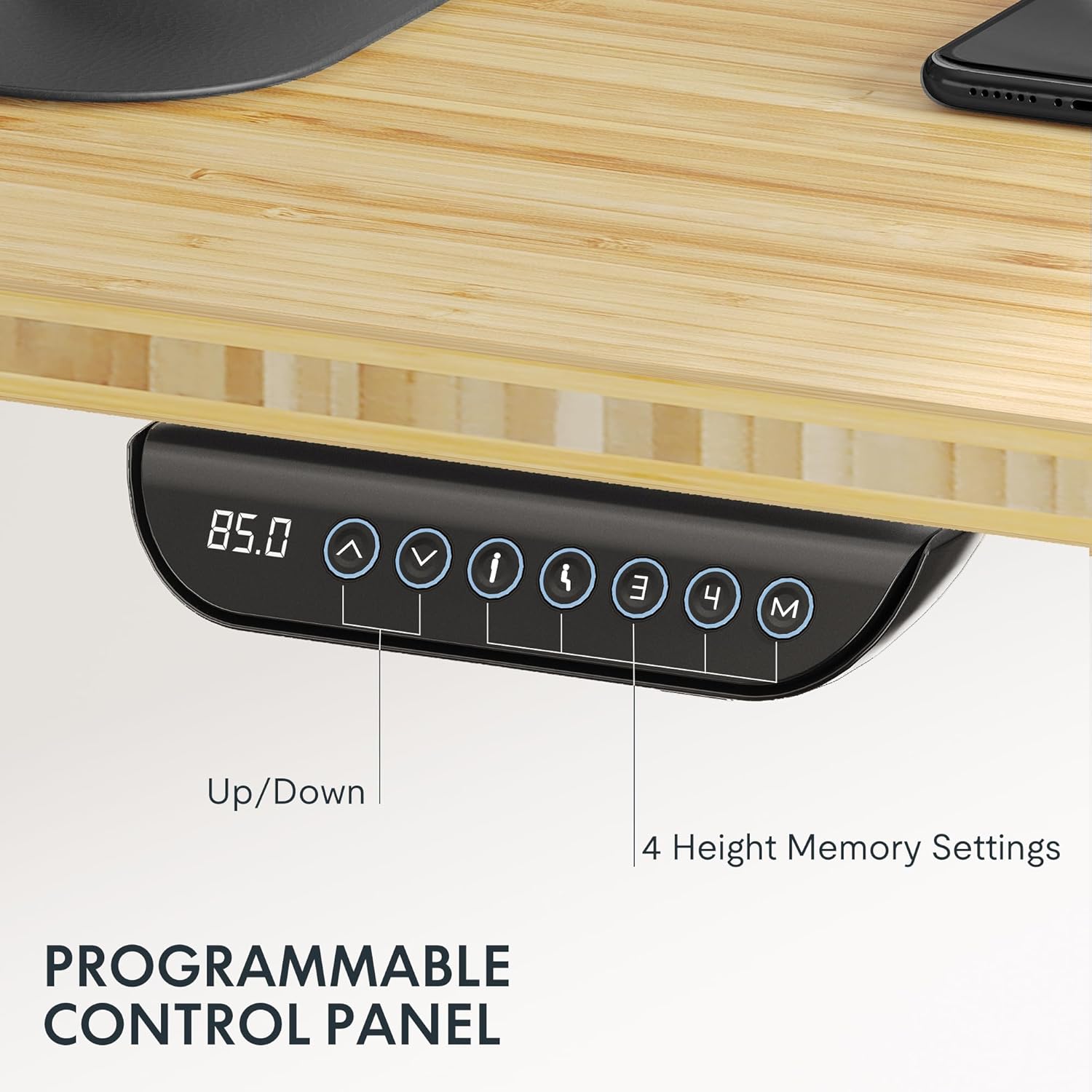
Image: The programmable control panel, featuring a digital height display, up/down buttons, and four memory preset buttons.
- Up/Down Arrows (↑ / ↓): Premeu i manteniu premut per ajustar l'alçada de l'escriptori manualment. Deixeu anar per aturar-lo.
- Pantalla digital: Mostra l'alçada actual de l'escriptori en polzades o centímetres.
- Botons de memòria (1, 2, 3, 4): These buttons allow you to save and recall preferred height settings.
- Per desar una alçada: Adjust the desk to your desired height. Press the "M" button, then immediately press one of the number buttons (1, 2, 3, or 4) until you hear a beep or see the display flash. The height is now saved.
- Per recordar una alçada: Press the corresponding number button (1, 2, 3, or 4). The desk will automatically move to the saved height.
- Funció anticol·lisió: The desk is equipped with an anti-collision system. If the desk encounters an obstacle during adjustment, it will automatically stop and reverse slightly to prevent damage or injury.
Capacitat de pes 5.2
The FLEXISPOT E6 MAX desk has a maximum load capacity of 330 lbs (150 kg). Do not exceed this weight to ensure proper function and safety.

Image: The desk demonstrating its robust 330 lbs load capacity with heavy items placed on the desktop.
6. Manteniment
- Neteja: Netegeu l'escriptori i el marc amb un drap suauamp drap. Eviteu productes químics agressius o netejadors abrasius.
- Gestió de cables: Periodically check that all cables are securely managed and not interfering with the desk's movement.
- Comprovació de fixació: Every few months, inspect all screws and bolts to ensure they remain tight. Tighten if necessary.
- Inspecció de motors: Listen for any unusual noises during operation. If you notice anything abnormal, contact customer support.
7. Solució De Problemes
If you encounter any issues with your FLEXISPOT E6 MAX desk, refer to the following common solutions. If the problem persists, contact customer support.
| Problema | Causa possible | Solució |
|---|---|---|
| L'escriptori no es mou | Power cable disconnected, control panel cable loose, overload. | Check power connection. Ensure all cables are securely plugged in. Reduce weight on the desk. Perform a reset (refer to specific reset instructions in the full manual, if available). |
| Ajust d'alçada desigual | Obstruction, uneven weight distribution. | Elimineu qualsevol obstrucció. Redistribuïu el pes uniformement sobre l'escriptori. |
| Desk stops during adjustment | Anti-collision activated, motor overheating. | Check for obstructions. Allow motors to cool down if used continuously for an extended period. |
| Els preajustaments de memòria no funcionen | Els preajustos no s'han desat correctament. | Torneu a desar la configuració d'alçada desitjada seguint les instruccions de la secció 5.1. |
8. Especificacions
| Característica | Detall |
|---|---|
| Marca | FLEXISPOT |
| Número de model | E6 |
| Material d'escriptori | Bamboo (Whole-Piece Board) |
| Material del marc | Metall |
| Dimensions de l'escriptori | 48"W x 24"D (121.9 cm x 61 cm) |
| Interval d'ajust d'altura | 24.4" - 50" (60 cm - 124 cm) |
| Tipus de motor | Motor dual |
| Stages | 3-Stage Lifting Columns |
| Capacitat de càrrega | Fins a 330 lliures (150 kg) |
| Nivell de soroll | Menys de 50 dB |
| Tauler de control | Programmable with 4 Memory Presets |
| Característiques especials | Anti-collision system, Includes assembly tools, Optional casters |
| UPC | 810072854940 |

Image: Detailed dimensions of the desktop and the adjustable height ranges of the desk frame.
9. Informació de la garantia
FLEXISPOT provides comprehensive warranty coverage for your E6 MAX Standing Desk:
- Cobertura de 10 anys: Applies to the desk frame and motor components.
- Cobertura de 2 anys: Applies to the control panel and other electronic components.
This warranty ensures peace of mind regarding the quality and durability of your product. For warranty claims or detailed terms and conditions, please contact FLEXISPOT customer support.
10. Atenció al client
For any questions, assistance with assembly, troubleshooting, or warranty inquiries, please contact FLEXISPOT customer support.
You can find more information and contact details by visiting the official FLEXISPOT store: