
Loddery QA1572X-5974-1417104221
Loddery 9.7-inch Car Radio Stereo User Manual
Model: QA1572X-5974-1417104221
For Dodge Ram 1500, 2500, 3500 (2013-2018) with Manual AC
1. Introducció
This manual provides comprehensive instructions for the installation, operation, and maintenance of your Loddery 9.7-inch Car Radio Stereo. Please read this manual thoroughly before using the product to ensure proper function and safety. Keep this manual for future reference.

Image 1.1: Loddery 9.7-inch Car Radio Stereo main unit.
2. Informació de seguretat
- Ensure the vehicle is turned off and the battery is disconnected before installation to prevent electrical shorts or damage.
- Es recomana una instal·lació professional per a un rendiment i una seguretat òptims.
- No feu servir el dispositiu de manera que us distregui de la conducció. Prioritzeu sempre la seguretat viària.
- Avoid exposing the unit to extreme temperatures, direct sunlight for prolonged periods, or moisture.
- Use only specified accessories and wiring provided with the unit.
3. Contingut del paquet
Verifiqueu que tots els elements que s'enumeren a continuació siguin presents al vostre paquet:
- Main Head Unit (9.7-inch Car Radio Stereo)
- Cable d'alimentació
- Cables d'entrada/sortida RCA
- Cables USB (2)
- Cable d'entrada de càmera
- Cable adaptador de ràdio
- Antena GPS
- Manual d'instruccions
- Cable adaptador USB
- Microphone (Wheat head)
- Caixa Canbus

Image 3.1: Included components with the Loddery Car Radio Stereo.
4. Compatibilitat
This Loddery 9.7-inch Car Radio Stereo is specifically designed for the following vehicle models:
- Dodge Ram 1500 (Years: 2013, 2014, 2015, 2016, 2017, 2018)
- Dodge Ram 2500 (Years: 2013, 2014, 2015, 2016, 2017, 2018)
- Dodge Ram 3500 (Years: 2013, 2014, 2015, 2016, 2017, 2018)
Nota important: This unit is only compatible with vehicles equipped with Manual Air Conditioning (AC) controls. It is not compatible with vehicles that have Automatic AC controls.

Image 4.1: Visual guide for vehicle compatibility, highlighting manual AC requirement.
5. Configuració i instal·lació
Installation of the Loddery Car Radio Stereo involves replacing the factory head unit. While the unit is designed for a plug-and-play experience in compatible vehicles, professional installation is highly recommended.
5.1 Passos previs a la instal·lació
- Desconnecta la bateria: Before beginning any electrical work, disconnect the negative terminal of your vehicle's battery to prevent electrical shorts.
- Remove Factory Unit: Carefully remove the existing factory radio and trim panels according to your vehicle's service manual.
- Inspeccioneu el cablejat: Familiarize yourself with the vehicle's wiring harness and the provided wiring for the new unit.
5.2 Connexions de cablejat
Connect the provided cables to the corresponding ports:
- Cable de corrent: Connecteu el maç d'alimentació principal al cablejat del vehicle. Assegureu-vos que totes les connexions estiguin ben fixades.
- Canbus Box: Connect the Canbus box as instructed to ensure proper communication with vehicle systems (e.g., steering wheel controls).
- Antena GPS: Munteu l'antena GPS en un lloc amb llum clara view del cel, normalment al tauler de control o sota el parabrisa.
- Cables USB: Connect the USB cables for external devices and Carplay/Android Auto functionality.
- Entrada de la càmera: Si instal·leu una part posterior view camera, connect its video output to the camera input cable.
- Micròfon: Connecteu el micròfon extern per millorar la qualitat de les trucades i les ordres de veu.
- Radio Adapter: Connecteu l'adaptador d'antena de ràdio.
- Cables RCA: Connect RCA input/output cables for external amplifiers or video sources if applicable.
5.3 Postinstal·lació
- Unitat segura: Carefully install the new head unit into the dashboard opening.
- Torneu a connectar la bateria: Torneu a connectar el terminal negatiu de la bateria del vehicle.
- Encesa inicial: Turn on the vehicle's ignition and power on the stereo.
- Calibració de la pantalla tàctil: Upon first startup, you may see a crosshair with numbers. Touch each number in sequence to calibrate the touchscreen.
- Funcions de prova: Verify all functions (radio, audio, touchscreen, steering wheel controls, GPS, Bluetooth, Carplay/Android Auto) are working correctly.
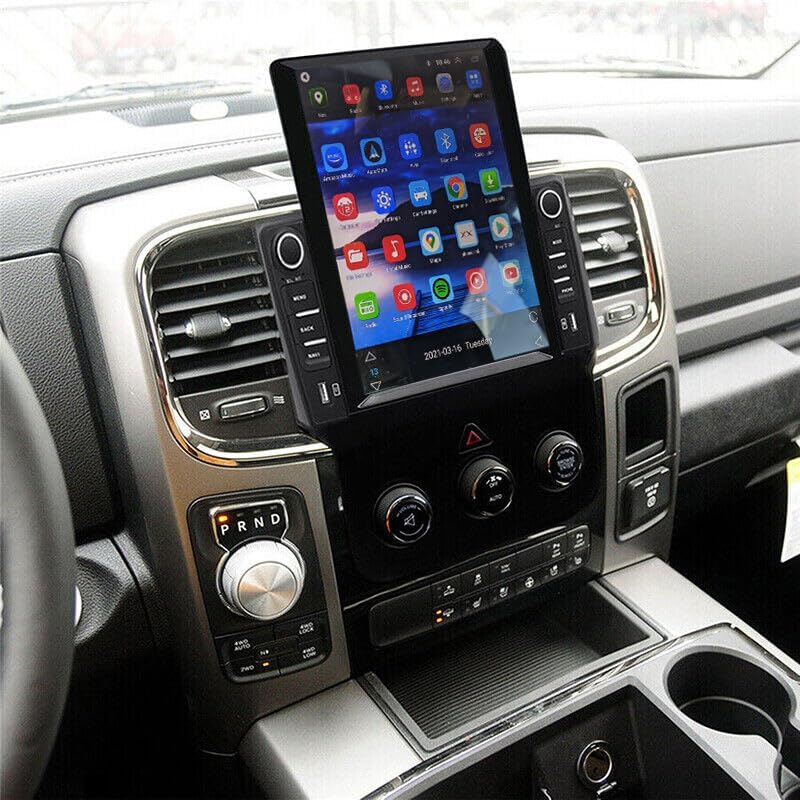
Imatge 5.1: Ex.ample of the Loddery Car Radio Stereo installed in a compatible vehicle.
6. Instruccions de funcionament
6.1 Funcionament bàsic
- Encès/apagat: Press and hold the power button (usually a knob or dedicated button) to turn the unit on or off. A short press may mute/unmute audio.
- Control de volum: Rotate the volume knob or use the touchscreen controls to adjust audio levels.
- Interfície de pantalla tàctil: Navigate through menus and applications by tapping, swiping, and dragging on the 9.7-inch display.
- Controls del volant: If properly connected via the Canbus, your vehicle's steering wheel controls for volume, track change, and mode selection should function.
6.2 CarPlay i Android Auto
The unit supports both wired and wireless Apple CarPlay and Android Auto, integrating your smartphone's features directly into the stereo display.
6.2.1 Apple CarPlay (for iOS devices)
- Connexió sense fil: Enable Bluetooth on your iPhone and pair it with the car stereo. Once paired, open the "ZLINK" application on the stereo to initiate CarPlay.
- Connexió per cable: Connect your iPhone to one of the USB ports using a certified USB cable. Open the "ZLINK" application if it doesn't launch automatically.
- Característiques: Access navigation, make calls, send/receive messages, listen to music, and use Siri voice assistant.
6.2.2 Android Auto (for Android devices)
- Connexió sense fil: Ensure Android Auto is installed on your Android phone. Enable Bluetooth and pair your phone with the car stereo. Open the Android Auto application on the stereo.
- Connexió per cable: Connect your Android phone to one of the USB ports using a certified USB cable. The Android Auto application on the stereo should launch automatically.
- Característiques: Access navigation, make calls, send/receive messages, listen to music, and use Google Assistant voice commands.

Imatge 6.1: acabatview of CarPlay and Android Auto functionality.

Image 6.2: User interfaces for Apple CarPlay and Android Auto.
6.3 Navegació GPS i WiFi
The unit features built-in GPS for navigation and WiFi connectivity for online services.
- Navegació GPS: Access pre-installed offline maps or use online navigation applications after connecting to WiFi. The GPS antenna ensures accurate positioning.
- Connexió WiFi: Connect the stereo to a mobile hotspot or a local WiFi network to access online maps, stream content, and download applications.

Image 6.3: GPS navigation and WiFi connectivity options.
6.4 Funcionalitat Bluetooth
Bluetooth 5.0 allows for hands-free calling, music streaming, and phonebook synchronization.
- Maridatge: Ves a la configuració de Bluetooth de l'equip de música i del telèfon. Cerca available devices and select the stereo's name to pair.
- Trucades mans lliures: Once paired, you can make and receive calls directly through the stereo, utilizing the built-in or external microphone.
- Reproducció de música: Stream audio from your paired device to the stereo.
- Guia telefònica: The stereo can automatically download your phone's contacts for easy access.

Image 6.4: Bluetooth interface for calls and music.
6.5 característiques addicionals
- Ràdio FM amb RDS: Tune into FM radio stations with RDS (Radio Data System) support for station information.
- 1080P HD Video Playback: Play high-definition video files from connected USB devices.
- Pantalla dividida: Utilize the split-screen function to run two applications simultaneously (e.g., navigation and music player).
- AHD posterior View Suport de càmera: Connect a compatible AHD rear view camera for enhanced parking assistance. The display will automatically switch to the camera feed when reversing.
- ADAS DVR Support (Optional): If an optional ADAS DVR is connected, the system can provide anti-collision warnings, front vehicle distance prediction, and lane departure warnings.
- Tire Pressure Detection (Optional): With an optional TPMS sensor kit, the unit can display real-time tire pressure and temperature data.
- Bluetooth OBD II (Optional): Connect an optional Bluetooth OBD II scanner to retrieve real-time vehicle data and diagnostic trouble codes.

Image 6.5: ADAS DVR functionality for driving safety.

Imatge 6.6: acabatview of optional auxiliary systems.
7. Manteniment
- Neteja de pantalla: Feu servir un drap suau i sense borrissol per netejar suaument la pantalla tàctil. Per a taques difícils, fregueu lleugeramentampNetegeu el drap amb aigua o un netejador de pantalles. Eviteu productes químics agressius.
- Actualitzacions de programari: Periodically check for software updates from the manufacturer to ensure optimal performance and access to new features.
- Atenció general: Keep the unit free from dust and debris. Avoid placing heavy objects on the unit or exposing it to excessive force.
8. Solució De Problemes
Aquesta secció tracta els problemes habituals que podeu trobar. Per a problemes que no figuren aquí, poseu-vos en contacte amb l'atenció al client.
| Problema | Causa possible | Solució |
|---|---|---|
| La unitat no s'encén. | Cablejat incorrecte; Fusible fundit; Bateria del vehicle desconnectada. | Check power connections and fuses. Ensure vehicle battery is connected. |
| Sense sortida d'àudio. | Volume too low; Mute function active; Speaker wiring issue. | Augmenta el volum. Comprova si el silenci està activat. Verifica les connexions dels altaveus. |
| CarPlay/Android Auto not connecting or unstable. | Incorrect app (ZLINK for CarPlay); Bluetooth not paired; Faulty USB cable; Phone settings. | Ensure correct app is open (ZLINK for iOS, Android Auto for Android). Verify Bluetooth pairing. Try a different USB cable. Check phone's Carplay/Android Auto settings. Restart phone and stereo. |
| Senyal GPS feble o imprecis. | Antena GPS obstruïda o instal·lada incorrectament. | Assegureu-vos que l'antena GPS tingui una visió clara view del cel i està connectat de manera segura. |
| Touchscreen unresponsive or inaccurate. | Calibration needed; Software glitch. | Perform touchscreen calibration (if prompted on startup). Restart the unit. If a reset button is available (often a small pinhole), use it. |
| Screen washed out in bright daylight. | High ambient light conditions. | Adjust brightness/contrast settings in the display menu. Consider anti-glare screen protectors or vehicle window tinting for severe cases. |
9. Especificacions
| Característica | Detall |
|---|---|
| Marca | Loddery |
| Nom del model | 9.7 inch Car Radio Stereo for Dodge Ram 1500 2500 3500 2013 2014 2015 2016 2017 2018 |
| Número de model de l'article | QA1572X-5974-1417104221 |
| Mida de la pantalla | 9.7 polzades |
| Dimensions del producte | 14.96 x 12.2 x 6.69 polzades |
| Pes de l'article | 4.13 lliures |
| Tecnologia de connectivitat | Bluetooth, Ethernet, USB, Wi-Fi |
| Característica especial | Wireless & Wired Carplay, Wireless & Wired Android Auto, Built-in GPS, WiFi, DSP, Camera Input, Microphone, Steering Wheel Control, 1080P HD Video Playback, Split Screen, Dual USB Input, FM RDS Radio |
| Mode de sortida d'àudio | estèreo |
| Tipus de muntatge | Muntatge al quadre de comandament |
| Components inclosos | Car compass (Note: This refers to the digital compass feature, not a physical compass) |
| Tipus de servei del vehicle | Car (Dodge Ram 1500/2500/3500, 2013-2018, Manual AC) |
10. Garantia i Suport
For any questions or concerns regarding your Loddery Car Radio Stereo, please contact customer support. The manufacturer provides support for product inquiries.
Garantia: If you have any questions, please feel free to contact the manufacturer.
For technical assistance or warranty claims, refer to the contact information provided with your purchase documentation or visit the official Loddery support weblloc.
Ask a question about this manual
Ask about setup, troubleshooting, compatibility, parts, safety, or missing instructions. Manuals+ will review the question and use this page’s manual context to help answer it.