
1. Introducció
Gràcies per la compraasing the ODK L-Shaped Gaming Desk. This manual provides detailed instructions for assembly, operation, maintenance, and troubleshooting to ensure safe and efficient use of your new desk. Please read this manual thoroughly before assembly and retain it for future reference.

Image 1.1: The ODK L-Shaped Gaming Desk in a typical gaming environment, showcasing its spacious design and integrated features.
2. Informació de seguretat
- Ensure all components are present and undamaged before beginning assembly. Do not use if any parts are missing or damaged.
- Munta l'escriptori sobre una superfície suau i neta per evitar ratllades.
- No estrenyeu massa els cargols durant el muntatge per evitar danys al material.
- Mantingueu les peces petites allunyades dels nens per evitar perills d'asfixia.
- Do not exceed the maximum load capacity of 50 kg for the desktop.
- Ensure all electrical connections (power outlets, USB ports) are properly grounded and used with compatible devices.
- Eviteu col·locar objectes calents directament sobre la superfície de l'escriptori sense protecció.
3. Contingut del paquet
Verify that all parts listed below are included in your package. A wrench is provided for assembly.
- Desktop panels (L-shaped sections)
- Components del marc d'acer
- Adjustable monitor stand components
- Two integrated drawers
- Storage shelves and racks
- Power strip with 2 AC outlets and 2 USB ports (5V-2A)
- RGB LED light strip with controller
- Ganxo per a auriculars
- Assembly hardware (screws, bolts, adjustable feet)
- Clau de muntatge
- Manual d'instruccions
4. Instruccions de muntatge
Assembly is required for this product. Follow the included detailed instruction manual step-by-step. The rack and drawers can be installed on either the left or right side to suit your preference and room layout.
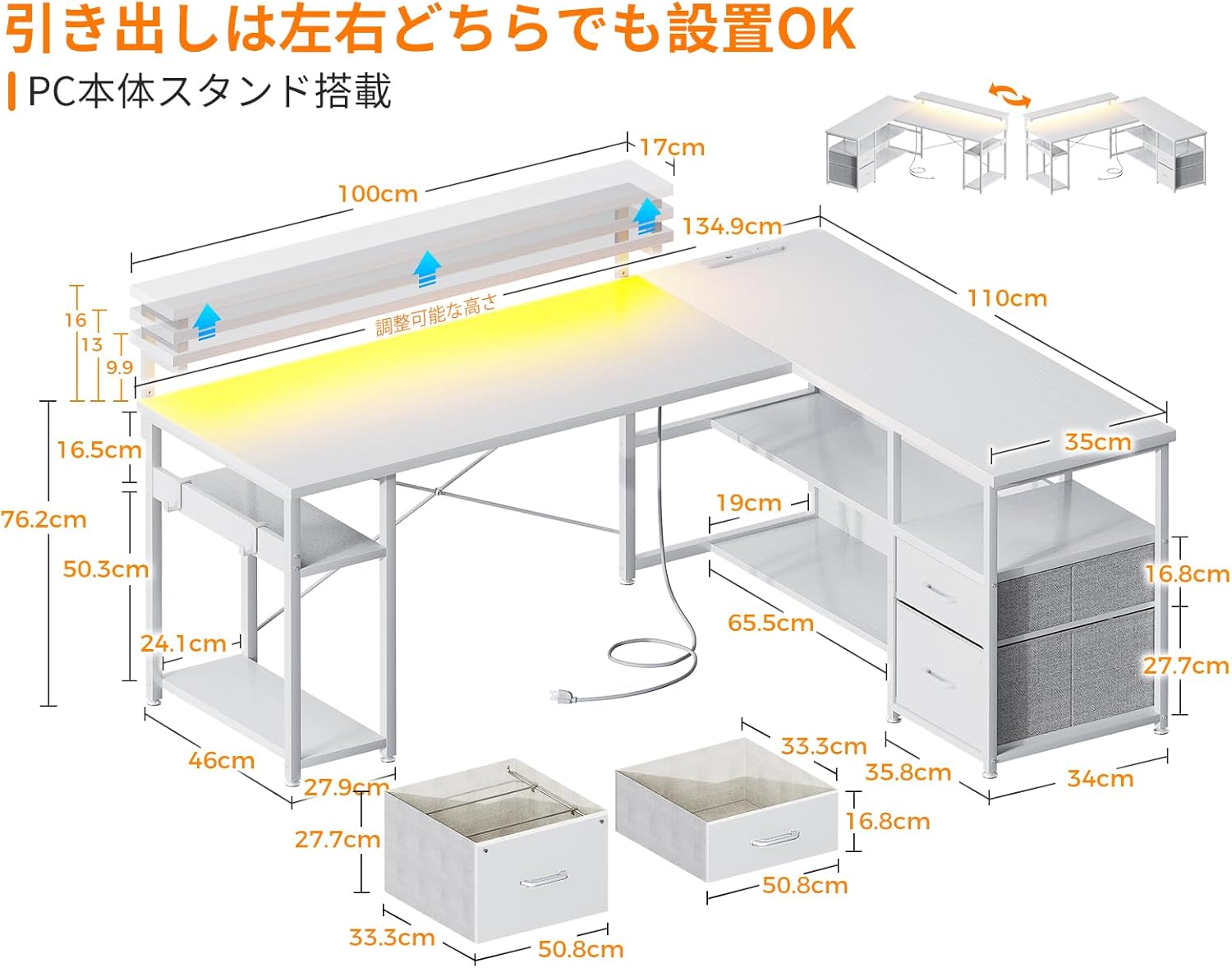
Imatge 4.1: Superposició dimensionalview and reversible design of the desk, illustrating how the storage unit can be positioned on either side.
4.1. Consells per a l'Assemblea General
- Identify all parts before starting.
- Use the provided wrench for tightening fasteners.
- Do not fully tighten all screws until the entire structure is loosely assembled. This allows for minor adjustments.
- Once the desk is fully assembled, tighten all screws securely.
4.2. Adjustable Feet Installation
The desk is equipped with adjustable feet to ensure stability on uneven surfaces. Install these feet at the bottom of the desk legs. Rotate them clockwise to extend and counter-clockwise to retract until the desk is level and stable.

Image 4.2: Detail of the adjustable feet, which allow for leveling the desk on uneven floors.
5. Instruccions de funcionament
5.1. Preses de corrent i ports USB
The desk includes a built-in power strip with two AC outlets (100-240V/15A) and two USB ports (5V-2A). Connect the desk's power cord to a wall outlet. These ports provide convenient charging for your computer, smartphone, and other electronic devices.

Image 5.1: The integrated power strip, showing the AC outlets and USB ports for device charging.
5.2. RGB LED Lighting
The desk features an RGB LED light strip to enhance your gaming or work environment. Use the included controller to switch between 10 different lighting modes and adjust colors. The light system includes a memory function that retains the last selected mode when turned off and on again.

Image 5.2: The remote control for the RGB LED lighting, illustrating the various color and mode selections.
5.3. Adjustable Monitor Stand
The monitor stand can be adjusted to three different heights: 9cm, 12cm, and 15cm. Adjust the height according to your preference to improve posture and reduce strain on your neck and shoulders during long periods of use.
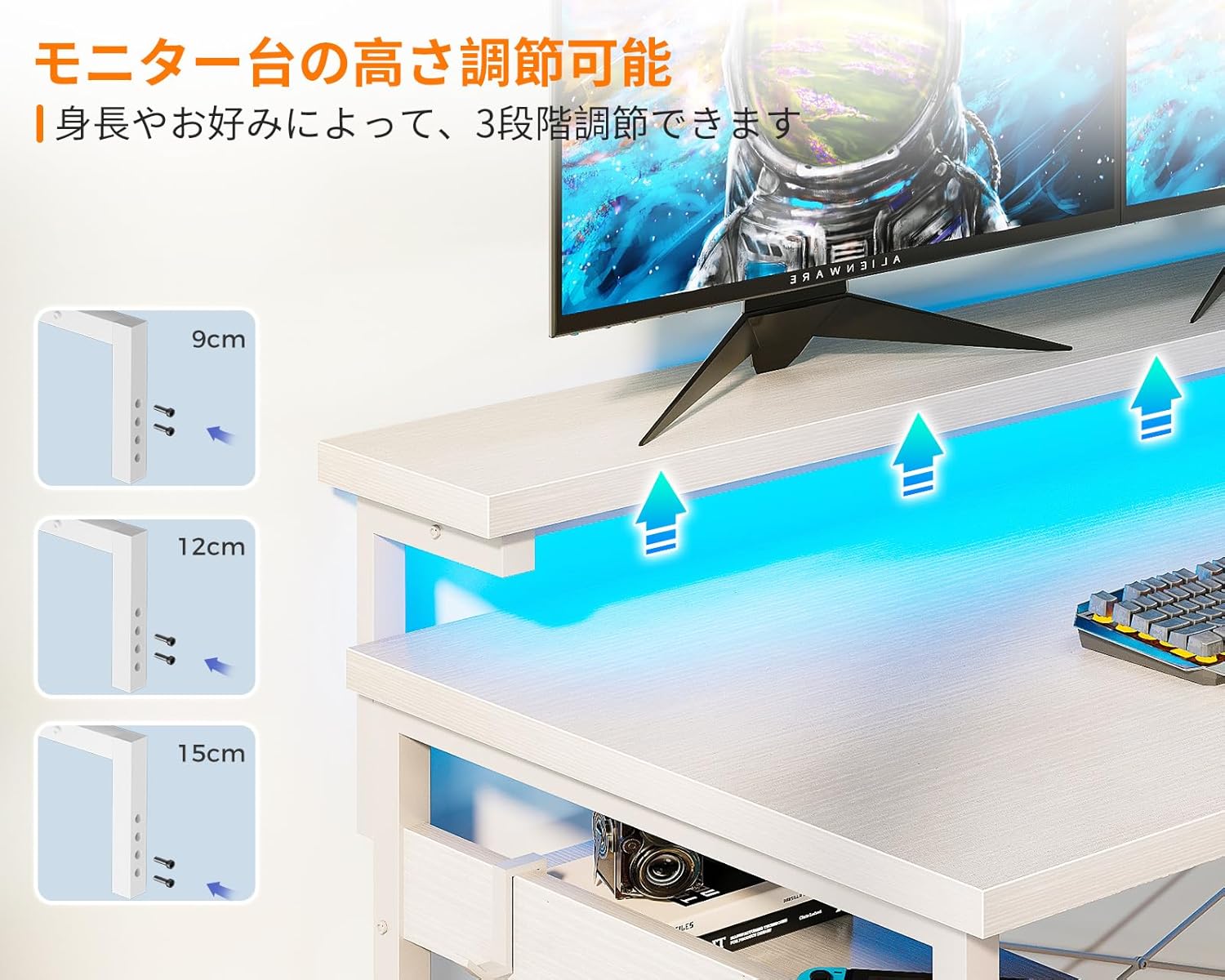
Image 5.3: The adjustable monitor stand, demonstrating the three height options for ergonomic positioning.
5.4. Calaixos d'emmagatzematge
The desk includes two integrated drawers for organized storage of books, documents, and other office supplies. These drawers are designed for easy access and contribute to a tidy workspace.

Image 5.4: The integrated drawers, providing convenient storage for various items.
6. Manteniment
- Neteja: Netegeu la superfície de l'escriptori amb un damp cloth. Avoid using harsh chemicals or abrasive cleaners, as these can damage the melamine finish.
- Vessaments: Immediately wipe up any spills to prevent water damage or staining. The melamine board is resistant to water, but prolonged exposure should be avoided.
- Elements de fixació: Reviseu periòdicament tots els cargols i perns per assegurar-vos que romanen ajustats. Torneu a apretar-los si cal per mantenir l'estabilitat.
- Components elèctrics: Ensure the power cord and connections are free from damage. Do not attempt to repair electrical components yourself.
7. Solució De Problemes
7.1. Desk is Unstable/Wobbly
- Comproveu els peus ajustables: Ensure all adjustable feet are making firm contact with the floor and are adjusted to level the desk.
- Apretar els elements de fixació: Verify that all assembly screws and bolts are securely tightened.
- Cross Bracing: Confirm that the cross-bracing hardware is correctly installed and tightened, as this significantly contributes to stability.
7.2. RGB LED Lights Not Working
- Connexió d'alimentació: Ensure the LED light strip is properly connected to its power source and the desk's main power.
- Bateria del controlador: If the controller is wireless, check its battery.
- Restablir: Try unplugging the desk from the wall outlet for a few minutes, then plug it back in to reset the electrical components.
7.3. Power Outlets/USB Ports Not Functioning
- Potència principal: Ensure the desk's main power cord is securely plugged into a working wall outlet.
- Compatibilitat del dispositiu: Verify that the devices you are trying to charge are compatible with the provided voltage i amperage.
- Sobrecàrrega: Avoid overloading the power strip. If too many high-power devices are connected, it may trip a circuit.
8. Especificacions
| Característica | Especificació |
|---|---|
| Marca | ODK |
| Model | B0CWH3746N |
| Forma | en forma de L |
| Color | Blanc |
| Dimensions generals | Aprox. 135 cm (amplada) x 110 cm (profunditat) x 76 cm (alçada) |
| Pes del producte | Aprox. 25.2 kg |
| Capacitat de càrrega d'escriptori | 50 kg |
| Material | High-strength Melamine Faced Board, Steel Frame |
| Preses de corrent | 2 x AC (100-240V/15A) |
| Ports USB | 2 x USB (5V-2A) |
| Ajust del suport del monitor | 3 levels (9cm, 12cm, 15cm) |
| Il·luminació LED | RGB, 10 lighting modes, memory function |
| Assemblea | Customer assembly required (wrench included) |
9. Garantia i Suport
ODK provides customer support for product defects. If you encounter any issues or have questions regarding your ODK L-Shaped Gaming Desk, please do not hesitate to contact us. Refer to your purchase documentation for specific warranty terms and contact information.
For assistance, please contact ODK customer service through the platform where you purchased the product or visit the official ODK weblloc.