
COLSUR S32
COLSUR 3-in-1 Charging Station User Manual
Model: S32
Producte acabatview
The COLSUR 3-in-1 Charging Station (Model S32) is a versatile device designed to simultaneously charge your iPhone, Apple Watch, and AirPods. It integrates a digital alarm clock and a night light with adjustable settings, providing a comprehensive bedside or desk solution. The unit includes an 18W power adapter and features additional USB-A and USB-C charging ports for other devices. Its design prioritizes efficient charging and user convenience, aiming to reduce cable clutter.

Image: The COLSUR 3-in-1 Charging Station in use, showing an iPhone wirelessly charging, an Apple Watch on its charging dock, and AirPods on their charging case, alongside the digital clock display and night light.

Image: A detailed diagram of the COLSUR 3-in-1 Charging Station, highlighting key components such as the snooze touch button, LED light area, adjustment setting button, earphone charging area (with two connector types), watch charging area, wireless charging for mobile phone, dual alarm clock, and USB-A & Type-C output interface.
Configuració
- Desembalar: Carefully remove all components from the packaging. The package includes the 3-in-1 charging station, an 18W high-efficiency adapter, and a detachable charging case for headphones and Apple Watch.
- Connectar l'alimentació: Plug the provided 18W high-efficiency adapter into a power outlet and connect it to the charging station.
- Activate Alarm Clock: Locate and pull out the insulation strip from the back of the alarm clock unit to activate its internal battery and display.
- Posició: Place the charging station on a stable, flat surface, such as a nightstand or desk.
Instruccions de funcionament
Dispositius de càrrega
The station supports simultaneous charging of multiple devices.
- Wireless Phone Charging: Place your compatible smartphone (e.g., iPhone 8 and newer, Samsung Galaxy S20 and newer) on the designated wireless charging pad. The magnetic suction chip assists in aligning the phone for optimal charging. The raised wireless charging panel is designed to accommodate camera protrusions. Ensure your phone case does not exceed 5mm in thickness and does not contain magnets, metal, grips, stands, or credit cards, as these can interfere with wireless charging.
- Càrrega d'Apple Watch: Place your Apple Watch (Series 2-9, SE, Ultra) on the dedicated charging area. The detachable charging case provides exclusive wireless charging for Apple Watch.
- Càrrega dels auriculars: Place your AirPods (1/2/3/Pro 1) or other compatible earbuds on the earbud charging area. The detachable charging case includes Apple Lightning and Type-C adapters for broad compatibility.
- Additional Wired Charging: Utilize the integrated USB-A and USB-C ports on the side of the unit to charge other devices via cable.

Image: A chart illustrating the universal wireless charging compatibility of the station, showing various iPhone models (11-15 series), Apple Watch models, Samsung Galaxy S series, and AirPods models.

Image: A transparent diagram illustrating that phone cases for wireless charging should not exceed 5mm in thickness and should not contain magnets, metal, grips, stands, or credit cards.
Funcionament amb llum nocturna
The integrated night light offers adjustable color modes and brightness levels.
- Activar/Desactivar: Toqueu la part superior de la lampshade to turn the night light on or off.
- Ajusta la brillantor: With the light on, touch and hold the top of the lampshade to cycle through brightness levels from 10% to 100%.
- Canvia el mode de color: Short press the adjustment setting button (refer to product diagram) to switch between white, warm white, and warm light modes.
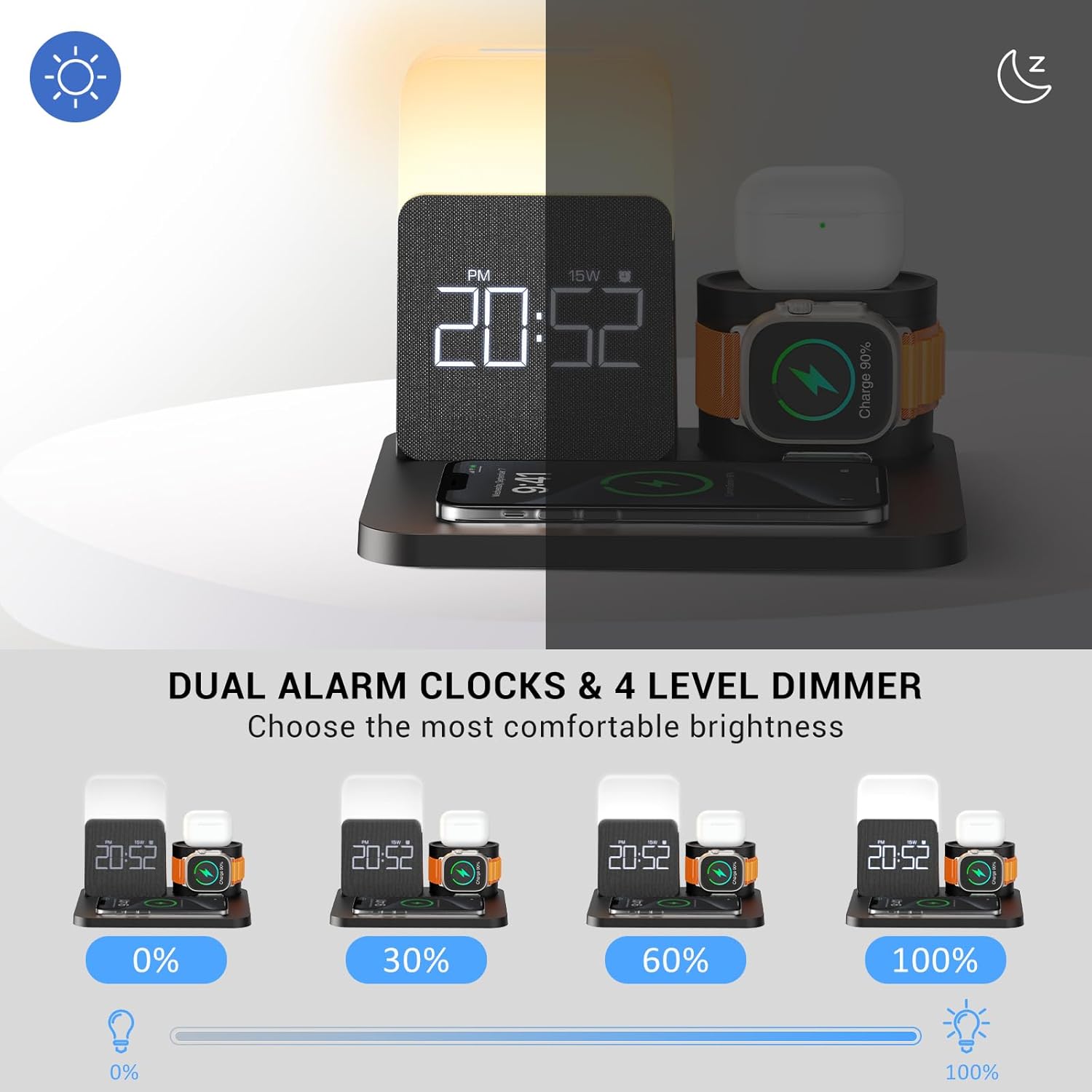
Image: The COLSUR charging station demonstrating four levels of night light brightness (0%, 30%, 60%, 100%) and the dual alarm clock display.
Configuració del despertador
The alarm clock features dual alarms, snooze, and adjustable display brightness.
- Establir alarmes: Use the adjustment setting buttons (refer to product diagram) to set up to two independent alarms. The smart chips and built-in battery memory function will retain your alarm settings even if power is interrupted.
- Funció de posposar: When an alarm sounds, touch the top of the lampshade to activate the snooze mode. The alarm will sound again after five minutes.
- Ajusta la brillantor de la pantalla: The LED display brightness can be adjusted through levels of 0%, 10%, 30%, 50%, and 100% for clear visibility in various lighting conditions. Refer to the product's control buttons for specific adjustment methods.

Image: A visual representation of the dual alarm clock feature, showing different alarm times set for morning wake-up and exercise time.
Manteniment
- Neteja: Disconnect the power adapter before cleaning. Use a soft, dry cloth to wipe the surface of the charging station. Do not use abrasive cleaners or solvents.
- Emmagatzematge: Quan no l'utilitzeu durant períodes prolongats, guardeu el dispositiu en un lloc fresc i sec, allunyat de la llum solar directa i de temperatures extremes.
- Manipulació: Handle the device with care to avoid dropping or impacting it, which could damage internal components.
Resolució de problemes
| Problema | Possible causa/solució |
|---|---|
| El dispositiu no es carrega sense fil. |
|
| Alarm clock display is off or not working. |
|
| Night light not functioning. |
|
| Velocitat de càrrega lenta. |
|
Especificacions
- Marca: COLSUR
- Model: S32
- Entrada Voltage: 120 Volts
- Ampera: 2 Amps
- Tecnologia de connectivitat: USB
- Tipus de connector: USB tipus C
- Característica especial: Wireless Charging, Alarm Clock, Night Light
- Dispositius compatibles: Airpods, Cellular Phones (iPhone 8-15 series, Samsung Galaxy S20-S22 series, Note 10), Smartwatches (Apple Watch 2-9, SE, Ultra)
- Components inclosos: 3-in-1 charging station, 18W high-efficiency adapter, detachable charging case for headphones and Apple Watch
- Dimensions: 7.64 x 6.38 x 5.98 polzades
- Pes: 1.52 lliures
Garantia i Suport
For any questions or assistance regarding your COLSUR 3-in-1 Charging Station, please contact COLSUR customer support. While specific warranty details are not provided in this manual, COLSUR is committed to customer satisfaction.
You can often find support contact information on the product packaging, the manufacturer's official weblloc web o a través del vostre punt de compra.
Ask a question about this manual
Ask about setup, troubleshooting, compatibility, parts, safety, or missing instructions. Manuals+ will review the question and use this page’s manual context to help answer it.