
FLEXISPOT QS1M-1675-IE
FLEXISPOT Lite Electric Standing Desk User Manual
Model: QS1M-1675-IE
Introducció
Thank you for choosing the FLEXISPOT Lite Electric Standing Desk. This manual provides essential information for the safe and efficient assembly, operation, and maintenance of your new desk. Please read this manual thoroughly before use and retain it for future reference.
The FLEXISPOT Lite Electric Standing Desk is designed to promote a healthier working environment by allowing seamless transitions between sitting and standing positions. Its robust construction and intuitive controls ensure a comfortable and productive workspace.
Instruccions de seguretat
- Assegureu-vos que tots els components siguin presents i no estiguin danyats abans del muntatge. No utilitzeu el producte si hi falta alguna peça o si està trencada.
- Mantingueu els nens i les mascotes allunyats de l'escriptori durant el funcionament per evitar lesions.
- Do not place hands or other objects near the moving parts of the desk frame during height adjustment.
- Ensure the power cord is properly connected and not damaged. Do not operate the desk with a damaged cord or plug.
- No sobrecarregueu l'escriptori. Consulteu la secció d'especificacions per conèixer la capacitat màxima de pes.
- Only use the desk on a level surface to ensure stability.
- Desconnecteu l'alimentació abans de netejar o realitzar qualsevol manteniment.
Contingut del paquet
Si us plau, verifiqueu que tots els components següents estiguin inclosos al vostre paquet:
- Desktop (160 x 75 cm, White+Maple)
- Desk Legs/Frame (Alloy Steel)
- Motor elèctric i caixa de control
- Tauler de control
- Adaptador d'alimentació i cable
- Portavasos
- Ganxo d'emmagatzematge
- Cable Management Accessories (Cable ties, Bundle Clamp)
- Assembly Hardware (Screws, Allen wrenches, etc.)
- Manual d'usuari
Imatge 1: Acabatview of desk components, including the desktop, frame, and control panel, ready for assembly.
Muntatge i muntatge
Follow these steps to assemble your FLEXISPOT Lite Electric Standing Desk. It is recommended to have two people for assembly, especially when handling the desktop.
- Desempaquetar components: Carefully remove all parts from the packaging and lay them out on a clean, soft surface to prevent scratches. Refer to the "Package Contents" section to ensure all parts are present.
- Attach Lifting Columns to Feet: Secure the lifting columns to the desk feet using the provided screws and tools. Ensure they are firmly attached.
- Connecta la barra transversal: Attach the crossbar between the two lifting columns. This forms the main frame of the desk.
- Install Control Box and Motor: Mount the control box and motor onto the designated areas of the desk frame. Connect the motor cables to the control box.
- Adjunta l'escriptori: Col·loqueu amb cura l'escriptori cap per avall sobre una superfície tova. Col·loqueu el marc muntat sobre l'escriptori, alineant els forats pretallats. Fixeu el marc a l'escriptori amb els cargols proporcionats.
- Instal·leu el tauler de control: Mount the control panel to the underside of the desktop in an easily accessible location. Connect its cable to the control box.
- Adjuntar accessoris: Install the cup holder and storage hook to the desired locations on the desktop edge.
- Gestió de cables: Use the provided cable management accessories to organize and secure all cables, including the power cord.
- Taula de posicions: With assistance, carefully flip the desk upright and place it in its desired location. Ensure it is on a stable, level surface.
- Connectar l'alimentació: Plug the power adapter into the control box, then plug the power cord into a wall outlet.
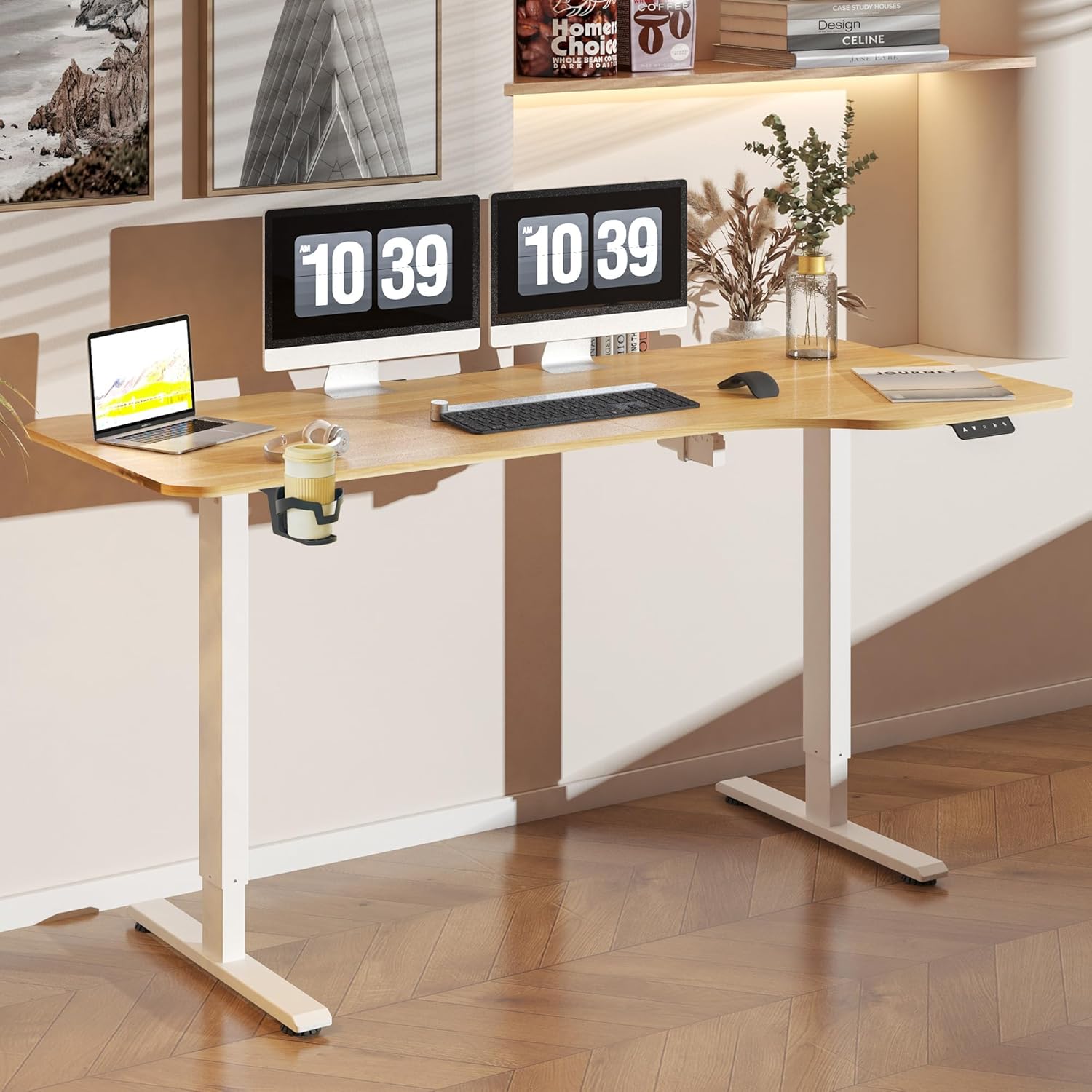
Imatge 2: The FLEXISPOT Lite Electric Standing Desk fully assembled and set up in a modern home office environment.
Instruccions de funcionament
Tauler de control acabatview

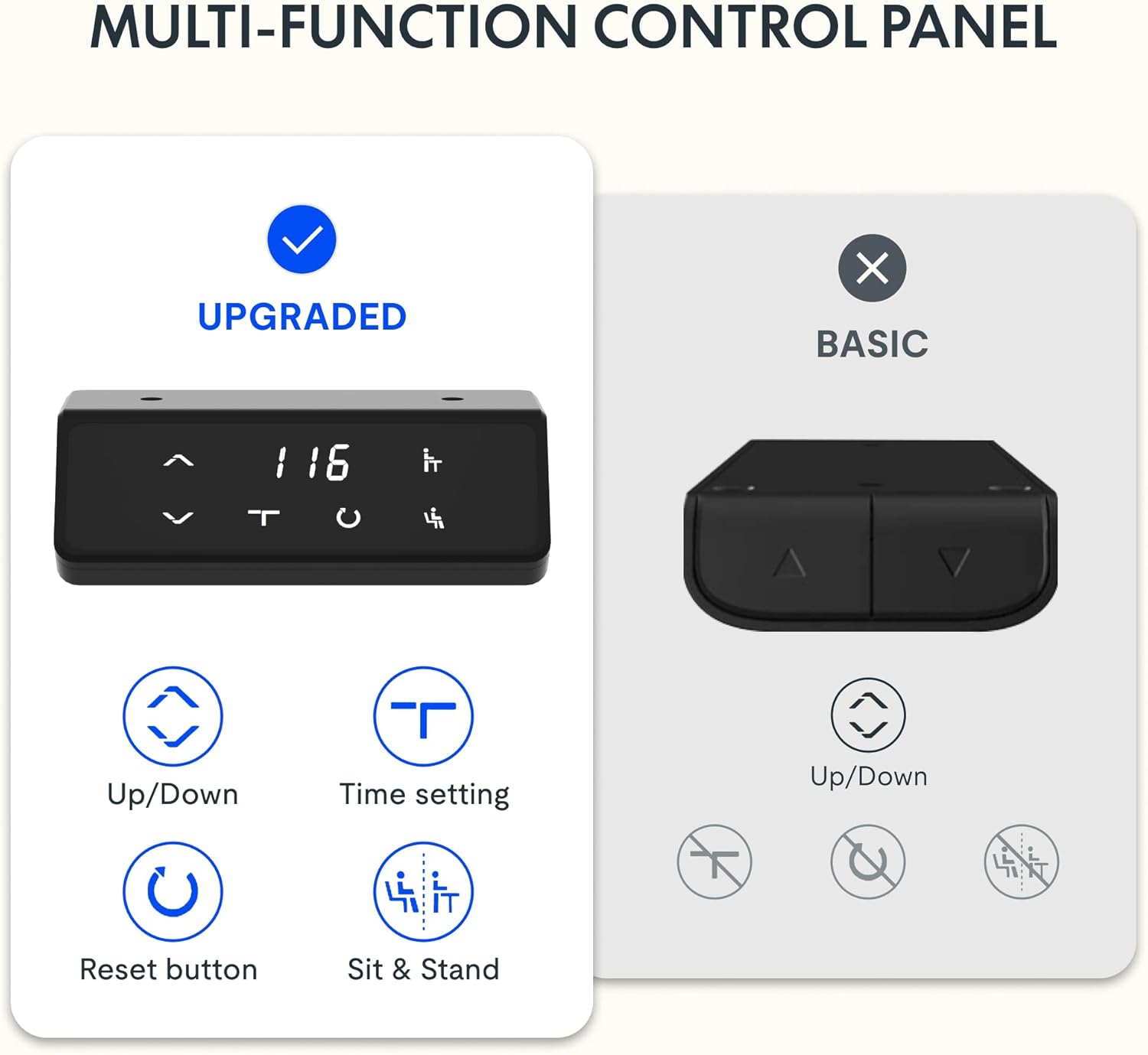
Imatge 3: Detallada view of the desk's control panel, showing buttons for Up/Down adjustment, Time Setting, Reset, and Sit & Stand memory presets.
Your FLEXISPOT Lite Electric Standing Desk features an intuitive control panel for easy height adjustment and memory functions.
- Up/Down Buttons (⌃ / ⌄): Press and hold these buttons to manually adjust the desk height upwards or downwards. Release the button to stop at the desired height.
- Preajustos de memòria: The control panel allows you to save and recall preferred height settings.
- Adjust the desk to your desired height (e.g., a comfortable sitting or standing position) using the Up/Down buttons.
- Press and hold the 'Sit & Stand' button (person icon) for approximately 3-5 seconds until the display flashes or beeps, indicating the height is saved.
- To recall a saved height, simply press the 'Sit & Stand' button. The desk will automatically move to the last saved height. (If your model supports multiple presets, consult the full product manual for specific instructions on saving and recalling each position.)
- Botó de reinici (R): If the desk encounters an error or does not respond correctly, a reset may be required.
- Press and hold the 'R' button (often indicated by a circle icon or 'Reset' text).
- The desk will move to its lowest position, then slightly rise. Release the button once this sequence is complete. The desk is now reset.
- Time Setting (T): This button, often labeled with a clock icon, may be used to set a timer for sit/stand reminders, if available on your model. Consult the full product manual for detailed instructions on using this feature.

Imatge 4: The FLEXISPOT Lite Electric Standing Desk in use, highlighting the accessible placement of the control panel for easy height adjustments.
Característiques
Interval d'ajust d'altura
The desk offers a wide range of height adjustment to accommodate various user preferences and activities, from a minimum of 71 cm to a maximum of 117 cm.

Imatge 5: Visual representation of the desk's height adjustment capabilities, illustrating the minimum and maximum heights.
Accessoris integrats
- Portavasos: A convenient cup holder is included to keep your beverages secure and prevent spills on your workspace.
- Storage Hook: A practical hook is provided for hanging headphones, bags, or other items, helping to keep your desktop clear and organized.

Imatge 6: Detallada view of the integrated cup holder and storage hook, designed for convenience and organization.
Gestió de cables
The desk includes features to help manage and organize your cables, ensuring a tidy and safe workspace.
- Cable Management Tray/Clips: Utilize the provided cable management solutions to route and secure power cords and peripheral cables.
- Bundle Clamp/Grommet: The desktop features a grommet hole and clamp for neatly passing cables through the desk surface.

Imatge 7: Examples of the desk's cable management features, including a cable routing system and a desktop grommet for organized wiring.
Manteniment
- Neteja: Netegeu la superfície i el marc de l'escriptori amb un drap suau iamp drap. Eviteu netejadors abrasius o productes químics agressius que puguin danyar l'acabat.
- Inspecció: Reviseu periòdicament tots els cargols i connexions per assegurar-vos que estiguin ben ajustats. Torneu a apretar-los si cal.
- Gestió de cables: Assegureu-vos que els cables no estiguin pinçats ni enredats, especialment durant els ajustos d'alçada.
- Cura del motor: The electric motor is designed for maintenance-free operation. Do not attempt to open or service the motor or control box.
Resolució de problemes
| Problema | Causa possible | Solució |
|---|---|---|
| L'escriptori no es mou. | Power cord disconnected; motor cable loose; overload. | Check power connections. Ensure motor cables are securely plugged in. Reduce weight on the desk. Perform a reset. |
| L'escriptori es mou de manera irregular o fa sorolls estranys. | Loose connections; obstruction; uneven load. | Check all assembly screws. Ensure no objects are obstructing the lifting columns. Distribute weight evenly on the desktop. Perform a reset. |
| Codi d'error que es mostra al tauler de control. | Error específic del sistema. | Refer to the specific error code in the full product manual (if available) or contact customer support. Often, a reset can resolve minor errors. |
| Els preajustaments de memòria no funcionen. | Presets not saved correctly; system glitch. | Re-save your desired height presets. Perform a reset if the issue persists. |
Especificacions
| Característica | Detall |
|---|---|
| Número de model | QS1M-1675-IE |
| Mida d'escriptori | 160 x 75 cm |
| Material d'escriptori | Fusta |
| Material del marc | Acer d'aliatge |
| Color | White+Maple |
| Altura mínima | 71 cm |
| Altura màxima | 117 cm |
| Capacitat màxima de pes | 150 lliures (aprox. 68 kg) |
| Nivell de soroll del motor | Menys de 50 dB |
| Muntatge obligatori | Sí |
Garantia i Suport
FLEXISPOT stands behind the quality of its products. Your FLEXISPOT Lite Electric Standing Desk comes with the following warranty:
- 5 any de garantia: Applies to the desk frame.
- 3 any de garantia: Applies to controllers and motors.
For warranty claims, technical support, or any questions regarding your product, please contact FLEXISPOT customer service. Please have your model number (QS1M-1675-IE) and proof of purchase ready.

Imatge 8: Official FLEXISPOT warranty details, outlining coverage for the desk frame, controllers, and motors.
Ask a question about this manual
Ask about setup, troubleshooting, compatibility, parts, safety, or missing instructions. Manuals+ will review the question and use this page’s manual context to help answer it.