
Introducció
This manual provides detailed instructions for setting up and operating your Majority Frameo Snap10 WiFi Digital Picture Frame. This 10.1-inch digital frame allows you to display photos and videos shared via the Frameo app, offering a convenient way to share memories with family and friends. It features a touchscreen, 32GB of internal storage, auto-rotate functionality, and a motion sensor for efficient use.

The Majority Frameo Snap10 Digital Picture Frame, showcasing a family photo on its 10.1-inch screen.
Què hi ha a la caixa
Si us plau, comproveu el contingut del paquet per assegurar-vos que hi hagi tots els elements:
- Majority Frameo Snap10 Digital Picture Frame
- Suport de peu
- Adaptador d'alimentació
- Control remot
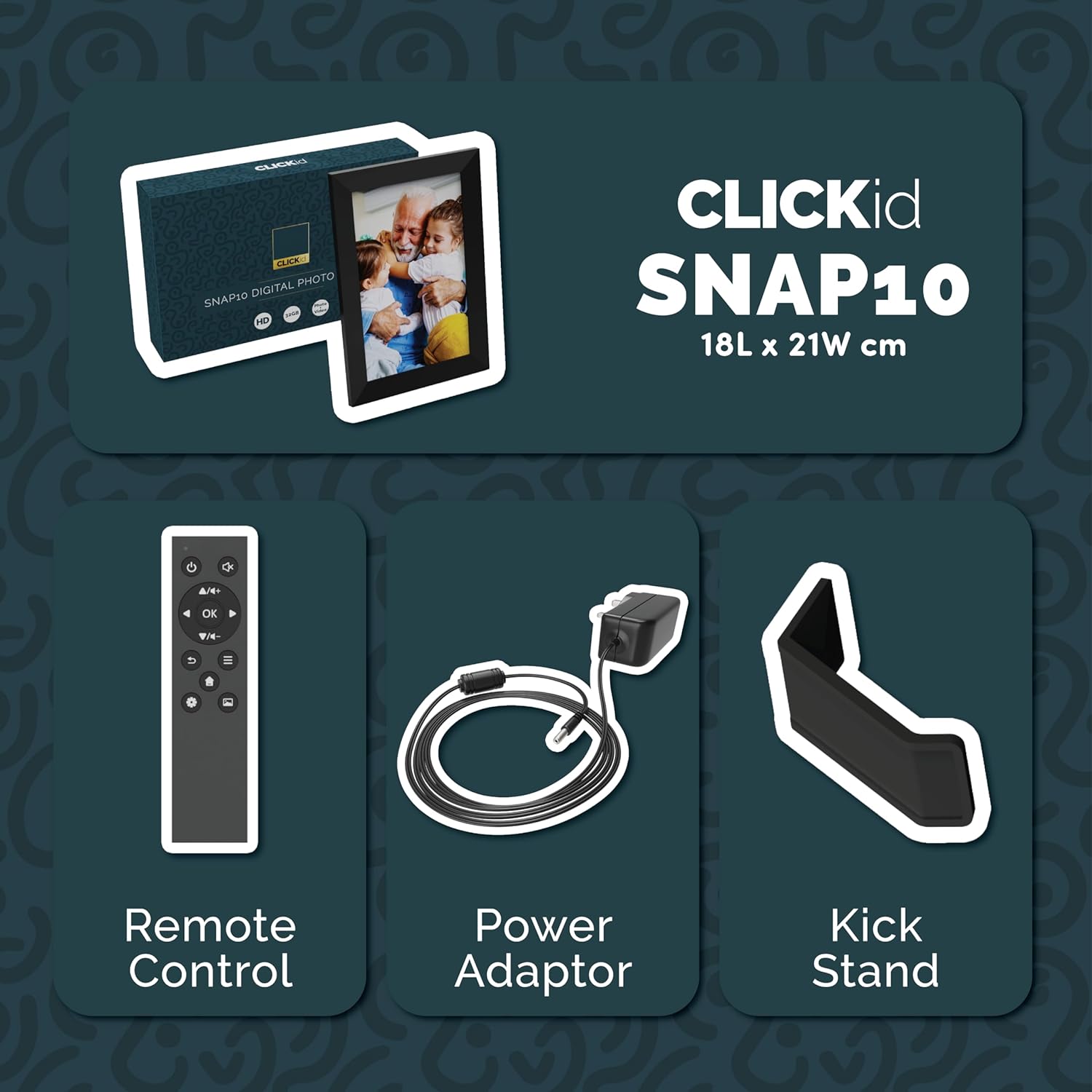
Included accessories: Remote Control, Power Adapter, and Kickstand.
Guia de configuració
- Unpack the Frame: Traieu amb cura el marc de fotos digital i tots els accessoris de l'embalatge.
- Attach the Kickstand: Insert the kickstand into the designated slot on the back of the frame. The frame supports both horizontal and vertical orientations.
- Connectar l'alimentació: Plug the power adapter into the DC port on the back of the frame, then connect it to a power outlet. The frame will automatically power on.
- Configuració inicial: Follow the on-screen instructions to select your language, time zone, and connect to a Wi-Fi network.
- Install Frameo App: Download the "Frameo" app from your smartphone's app store (available for iOS and Android).
- Connect Frame to App: Open the Frameo app and create an account. On your digital frame, tap "Add Friend" to get a unique code. Enter this code into the Frameo app on your smartphone to link the devices.

The back of the frame features essential ports for power, USB, and Micro SD card.
Instruccions de funcionament
Sending Photos and Videos
Once your frame is connected to the Frameo app, you can easily send photos and short videos from your smartphone.
- Open the Frameo app on your smartphone.
- Select the photos or videos you wish to send.
- Choose the connected digital frame as the recipient.
- Add a caption if desired, then tap "Send."

The Frameo app simplifies photo and video uploads from your smartphone.
Ús de la pantalla tàctil
The 10.1-inch LCD touchscreen allows for intuitive navigation. Swipe left or right to browse photos, tap to view options, and pinch to zoom.
Funcions de control remot
The included remote control provides convenient access to various frame functions from a distance.
- Navegació: Use arrow keys to move through menus and photos.
- D'acord/Entra: Confirmeu les seleccions.
- Enrere: Torna a la pantalla anterior.
- Reproduir/pausa: Control slideshows or video playback.
- Volum: Adjust audio for videos.

The included remote control for convenient operation.
Sensor de moviment
The integrated motion sensor can be enabled to automatically turn the display on when movement is detected and off when the area is vacant, conserving energy. This setting can be adjusted in the frame's system settings.
Funció de rotació automàtica
The frame automatically adjusts the photo orientation (portrait or landscape) based on how the frame is positioned. Ensure the auto-rotate feature is enabled in the settings for optimal display.

The auto-rotate feature adjusts display based on frame orientation.
Funcions acabadesview
- Pantalla tàctil LCD de 10.1 polzades: Provides a clear display and interactive control.
- 32 GB d'emmagatzematge intern: Ample space to store thousands of photos and videos.
- Connectivitat Wi-Fi: Enables seamless photo and video sharing from anywhere via the Frameo app.
- Frameo App Integration: Manage your frame, send media, and invite friends/family to share their moments.
- Sensor de moviment: Automatically turns the screen on/off to save energy.
- Rotació automàtica: Adjusts photo orientation automatically.
- Weather and Calendar Display: Integrated widgets provide current weather and calendar information.
- Ranura per a targeta de memòria: Supports Micro SD cards for additional storage or direct media import.
Manteniment
- Neteja: Use a soft, dry cloth to clean the screen and frame. Avoid abrasive cleaners or sprays directly on the screen.
- Actualitzacions de programari: The frame may receive automatic software updates via Wi-Fi. Ensure your frame is connected to the internet to receive the latest features and improvements.
- Gestió d'emmagatzematge: Periòdicament review your stored photos and videos. You can delete unwanted media directly from the frame or through the Frameo app to free up space.
Resolució de problemes
- El marc no s'encén:
- Assegureu-vos que l'adaptador de corrent estigui connectat correctament tant al marc com a una presa de corrent que funcioni.
- No es pot connectar a Wi-Fi:
- Verifiqueu la contrasenya del Wi-Fi. Assegureu-vos que el marc estigui dins de l'abast del vostre encaminador Wi-Fi. Proveu de reiniciar l'encaminador i el marc.
- Photos not appearing on the frame:
- Confirm that the frame is connected to Wi-Fi and linked to your Frameo app account. Check the Frameo app to ensure photos were successfully sent. Allow some time for photos to download, especially large batches.
- Frame is stuck on a white screen with a loading bar:
- This may indicate a software issue. Try performing a soft reset by disconnecting the power for 30 seconds and then reconnecting. If the issue persists, a factory reset might be necessary (refer to the frame's settings for this option, noting it will erase all data).
- El comandament a distància no funciona:
- Check if the batteries in the remote control need replacement. Ensure there are no obstructions between the remote and the frame's IR receiver.
Especificacions
| Marca | Majoria |
| Número de model | Snap10 |
| Color | Negre |
| Mida de la pantalla | 10.1 polzades |
| Resolució | 800*1280 |
| Relació d'aspecte | 2.10:1 |
| Capacitat d'emmagatzematge de memòria | 32 GB |
| Tecnologia de connectivitat | Wi-Fi |
| Mètode de control | App, Touchscreen, Remote |
| Font d'alimentació | Elèctric amb cable |
| Pes de l'article | 491 grams |
| Dimensions de l'article (L x A) | 7.08" de llargada x 8.26" d'amplada |
Garantia i Suport
The Majority Frameo Snap10 Digital Picture Frame comes with a Garantia ampliada de 2 anys. Registration is required to activate the extended warranty. Please refer to the product packaging or the manufacturer's website for details on how to register your product.
For technical support, troubleshooting assistance, or warranty claims, please contact Majority customer service through their official weblloc web o la informació de contacte que es proporciona a la documentació del producte.
Vídeo del producte
This video demonstrates the ease of sharing photos and videos with the Frameo app and viewing them on the digital picture frame, highlighting its use for connecting family members.