
amazon basics B0CX226DLQ
amazon basics Wireless Bluetooth Keyboard User Manual
Model: B0CX226DLQ
Introducció
This manual provides essential information for the setup, operation, and maintenance of your amazon basics Wireless Bluetooth Keyboard. Designed for seamless multi-device connectivity, this keyboard allows you to effortlessly switch between up to three devices running on iOS, Windows, or Android operating systems. Its compact and lightweight design, combined with noiseless keys and a built-in rechargeable battery, makes it an ideal solution for versatile typing needs on the go.

Imatge: De dalt a baix view of the amazon basics Wireless Bluetooth Keyboard, showcasing its compact layout and grey and black color scheme.
Contingut del paquet
En obrir el paquet, assegureu-vos que hi hagi tots els elements següents:
- 1 x amazon basics Wireless Bluetooth Keyboard
- 1 x cable de càrrega USB tipus C
- 1 x Manual d'usuari (aquest document)
Configuració
1. Càrrega del teclat
The keyboard features a built-in rechargeable battery. Before first use, it is recommended to fully charge the keyboard.
- Locate the Type-C charging port on the side of the keyboard.
- Connect one end of the provided USB Type-C charging cable to the keyboard's charging port.
- Connecteu l'altre extrem del cable a una font d'alimentació USB (per exemple, un port USB de l'ordinador o un adaptador de paret USB).
- El llum indicador de càrrega s'il·luminarà. Un cop completament carregat, el llum pot canviar de color o apagar-se, segons el model.

Imatge: Un costat en primer pla view of the keyboard, highlighting the Type-C charging port and the ON/OFF power switch.
2. Encès / apagat
To power on the keyboard, slide the ON/OFF switch located on the side of the keyboard to the "ON" position. To power off, slide it to the "OFF" position.
3. Emparellament Bluetooth
The keyboard supports connection to up to three devices simultaneously. Follow these steps to pair your devices:
- Assegureu-vos que el teclat estigui encès.
- Premeu el botó Fn key simultaneously with one of the Bluetooth channel keys (BT1, BT2, o BT3) for approximately 3-5 seconds until the corresponding indicator light flashes rapidly. This indicates the keyboard is in pairing mode.
- Al dispositiu (telèfon intel·ligent, tauleta, ordinador portàtil), aneu a la configuració de Bluetooth i activeu-lo.
- Cerca available devices. The keyboard will appear as "amazon basics Keyboard" or similar.
- Select the keyboard from the list to connect. If prompted, enter the displayed code on the keyboard and press Entra.
- Un cop connectat, l'indicador lluminós deixarà de parpellejar i romandrà fix durant uns segons abans d'apagar-se.
- Repeat these steps for up to two additional devices using the other BT channel keys.

Image: The keyboard positioned between a laptop, tablet, and smartphone, visually representing its multi-device connectivity feature.
Funcionament del teclat
1. Canviar entre dispositius
After pairing multiple devices, you can easily switch between them:
- Simplement premeu el Fn key simultaneously with the desired Bluetooth channel key (BT1, BT2, o BT3) to switch to the corresponding paired device.
- The keyboard will automatically connect to the selected device.
2. Compatibilitat del sistema operatiu
The keyboard is designed to be compatible with various operating systems. Some keys may have dual functions or specific behaviors depending on the OS.
- iOS: Compatible with iPhones and iPads.
- Windows: Fully functional with Windows PCs and laptops.
- Android: Works seamlessly with Android smartphones and tablets.
- Mac US: Compatible with MacBooks and iMacs.
- Chrome OS: Supports Chrome OS devices.
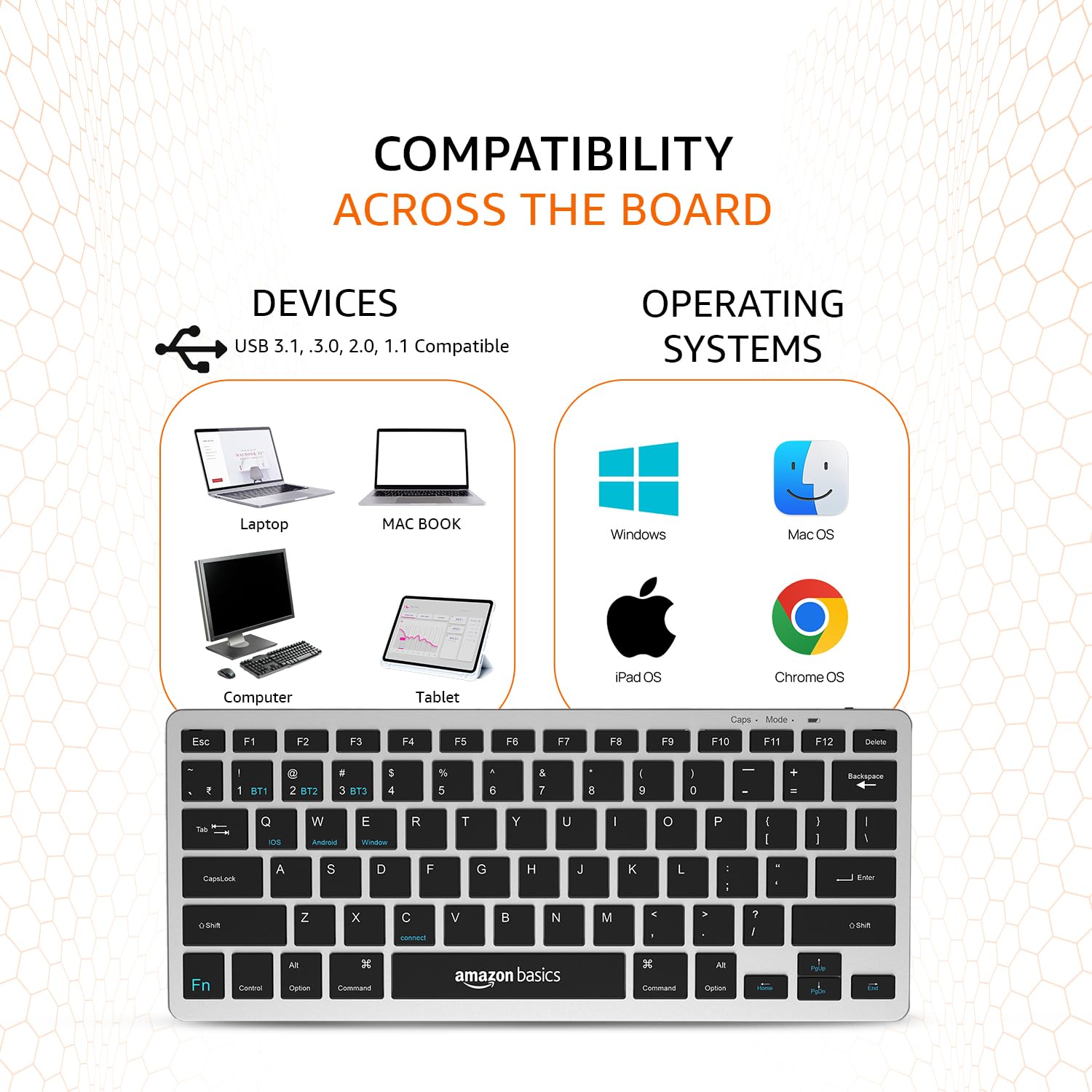
Image: A visual representation of the keyboard's broad compatibility, showing various device types and operating system logos it supports.
3. Special Function Keys
The keyboard features a dedicated Fn key that, when pressed in combination with other keys, activates special functions. Refer to the keycap legends for specific functions (e.g., media controls, volume, screen brightness).
Manteniment
Un manteniment adequat garanteix la longevitat i el rendiment òptim del teclat.
- Neteja: Use a soft, dry, lint-free cloth to wipe the keyboard surface. For stubborn dirt, slightly dampNetegeu el drap amb aigua o un netejador suau i no abrasiu. Eviteu la humitat excessiva.
- Cura de la bateria: To preserve battery life, avoid fully discharging the keyboard frequently. If storing for an extended period, charge the battery to about 50% and power off the keyboard.
- Emmagatzematge: Store the keyboard in a cool, dry place away from direct sunlight, extreme temperatures, and corrosive materials.
- Manipulació: Avoid dropping the keyboard or subjecting it to strong impacts. Do not attempt to disassemble the keyboard, as this will void the warranty.
Resolució de problemes
If you encounter issues with your amazon basics Wireless Bluetooth Keyboard, refer to the following common troubleshooting steps:
- El teclat no es connecta/s'emparella:
- Assegureu-vos que el teclat estigui encès i completament carregat.
- Assegureu-vos que el Bluetooth estigui habilitat al vostre dispositiu.
- Move the keyboard closer to your device to ensure it's within range.
- Forget or remove the keyboard from your device's Bluetooth list and attempt to re-pair it.
- Try pairing with a different device to rule out an issue with your primary device's Bluetooth.
- Keys Not Responding or Double Typing:
- Check the keyboard's battery level and recharge if low.
- Ensure the keyboard is properly connected to your device. Try switching to another BT channel and back.
- Clean the keys and surrounding areas to remove any debris that might be obstructing key presses.
- Restart both the keyboard (power off/on) and your connected device.
- Retard o resposta retardada:
- Ensure there are no other strong wireless signals or devices interfering with the Bluetooth connection.
- Redueix la distància entre el teclat i el dispositiu.
- Check for any pending software updates on your device that might improve Bluetooth performance.
- Problemes de càrrega:
- Verify that the Type-C cable is securely connected to both the keyboard and the power source.
- Proveu d'utilitzar un port USB o un adaptador d'alimentació diferent.
- Assegureu-vos que el cable de càrrega no estigui danyat.
If the issue persists after trying these steps, please contact amazon basics customer support for further assistance.
Especificacions
| Característica | Detall |
|---|---|
| Marca | conceptes bàsics d'Amazon |
| Model | Wireless Bluetooth Keyboard (B0CX226DLQ) |
| Tecnologia de connectivitat | Bluetooth |
| Disseny de claus | Disseny compacte de 78 tecles |
| Tipus de clau | Noiseless Keys |
| Dispositius compatibles | Portàtil, tauleta, telèfon intel·ligent |
| Compatibilitat de sistemes operatius | iOS, Windows, Android, Mac OS, Chrome OS |
| Tipus de bateria | Built-in Rechargeable Lithium Polymer |
| Contingut d'energia de la bateria | 1.48 watts-hora |
| Port de càrrega | USB tipus C |
| Material | ABS d'alta qualitat |
| Dimensions del producte (LxWxH) | 28.5 cm x 12 cm x 1.45 cm |
| Pes de l'article | 290 g |
| País d'origen | Índia |
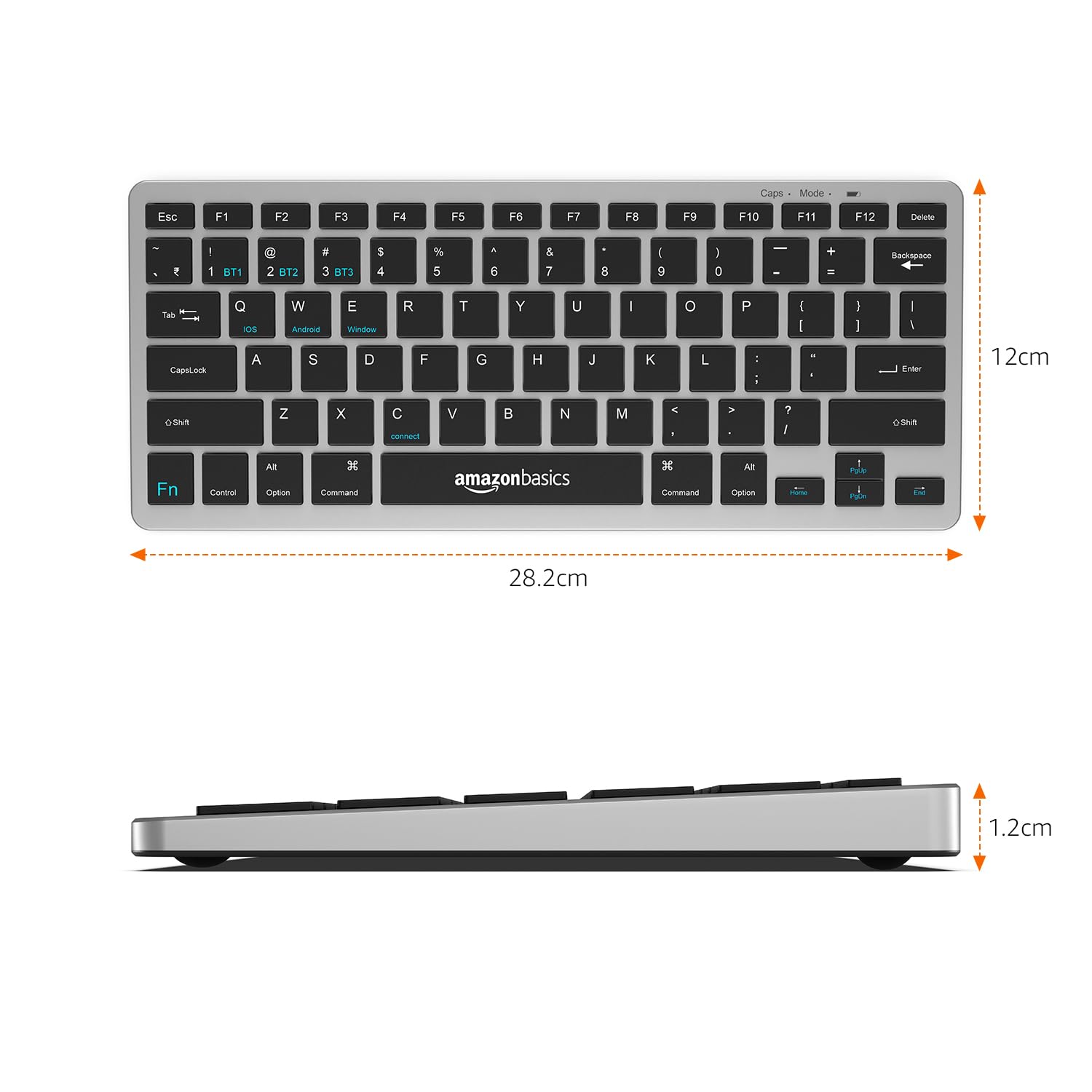
Image: The keyboard with overlaid measurements indicating its length (28.5 cm), width (12 cm), and thickness (1.2 cm).
Garantia i Suport
For information regarding the product warranty, please refer to the warranty card included in your package or contact amazon basics customer support directly. Warranty terms and conditions may vary by region and purchase date.
If you require further assistance, have questions, or need to report an issue that cannot be resolved using the troubleshooting guide, please contact amazon basics customer support through their official weblloc web o la informació de contacte proporcionada amb la compra.
For the latest support information and FAQs, visit the official amazon basics support page.
Ask a question about this manual
Ask about setup, troubleshooting, compatibility, parts, safety, or missing instructions. Manuals+ will review the question and use this page’s manual context to help answer it.