
1. Introducció
This manual provides detailed instructions for the setup, operation, and maintenance of your JKZTJOF MR23GA Magic Remote Control. Please read this manual thoroughly before using the remote control to ensure proper functionality and to maximize your viewing experience with compatible LG Smart TVs.
2. Producte acabatview
The MR23GA Magic Remote Control is designed to enhance your interaction with compatible LG Smart TVs. It features an intelligent upgraded chip for quick response times, voice control capabilities, and dedicated shortcut buttons for popular streaming services.
Característiques principals:
- Cerca per veu: Control your TV and search for content using voice commands.
- Resposta ràpida: Operations are processed rapidly, ensuring a smooth user experience.
- Botons de drecera: Direct access to popular streaming applications.
- Cursor, Click, and Scroll Function: Navigate menus and content intuitively.
- Disseny durador: Constructed from durable ABS material with an ergonomic design and soft, resilient buttons.

Imatge 2.1: Frontal i lateral view of the MR23GA Magic Remote Control, showcasinel seu disseny ergonòmic i la disposició dels botons.

Image 2.2: The MR23GA remote control highlighting its sensitive and durable build, TV control capabilities, quick response, and simple setup.
3. Compatibilitat
This remote control is compatible with the following 2023 LG Smart TV series:
- LG Z3 Series Smart TVs
- LG G3 Series Smart TVs
- LG C3 Series Smart TVs
- LG B3 Series Smart TVs
- Most 2023 LG LCD, LED, HDTV, UHD, OLED, HD, 4K, and 8K Smart TVs.
It is designed to replace original LG Magic Remote models such as MR650A, MR19BA, MR20GA, MR21GA, MR22GA, AKB75095307, AKB76037601, and AKB76037603.

Image 3.1: Visual representation of the MR23GA remote control's compatibility with several LG Magic Remote models.
4. Instruccions de configuració
Follow these steps to pair your MR23GA Magic Remote Control with your LG Smart TV:
- Insereix les piles: Open the battery compartment on the back of the remote control and insert two (2) AAA batteries (included). Ensure correct polarity.
- Restablir el comandament a distància: Manteniu premut el botó [INICI] i [ESQUENA] buttons simultaneously for approximately 10 seconds. This action resets the remote control.
- Pair with TV: Point the remote control towards your LG Smart TV. Press the [Wheel (OK)] button. A "Connected" message should appear on your TV screen, indicating successful pairing.
Once paired, the remote control will function as a direct replacement for your original LG Magic Remote.

Image 4.1: Step-by-step visual guide for pairing the MR23GA remote control with an LG Smart TV, showing the reset and connection steps.
5. Instruccions de funcionament
5.1 Navegació bàsica
- Botó d'encendre (⏻): Encén o apaga el televisor.
- Botons numèrics (0-9): Introduïu directament els números de canal.
- Pujar/baixar el volum: Ajusta el volum del televisor.
- Canal amunt/avall: Canvia els canals de televisió.
- Botó d'inici (⌂): Accesses the TV's home screen or main menu.
- Botó enrere (↶): Torna a la pantalla o menú anterior.
- Botó de roda (D'acord): Confirms selections and acts as a scroll wheel for navigation.
5.2 Control de veu
The MR23GA remote supports voice commands for convenient control. Press and hold the [Micròfon] button and speak clearly into the remote. Release the button when finished speaking.
- Example commands: "Start music," "Volume set to mute," "Find a romance movie," "Play the next episode."

Image 5.1: Illustration of the voice interaction feature, showing example commands and the microphone button on the remote.
5.3 Cursor, Click, and Scroll Function
The remote features a motion-sensing cursor that allows you to point and click on your TV screen, similar to a computer mouse. Use the scroll wheel for quick navigation through lists and web pàgines.
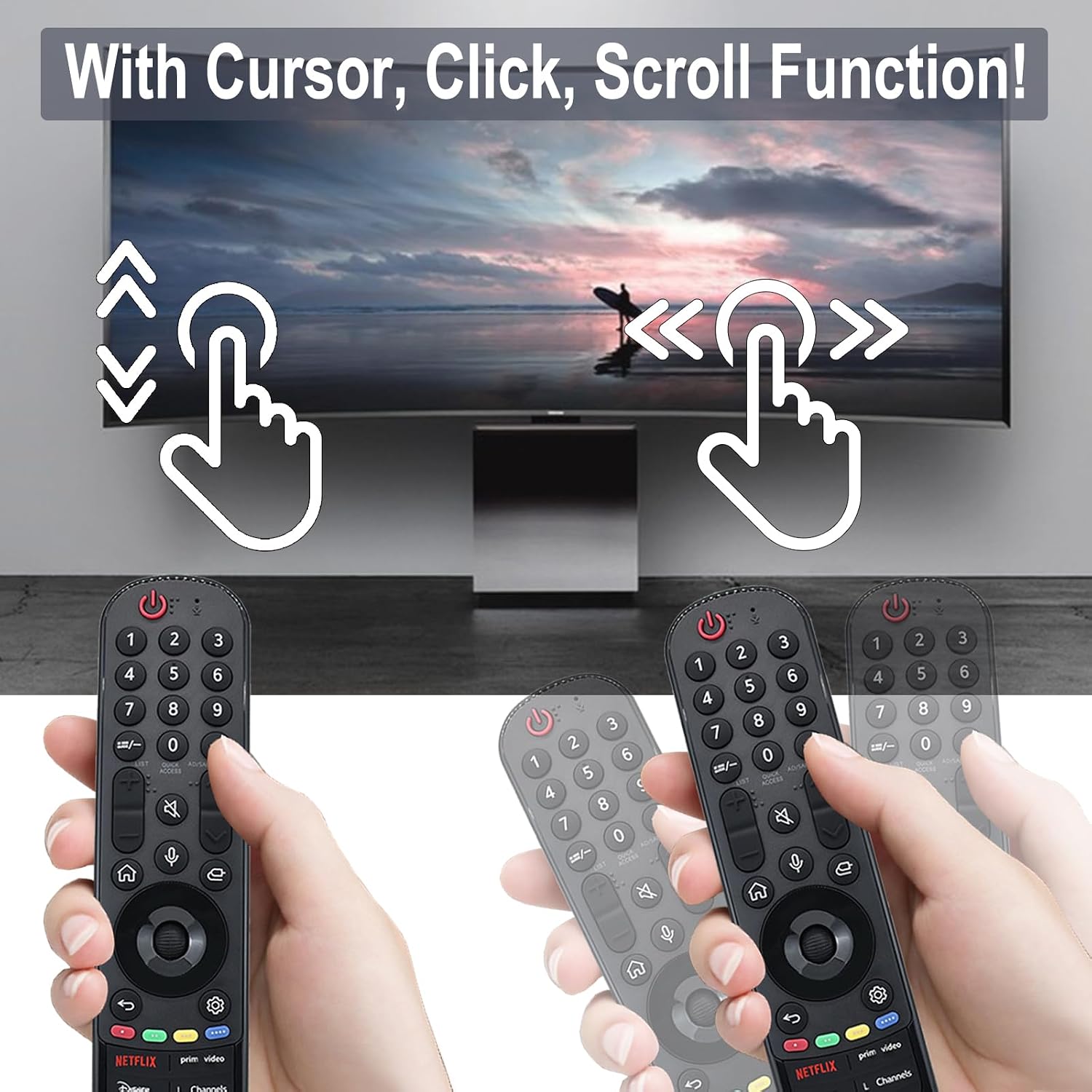
Image 5.2: Depiction of the cursor, click, and scroll functions of the remote control on a TV screen.
5.4 botons de drecera
The remote includes six dedicated shortcut buttons for quick access to popular streaming services and functions:
- NETFLIX
- Prime Video
- Disney+
- L Channels
- Eslinga
- Alexa
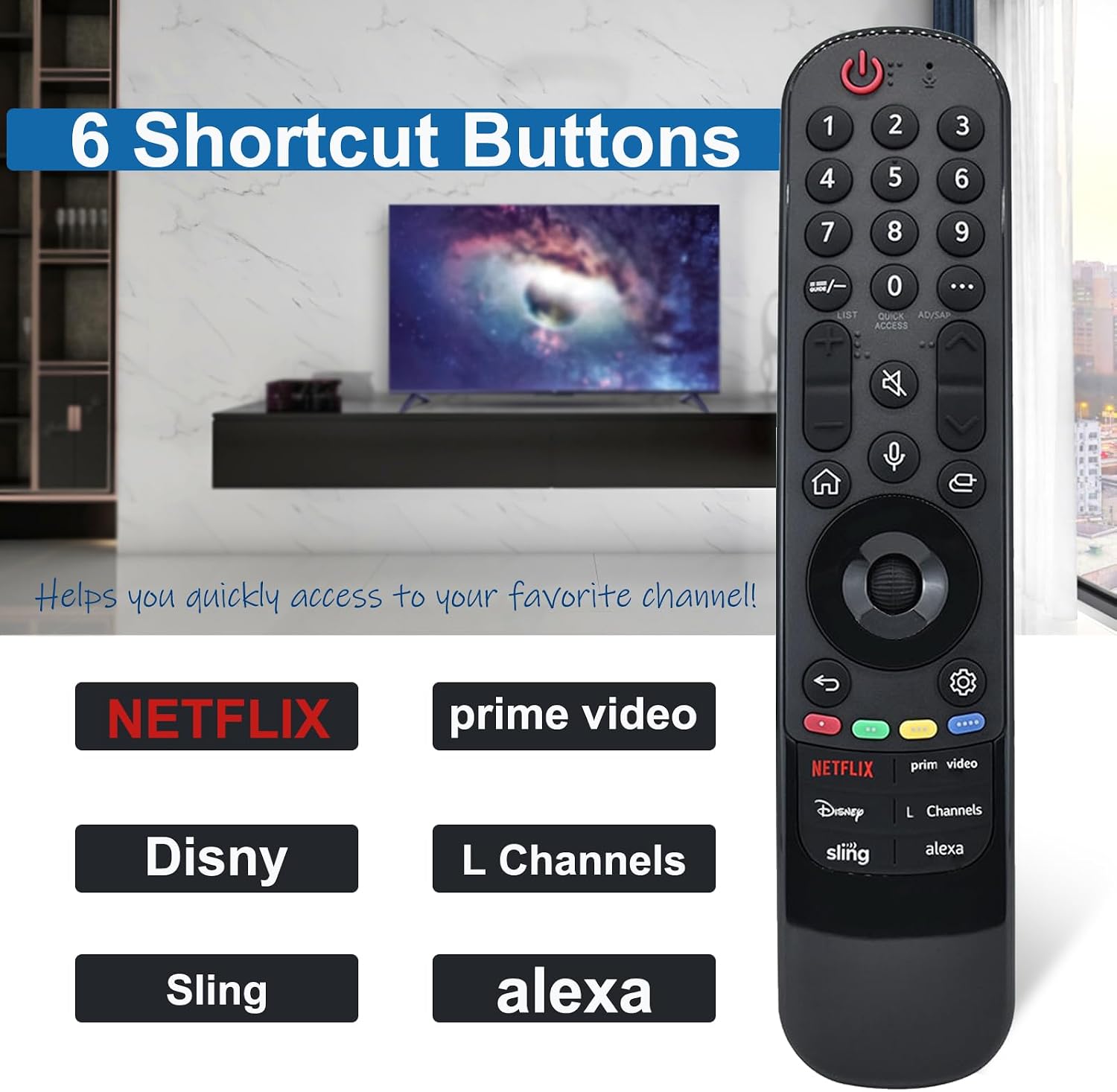
Image 5.3: Close-up of the MR23GA remote control highlighting the six dedicated shortcut buttons for various streaming services and functions.
6. Manteniment
- Neteja: Netegeu el comandament a distància amb un drap suau i sec. No utilitzeu netejadors líquids ni materials abrasius.
- Substitució de la bateria: Replace batteries when the remote's response becomes slow or inconsistent. Always replace both batteries at the same time with new AAA batteries.
- Emmagatzematge: Guardeu el comandament a distància en un lloc fresc i sec, allunyat de la llum solar directa i de temperatures extremes.
- Eviteu les gotes: While durable, avoid dropping the remote control to prevent damage.

Image 6.1: Features of the MR23GA remote control emphasizing its durable ABS material, lightweight ergonomic design, and soft, resilient buttons.
7. Solució De Problemes
| Problema | Possible causa/solució |
|---|---|
| El comandament a distància no respon. |
|
| El control per veu no funciona. |
|
| Cursor is not appearing or moving. |
|
8. Especificacions
| Característica | Detall |
|---|---|
| Model | MR23GA |
| Marca | JKZTJOF |
| Tecnologia de connectivitat | infrarojos |
| Característica especial | Cerca per veu |
| Nombre màxim de dispositius compatibles | 1 (Televisió) |
| Distància de control | Fins a 10 metres |
| Vida útil del botó | Over 120,000 clicks |
| Font d'alimentació | 2 piles AAA (incloses) |
9. Garantia i Suport
JKZTJOF provides a 30-day return and refund service. If you receive an incorrect or damaged product, please contact the seller directly for assistance. For further support or inquiries, refer to the seller's contact information on the purchase platform.