
ODK SPCB01120201014USDF
ODK 55 inch Computer Desk User Manual
Model: SPCB01120201014USDF
Marca: ODK
1. Introducció
Thank you for choosing the ODK 55 inch Computer Desk. This desk is designed to enhance your gaming and work environment with its multi-functional features, including a full monitor stand, built-in LED lighting, integrated power outlets, and convenient storage solutions. Constructed with a premium metal frame and thick particleboard, it ensures stability and durability for long-term use. This manual provides detailed instructions for assembly, operation, maintenance, and troubleshooting to ensure you get the most out of your new desk.

Figure 1: ODK 55 inch Computer Desk with LED Lights
2. Contingut del paquet
Please verify that all components are present before beginning assembly. If any parts are missing or damaged, please contact ODK customer service.
- Desk Panels (Main desktop, monitor stand, side shelves)
- Metal Frame Components (Legs, support bars, X-brackets)
- Tira de llum LED amb controlador
- Recessed Power Strip with USB Ports
- Assembly Hardware (Screws, nuts, bolts, tools)
- Ganxo per a auriculars
- Manual d'instruccions
3. Especificacions
| Característica | Descripció |
|---|---|
| Marca | ODK |
| Número de model | SPCB01120201014USDF |
| Dimensions (P x A x A) | 55 "P x 19.6" W x 34" H |
| Pes | 39.02 lliures |
| Material | Engineered Wood (Top), Alloy Steel (Frame) |
| Llums LED | RGB, 10 Dynamic Modes, 10 Color Variations, 3 Brightness Levels |
| Preses de corrent | 3 endolls de CA (120 V/12 A), 2 ports USB (5 V/2 A) |
| Longitud del cable d'alimentació | 6.6 peus |
| Característiques especials | Monitor Stand, Storage Shelves, Headphone Hook, Reversible PC Stand |
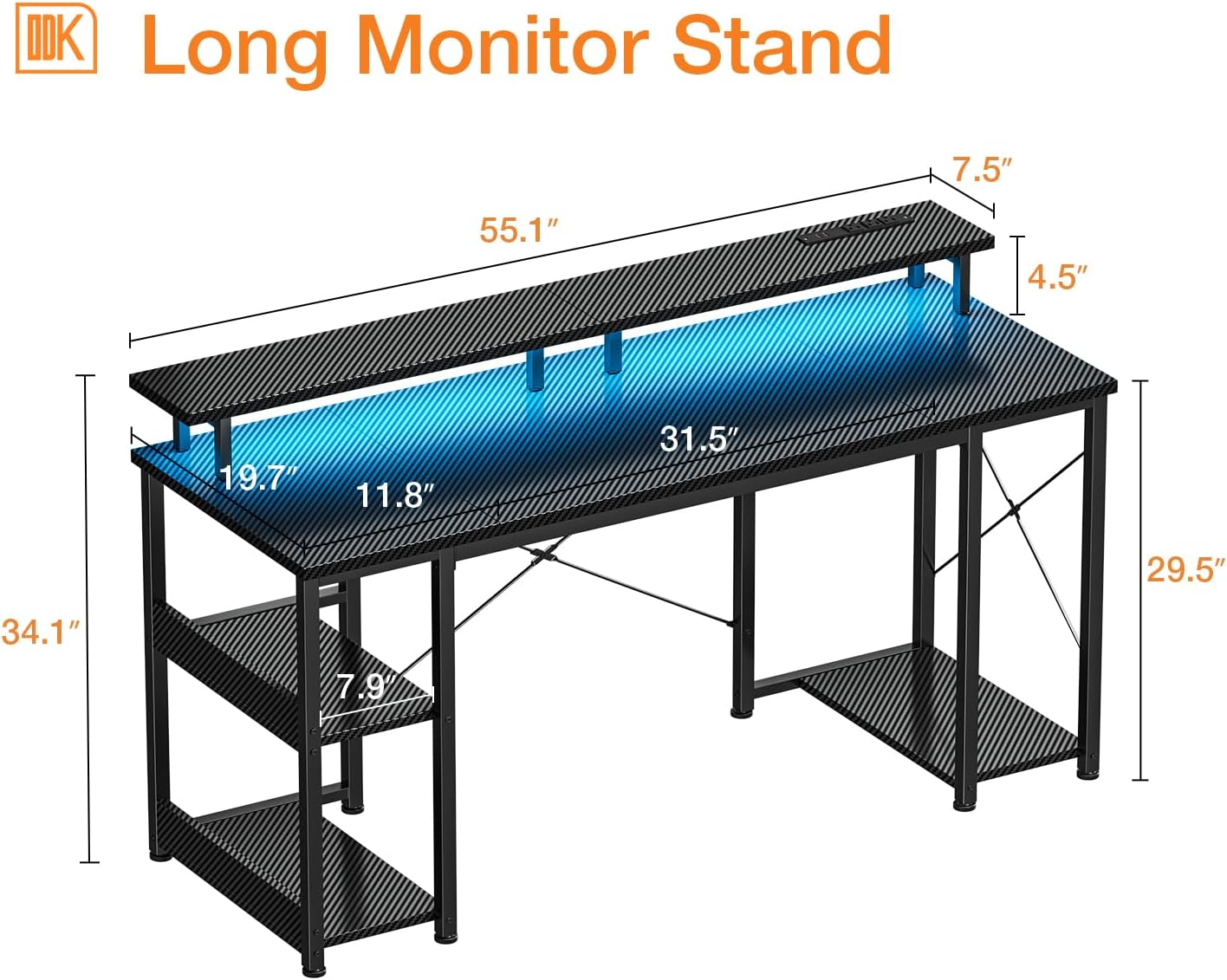
Figura 2: Dimensions de l'escriptori
4. Muntatge i muntatge
The ODK Computer Desk is designed for easy assembly, typically taking around 30 minutes with the provided tools and instructions. It is recommended for one person to assemble.
4.1 Passos de muntatge
- Desembaleu tots els components i verifiqueu-los amb la llista de contingut del paquet.
- Follow the step-by-step graphical instructions provided in the separate assembly guide.
- Assegureu-vos que tots els cargols estiguin ben ajustats per a l'estabilitat.
- Attach the LED light strip and power strip as indicated in the instructions.

Figure 3: Stable X-Bracket Design and Storage
The desk features a stable X-bracket design for enhanced durability. The side shelves are two-tiered and can be configured to accommodate a CPU tower by removing the bottom shelf, offering flexible storage options.

Figure 4: Removable Shelf for CPU Tower
4.2 Muntatge acabatview Vídeo
Video 1: Official product video demonstrating the features and assembly of the ODK Computer Desk with Monitor Stand and Storage Shelves.
5. Instruccions de funcionament
5.1 Funcionament dels llums LED
The desk features built-in RGB LED lights with various modes and colors to customize your environment. The lights are controlled via an inline controller attached to the power cord.

Figure 5: LED Light Controller
- Static Color Button (C): Press once to switch to static color mode. Each subsequent press changes the color.
- Dynamic Mode Button (M): Press once to switch to dynamic mode effects. Each subsequent press changes the dynamic mode. Press and hold for more than 3 seconds to enter demo mode, where the strip cycles through various dynamic modes automatically.
- Speed & Brightness and Power Button (S/B / Power):
- In static mode, press to adjust brightness (3 levels: 30%, 50%, 100%).
- In dynamic mode, press to adjust dynamic mode speed.
- Press and hold to shut down when the strip is on. Press briefly to turn on when the strip is off.
The product has a power-off memory function; the strip can restore the color, brightness, and mode in the next power-on.

Figure 6: LED Brightness Levels
5.2 Power Outlets Usage
The desk is equipped with a recessed power strip for convenient access to power for your devices.

Figure 7: Recessed Power Strip
- Plug the desk's main power cord (6.6-foot) into a standard wall outlet.
- Use the 3 AC outlets (120V/12A) for monitors, computers, or other electronics.
- Use the 2 USB ports (5V/2A) to charge mobile devices, headphones, or other USB-powered accessories.

Figure 8: Power Outlet Details
6. Manteniment
To ensure the longevity and appearance of your ODK Computer Desk, follow these simple maintenance guidelines:
- Neteja: Netegeu les superfícies de l'escriptori amb un drap suau iamp drap. Eviteu productes químics agressius o netejadors abrasius, que poden danyar l'acabat.
- Vessaments: Clean up spills immediately to prevent staining or damage to the wood and electrical components.
- Comprovació d'estabilitat: Reviseu periòdicament tots els cargols i connexions per assegurar-vos que romanen ajustats. Torneu a apretar-los si cal per mantenir l'estabilitat de l'escriptori.
- Gestió de cables: Organize cables to prevent tangles and reduce strain on the power outlets and LED strip.
7. Solució De Problemes
If you encounter any issues with your ODK Computer Desk, refer to the following common troubleshooting tips:
- Els llums LED no funcionen:
- Ensure the desk's main power cord is securely plugged into a working wall outlet.
- Check the connection between the LED strip and its inline controller.
- Verify the inline controller is not damaged and try pressing the power button.
- Power Outlets Not Providing Power:
- Confirm the desk's main power cord is fully inserted into the wall outlet.
- Proveu la presa de corrent amb un altre dispositiu per assegurar-vos que funciona.
- Check if any circuit breakers have tripped.
- Desk Wobbles/Unstable:
- Assegureu-vos que tots els cargols de muntatge estiguin ben apretats.
- Check that the desk is on a flat, level surface. Adjust feet pads if necessary.
- Verify that the X-brackets are correctly installed and secured.
- Peces que falten o danyades:
- Refer to the "Package Contents" section and contact ODK customer service for replacements.
8. Garantia i Suport
ODK is committed to providing high-quality products and excellent customer service. We offer 24-hour online professional pre-sale and after-sale service to assist you with any inquiries or issues.
For any quality problems, ODK provides fast refund or replacement services. Please retain your proof of purchase for warranty claims.
For support, please visit the official ODK store or contact our customer service team through the platform where you purchased the product.
Thank you for choosing ODK.
Ask a question about this manual
Ask about setup, troubleshooting, compatibility, parts, safety, or missing instructions. Manuals+ will review the question and use this page’s manual context to help answer it.