
1. Introducció
The LILYGO T-BeamSUPREME is a collaborative development board designed for advanced communication and positioning applications. It integrates an ESP32-S3 microcontroller, a LoRa SX1262 module for long-range wireless communication, and an L76K GPS chip for precise location tracking. The board also features built-in WiFi and Bluetooth connectivity, along with a 1.3-inch SH1106 OLED display for real-time information. This device is particularly suitable for Meshtastic projects, enabling off-grid communication networks.
2. Producte acabatview i Components
The T-BeamSUPREME board is a compact and versatile unit. Key components include the ESP32-S3 core, LoRa module, GPS module, and an OLED display. The core module is designed to be replaceable, allowing for different GPS versions (e.g., UBLOX or L76K) to be used based on specific project requirements.
2.1. Què hi ha a la caixa
- LILYGO T-BeamSUPREME Development Board (LoRa L76K Module, Bluetooth, WiFi, GPS, 1.3" SH1106 OLED)
- Antena LoRa
- Antena GPS
- Pin Headers (for expansion)
2.2. Disseny del tauler

Figura 2.2.1: Frontal view of the LILYGO T-BeamSUPREME development board, showing the OLED display, ESP32-S3 core, LoRa module, and various connectors.

Figura 2.2.2: Esquena view of the LILYGO T-BeamSUPREME board, highlighting the 18650 battery holder and USB-C port.

Figure 2.2.3: Detailed diagram illustrating the pinout, main components, and expansion interfaces of the LILYGO T-BeamSUPREME board.

Figure 2.2.4: Comparison of L76K and Ublox GNSS modules, detailing properties like positioning support, parallelism, update rate, and oscillator type.
3. Instruccions de configuració
Follow these steps to prepare your LILYGO T-BeamSUPREME for operation:
- Col·loca les antenes: Carefully screw the provided LoRa antenna onto the SMA connector labeled 'LoRa' and the GPS antenna onto the U.FL connector labeled 'GPS'. Ensure connections are secure but do not overtighten.
- Font d'alimentació: The board can be powered via the USB-C port or by inserting an 18650 Li-ion battery into the battery holder on the back. Ensure correct battery polarity.
- Initial Firmware: The board typically comes pre-flashed with a basic firmware. For Meshtastic functionality, it is recommended to flash the latest Meshtastic firmware. Refer to the official Meshtastic documentation for detailed flashing instructions.
- Connexió a l'ordinador: Use a USB-C cable to connect the board to your computer for power, data transfer, and firmware flashing.
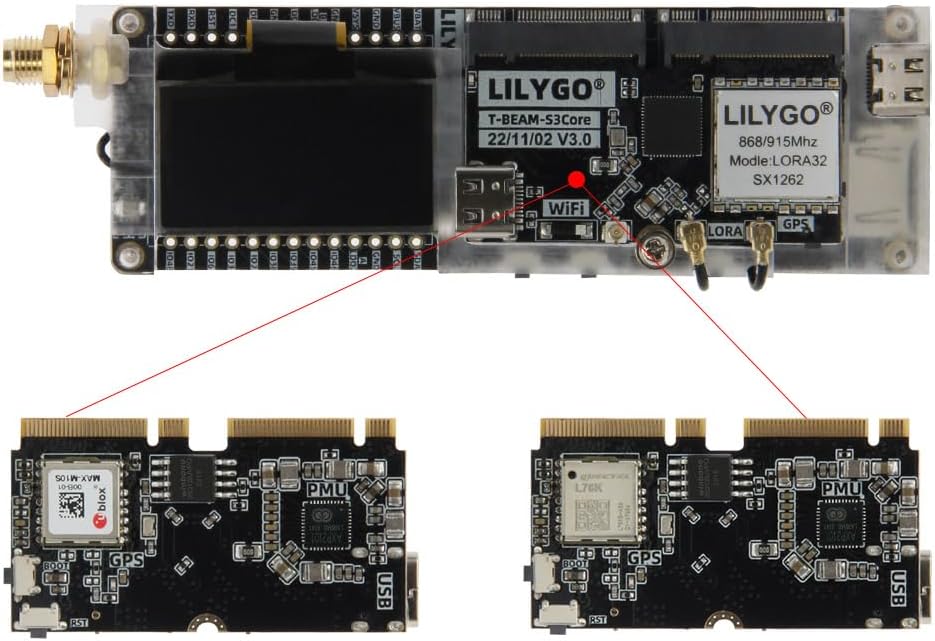
Figure 3.1: Proper connection of the external antenna to the board.
4. Instruccions de funcionament
Once set up, the LILYGO T-BeamSUPREME can be used for various applications, primarily Meshtastic.
4.1. Meshtastic Operation
The T-BeamSUPREME is designed to run Meshtastic firmware, enabling a decentralized mesh network for communication. After flashing the Meshtastic firmware, you can configure the device using the Meshtastic mobile app (available for Android and iOS) or the web interfície.
- Maridatge: Use Bluetooth to pair your mobile device with the T-BeamSUPREME.
- Configuració: Set up channel settings, device roles (router, client), and other network parameters via the app.
- Missatgeria: Send and receive text messages over the LoRa mesh network.
4.2. Funcionalitat del GPS
The integrated L76K GPS module provides location data. Once powered on and with a clear view of the sky, the GPS module will acquire satellite signals. The OLED display can show GPS coordinates, altitude, and satellite count, depending on the firmware.
4.3. Pantalla OLED
The 1.3-inch SH1106 OLED display provides real-time feedback on the device's status, including network information, GPS data, battery level, and other sensor readings (if supported by firmware).
4.4. WiFi and Bluetooth
The ESP32-S3 provides 2.4 GHz WiFi and Bluetooth 5 (LE) connectivity. These are primarily used for device configuration, firmware updates, and connecting to other devices or networks as required by your application.
5. Especificacions

Figure 5.1: Physical dimensions of the LILYGO T-BeamSUPREME board (Length: 114.6mm, Height: 28mm, Width: 33mm).
| Característica | Descripció |
|---|---|
| Marca | LILYGO |
| Nom del model | T-BeamSUPREME |
| Tecnologia de connectivitat | Bluetooth, WiFi |
| Components inclosos | LoRa L76K Module, Bluetooth, WiFi, GPS, 1.3" SH1106 OLED |
| Sistema operatiu | Linux (compatible) |
| Fabricant de CPU | Espressif Systems (ESP32-S3) |
| Comunicació sense fils estàndard | Bluetooth |
| Dispositius compatibles | Keyboards, mice, USB storage devices (via host functionality) |
| Tecnologia de RAM | LPDDR4 |
| Nombre de processadors | 1 (Dual-core LX7 microprocessor) |
| Ports USB totals | 2 (USB-C for power/data, potentially another for host) |
| Compatibilitat amb la llar intel·ligent | No és compatible amb la llar intel·ligent |
| País d'origen | Xina |
6. Manteniment
Proper care ensures the longevity and reliable operation of your LILYGO T-BeamSUPREME board.
- Manipulació: Always handle the board by its edges to avoid touching sensitive electronic components. Electrostatic discharge can damage the board.
- Medi ambient: Keep the board in a dry environment, away from moisture, dust, and extreme temperatures.
- Antenes: Ensure antennas are securely connected before operation. Avoid bending or stressing the antenna connectors.
- Cura de la bateria: If using an 18650 battery, ensure it is of good quality and correctly inserted. Do not overcharge or deeply discharge the battery. Remove the battery if the device will not be used for an extended period.
- Neteja: Use a soft, dry brush or compressed air to gently remove dust from the board. Avoid using liquids or solvents.
7. Solució De Problemes
This section addresses common issues you might encounter with your T-BeamSUPREME board.
- El dispositiu no s'encén:
- Check USB-C cable connection and power source.
- If using a battery, ensure it is charged and correctly inserted with proper polarity.
- El GPS no rep senyal:
- Ensure the GPS antenna is securely connected.
- Operate the device outdoors with a clear view of the sky. GPS acquisition can take several minutes, especially for the first fix.
- Verify that the firmware supports and correctly initializes the L76K GPS module.
- Problemes de connectivitat WiFi/Bluetooth:
- Ensure the device is within range of the WiFi access point or Bluetooth device.
- Check for any firmware-related issues or incorrect configuration settings.
- Reinicieu el dispositiu i proveu de connectar-vos de nou.
- Durada de la bateria curta:
- ESP32-S3 modules can be power-intensive. Optimize firmware settings for power saving if possible.
- Consider using a higher capacity 18650 battery or an external power bank for extended operation.
- Antenna Connector Loosening:
- Regularly check the tightness of the antenna connectors. If used in a portable setup, consider a protective enclosure to prevent stress on the connectors.
8. Garantia i Suport
8.1. Informació de la garantia
This LILYGO T-BeamSUPREME development board comes with a 138 dies de garantia against manufacturer defects. This warranty covers defects in materials and workmanship under normal use. It does not cover damage caused by misuse, accidents, unauthorized modifications, or improper installation.
8.2. Suport tècnic
For any questions, technical assistance, or suggestions regarding the product, please do not hesitate to contact LILYGO customer support. We are committed to providing prompt assistance and will respond to your inquiries as quickly as possible.
You can often find additional resources, community forums, and updated documentation on the official LILYGO GitHub page: github.com/Xinyuan-LilyGO/LilyGo-LoRa-Series
