
Konix 3328170001175
Konix Hello Kitty Wireless Bluetooth 5.3 Headphones User Manual
Model: 3328170001175
Introducció
Gràcies per la compraasing the Konix Hello Kitty Wireless Bluetooth 5.3 Headphones. This manual provides essential information for setting up, operating, maintaining, and troubleshooting your new headphones. Please read this manual thoroughly before use to ensure optimal performance and longevity of your device.

Imatge: Frontal view of the Konix Hello Kitty Wireless Bluetooth 5.3 Headphones, showcasing the white and pink design with Hello Kitty graphics on the earcups.
Característiques del producte
- Disseny còmode: Lightweight construction with padded ear cushions and an adjustable headband for extended wear comfort.
- Connectivitat sense fils: Equipped with Bluetooth 5.3 for stable and efficient wireless connection to PC, smartphones, and tablets.
- Llarga vida útil de la bateria: Gaudeix de fins a 30 hores de reproducció de música amb una sola càrrega.
- Micròfon integrat: Facilitates clear communication for calls and voice commands.
- Connectivitat versàtil: Includes a 3.5mm jack cable for wired audio connection, offering flexibility when wireless is not preferred or battery is low.
- Àudio d'alta qualitat: Features 40mm speakers for an immersive listening experience.
- Controls integrats: Direct controls on the headphone for volume adjustment, voice assistant activation (Siri/Android compatible), and call management.

Image: A person wearing the Konix Hello Kitty headphones, with icons illustrating key features such as Bluetooth 5.3 connectivity, a built-in microphone, and the inclusion of a 3.5mm audio jack and Type-C charging cable.
Contingut del paquet
- Konix Hello Kitty Wireless Bluetooth 5.3 Headphones
- Cable Jack d'àudio de 3.5 mm
- Cable de càrrega USB tipus C
- Manual d'usuari (aquest document)

Image: The front of the retail packaging for the Konix Hello Kitty Bluetooth headset, showing the product image and key features.
Configuració
1. Càrrega dels auriculars
Before first use, fully charge your headphones. Connect the USB Type-C charging cable to the charging port on the headphones and the other end to a USB power source (e.g., computer USB port, wall adapter). The charging indicator light will show the charging status.
- Temps de càrrega: aproximadament 2.5 hores.
- Battery Life: Up to 30 hours of playtime on a full charge.
- Standby Time: Up to 200 hours.

Image: The Konix Hello Kitty headphones with an overlay indicating a 30-hour playtime, 200-hour standby time, and 2.5-hour charging time.
2. Emparellament Bluetooth
- Assegureu-vos que els auriculars estiguin carregats i apagats.
- Press and hold the Power button until the LED indicator light flashes, indicating pairing mode.
- Al dispositiu (telèfon intel·ligent, tauleta, PC), activeu el Bluetooth i cerqueu els dispositius disponibles.
- Select "Konix Hello Kitty" (or similar name) from the list of found devices.
- Once paired, the LED indicator will change (e.g., solid blue) and you will hear an audible confirmation.
3. Connexió amb cable (opcional)
If you prefer a wired connection or if the battery is depleted, you can use the included 3.5mm audio jack cable.
- Plug one end of the 3.5mm audio cable into the audio jack on the headphones.
- Connecteu l'altre extrem al port de sortida d'àudio de 3.5 mm del vostre dispositiu.
- Els auriculars canviaran automàticament al mode amb cable.
Instruccions de funcionament
Encès/Apagat
- Encès: Premeu i manteniu premut el botó d'engegada durant aproximadament 3 segons.
- Apagar: Premeu i manteniu premut el botó d'engegada durant aproximadament 5 segons.
Reproducció de música
- Reproduir/pausa: Premeu el botó multifunció.
- Pujar el volum: Premeu el botó Pujar volum.
- Baixar el volum: Premeu el botó per baixar el volum.
- Pista següent: Press and hold (or double-press, depending on model) the Volume Up button.
- Pista anterior: Press and hold (or double-press, depending on model) the Volume Down button.
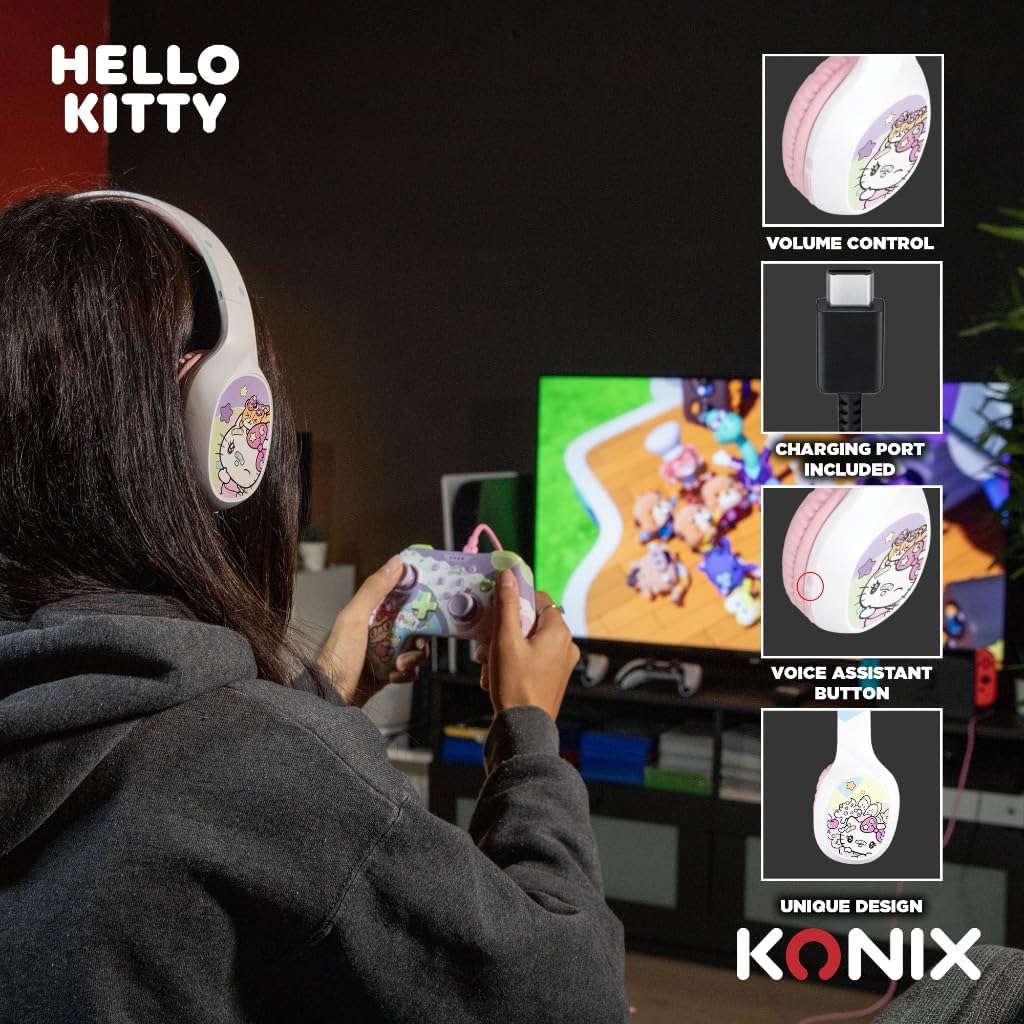
Image: A user interacting with the Konix Hello Kitty headphones, with insets highlighting the volume control, charging port, and voice assistant button located on the earcup.
Gestió de trucades
- Respondre/Finalitzar la trucada: Premeu el botó multifunció.
- Rebutja la trucada: Manteniu premut el botó multifunció.
- Torna a marcar l'últim número: Premeu dues vegades el botó multifunció.
Assistent de veu
Activate your device's voice assistant (Siri, Google Assistant, etc.) directly from the headphones.
- Activa l'Assistent de veu: Press the dedicated Voice Assistant button.
Manteniment i cura
- Neteja: Netegeu els auriculars amb un drap suau i sec. No utilitzeu productes de neteja abrasius ni dissolvents.
- Emmagatzematge: Guardeu els auriculars en un lloc fresc i sec, allunyat de la llum solar directa i de temperatures extremes.
- Cura de la bateria: Per allargar la durada de la bateria, eviteu descarregar-la completament amb freqüència. Carregueu els auriculars regularment, fins i tot si no els feu servir durant períodes prolongats.
- Resistència a l'aigua: Aquests auriculars no són impermeables. Eviteu l'exposició a l'aigua o a una humitat excessiva.
- Manipulació: Do not drop, disassemble, or attempt to repair the headphones yourself. This may void the warranty and cause damage.
Resolució de problemes
| Problema | Causa possible | Solució |
|---|---|---|
| Els auriculars no s'engeguen. | Bateria baixa. | Carregueu els auriculars completament. |
| No es pot emparellar per Bluetooth. | Auriculars no en mode d'emparellament; Bluetooth del dispositiu desactivat; Massa lluny del dispositiu. | Ensure headphones are in pairing mode; Turn on Bluetooth on your device; Move headphones closer to your device (within 10 meters). |
| Sense so o amb un volum baix. | Volume too low on headphones or device; Incorrect audio output selected; Headphones not properly connected (wired). | Increase volume on both headphones and device; Check device's audio output settings; Ensure 3.5mm cable is fully inserted. |
| El micròfon no funciona. | Microphone muted on device; Incorrect input device selected. | Check microphone settings on your device; Ensure "Konix Hello Kitty" is selected as the input device. |
| Connexió intermitent. | Interference; Too far from device; Obstacles between devices. | Move away from other wireless devices; Reduce distance to paired device; Remove obstacles. |
Especificacions
| Característica | Detall |
|---|---|
| Número de model | 3328170001175 |
| Connectivitat | Sense fil (Bluetooth 5.3), amb cable (connector de 3.5 mm) |
| Versió Bluetooth | 5.3 |
| Mida de l'altaveu | 40 mm |
| Interval de freqüència | 20 Hz - 20,000 Hz |
| Durada de la bateria (temps de reproducció) | Fins a 30 hores |
| Temps d'espera | Fins a 200 hores |
| Temps de càrrega | Aprox. 2.5 hores |
| Micròfon | Integrat |
| Color | Blanc, Rosa |
| Pes | 290 grams (aprox.) |
| Dimensions (paquet) | 20.1 x 18.8 x 8 cm |
| Control de soroll | Cancel·lació de soroll híbrida |
Garantia i Suport
Konix products are designed and manufactured to the highest quality standards. For information regarding warranty coverage and customer support, please refer to the warranty card included with your product or visit the official Konix weblloc web. Si us plau, conserveu el comprovant de compra per a reclamacions de garantia.
For technical assistance or inquiries, please contact Konix customer support through their official channels.
Ask a question about this manual
Ask about setup, troubleshooting, compatibility, parts, safety, or missing instructions. Manuals+ will review the question and use this page’s manual context to help answer it.