
SENSSUN IF1090D
SENSSUN Smart Fitness Scale User Manual
Model: IF1090D
1. Introducció
The SENSSUN Smart Fitness Scale is designed to provide a comprehensive analysis of your body composition, helping you monitor your health and fitness journey. This digital bathroom scale accurately measures various body metrics and seamlessly syncs with your smartphone via Bluetooth for convenient data tracking and analysis.

Image: The SENSSUN Smart Fitness Scale, a sleek black digital scale with four silver electrode pads, displayed alongside a smartphone showing its companion app interface. The scale features a clear digital display.

Imatge: Vista de dalt a baix view of the SENSSUN Smart Body Fat Scale, black with silver accents, positioned next to a smartphone displaying the 'MovingLife' app. Text indicates 'Smart Body Fat Scale - Bluetooth Compatible' and app availability on App Store and Google Play.
2. Configuració
2.1 Desembalatge i instal·lació de la bateria
Carefully remove the scale from its packaging. Locate the battery compartment on the underside of the scale. Insert the included 2 AAA batteries, ensuring correct polarity (+/-). Close the battery compartment securely.
2.2 Descàrrega i emparellament de l'aplicació
- Download the 'MovingLife' app from your smartphone's app store (available on Apple App Store and Google Play Store). You can also visit http://www.camry.com.cn/app_download_movinglife.html for direct download.
- Assegureu-vos que el Bluetooth estigui habilitat al vostre telèfon intel·ligent.
- Open the 'MovingLife' app and follow the on-screen instructions to create your user profile.
- Step onto the scale barefoot. The scale will automatically turn on and attempt to pair with the app via Bluetooth. Once connected, your weight and other body composition data will appear in the app.

Image: A person holding the sleek black SENSSUN Smart Fitness Scale, highlighting its slim design and tempered glass material. The image also notes its 330lb/150kg capacity, smart chip for exactness, and auto-calibration feature.
3. Instruccions de funcionament
3.1 Prendre una mesura
Place the scale on a hard, flat surface. Step onto the scale barefoot, ensuring your feet are centered on the electrode pads. Stand still until your weight is displayed on the LCD screen and the data is transferred to the 'MovingLife' app.

Imatge: Un primer pla view of the SENSSUN Smart Fitness Scale's clear LCD display, showing a weight reading of 128.2 lbs. The display is bright and easy to read.
3.2 Understanding Body Composition Data
The scale provides 15 essential body composition metrics, including:
- Pes
- Greix corporal
- Aigua corporal
- Múscul
- Proteïna
- Missa òssia
- IMC (índex de massa corporal)
- BMR (taxa metabòlica basal)
- Somatotype
- Massa corporal magra
- AMR (Active Metabolic Rate)
- Greix subcutani
- Múscul esquelètic
- Índex de greix visceral
- Edat corporal

Image: An infographic illustrating the 15 essential body composition data points measured by the scale, including Body Fat, Body Water, Skeletal Muscle, Body Muscle, Visceral Fat Index, BMR/AMR, Somatotype, Subcutaneous Fat, Lean Body Mass, Weight, BMI, Body Score, Body Bone, Protein, and Body Age.
3.3 Using the MovingLife App
The 'MovingLife' app allows you to:
- Set personal fitness goals.
- Monitor your fitness trends with automatic charts and graphs.
- Track historical data for comparison and progress analysis.
- Manage unlimited user profiles, ensuring privacy as data is stored only on individual mobile devices.
- Sync data with other fitness apps like Apple Health, Google Fit, and Fitbit.

Image: A graphic demonstrating the 'Track Your Progress' feature of the app, showing trend lines for Body Weight, BMI, and Body Fat over time. A smartphone displays the app's interface with detailed body data.
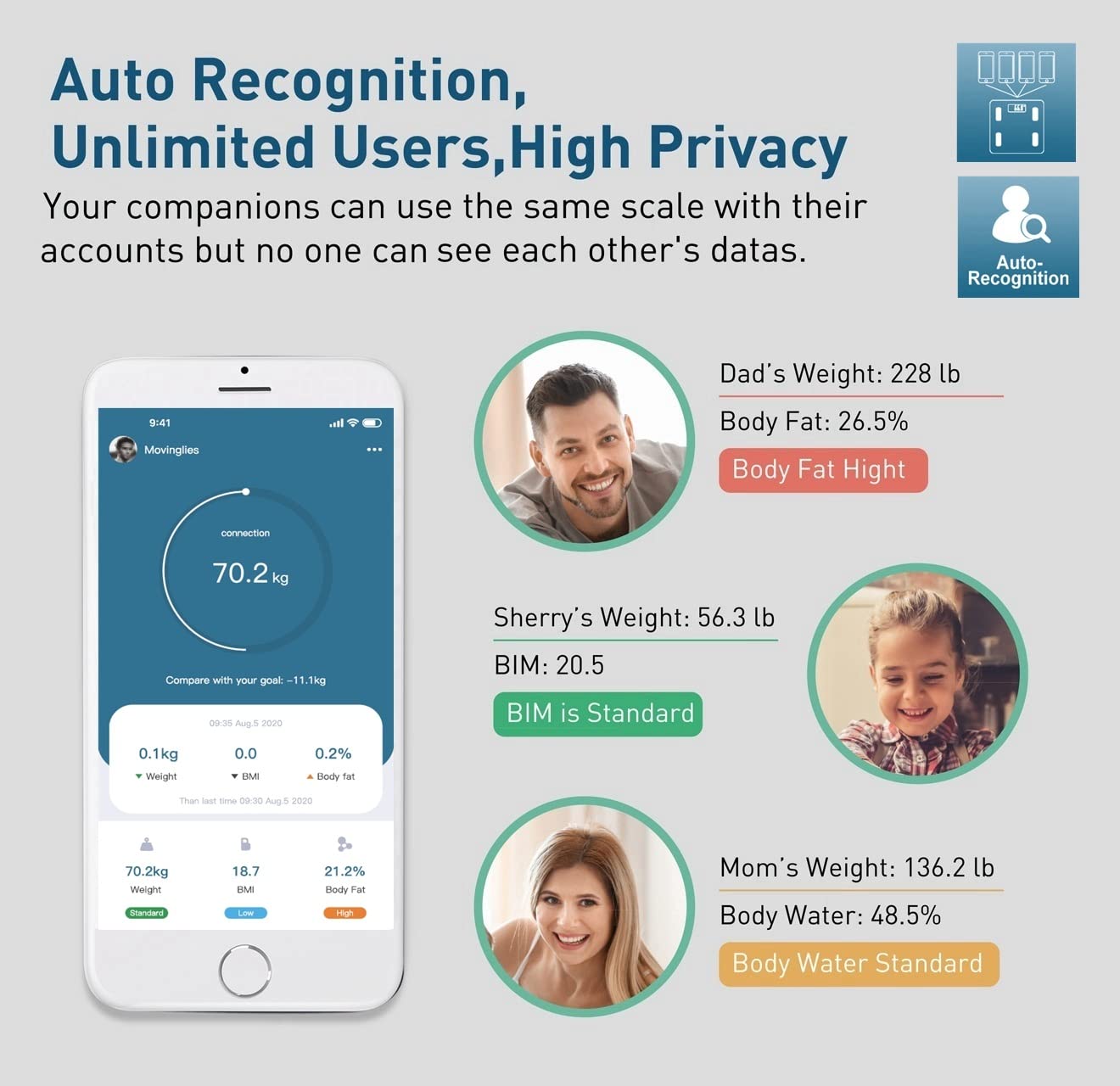
Image: A visual explaining the 'Auto Recognition, Unlimited Users, High Privacy' feature of the app. It shows an app screen with a health report and three user profiles (Dad, Sherry, Mom) with their respective weight and body fat/water data, emphasizing that data is private to each user's device.
3.4 Mode nadó
The 'Baby Mode' feature allows you to weigh your baby easily:
- Weigh yourself first.
- Then, weigh yourself while holding your baby.
- The app will automatically deduct your weight to provide your baby's weight.

Image: A mother holding a baby, with a smartphone displaying the 'Baby Mode' feature in the app. The app shows a simplified interface for weighing a baby by first weighing yourself, then weighing yourself with the baby, and the app calculating the baby's weight.
Video: An official product video demonstrating the features of the SENSSUN Smart Fitness Scale, including its slim design, high-precision sensors, dual unit measurement (kg/lb), 15 body data points, clear LCD display, and user-friendly app with automatic data saving and charting. The video highlights the ease of use and comprehensive health tracking capabilities.
4. Manteniment
To ensure the longevity and accuracy of your SENSSUN Smart Fitness Scale, follow these maintenance guidelines:
- Neteja: Netegeu la superfície de la bàscula amb un drap suau iamp drap. No utilitzeu productes de neteja abrasius ni submergiu la bàscula en aigua.
- Emmagatzematge: Guardeu la bàscula en un lloc fresc i sec. Eviteu temperatures extremes i la llum solar directa.
- Substitució de la bateria: Replace batteries when the low battery indicator appears on the display. Remove batteries if the scale will not be used for an extended period.
- Evitar l'impacte: Do not drop the scale or subject it to heavy impact, as this may damage the sensors.

Imatge: Una imatge detallada view espectacleasing the design features of the scale, specifically its rounded corners for safety and anti-slip feet for stability during use.
5. Solució De Problemes
| Problema | Causa possible | Solució |
|---|---|---|
| L'escala no s'encén. | Low or no batteries. | Check battery installation or replace with new AAA batteries. |
| Lectures inexactes. | Scale on uneven surface; not calibrated; feet not properly placed. | Place scale on a hard, flat surface. Step on and off quickly to re-calibrate. Ensure bare feet are centered on electrodes. |
| App not connecting to scale. | Bluetooth off; app not open; scale not active. | Ensure Bluetooth is on. Open 'MovingLife' app. Step on scale to activate it. Restart app/phone if necessary. |
| Body composition data not showing. | Not barefoot; feet not making good contact with electrodes. | Ensure you are stepping on the scale barefoot and your feet are making full contact with all four electrode pads. |
6. Especificacions
- Dimensions del producte: 11 x 9.6 x 1 polzades
- Pes del producte: 2.2 lliures
- Límit de pes: 330 lliures / 150 kg
- Increments de mesura: 0.2 lliures / 0.1 kg
- Sensors: 4 sensors d'alta precisió
- Visualització: Pantalla LCD clara
- Connectivitat: Bluetooth 4.0
- Compatibilitat de l'aplicació: Android 4.3 i iOS 8.0 o superior
- Font d'alimentació: 2 piles AAA (incloses)
- Material: Vidre temperat
- Característiques especials: Body Composition Analyzer, Non-Slip Platform, Precision Balanced, Auto-calibration, Rounded Corners

Image: A diagram illustrating the physical dimensions of the SENSSUN Smart Fitness Scale, showing its length as 11 inches, width as 9.6 inches, and thickness as 0.8 inches.

Image: A close-up composite image highlighting the accurate sensor technology within the scale and the clarity of its LCD display, showing a weight reading of 68.8 kg.
7. Garantia i Suport
For warranty information and customer support, please refer to the contact details provided on the product packaging or the official SENSSUN weblloc web. Conserveu el rebut de compra com a comprovant de compra per a qualsevol reclamació de garantia.
Ask a question about this manual
Ask about setup, troubleshooting, compatibility, parts, safety, or missing instructions. Manuals+ will review the question and use this page’s manual context to help answer it.