
Introducció
Gràcies per la compraasing the WIITHINK WCD-9949 Portable CD Player Boombox. This device offers versatile audio playback options including CD, FM radio, Bluetooth, USB, and AUX input. Designed for ease of use and portability, it provides a rich audio experience for various settings. Please read this manual carefully to ensure proper operation and maintenance of your new boombox.
Informació de seguretat
- No exposeu la unitat a la pluja o la humitat per evitar incendis o xocs.
- No bloquegeu les obertures de ventilació. Assegureu-vos que hi hagi prou espai al voltant de la unitat per a un flux d'aire adequat.
- Utilitzeu només accessoris/accessoris especificats pel fabricant.
- Desendolleu la unitat durant les tempestes llamps o quan no l'utilitzeu durant llargs períodes.
- No obriu la unitat casing. Demaneu totes les tasques de manteniment a personal de servei qualificat.
- Dispose of batteries properly. Do not expose batteries to excessive heat.
Contingut del paquet
Verifiqueu que tots els elements siguin presents al paquet:
- 1 x WIITHINK WTB791 Portable CD Radio Boombox (Batteries Not Included)
- 1 comandament a distància (piles no incloses)
- 1 x cable d'alimentació
- 1 x línia AUX
- 1 x Manual d'usuari
- 1 x Caixa d'embalatge
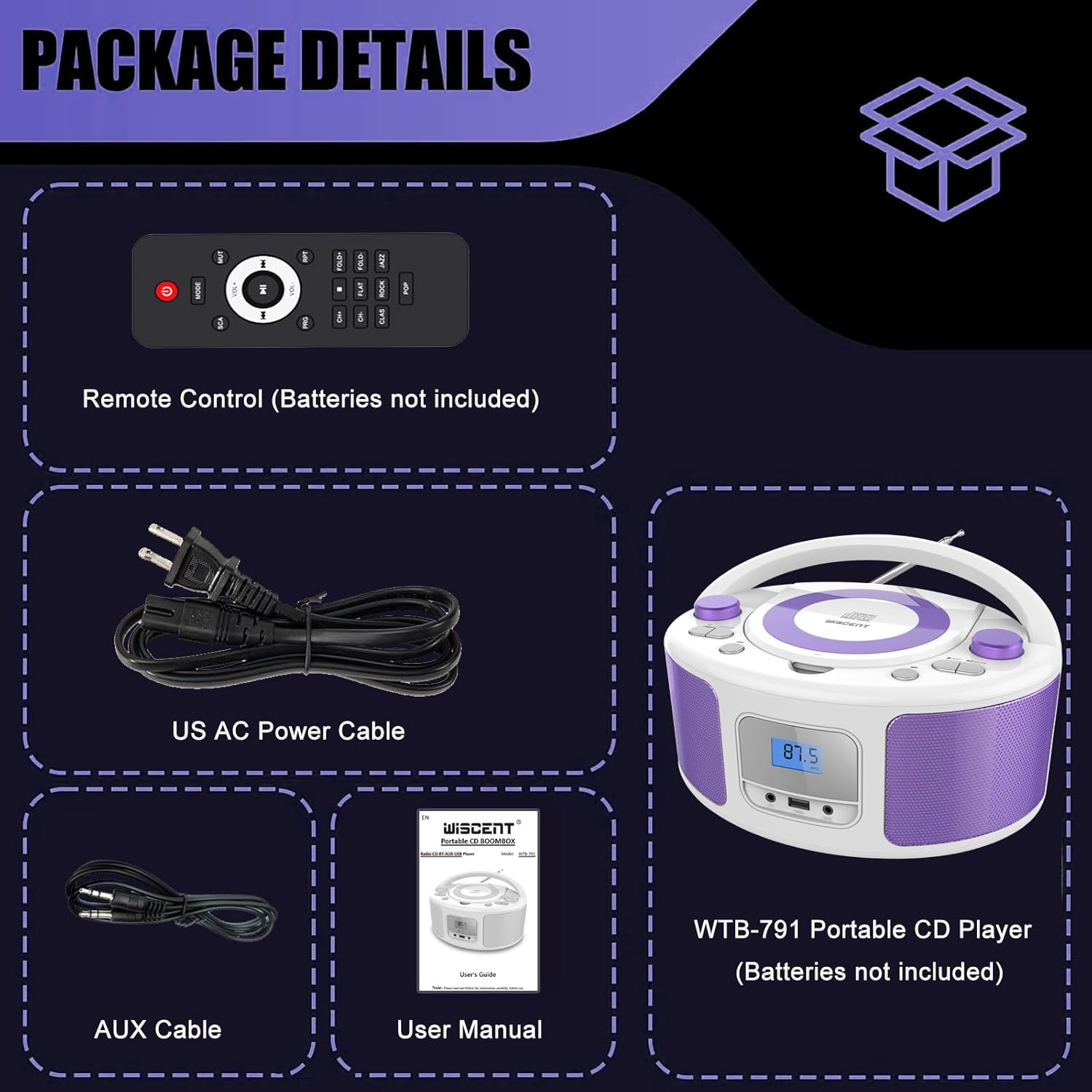
Image: Contents of the WIITHINK WCD-9949 Boombox package, showing the boombox, remote control, power cable, AUX cable, and user manual.
Producte acabatview
Familiarize yourself with the main components of your boombox.

Imatge: Frontal view of the WIITHINK WCD-9949 Boombox, highlighting key features such as CD player, Bluetooth, USB port, AUX input, headphone jack, LCD display, FM radio, and power options.
- Reproductor de CD de càrrega superior: For playing CDs, CD-R/RW, MP3 CDs, and audiobook CDs.
- Sintonitzador de ràdio FM: Per escoltar emissores de ràdio FM.
- Bluetooth: Per a la transmissió d'àudio sense fil des de dispositius compatibles.
- Entrada USB: For playing MP3/WMA music files from USB flash drives (FAT32 format, up to 128GB).
- Entrada AUX (3.5 mm): Per connectar dispositius d'àudio externs.
- Presa d'auriculars (3.5 mm): Per a una escolta privada.
- Pantalla LCD: Shows current mode, track number, and radio frequency.
- Botons de control: Power, Mode, Play/Pause, Skip/Search, Repeat, Scan, EQ/Function.
- Botons de volum: Ajusta el nivell de sortida d'àudio.
- Pom d'afinació: Ajusta la freqüència de ràdio FM.
- Antena telescòpica: Per a una millor recepció de ràdio FM.
- Nansa de transport: Per a una fàcil portabilitat.
Configuració
Alimentant el Boombox
El teu boombox pot funcionar amb corrent altern o amb piles.
AC Power (Wall Outlet)
- Assegureu-vos que el boombox estigui apagat.
- Insert one end of the provided AC power cable into the AC IN jack on the back of the boombox.
- Connecteu l'altre extrem del cable d'alimentació de CA a una presa de corrent estàndard.

Imatge: Part posterior view of the boombox, indicating the AC IN jack for power connection and the battery compartment.
Battery Power (Portable Use)
- Assegureu-vos que el boombox estigui apagat i desconnectat de la xarxa elèctrica.
- Localitzeu el compartiment de la bateria a la part inferior de la unitat.
- Obriu la tapa del compartiment de la bateria.
- Insert 4 x UM2-C 1.5V batteries (not included), ensuring correct polarity (+/-).
- Tanqueu bé la tapa del compartiment de la bateria.
Nota: Traieu les piles si no heu d'utilitzar la unitat durant un període prolongat per evitar fuites i danys.
Instruccions de funcionament
Funcionament general
- Encès/apagat: Premeu el botó PODER botó per encendre o apagar la unitat.
- Seleccioneu el mode: Premeu el botó MODE button repeatedly to cycle through available modes: CD, FM, Bluetooth (BT), USB, AUX. The selected mode will be displayed on the LCD screen.
- Ajustar el volum: Gira el VOLUM knob clockwise to increase volume and counter-clockwise to decrease volume.
- Modes d'equalització: Premeu el botó EQ/DIVERSIÓ button to select different equalizer presets: ROCK / POP / FLAT / CLASS / JAZZ.

Imatge: Més deview of the boombox's multiple playback modes and features.
Reproducció de CD
- Premeu el botó MODE button to select CD mode. "CD" will appear on the display.
- Obriu la tapa del compartiment del CD aixecant-la suaument.
- Place a CD (CD, CD-R/RW, MP3 CD, audiobook CD) onto the spindle with the label side facing up.
- Close the CD compartment cover. The CD will begin playing automatically.
- Reproduir/pausa: Premeu el botó REPRODUCCIÓ/PAUSA botó per aturar o reprendre la reproducció.
- Omet les pistes: Premeu el botó Saltar endavant or SALTAR ENRERE botons per saltar a la pista següent o anterior.
- Repetiu: Premeu el botó RPT button to repeat the current track (Repeat 1) or all tracks (Repeat All).
- Reproducció del programa: Refer to the detailed user manual for programming specific track orders.

Image: Close-up of the top-loading CD player with a disc inside, ready for playback.
Funcionament de la ràdio FM
- Premeu el botó MODE button to select FM radio mode. The FM frequency will appear on the display.
- Esteneu l'antena telescòpica per a una recepció òptima.
- Escaneig automàtic: Manteniu premut el botó ESCANEAR button to automatically scan and save available FM stations (up to 30 presets).
- Sintonització manual: Gira el TUNING botó per ajustar manualment la freqüència.
- Selecciona una configuració predeterminada: Utilitza el PRECONFIGURACIÓ +/- buttons on the remote control to navigate through saved stations.

Image: Visual representation of the FM radio feature, showing the frequency range and preset capabilities.
Emparellament Bluetooth
- Premeu el botó MODE button to select Bluetooth mode. "BT" will flash on the display, indicating it's ready for pairing.
- Al dispositiu amb Bluetooth (telèfon intel·ligent, tauleta, etc.), activeu el Bluetooth i cerqueu els dispositius disponibles.
- Select "WTB-791" from the list of devices.
- Once paired, "BT" will stop flashing and remain solid. You can now stream audio wirelessly.
- Control playback (Play/Pause, Skip) using the boombox buttons or your connected device.

Image: The boombox displaying "BT" for Bluetooth mode, connected to a smartphone for wireless music streaming.
Reproducció USB
- Insert a USB flash drive (FAT32 format, up to 128GB) containing MP3/WMA audio files into the USB port on the front of the boombox.
- Premeu el botó MODE button to select USB mode. "USB" will appear on the display.
- Playback will start automatically. Use the Play/Pause and Skip buttons to control playback.
Entrada AUX
- Connect an external audio device (e.g., MP3 player, laptop) to the AUX IN jack on the front of the boombox using the provided 3.5mm AUX cable.
- Premeu el botó MODE per seleccionar el mode AUX. Apareixerà "AUX" a la pantalla.
- Control playback from your external device. Adjust volume using the boombox's volume knob.

Image: The boombox connected to multiple external devices via AUX input, demonstrating its versatility.
Ús d'auriculars
For private listening, plug 3.5mm headphones (not included) into the HEADPHONE jack on the front of the boombox. The speakers will automatically mute.
Control remot
The included remote control allows you to operate the boombox from a distance. Ensure batteries are inserted correctly (2 x AAA, not included). Functions include Power, Mode selection, Volume, Mute, Play/Pause, Skip/Search, Repeat, Scan, and EQ modes.

Image: The boombox and its remote control, highlighting the convenience of remote operation.
Manteniment
- Netegeu la unitat amb un drap suau i sec. No utilitzeu productes de neteja abrasius ni dissolvents.
- Keep the CD compartment clean and free of dust. Use a CD lens cleaner if necessary.
- Guardeu la unitat en un lloc fresc i sec, allunyat de la llum solar directa i de temperatures extremes.
Resolució de problemes
| Problema | Solució |
|---|---|
| Sense poder | Check if the AC power cable is securely connected. If using batteries, ensure they are inserted correctly and not depleted. |
| El CD no es reprodueix | Ensure the CD is clean and free of scratches. Verify the CD is inserted correctly with the label side up. Close the CD compartment completely. Ensure CD mode is selected. |
| Mala recepció de ràdio FM | Extend and adjust the telescopic antenna. Try repositioning the unit. |
| Bluetooth no emparellat | Ensure the boombox is in Bluetooth mode and "BT" is flashing. Make sure your device's Bluetooth is enabled and within range. Forget previous pairings on your device and try again. |
| Problemes de reproducció per USB | Ensure the USB drive is formatted to FAT32 and contains compatible MP3/WMA files. The maximum capacity supported is 128GB. |
Especificacions
| Característica | Detall |
|---|---|
| Número de model | WCD-9949 |
| Dimensions del producte (L x A x A) | 7 x 10 x 5 polzades |
| Pes de l'article | 3.91 lliures |
| Tecnologia de connectivitat | Auxiliar, Bluetooth, USB |
| Tipus d'altaveu | Integrat |
| Potència de sortida | 2 x 2 W RMS |
| Freqüència de ràdio FM | 87.5-108 Mhz |
| Font d'alimentació | AC 100-240V~ / 4 x C batteries (not included) |
| Capacitat USB | Up to 128GB (FAT32 format only) |
Garantia i suport
WIITHINK is committed to customer satisfaction. Your product comes with:
- 18-Month Replacement: For missing parts or defective products.
- Suport tècnic de tota la vida: Assistance with any product inquiries.
- Amazon Buyer-Seller Messaging: Available 7/24 for support.
For any inquiries, please go to Your Orders, find your order in the list, and click on "WIITHINK" to contact us.

Image: Details on WIITHINK's customer support, including replacement policy and technical assistance.
Vídeos oficials de productes
WIITHINK Direct - CD Radio Portable CD Player Boombox with Bluetooth
Video: An official product video from WIITHINK Direct showcasing the features and functionality of the CD Radio Portable CD Player Boombox with Bluetooth.