
1. Introducció
Thank you for choosing the MAIRDI M890DCBTENC Bluetooth Headset. This manual provides essential information for setting up, operating, and maintaining your headset to ensure optimal performance and longevity. Please read this manual carefully before using the product.

Image 1: MAIRDI M890DCBTENC Bluetooth Headset.
Característiques principals:
- Connectivitat perfecta: Bluetooth V5.2 for stable and fast wireless connections.
- Àudio HD: APTX and low latency technology for high-fidelity sound.
- AI Noise-Canceling Microphone: Dual-mic technology filters out 98% of background noise for crystal-clear calls.
- Durada de la bateria ampliada: Up to 40 hours of talk and music time on a single charge.
- Vinculació multipunt: Connects to two devices simultaneously (e.g., PC/laptop and mobile phone).
- Comoditat i ajustabilitat: 330-degree rotatable microphone boom, adjustable headband, and super soft leather ear cushions.
- Càrrega versàtil: Includes a charging stand with an in-built Bluetooth receiver for plug-and-play PC connectivity, or charge via USB cable.
2. Què hi ha a la caixa
Upon opening your MAIRDI M890DCBTENC Bluetooth Headset package, you should find the following items:
- MAIRDI M890DCBTENC Bluetooth Headset
- Charging Base (with integrated Bluetooth receiver)
- Cable de càrrega USB
- Guia d'usuari
- Bossa de transport
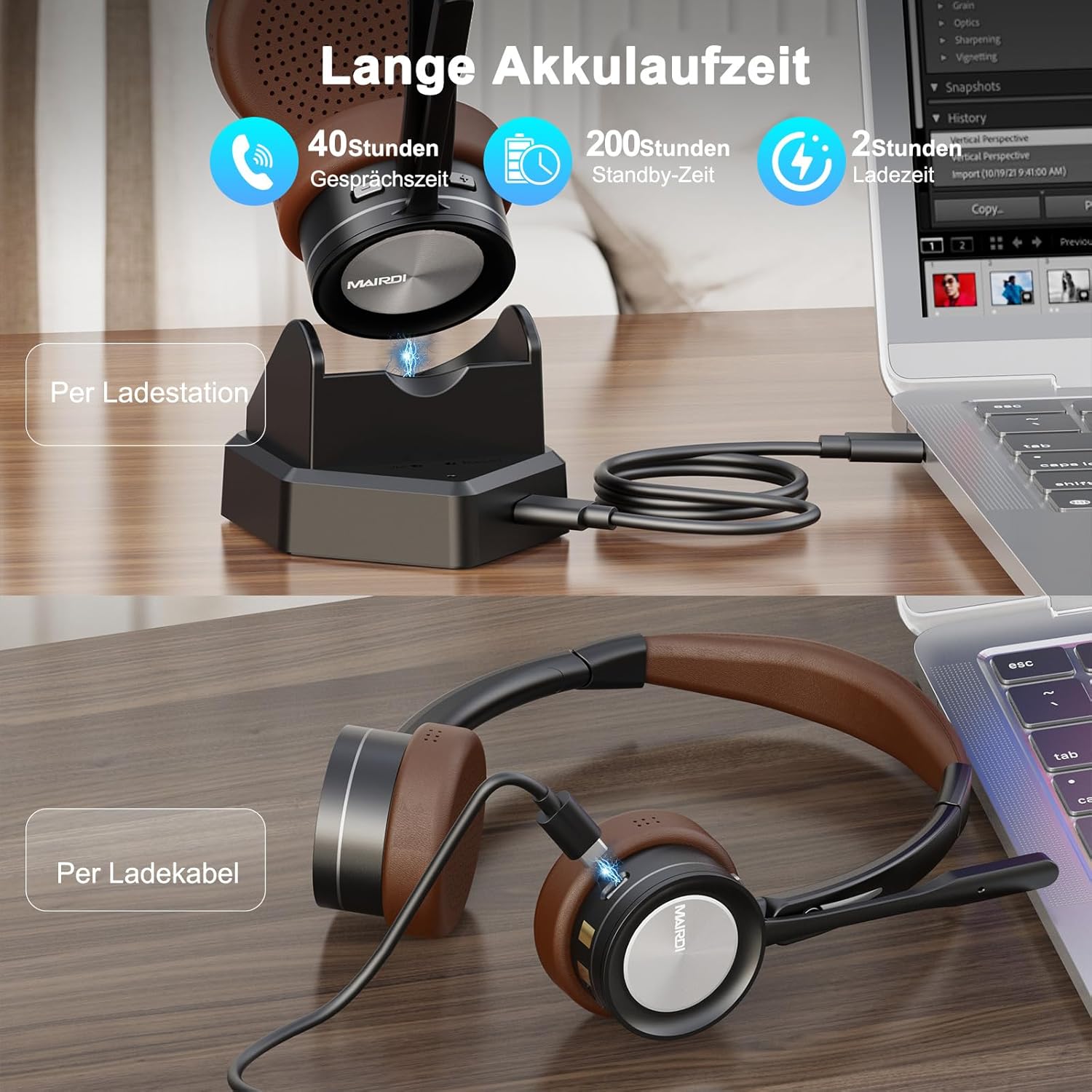
Image 2: The MAIRDI M890DCBTENC Headset with its charging base and USB cable.
3. Configuració
3.1 Càrrega inicial
Before first use, fully charge your headset. Connect the USB charging cable to the charging base and a power source (e.g., computer USB port or wall adapter). Place the headset on the charging base. The indicator light will show charging status.

Image 3: The headset can be charged via the charging station or directly with the USB cable.
3.2 Connexió a un dispositiu
Your headset offers two primary connection methods: via the charging base (with integrated Bluetooth receiver) for PCs without Bluetooth, or directly via Bluetooth to any compatible device.
3.2.1 Connecting via Charging Base (for PC)
- Connect the charging base to your PC's USB port using the provided USB cable. The base acts as a plug-and-play Bluetooth receiver.
- Turn on the headset. It will automatically attempt to pair with the connected charging base.
- Once connected, your PC should recognize the headset as an audio device. Select it as your input/output device in your system's sound settings.
3.2.2 Connecting via Bluetooth (Direct)
- Ensure the headset is powered on and in pairing mode (usually indicated by a flashing LED).
- On your device (PC, laptop, Mac, smartphone), go to Bluetooth settings.
- Cerca available devices and select "MAIRDI M890DCBTENC" from the list.
- Once paired, the headset's LED indicator will show a steady light.

Image 4: The headset supports multipoint pairing, allowing simultaneous connection to a laptop and a smartphone.
3.3 Emparellament multipunt
The headset supports connecting to two Bluetooth devices simultaneously. After pairing with the first device, put the headset back into pairing mode and connect to the second device. The headset will manage audio switching between the two connected devices.
4. Instruccions de funcionament
4.1 Encès/Apagat
- To power on, slide the power switch to the 'ON' position.
- Per apagar-lo, feu lliscar l'interruptor d'alimentació a la posició "OFF".
4.2 Gestió de trucades
- Respondre/Finalitzar la trucada: Press the multi-functional button once.
- Rebutja la trucada: Press and hold the multi-functional button for 2 seconds.
- Silència del micròfon: Press the mute button on the microphone boom. An audible prompt will indicate 'Mute On' or 'Mute Off'.

Image 5: The headset features a microphone with noise cancellation and a dedicated mute button.
4.3 Volume Control & Music Playback
- Pujar/baixar el volum: Use the dedicated volume buttons on the earcup.
- Reproduir/pausa: Press the multi-functional button once.
- Pista següent: Premeu i manteniu premut el botó "Pujar volum".
- Pista anterior: Premeu i manteniu premut el botó "Baixar el volum".
4.4 Microphone Adjustment
The microphone boom can be rotated 330 degrees to position it optimally for your voice or to move it out of the way when not in use. Ensure the microphone is positioned close to your mouth for best voice pickup and noise cancellation.

Image 6: The headset features a soft earpad, 330° rotatable microphone arm, and an adjustable headband for comfort.
4.5 Busy Light Indicator
The headset features a busy light indicator to signal to others when you are on a call or in a meeting, helping to minimize interruptions.
5. Manteniment
To ensure the longevity and optimal performance of your MAIRDI M890DCBTENC headset, follow these maintenance guidelines:
- Neteja: Use a soft, dry cloth to clean the headset and charging base. Avoid using harsh chemicals or abrasive materials.
- Emmagatzematge: When not in use, store the headset in the provided carry pouch or on the charging base to protect it from dust and damage.
- Cura de la bateria: Avoid fully discharging the battery frequently. Charge the headset regularly, even if not in daily use, to maintain battery health.
- Condicions ambientals: Do not expose the headset to extreme temperatures, humidity, or direct sunlight. Keep it away from water and other liquids.
6. Solució De Problemes
Si teniu problemes amb els auriculars, consulteu els problemes i solucions més comuns següents:
| Problema | Possible solució |
|---|---|
| Els auriculars no s'encén. | Ensure the headset is fully charged. Connect it to the charging base or directly via USB cable. |
| No es pot emparellar amb un dispositiu. | Ensure the headset is in pairing mode (flashing LED). Turn off and on Bluetooth on your device. Move the headset closer to the device. Clear previous Bluetooth connections on your device. |
| No hi ha àudio o hi ha mala qualitat d'àudio. | Check volume levels on both the headset and your connected device. Ensure the headset is selected as the default audio input/output device. Re-pair the headset. |
| El micròfon no funciona. | Ensure the microphone is not muted. Check that the headset is selected as the default microphone in your device's sound settings. Position the microphone boom correctly. |
| Durada de la bateria curta. | Ensure the headset is fully charged before use. Battery life can vary based on usage patterns and volume levels. |
7. Especificacions
| Característica | Detall |
|---|---|
| Marca | MAIRDI |
| Número de model | M890DCBTENC |
| Color | marró |
| Tecnologia de connectivitat | Sense fil (Bluetooth) |
| Versió Bluetooth | 5.2 |
| Col·locació de l'orella | A l'orella |
| Control de soroll | Aïllament acústic |
| Micròfon | AI Noise-Canceling, 330° Rotatable |
| Durada de la bateria (mitjana) | 40 hores |
| Interval de freqüència | 20 Hz - 20,000 Hz |
| Tipus de controlador d'àudio | Conductor dinàmic |
| Tipus de control | Control de volum, comandament a distància |
| Dispositius compatibles | PC, Laptop, Desktop, Mac, Smartphone, Cell Phone |
| Pes de l'article | 0.53 quilos |
| Material | Leather (ear cushions) |
8. Garantia i Suport
For warranty information and customer support, please refer to the official MAIRDI weblloc web o poseu-vos en contacte amb el vostre distribuïdor. Conserveu el rebut de compra com a comprovant de compra per a reclamacions de garantia.
9. Vídeos de productes
Bluetooth Headset with Microphone for PC
Vídeo 1: Un overview of the MAIRDI Bluetooth Headset with Microphone for PC, highlighting its features and design.


